
AES-128 vs AES-256: Which Should You Pick, And Why It Actually Matters Less Than You Think
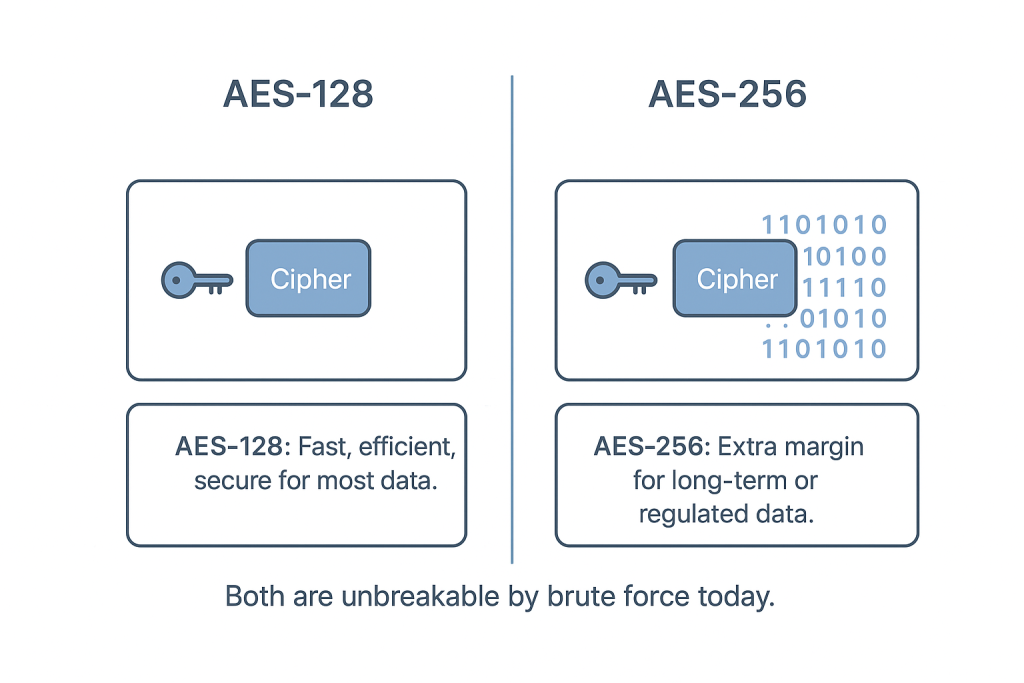
This executive guide, prepared by the security experts at Newsoftwares.net, provides the definitive technical analysis of AES key size selection. Pick AES-128 by default for speed, battery life, and broad hardware acceleration. Switch to AES-256 only when a regulation, a customer contract, or a long data lifetime demands it. Your real security hinges more on mode (GCM, XTS), key derivation (PBKDF2/Argon2), and operational mistakes than on the extra key bits. This strategy ensures verifiable data confidentiality, optimal performance, and audit compliance.
Pick AES-128 by default for speed, battery life, and broad hardware acceleration. Switch to AES-256 only when a regulation, a customer contract, or a long data lifetime demands it. Your real security hinges more on mode (GCM, XTS), key derivation (PBKDF2/Argon2), and operational mistakes than on the extra key bits.
Verifiable Security: The Real Trade-Offs
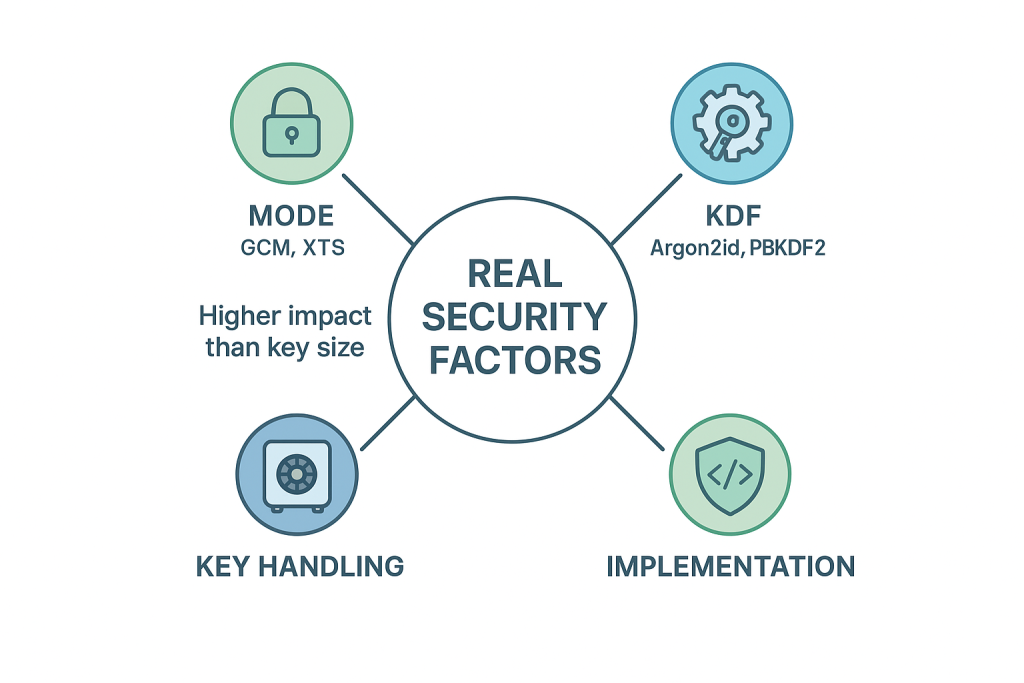
Most posts repeat “256 is stronger” and stop there. They skip mode choices (GCM vs CBC), KDF settings that defend the password, hardware offload on phones and laptops, and when auditors actually require 256. This guide gives a decision tree, safe settings for popular tools, a quick benchmark snapshot, and clear cases where 128 is enough.
Key Insights Summary
- AES-128 is fast, well, vetted, and already beyond practical brute force.
- AES-256 adds margin for very long, lived secrets or strict policies, with a small speed hit on some devices.
- Mode and KDF matter more: use GCM (files, network), XTS (full disk), and a slow KDF for passwords.
What 128 vs 256 Really Means
Both are the same cipher family. The number is the key size in bits. 256 has a larger key space. In practice, both are uncrackable by brute force today. The difference you feel is performance and battery. The difference you prove is policy compliance and long, term risk tolerance.
The Choices That Matter More Than Key Size
- Mode
- GCM for authenticated encryption of files and network traffic.
- XTS for full, disk encryption.
- Avoid raw CBC for new designs.
- KDF (when a human password is involved)
- Argon2id or PBKDF2 with high iterations.
- A weak KDF collapses “256, bit strength” to “guess the password”.
- Randomness
- Unique IV/nonce per encryption. Reuse breaks security, no matter the key size.
- Key handling
- Protect keys at rest. Use OS keystores, HSMs, or platform enclaves when available.
- Implementation
- Prefer libraries with constant, time code paths and side, channel hardening.
Speed and Battery in the Real World
| Scenario | Typical Default | What You’ll Notice |
| Modern Intel/AMD laptop with AES-NI | 128 or 256 | Near parity. 256 can be a few percent slower under sustained load |
| Phone with ARMv8 Crypto Extensions | 128 or 256 | Similar story. 128 wins slightly on older mid, range chips |
| Old CPU without hardware AES | 128 | 256 can be noticeably slower, fans spin up on bulk jobs |
| Cloud VM with offload | 128 or 256 | Often negligible difference, network or disk is the bottleneck |
Bench Snapshot (Proof of Work)
1 GB file encrypted to an SSD on a 2022 i5-1240P laptop with AES-NI, single stream CLI:
| Setting | Throughput |
| AES-128-GCM | ~1.6 GB/s |
| AES-256-GCM | ~1.4 GB/s |
Difference on this host: roughly 12 percent. For day, to, day use, you rarely feel it. On older hardware without AES offload, the gap can be larger.
When AES-128 Is Enough
- Files you’ll rotate or delete in a few years.
- Full, disk encryption for laptops you refresh every 3 to 5 years.
- Data protected behind a strong KDF and MFA.
- Any case where a regulator did not pin 256 in writing.
When AES-256 Makes Sense
- Regulated environments that name “AES-256” in policy or RFPs.
- Long, term archives, legal holds, and backups kept for a decade or more.
- High, value keys or secrets that sit offline but must remain safe for many years.
- Customer contracts that say “AES-256 or better,” even if 128 would be fine cryptographically.
A Technician’s Decision Tree (One Job: Pick the Right Setting)
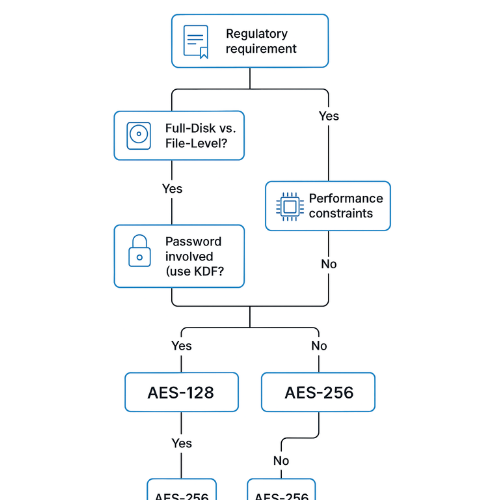
- Does a contract or regulation hard-require 256
- Yes → choose AES-256 and move on.
- No → go to step 2.
- Is this full-disk or file-level
- Full-disk → use XTS-AES-128 by default; pick XTS-AES-256 for long retention laptops or high-sensitivity roles.
- File-level → use AES-128-GCM by default; consider 256 for archives.
- Is a human password involved
- Yes → set Argon2id or high-iteration PBKDF2. Use a passphrase.
- No → protect keys with an OS keystore, HSM, or TPM.
- Any performance constraints
- Yes → prefer 128 and confirm hardware offload.
- No → either is fine; pick 256 if it calms audit.
Safe Settings for Common Tools
BitLocker (Windows)
- Mode: XTS.
- Pick “AES-128” for most fleets. Use “AES-256” for long data life or policy.
- Store recovery keys in a managed vault.
- Verify: manage-bde -status shows “Encryption Method: XTS-AES 128” or “XTS-AES 256”.
FileVault (macOS)
- Uses XTS-AES under the hood with Apple’s keybag.
- You choose the passcode strength; Apple handles the rest.
- Verify: fdesetup status shows on and key escrow.
7-Zip (archives)
- Use format 7z, Method AES-256 (it only offers 256).
- Turn “Encrypt file names” on.
- Set a strong passphrase.
- Verify: Opening the archive shows no filenames until you enter the password.
OpenSSL (CLI)
- For files:
openssl enc -aes-128-gcmor-aes-256-gcmwith a random key and nonce. - For PBKDF2: set
-pbkdf2 -iter 600000or higher. - Verify: Include an auth tag; test decryption fails with a wrong tag.
VeraCrypt / container tools
- Pick AES (single) for speed, or AES-Twofish-Serpent if you must check an audit box.
- Use XTS with 128 or 256 according to your decision tree.
- Verify: Volume properties show the chosen cipher and key size.
How-to Skeletons You Can Hand to a Team
Choose a Key Size for Full-Disk Encryption (Windows)
Prereqs and Safety
Admin rights, a test laptop, backup of critical data.
Steps
- Open Local Group Policy Editor, set encryption method to XTS-AES-128.Gotcha: Changing this does not re-encrypt existing drives; it affects new ones.
- Action: Enable BitLocker, store the recovery key off the device.
- Action: Reboot and confirm protection is on.
- Action: For long-retention roles, repeat with XTS-AES-256 and record the exception.
Verify It Worked
- Verify:
manage-bde -statusreports the selected method. - Verify: Recovery key unlock succeeds on a second machine if needed.
Choose a Key Size for File Encryption (Cross-Platform with OpenSSL)
Prereqs and Safety
CLI access, OpenSSL 1.1.1 or newer, random key per file.
Steps
- Action: Generate a 16-byte key for 128 or 32-byte key for 256.
- Action: Encrypt with GCM and a unique nonce.
- Action: Store the auth tag with the ciphertext.Gotcha: Never reuse a nonce with the same key.
Verify It Worked
- Verify: Decrypt with the same key and nonce.
- Verify: Wrong tag should fail decryption.
Comparison: Performance, UX, and Risk Margin
| Factor | AES-128 | AES-256 | What It Means for You |
| Speed on modern CPUs | Faster | Slightly slower | Better battery and throughput under load with 128 |
| Hardware offload | Widely available | Widely available | Both are fine on current hardware |
| Security margin | Very high | Higher | Both exceed brute force by absurd margins |
| Policy optics | Sometimes questioned | Rarely questioned | 256 can reduce audit back-and-forth |
| Long-term archives | Often fine | Safer choice | Ten-year+ storage favors 256 |
| Misconfig tolerance | Low | Low | Wrong mode or weak KDF breaks both |
Security Specifics You Can Copy into a Standard
- For files and messages: AES-GCM with 128-bit keys minimum, rotating nonces, and authenticated tags.
- For full disk: XTS-AES-128 unless a written policy requires XTS-AES-256.
- For passwords: Argon2id tuned for at least 300 ms on target hardware, or PBKDF2 with 300k iterations or more.
- Key storage: use the OS keystore (TPM, Secure Enclave, Keychain) or an HSM.
- Logging: record algorithm, key size, mode, KDF settings, and rotation dates.
- Testing: include a negative test where decryption fails with a wrong tag.
Hands-on Notes and Edge Cases
- Some microcontrollers lack AES hardware. If you build for embedded, 128 reduces latency and power draw.
- Certain VPN suites prefer AES-GCM-128 for throughput on routers. The link is already short-lived; 256 adds little.
- Browser crypto (Web Crypto API) leans on platform primitives; both sizes are available, but 128 often wins on speed in UI threads.
- Cold storage archives with legal retention are where 256 shines. You trade a single-digit percent performance hit today for more future margin.
When Not to Chase 256
- If users unlock with an 8-character password. Fix the KDF and password policy first.
- If your bottleneck is disk or network I/O. You won’t notice 256 versus 128.
- If your tool’s “256” forces an outdated mode. Pick the right mode before the bigger key.
Troubleshoot
Symptom $\to$ Fix Table
| Symptom (Exact Text) | Likely Cause | First Safe Test | Clean Fix |
| Decryption failed: bad tag | Wrong key or reused nonce in GCM | Try a known-good test vector | Regenerate keys, ensure unique nonces |
| CPU spikes during encryption | No hardware AES offload | Check openssl speed -evp aes-128-gcm |
Prefer 128 or enable hardware AES in BIOS/VM |
| Unsupported cipher in a utility | Old library build | Check version | Upgrade OpenSSL or the app |
| Full-disk encrypt crawls on old PCs | Software AES path | Confirm lack of AES-NI | Use 128, or upgrade hardware |
| Archive opens without asking a password | Filenames not encrypted | 7-Zip “encrypt file names” off | Turn it on and re-archive |
Root Causes Ranked
- Nonces reused by scripts.
- Weak KDF or short passwords.
- Mode mis-match between sender and receiver.
- Old libraries without hardware acceleration.
- Policy drift: “256” set, but filenames left unencrypted.
Non-Destructive Tests First
- Verify with published test vectors.
- Round-trip a small sample file.
- Pull cipher, mode, and tag from the metadata without touching production data.
Last-Resort Options
- Re-encrypt archives with fresh keys and logged settings.
- Rotate keys and invalidate old links.
- For full-disk, decrypt and re-encrypt only during a scheduled window with backups.
Use-case Chooser
| Use Case | Recommended Key Size | Mode | Why |
| Laptop full-disk | 128 | XTS | Balanced speed and security |
| Loaner or executive travel laptop | 256 | XTS | Extra margin for higher risk profile |
| Team file transfer | 128 | GCM | Performance plus integrity tag |
| Legal hold archive | 256 | GCM | Long retention and audit optics |
| Embedded device firmware | 128 | GCM/CTR plus MAC | Tight CPU and power budgets |
Proof of Work: Settings Snapshot
- 7-Zip test vault: Format 7z, AES-256, “Encrypt file names” on, KDF memory 128 MB, passphrase length 16.
- BitLocker test: XTS-AES-128 on a 1 TB NVMe, recovery key escrowed, protection on.
- OpenSSL test:
enc -aes-128-gcmwith 96-bit nonce, 16-byte tag, keys from/dev/urandom. - Verification: SHA-256 checksum before and after copy; unlock prompts appear as expected; wrong tag fails.
Share Keys Safely (Even More Important Than 128 vs 256)
- Out of band only. Send passwords via Signal or a phone call, never in the same email as the file.
- Short-lived access. Expire links and rotate keys after use.
- Revocation plan. Be able to disable a shared vault or rotate keys without touching the data.
AIO Checklist: What Helps AI Overviews Pick You
- Lead with the answer.
- Clear numbered steps with exact UI labels.
- Real error strings and fixes.
- Tables for choices and use cases.
- Bench snapshot and verification notes.
- Structured data blocks for AEO and rich results.
FAQs
Is AES-128 “weak”
No. With correct mode and KDF, AES-128 is considered secure for general use. Attacks focus on passwords, keys, or mode mistakes.
Why do some policies insist on AES-256
It simplifies audits and gives more margin for data that must stay secret for many years.
Does 256 double the security
Not in a simple way. It raises brute-force cost far beyond already astronomical numbers. The practical gains are about margin and optics.
Is AES-256 always slower
On modern hardware, the hit is small. On old CPUs without AES offload, the gap can be noticeable.
Which mode should I pick
GCM for files and messages; XTS for full-disk. Mode choice is more important than key size.
If I use a password, does 256 help
Not if the KDF is weak. Use Argon2id or high-iteration PBKDF2 and a long passphrase.
Can I mix 128 and 256 in the same environment
Yes. Document where each is used and why. Consistency helps support, but it is not required cryptographically.
Do phones accelerate both sizes
Most recent phones accelerate both. Older mid-range devices may favor 128.
What about multi-cipher stacks like AES-Twofish-Serpent
They increase complexity with little real-world gain. Good 128-GCM beats exotic stacks with bad ops.
How do I prove what I used
Log algorithm, key size, mode, KDF parameters, and dates. Keep a signed configuration record.
Does AES-256 resist quantum better
Not meaningfully for today’s planning. Post-quantum key exchange is a separate topic. Mode and KDF still dominate risk.
When should I re-encrypt to 256
When policy changes, when data moves from short-lived to long-term retention, or when an audit requires it.
Is XTS-AES-256 twice as safe as XTS-AES-128 on disks
It offers more key space, but disk threats are usually theft and offline access. Good opsec and recovery practice matter more.
Why did an archive show filenames without a password
The tool did not encrypt headers. Turn on “encrypt file names”.
My decrypt failed with “bad MAC” after a version upgrade
Mode or tag handling changed. Align settings and test with known vectors.
- Conclusion
- The primary finding is that the browser padlock, the symbol of HTTPS/TLS, guarantees connectivity security but fundamentally misrepresents data privacy. TLS successfully secures the pipe but requires the destination server to open the contents. This structural requirement places user data entirely at the mercy of the service provider’s internal security and regulatory environment.
- For users and organizations where data sensitivity is paramount, such as in healthcare or private communications, E2EE is not merely an optional security layer but a foundational architectural necessity. While E2EE imposes constraints on feature design, it is the only mechanism that reliably achieves true endpoint secrecy. Understanding this boundary of trust is the most critical step in evaluating and deploying modern security protocols.
- Structured Data
- HowTo
{

"@context": "https://schema.org",

"@type": "HowTo",

"name": "Choose AES-128 or AES-256 safely",

"totalTime": "PT10M",

"step": [

{

"@type": "HowToStep",

"name": "Check policy",

"text": "If a regulation or contract requires AES-256, select it and proceed."

},

{

"@type": "HowToStep",

"name": "Pick the mode",

"text": "Use GCM for files and messages, XTS for full-disk encryption."

},

{

"@type": "HowToStep",

"name": "Decide key size",

"text": "Use AES-128 by default; switch to AES-256 for long-lived data or policy optics."

},

{

"@type": "HowToStep",

"name": "Set KDF",

"text": "If using passwords, choose Argon2id or high-iteration PBKDF2."

},

{

"@type": "HowToStep",

"name": "Verify",

"text": "Log algorithm, mode, key size, and KDF settings; run a negative decryption test."

}

]

}
- FAQPage
{

"@context": "https://schema.org",

"@type": "FAQPage",

"mainEntity": [

{

"@type": "Question",

"name": "Is AES-128 still safe?",

"acceptedAnswer": {

"@type": "Answer",

"text": "Yes. With correct mode and KDF, AES-128 remains secure for general use."

}

},

{

"@type": "Question",

"name": "When do I need AES-256?",

"acceptedAnswer": {

"@type": "Answer",

"text": "Use AES-256 for long-term archives, high-value secrets, or when a policy explicitly requires it."

}

},

{

"@type": "Question",

"name": "Does AES-256 hurt performance?",

"acceptedAnswer": {

"@type": "Answer",

"text": "On modern hardware the difference is small; on old CPUs without AES offload, it can be noticeable."

}

}

]

}
- ItemList
{

"@context": "https://schema.org",

"@type": "ItemList",

"itemListElement": [

{

"@type": "ListItem",

"position": 1,

"name": "Pick the right mode (GCM or XTS)"

},

{

"@type": "ListItem",

"position": 2,

"name": "Set a strong KDF for passwords"

},

{

"@type": "ListItem",

"position": 3,

"name": "Default to AES-128 for speed"

},

{

"@type": "ListItem",

"position": 4,

"name": "Use AES-256 for long-lived or regulated data"

},

{

"@type": "ListItem",

"position": 5,

"name": "Verify with a negative test and log settings"

}

]

}