

Introduction:
To make things more convenient, most companies setup network access where the transfer of information becomes rather easier and hassle free. However, since you do not know what the intentions of your employees are, you stay at threat always. In case if such statement stands true in your company’s case, know that you could avoid such risk by blocking network access. The flow of information might be affected but it would certainly eliminate the risk factor involved in it.
Realize how you can Block network Mapped drives
The need of employers to increase productivity of their employees has greatly embraced the growing incorporation of network-based communications, which in turn have encouraged employees to take advantage of this technology. This is the reason why employees all around the world have been using company’s networks to communicate, collaborate, and access their peer’s data. Although doing so brings a boom in overall productivity, such type of network-based association has at the same time brought company’s data into a comparatively more vulnerable environment which is what makes it a tedious task to take preventive measures to secure company’s data.
Although network-based communication makes it easy for the employees to access corporate information, but what happens if such sensitive information gets leaked or compromised? You may lose your financial records, business plans, customer’s details, and products information; and the loss of such information can damage a company’s reputation and can even undermine its brand.
USB Block is an easy to use data leak prevention tool that lets you block unauthorized access of network mapped drives and PCs. It means that unauthorized users cannot access network mapped drives on the computer where USB Block is installed; unless they enter a valid password. This feature does not restrict other’s access to your own shared folders; therefore it is recommended that you stop sharing all folders on the computer where USB Block is installed.
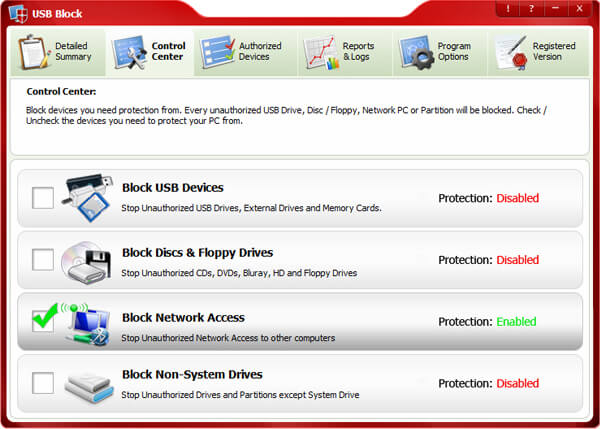
Follow these simple steps to block unauthorized use of network mapped drives and PCs:
- Run the software and enter your password.
- Click ‘OK’ after entering a valid password.
- Switch to ‘Control Center’ tab from where you can block devices you need to protect your PC from. Check ‘Block Network Access’ to prevent unauthorized use of network mapped drives.
- Now, whenever an unauthorized user tries to access shared folders or network mapped drives from the computer where USB Block is installed, a password prompt window will open asking you either you want to authorize this drive or not.
- To add a device to your Authorize List, simply check the box ‘Remember (add to Authorize List)’ that appears every time a password prompt window will appear.
Summary:
Having USB block alongside, you can make sure all un-trusted devices are restricted from being inserted or connected into your system. This does not mean you would be also restricting your own devices as you could simply white-list them, connect them and use them as necessary. It does not only cover a USB drive but includes multiple options that are used to transfer data from one destination to another.