

Introduction:
Folders have existed since the very beginning that has enabled us to store all the productive files at one place, stored in a folder. However, since we sometimes store files that are confidential in nature, we sometimes lose our confidential files due to the lack of importance given to its security. Hence, folder protect helps you secure your files stored in the folders quickly.
How to hide data and protect it using Folder Protect?
Many people are in the habit of storing confidential information on their computers. Information saved mostly include business details, credit card numbers, passwords, financial information, tax details, important official files and secret documents which are important enough to be protected from unauthorized access. From board meetings to family tree information, the reliance on computers and information management applications are ever expanding.
And when it comes to protecting data stored on computers, do not rely on basic protection features that come standard with Windows. One can either simply hide files and folders from snoopers using the ‘Hide’ feature of Windows, or store them in external devices to keep it on the side, unencrypted and unprotected! However, such measures do not usually benefit them in the long run, because the truth of the matter is that these ‘hidden’ folders and files can be very easily viewed by someone who knows his way around them. For example, if you select ‘Show hidden files and folders’ in Windows Folder Options, and uncheck the ‘Hide protected operating system files’ option, you can easily view the content of both the folders and the files.
Data security should not in any way be taken lightly. With the recent spate of events involving serious data breaches globally, you should consider protecting your data with serious thoughtfulness.
From preventing your documents from being accidentally deleted by your siblings; to safeguarding your company’s data and information from negative elements; or protecting your files against malware – all these real life scenarios are the main cause of worry in an organization or a PC user in general.
Folder Protect is designed with all this in mind. It is a user-centered, policy-driven access control and password protection tool to meet your everyday data and information protection needs. Folder Protect is a highly customizable way of securing your data, in exactly the way you have always wanted.
You can hide data with Folder Protect including files, folders, PDF files, ZIP / RAR files and any kind of image files (jpg, bmp, gif) at once without taking too much time. The only way to access hidden folders is to give the exact path in Run, Windows Explorer or by using DOS mode.
Follow these simple steps to hide data with Folder Protect with a single mouse click:
- Download Folder Protect and install it on your computer. Run the program and it will ask you to set and confirm a password. Make sure to set a strong password which is easy to remember but hard to guess. Click ‘OK’ to log in to the application and then click the ‘Add’ button to add your data.
- When you click on the ‘Add’ button, Folder Protect’s wizard screen will appear showing you the following two steps:
- Step 1: Choose Protection Method
- Step 2: Add Items You Wish to Protect
- Both of these steps are self-explanatory.
Hide Data With Folder Protect
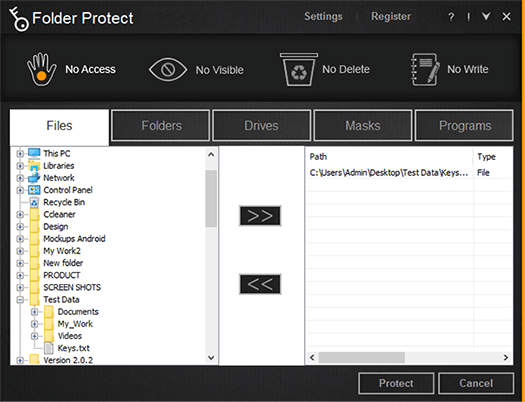
- The option titled ‘Choose Protection Method’ asks you the protection method you wish to choose in order to protect your data with Folder Protect. The protection method itself includes four distinct methods of data protection that you can select according to your needs.
- You may select from the No Access, No Visible, No Delete or No Write options to make your data completely inaccessible, hidden, delete proof or write proof respectively.
- The second protection method titled ‘Add Items You Wish to Protect’ allows you to protect data with Folder Protect including files, folders, drives, masks or programs.
- To hide data with Folder Protect, select the protection type ‘No Visible’ from Step 1 above.
- Data includes files and folders. Therefore, click the ‘Files’ tab if you wish to protect files and click on the ‘Folders’ tab if you want to protect complete folders. When you click the respective tab, Folder Protect shows you a folder tree containing all the files and folders so that you can choose which file or folder you want to hide.
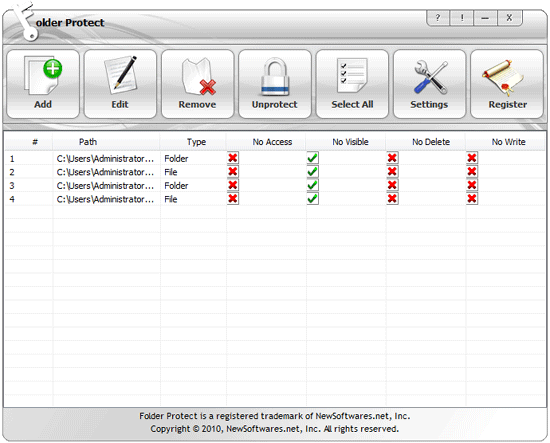
- Select files and folders and add them to your list by using the ‘Add’ button. You can also Drag and Drop the items.
- You can also hide data with Folder Protect based on their extensions like *.doc, *. mpeg, *.mp3 and so on. To do this, click the ‘Masks’ tab and add the extension(s) to your locking list. Kindly note that drag and drop is not supported when you protect extensions.
- When you’re done with the selection, click ‘Protect’.
- Once you click ‘Protect’, you’ll be able to see the list of your protected items. You can further manage your hidden items in the list.
Verdict:
Folders were known to be a pathway that leads to our efficiency where we were able to find all of our files easily. But maintaining its security should be the most productive objective. Folder Protect also supports the customization option that lets you make your data delete-proof, write-proof etc. Hence, with the help of folder protect’s password protection feature; you have nothing to worry about.