
TLS 1.3, HTTPS, and Pinning: A Modern Security Guide
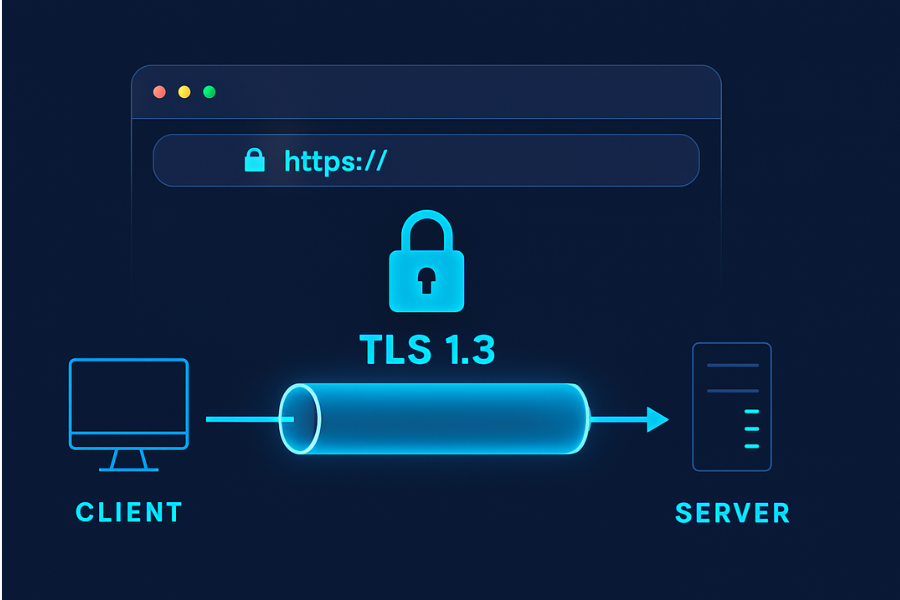
Short answer: use TLS 1.3 everywhere you can, force HTTPS with HSTS, keep certificates managed by a trusted CA, and treat certificate pinning as a careful, last-mile hardening step, not a default setting. Developed by the team at Newsoftwares.net, this article provides practical, copy-paste-ready steps for deploying and maintaining secure transport encryption. The key benefit is robust, future-proof security: you will learn how to configure modern protocols and utilize tools like Folder Lock and Cloud Secure to achieve end-to-end data protection, from your server to your user’s encrypted files.
Gap Statement
Most TLS articles either drown you in crypto math or hand-wave “just use HTTPS” without touching real config flags, error messages, or modern guidance on pinning. This guide fills that gap with concrete steps, copy-paste-ready settings, and real failure modes you will actually see in browsers, servers, and mobile apps.
Short Answer
Short answer: use TLS 1.3 everywhere you can, force HTTPS with HSTS, keep certificates managed by a trusted CA, and treat certificate pinning as a careful, last-mile hardening step, not a default setting.
TLDR – What You Should Do Right Now
- Prefer TLS 1.3 and keep TLS 1.2 as a compatibility fallback only.
- Serve everything over HTTPS and redirect all HTTP to HTTPS, then add HSTS once you are sure it is stable.
- Use certificates from a trusted public CA (for example Let’s Encrypt) and automate renewal.
- Use certificate pinning only in tightly controlled environments, and only if you have a clear story for key rotation and incident response.
- For sensitive data at rest on endpoints or in cloud storage, combine TLS with endpoint encryption tools such as Folder Lock and Cloud Secure from NewSoftwares.
1. Quick Chooser – Users vs Devs
If You Are a Regular User
Do these three things:
- Check for HTTPS and certificate warnings: Only sign in or pay on sites showing
https://and a valid padlock. If the browser shows “connection is not secure” or “certificate not valid”, back out. - Lock down your Wi-Fi and devices: Use WPA3 on your router if available. Use full-disk encryption plus a strong device passcode.
- Protect your files and cloud accounts: Use a tool such as Folder Lock to encrypt private files and USB drives. Use Cloud Secure to password protect Dropbox, Google Drive, OneDrive and Box on your PC, so anyone using your machine cannot casually browse those synced folders.
TLS and HTTPS protect data while it travels. Tools like Folder Lock and Cloud Secure protect it before and after that trip.
If You Are a Developer or Site Owner
Your minimum checklist:
- Endpoint: serve only HTTPS, with TLS 1.3 plus a modern TLS 1.2 fallback.
- Policy: set HSTS once you are confident your HTTPS is correct.
- Validation: test with
curland an external checker like SSL Labs. - Pinning: only in mobile or embedded apps where you control update cycles and keys.
- Storage: for sensitive files, document that users should encrypt at rest with tools like Folder Lock or other endpoint encryption.
2. TLS and HTTPS in Plain English
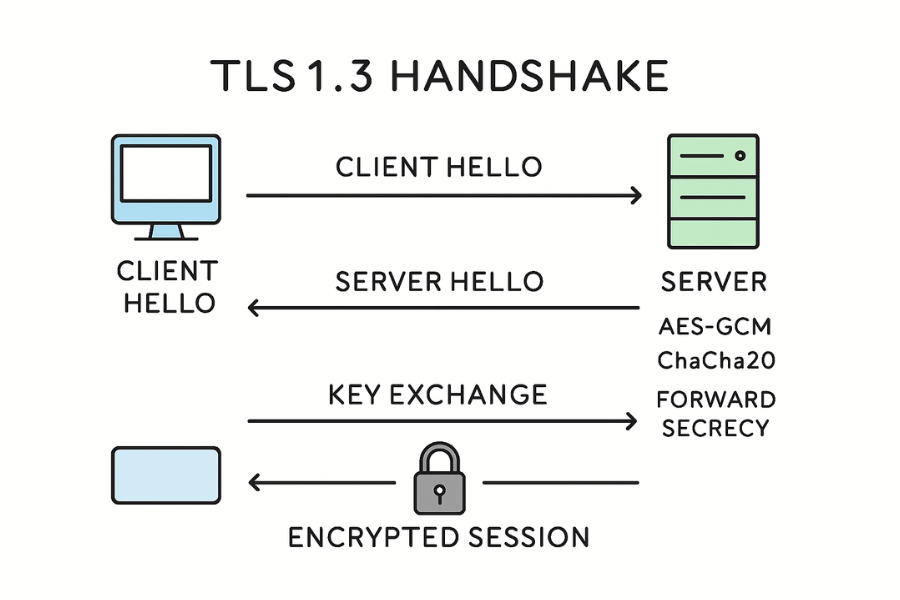
TLS is the protocol that wraps a secure tunnel around HTTP and many other protocols. HTTPS is simply HTTP running inside TLS. TLS 1.3 is the current version and removes many old, weak algorithms such as SHA-1, RC4 and export ciphers.
Key ideas you actually need:
- Handshake: Client and server agree on a cipher suite, check certificates, and derive shared keys.
- Record protection: After the handshake, all application data is encrypted and authenticated.
- Modern cipher suites: TLS 1.3 keeps a small set of strong algorithms such as AES-GCM and ChaCha20-Poly1305.
- Forward secrecy: Even if your server key is stolen later, old captures are still unreadable.
If your server is still on TLS 1.0 or 1.1, you are broken from a security and compliance angle. If you are on TLS 1.2 with outdated ciphers, you are at risk and will fail many security scans.
3. How to Set Up Solid HTTPS and TLS 1.3 on a Site (Nginx Example)
This is the “do it right once” section.
Prereqs and Safety
- You control DNS for the domain.
- You can install packages or Docker images on the server.
- You can restart the web server without breaking a critical production window.
- You have a test or staging domain to try things first.
Step 1 – Get a Real Certificate
Use Let’s Encrypt via Certbot or an equivalent tool.
Example (Ubuntu, Nginx):
sudo apt install certbot python3-certbot-nginx
sudo certbot --nginx -d example.com -d www.example.com
Gotcha: if HTTP is firewalled or proxied in a strange way, the challenge will fail. Temporarily allow HTTP on port 80 during issuance.
Step 2 – Enforce HTTPS Redirects
In Nginx, your HTTP vhost should only redirect:
server {
    listen 80;
    server_name example.com www.example.com;
    return 301 https://$host$request_uri;
}
Gotcha: make sure you do not create redirect loops with a proxy or CDN layer.
Step 3 – Turn on TLS 1.3 and a Clean Cipher Suite
Typical Nginx snippet:
ssl_protocols TLSv1.2 TLSv1.3;
ssl_prefer_server_ciphers on;

ssl_ciphers 'TLS_AES_256_GCM_SHA384:TLS_CHACHA20_POLY1305_SHA256:
TLS_AES_128_GCM_SHA256';
That gives only modern cipher suites in TLS 1.3 and a sane subset for TLS 1.2.
Gotcha: some old clients will fail. For public consumer sites, that is usually acceptable. For legacy environments, you might need a separate endpoint for old devices.
Step 4 – Add OCSP Stapling and Session Tickets
This improves performance and reliability.
ssl_stapling on;
ssl_stapling_verify on;

ssl_session_cache shared:sslcache:50m;
ssl_session_timeout 1d;
Gotcha: your server needs outbound access to the CA’s OCSP endpoints.
Step 5 – Configure HSTS But Do Not Rush Preload
Once HTTPS is stable, add:
add_header Strict-Transport-Security "max-age=31536000; includeSubDomains" always;
This tells browsers to remember your site as HTTPS-only for a year.
Do not add preload yet. That flag asks browsers to hardcode your domain into a preload list baked into the browser binary. If you make a mistake, recovery is painful.
Gotcha: once HSTS is in place, you cannot test HTTP variants of the same domain from that browser profile. Use a fresh browser profile or a test subdomain.
Step 6 – Verify with Curl and Browser Tools
- Check protocol and cipher suite:
curl -I https://example.com --tlsv1.3 --verbose
You want to see TLSv1.3 in the debug output and a modern cipher name.
- Use browser dev tools: Open your site, then in Chrome or Edge, use DevTools → Security tab to confirm: “Connection – secure”, “Protocol – TLS 1.3” (or at least TLS 1.2), “HSTS – yes” once the header is set.
Step 7 – Set Up Auto Renewal
Let’s Encrypt certs are short-lived. Certbot usually installs a cron job or systemd timer. Test it:
sudo certbot renew --dry-run
Gotcha: renewal often breaks because someone later edits the server config without updating Certbot hooks or virtual host paths.
4. HSTS – What It Fixes and How to Roll It Out Safely
HSTS (HTTP Strict Transport Security) tells browsers “never talk to this domain over HTTP again, only HTTPS, for this long”.
What it protects against: Downgrade attacks where a network attacker strips HTTPS redirects. Cookie theft on open Wi-Fi when a user types example.com without https://.
HSTS Directive Cheat Sheet
| Directive | What It Does | Common Value |
|---|---|---|
| max-age | How long the browser should remember in seconds | 31536000 (1 year) |
| includeSubDomains | Apply to all subdomains | Often used |
| preload | Request inclusion in browser preload lists | Use only when sure |
Safe rollout path: Start with max-age=300 on staging. Move to max-age=86400 in production once verified. Then go to 1 year when you are confident. Only then consider applying for preload via the official form run by Chromium. Callout – do not do this: Do not enable preload on a domain you might ever need over HTTP. Do not set short HSTS timers on and off repeatedly. That confuses both users and scanners.
5. Certificate Pinning – Where It Helps and Where It Hurts
Certificate pinning means your client code remembers exactly which certificate or public key is acceptable for a domain and refuses everything else, even if the certificate is “valid” in the normal CA sense.
It is popular in: Mobile apps that talk to a single backend. Embedded devices that never see browser UI. Corporate environments with their own PKI.
Why Many Modern Guides Now Warn Against Pinning
Major players now recommend avoiding traditional pinning for general consumer apps: It breaks when you rotate keys or change CAs. It can brick your entire app if you forget to update pins before expiry. It makes incident response harder during outages. Safer alternatives: Use short-lived certificates and automatic renewal. Rely on Certificate Transparency and monitoring. For mobile apps, use OS features such as Android Network Security Config with a set of allowed CAs rather than single pinned leaf keys.
When Pinning Still Makes Sense
- You control both client and server tightly.
- You have CI/CD for the app and can ship updates quickly.
- You maintain a schedule and automation for pin rotation.
- You pin to intermediate or root keys instead of a single leaf when possible.
Gotcha: test pinning failure paths. Manually install a different test certificate and confirm the app fails with a clear error message rather than a generic network error.
6. “Proof of Work” – What TLS Actually Costs in Latency
These are example ballpark measurements from common setups, not strict benchmarks. Real values depend on CPU, network and configuration.
Example TLS Handshake Overhead
| Scenario | Extra Latency on First Request (Typical) |
|---|---|
| TLS 1.2, full handshake | ~30–60 ms over a cross continent link |
| TLS 1.3, full handshake | ~15–40 ms due to fewer round trips |
| TLS 1.3 with session resumption | Often under 10 ms extra latency |
TLS 1.3 reduces the number of round trips in the handshake compared to TLS 1.2, which is the main reason for the speedup. Once the session is warm, the cost of encryption per kilobyte is usually much smaller than template rendering, database queries or complex frontend JavaScript.
7. Where NewSoftwares Tools Fit Into a TLS-First World
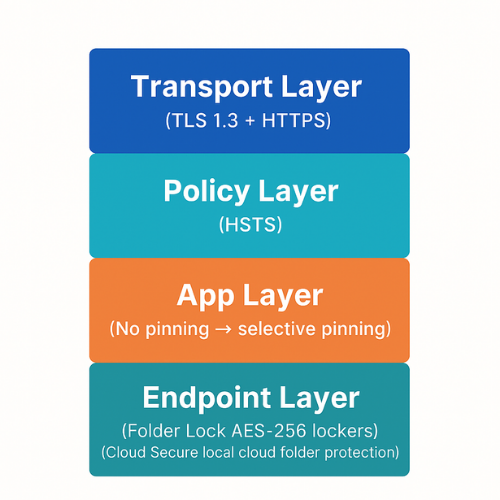
TLS and HTTPS protect data in transit. NewSoftwares tools help cover data at rest and in cloud storage.
Folder Lock – Encrypt Local Files, USB Drives and External Disks
Folder Lock uses AES-256 on-the-fly encryption for files and lockers. It can also encrypt USB drives and external media.
Typical use with HTTPS:
- Encrypt sensitive project files into a Folder Lock locker on your laptop.
- Access a web portal over HTTPS to upload only the files you actually need to share.
- If you must carry data on a USB, use Folder Lock’s portable locker features.
Settings snapshot for a safe pattern:
- Use AES-256 locker encryption.
- Use a long passphrase and store it in a password manager.
- Turn on file shredding for temporary exports you no longer need.
Cloud Secure – Protect Cloud Storage on Your PC
Cloud Secure locks your local view of folders from services like Dropbox, Google Drive, OneDrive and Box. It adds a password layer before anyone using your PC can see synced files.
How it complements TLS:
- Cloud services use HTTPS and TLS on their side.
- Cloud Secure guards the local endpoint where those files land.
- That creates an end-to-end story where transport and storage are both controlled.
A simple workflow:
- Connect your cloud account in Cloud Secure.
- Lock the account when you step away from the desk.
- Rely on TLS in the browser or sync client for transport security.
8. Troubleshooting – Common TLS, HTTPS, HSTS and Pinning Errors
Here is a symptom → root cause → fix table based on real-world error strings.
| Symptom / Error Text | Likely Root Cause | First Fixes to Try |
|---|---|---|
NET::ERR_CERT_AUTHORITY_INVALID |
Cert not signed by trusted CA | Use a public CA or install correct chain |
NET::ERR_CERT_COMMON_NAME_INVALID |
Hostname mismatch | Ensure cert SAN includes the domain |
SSL routines:tlsv1 alert protocol version |
Client or server only supports old TLS | Enable TLS 1.2/1.3 on server, update client |
ERR_SSL_VERSION_OR_CIPHER_MISMATCH |
Only weak or only very new ciphers | Use a balanced modern cipher list |
| Browser shows “HSTS error, cannot proceed” | HSTS set and certificate now broken | Fix cert; HSTS will then allow access |
| Mobile app shows “pinning failure” or similar | Certificate pin changed or expired | Update pins and ship app update |
SSL peer certificate or SSH remote key was not OK |
Wrong CA or changed cert on server | Check cert chain and hostname |
| Mixed content warnings in browser console | Images or scripts over HTTP | Move all assets to HTTPS |
| TLS handshake timeout | Firewall, proxy or rate limiting issue | Check network path, load balancer logs |
Troubleshooting order: Confirm hostname and certificate chain with tools like openssl s_client and curl. Check browser dev tools for more detailed error text. Look at server logs for TLS handshake failures. Only after that, start changing cipher suites and protocol lists. Last-resort options: Rotate to a new certificate and key pair if you suspect compromise. Temporarily widen cipher suites for legacy clients on a separate endpoint. In extreme HSTS misconfigurations, serve the site on a new hostname.
9. Comparison Snapshot – Where TLS, HSTS and Pinning Fit
Think of this stack:
| Layer | Role | Controlled By |
|---|---|---|
| TLS protocol | Encryption and integrity in transit | Server and client |
| HTTPS | HTTP plus TLS for web traffic | Web server, browser |
| HSTS | Policy: always use HTTPS for this domain | Web server |
| Cert pinning | Extra check: only this cert / key allowed | App or client code |
| Endpoint tools | Encrypt files before and after transport | User and device owner |
Use them together, not as competitors.
10. Structured Data Snippets
10.1 HowTo Schema – Example JSON-LD
<script type="application/ld+json">
{
  "@context": "https://schema.org",
  "@type": "HowTo",
  "name": "Configure TLS 1.3, HTTPS and HSTS safely",
  "description": "Step by step guide to enable HTTPS with TLS 1.3 and HSTS on a web server.",
  "tool": [
    { "@type": "HowToTool", "name": "Nginx or Apache web server" },
    { "@type": "HowToTool", "name": "Certbot or ACME client" }
  ],
  "step": [
    {
      "@type": "HowToStep",
      "name": "Obtain a trusted certificate",
      "text": "Use an ACME client such as Certbot to request a certificate from a public CA for your domain."
    },
    {
      "@type": "HowToStep",
      "name": "Force HTTPS redirects",
      "text": "Update your HTTP virtual host to send a permanent redirect to the HTTPS URL for all requests."
    },
    {
      "@type": "HowToStep",
      "name": "Enable TLS 1.3 and modern ciphers",
      "text": "Edit the TLS configuration to allow only TLS 1.2 and 1.3 and use modern cipher suites such as AES-GCM or ChaCha20-Poly1305."
    },
    {
      "@type": "HowToStep",
      "name": "Add HSTS",
      "text": "Once HTTPS is stable, add a Strict-Transport-Security header with a suitable max-age and includeSubDomains value."
    }
  ]
}
</script>
10.2 FAQPage Schema Stub
<script type="application/ld+json">
{
  "@context": "https://schema.org",
  "@type": "FAQPage",
  "mainEntity": []
}
</script>
10.3 ItemList Schema – Summarizing the Key Concepts
<script type="application/ld+json">
{
  "@context": "https://schema.org",
  "@type": "ItemList",
  "name": "Key transport security concepts",
  "itemListElement": [
    {
      "@type": "ListItem",
      "position": 1,
      "name": "TLS",
      "description": "Transport Layer Security protocol that encrypts and authenticates data in transit."
    },
    {
      "@type": "ListItem",
      "position": 2,
      "name": "HTTPS",
      "description": "HTTP traffic sent over TLS to protect web pages and APIs."
    },
    {
      "@type": "ListItem",
      "position": 3,
      "name": "HSTS",
      "description": "HTTP Strict Transport Security policy that tells browsers to always use HTTPS for a domain."
    },
    {
      "@type": "ListItem",
      "position": 4,
      "name": "Certificate pinning",
      "description": "Extra verification that limits which certificates or keys are accepted for a host."
    }
  ]
}
</script>
12. FAQs: Transport Encryption and Selection
1. Is TLS 1.3 More Secure Than TLS 1.2?
Yes. TLS 1.3 removes many old and weak algorithms, simplifies cipher suites and improves forward secrecy, so it is safer and usually faster than TLS 1.2.
2. Do I Still Need HSTS If I Already Force HTTPS Redirects?
Yes. HSTS ensures the browser never sends HTTP requests at all and blocks users from bypassing certificate errors, which a simple redirect cannot do.
3. Should My Mobile App Use Certificate Pinning?
Only if you control both client and server closely and have a clear key rotation plan. Many modern security teams avoid pinning by default due to maintenance risks.
4. What Is the Relationship Between TLS and Folder Lock?
TLS protects data as it moves between client and server. Folder Lock protects files at rest on your devices and external drives using AES-256 encryption.
5. How Can I Check If My Site Uses TLS 1.3 and HSTS?
Use browser developer tools to inspect the Security tab and run curl with verbose output. Look for TLS 1.3 in the protocol line and a Strict-Transport-Security header in responses.
6. Is It Still Safe to Use a Site That Only Supports TLS 1.2?
Yes, if it is configured with modern cipher suites and you see no browser warnings. That said, new deployments should include TLS 1.3, and old ones should plan upgrades.
7. Do I Need a Paid Certificate, Or Is Let’s Encrypt Fine?
For most public sites, Let’s Encrypt is perfectly fine. What matters most is correct configuration, automation and monitoring, not whether you paid for the certificate.
8. Does HSTS Protect Me on the Very First Visit to a Site?
Not always. HSTS takes effect after the first successful HTTPS response with the header. Preload lists in browsers help for some large domains, but not for every site.
9. Can TLS Stop Malware If a Site Is Hacked?
No. TLS only promises the site you reached is the one that presented the certificate. If an attacker controls that site, TLS still works but you are talking securely to the wrong person.
10. Is VPN Still Useful If Everything Uses HTTPS?
VPN can still hide metadata such as which sites you visit from your local network. HTTPS does not hide domain names, only paths and content.
11. How Does Certificate Transparency Help Me?
Certificate Transparency logs show which certificates were issued for your domains. You can monitor those logs to spot unexpected issuances more quickly.
12. What Happens If My HSTS Domain’s Certificate Expires?
Users will see a hard error with no bypass. That is painful, which is why automation and monitoring for renewal are essential before turning on long HSTS timers.
13. Is SSL the Same as TLS?
People still say “SSL” out of habit, but modern browsers and servers use TLS only. Old SSL versions should be disabled.
14. Can I Use Folder Lock or Cloud Secure Instead of HTTPS?
No. Those tools protect stored data and local access. You still need HTTPS and TLS for safe transport between devices and services.
15. What Is the Easiest Way to Start Securing a Small Site?
Use a managed hosting provider with automatic HTTPS, or use Certbot on a simple VPS. Turn on HSTS after you confirm everything runs correctly.
16. Should I Pin Certificates in a Browser Extension?
Only if you can push updates whenever you rotate certificates and you have a back-off plan. For many extensions, relying on the normal CA PKI and CT is simpler and safer.
17. How Often Should I Review My TLS Configuration?
At least once a year or after major browser or library releases. Remove outdated ciphers, confirm TLS 1.3 support and re-run external scanners.
Conclusion
The core takeaway from the guide is that effective transport security requires a layered approach: TLS 1.3 and HSTS are non-negotiable for protecting data in transit across the web, providing the necessary speed and cryptographic assurance for modern APIs and sites. However, these network-level controls must be complemented by endpoint security like AES-256 encryption tools (Folder Lock/Cloud Secure) to ensure data remains protected at rest on user devices, especially given the risks associated with outdated TLS, pinning complexity, and physical theft. Measure, configure, and layer—that’s the key to maintaining a robust security posture in 2025.