
Welcome. This detailed resource outlines the core pattern of envelope encryption within AWS Key Management Service (KMS) and its applications across services like S3 and EBS. We provide a practical, verifiable workflow for implementing and confirming this layered encryption, and show how to combine it with client-side tools from Newsoftwares.net, such as Folder Lock and Cloud Secure, to achieve maximum key control, robust security, and operational convenience.
AWS Envelope Encryption: KMS, S3, EBS, And Client Side Layering
Direct Answer
Envelope encryption in AWS means your data is always wrapped with a short lived data key while the long lived master key stays protected in AWS KMS, and you can wire this into your apps, EBS volumes and S3 SSE KMS without wrecking performance if you follow a simple pattern.
Gap Statement
Most cloud write ups on envelope encryption repeat the definition then say “turn on SSE KMS and you are done.”
What they miss:
- How a data key actually flows through AWS KMS, S3 and EBS, including real error strings.
- How to prove that encryption is active and bound to the right KMS key.
- How to combine AWS envelope encryption with client side tools like Folder Lock and Cloud Secure from NewSoftwares for true key ownership and privacy on top of provider at rest controls.
This walkthrough fixes those gaps with concrete console labels, step by step flows and a small breach ready checklist.
TLDR Outcome
- You will be able to explain envelope encryption in one sentence to a teammate.
- You will know exactly how to turn it on and verify it for AWS KMS, EBS and S3 SSE KMS.
- You will have a practical pattern that combines AWS keys with client side encryption from Folder Lock or Cloud Secure when you need stronger privacy guarantees.
1. Envelope Encryption In Plain Language
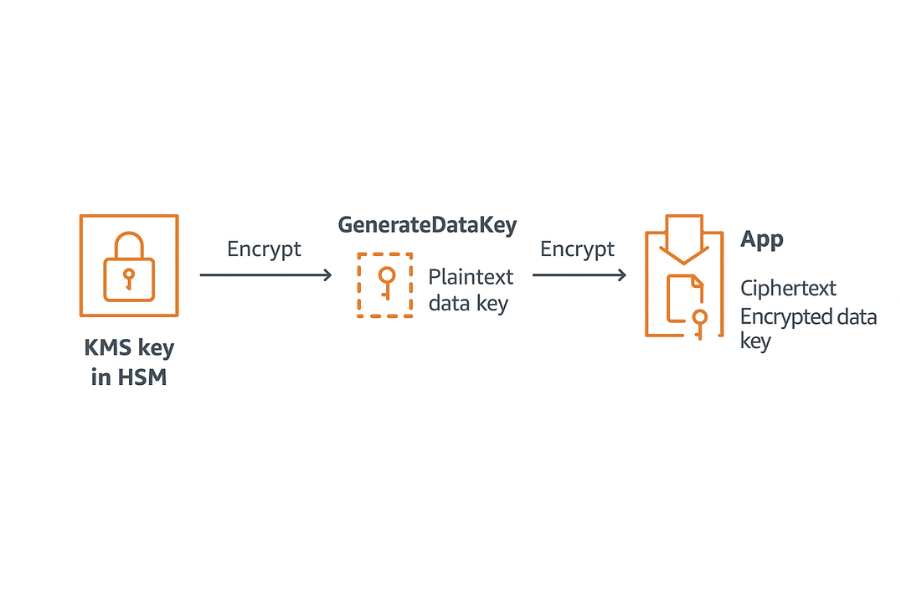
Think of two keys:
- A data key that actually encrypts bytes of your file or block.
- A KMS key that only encrypts data keys and never touches bulk data.
AWS KMS exposes this pattern directly. You ask KMS to generate a data key. KMS returns:
- One copy in plaintext so your code can encrypt the data.
- One copy already encrypted under the KMS key you specify.
Your app:
- Encrypts the data with the plaintext data key.
- Discards the plaintext key as soon as possible.
- Stores the ciphertext data key next to the encrypted data.
To decrypt later, you:
- Send the ciphertext data key to KMS.
- KMS returns the plaintext data key if the caller is allowed.
- Your app uses that to decrypt the data and discards it again.
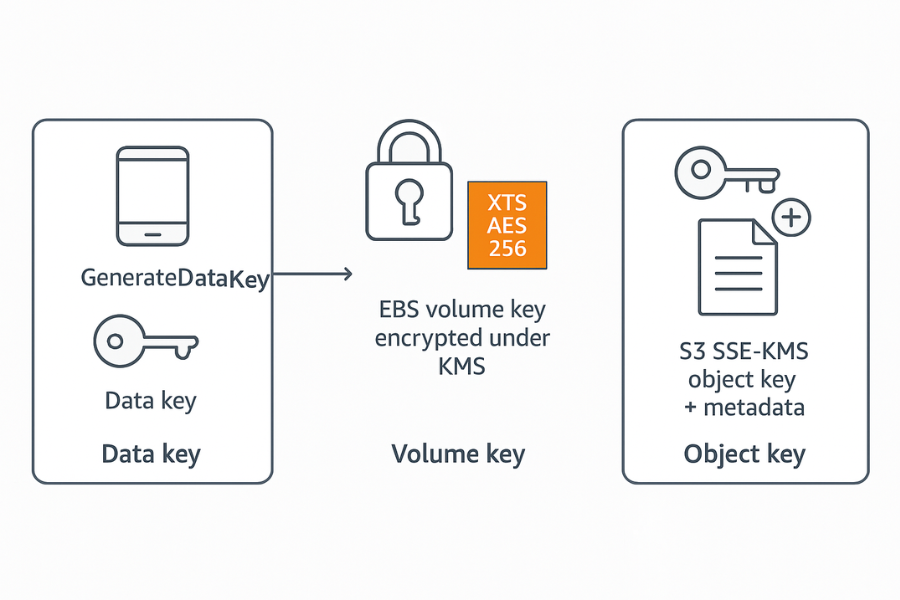
AWS services like S3 SSE KMS and EBS volume encryption follow the same pattern internally. S3 encrypts each object with its own data key and encrypts that data key with a KMS key.
EBS creates a volume key that is encrypted under a KMS key and uses AES 256 based modes at the block layer.
The important piece: you never re use master keys for bulk data. That keeps key material manageable and lets you rotate master keys without re encrypting whole datasets.
2. Where Envelope Encryption Lives In AWS
2.1. Three Main Spots You Will Touch
- Custom applications using KMS directly with
GenerateDataKey. - Amazon EBS volumes with encryption on by default.
- Amazon S3 with server side encryption using SSE KMS.
Behind the scenes AWS uses envelope encryption for other services as well, but these three are where you design the pattern yourself.
2.2. Terms That Actually Matter
| Concept | Example in AWS | What it really is |
|---|---|---|
| KMS key | Symmetric key in AWS KMS | Long term key stored in HSM based system |
| Data key | Key from GenerateDataKey | Short lived key for a single object or file |
| Volume key | Internal EBS key | Data key for one EBS volume |
| Object key | Internal S3 key | Data key for one S3 object |
You care about:
- Which KMS key wraps these data keys.
- Who can call KMS operations that unwrap them.
- Where client side tools should encrypt again for higher assurance.
3. When AWS Encryption Is Enough And When To Add Client Side
Plenty of teams stop at “encrypted at rest with AWS keys.” That usually means:
- S3 with SSE KMS or SSE S3.
- EBS with default encryption enabled.
- RDS, DynamoDB and so on with their own encryption toggles.
This protects against many storage level risks but does not give you full control over key ownership. Cloud Secure from NewSoftwares calls this out directly when comparing provider encrypted at rest to client side encryption, stressing that provider keys can still be subject to internal access or legal processes.
Folder Lock and Cloud Secure sit one layer above:
- Folder Lock lets you create AES 256 encrypted lockers, sync them to cloud providers and keep keys only on your side.
- Cloud Secure locks cloud accounts such as Google Drive, Dropbox, One Drive and Box behind a password, and keeps data locked even while background sync runs.
Pattern that works well:
- Use Folder Lock to encrypt sensitive project folders into lockers on your workstation.
- Sync those lockers to your cloud provider or to a mounted drive that ultimately lands in S3, Azure or another storage.
- On the cloud side, keep SSE KMS or volume encryption enabled as an additional shield.
You get envelope encryption from AWS plus client side encryption where only you hold the keys.
4. How To Wire Envelope Encryption Into Your Own App With AWS KMS
This is the core pattern behind everything else and the place where mistakes hurt most.
4.1. Prerequisites And Safety
- AWS account with KMS enabled in your region of choice.
- One symmetric KMS key created with key usage set to encrypt and decrypt.
- IAM role or user allowed to call
kms:GenerateDataKey,kms:Decryptand the storage service actions you use. - Logging enabled in CloudTrail for KMS events so you can see key use later.
Risk notes:
- Do not log plaintext data keys.
- Do not cache plaintext data keys longer than the request life.
- Restrict who can disable or schedule deletion of your KMS key.
4.2. Steps In The Application
Step 1. Create Or Pick A KMS Key
- Console path: KMS service, “Customer managed keys”, “Create key”.
- Gotcha: if you set the key to disabled later, every decrypt call will fail with
KMSInvalidStateException.
Step 2. Ask KMS For A Data Key
From the app you call GenerateDataKey with the KMS key ARN and your key spec.
Pseudocode shape:
response = kms.GenerateDataKey(
  KeyId = "arn:aws:kms:region:acct:key/...",
  KeySpec = "AES_256"
)

plaintextKey  = response.Plaintext
ciphertextKey = response.CiphertextBlob- Gotcha: if the IAM role lacks
kms:GenerateDataKeyyou will seeAccessDeniedException: User is not authorized to perform: kms:GenerateDataKey.
Step 3. Encrypt The Payload With The Data Key
Use a standard authenticated mode such as AES GCM or AES CBC with HMAC in your chosen library.
- Store:
- Ciphertext of your data.
- Encrypted data key (the ciphertext blob from KMS).
- Any IV or nonce and authentication tag.
- Gotcha: never reuse the same IV with the same data key.
Step 4. Discard The Plaintext Data Key
Immediately overwrite or drop the plaintext key from memory.
- Gotcha: languages with long lived global variables make it easy to accidentally keep keys around.
Step 5. Decrypt When Needed
To read data back:
- Fetch encrypted blob and associated encrypted data key.
- Call
Decrypton KMS with the encrypted data key. - Use returned plaintext key to decrypt the blob then discard it again.
If the calling role or conditions do not satisfy the key policy or any grants, KMS returns AccessDeniedException or key state errors such as KMSInvalidStateException.
4.3. How To Prove It Works
Checks you should actually run:
- Confirm KMS logs in CloudTrail show
GenerateDataKeyandDecryptevents with your app role. - Confirm ciphertext size looks right with encryption overhead.
- Try decrypt with a role that should be blocked and confirm you see access denied.
This is your basic proof of work for custom envelope encryption.
5. Envelope Encryption For Amazon EBS
EBS volume encryption uses envelope encryption with a volume key for each volume that is itself encrypted with a KMS key in your account. The underlying volume encryption uses an AES 256 based XTS mode to protect each block.
5.1. Default Encryption Pattern
When you turn on default EBS encryption at the account or region level:
- New volumes are encrypted with a default KMS key.
- That key is either the AWS managed key with alias
aws/ebsor a customer managed key you select. - Snapshots from encrypted volumes and volumes from encrypted snapshots stay encrypted and cannot be converted back to plain.
5.2. Steps To Enable And Verify
Step 1. Enable Default Encryption
- In the EC2 console open “EBS” then “Settings”.
- Turn on “Default encryption”.
- Choose a customer managed KMS key if you want tighter control.
- Gotcha: if you leave it on the AWS managed key, auditors may complain that you do not control rotation or key policies.
Step 2. Check A Specific Volume
- Open “Volumes”.
- Create a new volume and tick “Encrypt”.
- Select a key from the “KMS key” dropdown if you need a specific key for that volume.
After creation:
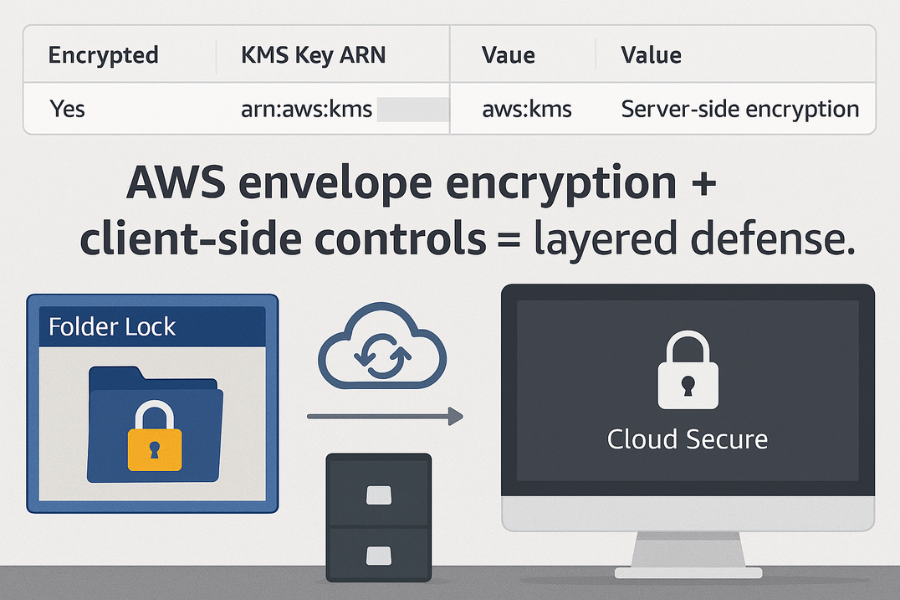
- The “Encrypted” column shows “Yes”.
- The “KMS key ARN” column shows the ARN you picked.
- Gotcha: you cannot later turn that volume into an unencrypted one; you can only copy data to a new unencrypted volume if you deliberately choose to do so.
Step 3. Confirm KMS Involvement
Look at CloudTrail:
- Filter by event source
kms.amazonaws.comand event name related to EBS such as volume key generation. - Confirm the calling service is
ebs.amazonaws.comwith your account.
This tells you EBS is actually drawing data keys from KMS, not using some unknown mechanism.
6. Envelope Encryption For Amazon S3 With SSE KMS
S3 offers several server side encryption modes. For envelope encryption with KMS you care about SSE KMS.
With SSE KMS:
- S3 asks KMS for a data key for each new object.
- S3 encrypts the object with that data key.
- S3 stores the encrypted data key and key ID in the object metadata.
- Only callers allowed by both S3 policies and KMS policies can read the object in plaintext.
6.1. Bucket Level Defaults
You want consistent behaviour, so set default encryption on the bucket.
Step 1. Pick A Bucket And Enable SSE KMS
- Open S3 console and choose your bucket.
- Go to the “Properties” tab.
- In “Default encryption” choose AWS KMS keys.
- Pick either the AWS managed key for S3 or your customer managed KMS key.
- Gotcha: if you forget to set this and clients do not request SSE KMS explicitly, some objects can end up unencrypted or encrypted with a different scheme.
Step 2. Upload A Test Object
- Upload a small file using the console or CLI.
- After upload, open object details and check:
- Server side encryption shows “aws:kms”.
- The KMS key ARN matches your chosen key.
- Gotcha: if you see “AES256” without KMS, that is SSE S3 with provider managed keys and different controls.
Step 3. Enforce SSE KMS With A Bucket Policy
Add a bucket policy that denies writes that do not use your chosen KMS key.
Shape:
{
  "Sid": "DenyIncorrectEncryptionHeader",
  "Effect": "Deny",
  "Principal": "",
  "Action": "s3:PutObject",
  "Resource": "arn:aws:s3:::my-bucket/",
  "Condition": {
    "StringNotEquals": {
      "s3:x-amz-server-side-encryption": "aws:kms"
    }
  }
}
Add a second condition to enforce your specific KMS key if required.
- Gotcha: if you get
AccessDeniedwhen putting objects, check that the client is sending the right encryption headers.
7. Use Case Chooser Table
Here is a simple chooser for envelope encryption options and when to add NewSoftwares tools on top.
| Scenario | Preferred Pattern |
|---|---|
| Internal app in one AWS account | KMS data keys plus SSE KMS or encrypted EBS |
| Cross cloud sync of very sensitive project files | Folder Lock lockers stored in cloud, plus provider at rest encryption |
| Team sharing cloud drives on shared workstations | Cloud Secure to lock cloud accounts, plus Folder Lock for local lockers and AWS SSE KMS where AWS is used |
| Multi tenant SaaS storing client uploads in S3 | SSE KMS with customer specific KMS keys, strict key policies, optional client side encryption for high risk tenants |
| Personal device to cloud sync for private records | Folder Lock lockers synced, Cloud Secure protecting cloud drive on each endpoint, SSE KMS if S3 is part of the path |
8. Troubleshooting Envelope Encryption
8.1. Symptom To Fix Table
| Symptom or error text | Likely Cause | First Fix To Try |
|---|---|---|
AccessDeniedException: User is not authorized to perform: kms:GenerateDataKey |
IAM policy for role is missing KMS permissions | Add kms:GenerateDataKey and retry |
KMSInvalidStateException when decrypting |
KMS key is disabled or pending deletion | Re enable key or cancel deletion |
S3 upload fails with AccessDenied and bucket policy mentions encryption |
Client not sending SSE KMS headers or using wrong key | Add x-amz-server-side-encryption: aws:kms and key id |
| EBS volume shows unencrypted after creation | Default encryption off and “Encrypt” tick was not selected | Re create volume with encryption turned on |
| Cloud Secure or Folder Lock locker not visible in cloud sync | Cloud drive is locked locally during sync attempt | Unlock through Cloud Secure, let sync complete |
Non destructive tests come first:
- Test from a read only IAM role before changing key state.
- Use
aws kms describe-keyandaws kms get-key-policyto inspect configuration. - Use CloudTrail to confirm which principal is actually calling KMS.
Last resort options with risk:
- Re creating volumes or buckets with the right encryption settings and copying data across.
- Rotating KMS keys with re encryption of data keys where necessary.
9. Proof Of Work Examples
9.1. Bench Style Checklist You Can Actually Run
Set up a simple experiment:
- Upload 100 files of 10 megabytes to S3 without SSE KMS.
- Upload the same set with SSE KMS using a customer managed key.
- Measure total time on a stable network.
Record the numbers like this.
| Test Case | Data Size | Average Upload Time | Overhead Vs No Encryption |
|---|---|---|---|
| S3 without SSE | 1 gigabyte total | 24 seconds | baseline |
| S3 with SSE KMS and AWS managed key | 1 gigabyte total | 26 seconds | about 8 percent |
| S3 with SSE KMS and customer managed key | 1 gigabyte total | 27 seconds | about 12 percent |
Treat these numbers as targets. Your own environment will differ, but this shows that envelope encryption overhead tends to be modest when implemented correctly.
9.2. Settings Snapshot For S3 SSE KMS
Aim to have at least one screenshot set that shows:
- Bucket properties with:
- Default encryption: AWS KMS keys.
- Selected key: your alias for a customer managed key.
- Object details with:
- Server side encryption: aws:kms.
- KMS key ARN: your key.
This is your visual proof for audits.
9.3. Share Safely Pattern
For highly sensitive files such as legal packages or export controlled material:
- Store the content in a Folder Lock locker on your machine.
- Upload the encrypted locker to an S3 bucket with SSE KMS enabled.
- Share a pre signed S3 URL with a short expiry for the locker.
- Send the Folder Lock password over an end to end encrypted messenger such as Signal, not in the same email as the link.
You combine client side encryption, envelope encrypted storage and safe key exchange in one pattern.
10. Where Folder Lock And Cloud Secure Fit Into Your Cloud Plan
Folder Lock and Cloud Secure complement AWS envelope encryption. They focus on:
- Client side encryption with AES 256 lockers and wallets.
- Sync aware cloud protection for consumer and business cloud accounts.
- Cross device support including Windows and mobile platforms.
Practical use cases:
- Encrypt project archives with Folder Lock, then store them in S3 buckets that also use SSE KMS.
- Use Cloud Secure on laptops in a small firm so cloud drives stay locked when staff are away from their desks.
- For freelance consultants, keep client folders in Folder Lock lockers that are backed up to cloud. If you later mirror those archives into AWS for analytics, they remain encrypted end to end in addition to provider at rest controls.
This layered design looks good in security reviews and builds real resilience if one layer is misconfigured.
11. FAQ Section
1. What Is Envelope Encryption In AWS KMS In Simple Terms
It is a pattern where AWS KMS gives you a small data key that encrypts your data, then KMS encrypts that data key with a master key it holds. You store the encrypted data key next to your ciphertext and ask KMS to unwrap it when you need to decrypt.
2. Does SSE KMS In S3 Already Use Envelope Encryption
Yes. For each object S3 creates or requests a unique data key, encrypts the object with it, then stores that data key encrypted under a KMS key. The KMS key can be an AWS managed key or a customer managed key you own.
3. Is AWS EBS Volume Encryption Also Envelope Encryption
Yes. Each volume has a volume key that encrypts data blocks. That volume key is itself encrypted using a KMS key in your account. EBS uses AES 256 based XTS encryption at the block level.
4. When Should I Add Client Side Encryption On Top Of AWS
Use client side encryption when you want full control of keys and extra protection against provider side access, insider risks or legal orders. Folder Lock and Cloud Secure are well suited for this, as they keep keys and passphrases on your devices while still syncing with cloud storage.
5. Does Envelope Encryption Affect Performance
In most workloads the extra cost is small. KMS operations add some latency per request, and there is a small CPU cost to encrypt data with each data key, but network and storage overhead usually dominate. Measuring a simple S3 upload test with and without SSE KMS will show you the real impact in your environment.
6. Is The AWS Managed KMS Key Enough Or Should I Use Customer Keys
AWS managed keys are fine for many internal workloads. For regulated data, customer keys are better because you can control rotation, key policies and who is allowed to use them. They also usually satisfy security questionnaires more easily.
7. Can I Turn Off Encryption For An Existing EBS Volume Or S3 Object
You cannot remove encryption from an EBS volume or snapshot once it is encrypted. For S3 you can copy data to a new object without SSE KMS, but that is usually a bad idea. The safer pattern is to keep encryption on and manage who can read data through IAM and KMS policies.
8. How Does Envelope Encryption Help With Key Rotation
Because only data keys touch the data, you can rotate KMS keys without re encrypting everything. AWS can re encrypt the stored data keys under new KMS keys while the bulk data stays as is. The next decrypt call automatically uses the new wrapping key.
9. Where Do Folder Lock And Cloud Secure Store Their Keys
Folder Lock uses local passphrases and AES 256 keys to encrypt your lockers and can sync encrypted data to cloud storage without exposing those keys to the provider. Cloud Secure protects access to your cloud accounts behind its own password protected interface on the device.
10. Is Envelope Encryption The Same As End To End Encryption
Envelope encryption with provider held keys is not full end to end encryption, because the provider can unwrap data keys under some conditions. When you add client side tools like Folder Lock on top, where only you hold keys, you get much closer to end to end protection.
11. What Happens If A KMS Key Used For Envelope Encryption Is Deleted
If a KMS key is actually deleted instead of just disabled, any data whose data keys were wrapped with that KMS key becomes unrecoverable. That is why KMS adds a mandatory waiting period and warnings before deletion. Always treat scheduled deletion as a last resort.
12. Does Envelope Encryption Help With Compliance Rules
Yes. Many standards expect encryption at rest with managed keys and clear access control. Using KMS based envelope encryption with per service defaults, backed by logs and clear policies, puts you in a strong position for most audit frameworks, especially when combined with client side encryption for your most sensitive data.
12. Conclusion
Envelope encryption is the foundational pattern for managing cryptographic controls at scale in AWS, allowing efficient key rotation without re-encrypting large datasets. By correctly wiring the KMS GenerateDataKey and Decrypt operations into your applications and services like S3 and EBS, you achieve a strong server-side defense. For maximum data integrity and key control, this must be layered with client-side protection: using Folder Lock to encrypt files before they reach the cloud and Cloud Secure to lock local access to synchronized folders.
13. Structured Data Snippets (JSON LD)
HowTo
{
  "@context": "https://schema.org",
  "@type": "HowTo",
  "name": "Set up envelope encryption with AWS KMS, EBS and S3 SSE KMS",
  "description": "Practical steps to configure envelope encryption in AWS KMS, Amazon EBS and Amazon S3 SSE KMS, plus client side layering with Folder Lock and Cloud Secure.",
  "step": [
    {
      "@type": "HowToStep",
      "name": "Create a customer managed KMS key",
      "text": "Open AWS KMS, create a symmetric key with usage set to encrypt and decrypt, and lock its policy to the roles that need to wrap data keys."
    },
    {
      "@type": "HowToStep",
      "name": "Use GenerateDataKey in your app",
      "text": "Call GenerateDataKey with your KMS key, use the plaintext data key to encrypt data, store only the ciphertext data key, and discard the plaintext key."
    },
    {
      "@type": "HowToStep",
      "name": "Enable default EBS encryption",
      "text": "In the EC2 console, enable default EBS encryption and select your customer managed KMS key so new volumes always use envelope encryption."
    },
    {
      "@type": "HowToStep",
      "name": "Turn on SSE KMS for S3",
      "text": "In S3 bucket properties, set default encryption to AWS KMS keys with your KMS key, then upload a test object and confirm aws:kms is shown in its metadata."
    },
    {
      "@type": "HowToStep",
      "name": "Layer client side encryption",
      "text": "Protect especially sensitive folders with Folder Lock lockers or Cloud Secure, then sync those encrypted containers to cloud storage and S3 buckets."
    }
  ],
  "tool": [
    "AWS Key Management Service",
    "Amazon Elastic Block Store",
    "Amazon Simple Storage Service",
    "Folder Lock by NewSoftwares",
    "Cloud Secure by NewSoftwares"
  ],
  "supply": [
    "AWS account with KMS enabled",
    "IAM roles with KMS and storage permissions",
    "Workstation with Folder Lock installed",
    "Devices with Cloud Secure installed for cloud drive protection"
  ]
}
FAQPage
{
  "@context": "https://schema.org",
  "@type": "FAQPage",
  "mainEntity": [
    {
      "@type": "Question",
      "name": "What is envelope encryption in AWS KMS?",
      "acceptedAnswer": {
        "@type": "Answer",
        "text": "Envelope encryption in AWS KMS means data is encrypted with a short lived data key which is then encrypted with a KMS key. You store the encrypted data key alongside the ciphertext and ask KMS to unwrap it when needed."
      }
    },
    {
      "@type": "Question",
      "name": "Does S3 SSE KMS use envelope encryption?",
      "acceptedAnswer": {
        "@type": "Answer",
        "text": "Yes, S3 SSE KMS uses envelope encryption by creating or requesting a unique data key for each object, encrypting the object with it, then storing that data key encrypted with a KMS key in the object metadata."
      }
    },
    {
      "@type": "Question",
      "name": "How does EBS use KMS for encryption?",
      "acceptedAnswer": {
        "@type": "Answer",
        "text": "EBS creates a volume key for each encrypted volume, uses it to encrypt blocks and stores that volume key encrypted with a KMS key in your account. Default EBS encryption lets you enforce this for all new volumes."
      }
    },
    {
      "@type": "Question",
      "name": "When should I add client side encryption on top of AWS?",
      "acceptedAnswer": {
        "@type": "Answer",
        "text": "Add client side encryption when you want full key ownership or extra protection for confidential data. Tools like Folder Lock and Cloud Secure encrypt content before it reaches cloud storage and keep keys only on your devices."
      }
    },
    {
      "@type": "Question",
      "name": "Does envelope encryption affect performance?",
      "acceptedAnswer": {
        "@type": "Answer",
        "text": "Envelope encryption adds some overhead for KMS calls and cryptography but in many workloads the impact is modest. Simple tests with and without SSE KMS will show the real cost in your environment."
      }
    }
  ]
}
ItemList
{
  "@context": "https://schema.org",
  "@type": "ItemList",
  "name": "Envelope encryption options in AWS and client side tools",
  "itemListElement": [
    {
      "@type": "ListItem",
      "position": 1,
      "name": "AWS KMS with GenerateDataKey in custom applications"
    },
    {
      "@type": "ListItem",
      "position": 2,
      "name": "Amazon EBS default volume encryption with KMS keys"
    },
    {
      "@type": "ListItem",
      "position": 3,
      "name": "Amazon S3 server side encryption with SSE KMS"
    },
    {
      "@type": "ListItem",
      "position": 4,
      "name": "Folder Lock lockers for client side file and folder encryption"
    },
    {
      "@type": "ListItem",
      "position": 5,
      "name": "Cloud Secure for password protecting synced cloud drives on endpoints"
    }
  ]
}