
AES vs ChaCha20: Benchmarking Performance and Security for Modern Apps
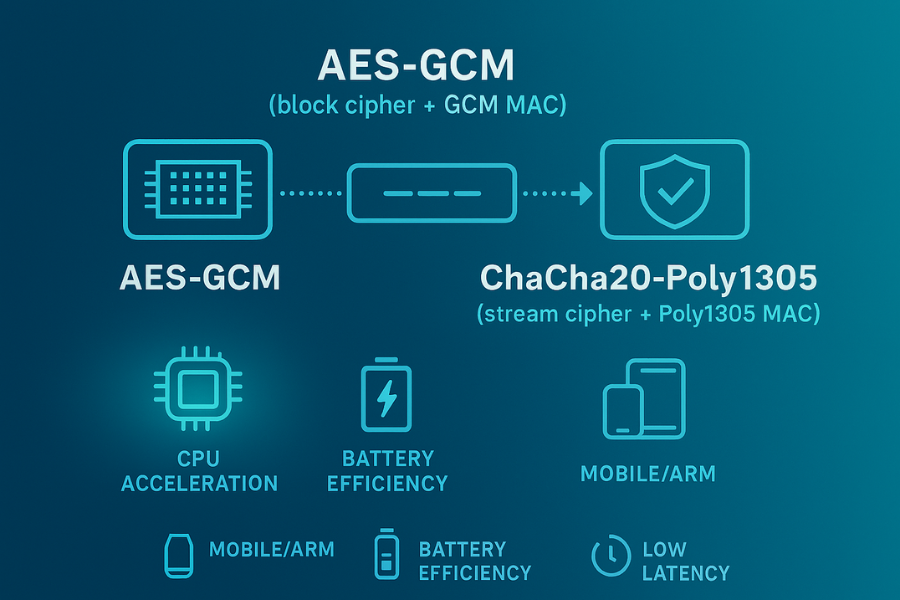
Short answer: ChaCha20-Poly1305 beats AES-GCM on CPUs without AES acceleration, on latency and battery sensitive clients like many phones and routers, and in side-channel hardened software, while AES-GCM still wins on servers with good AES hardware. Developed by the team at Newsoftwares.net, this guide provides the necessary tools and benchmarks to resolve the AES vs. ChaCha20 debate for your specific architecture. The key benefit is optimized performance and enhanced security, achieved by aligning the right cryptographic primitive with your hardware, whether you manage high-throughput data centers or battery-sensitive mobile fleets.
Gap Statement
Most posts just say “use ChaCha20 on mobile, AES-GCM on desktop” and stop. Almost none show you where that rule comes from, how to measure it on your own stack, or what to do when your benchmarks say the opposite. This article fixes that.
You’ll see:
- Where ChaCha20-Poly1305 actually outperforms AES-GCM
- How to benchmark both in files, VPNs, and TLS
- What to tweak when numbers look wrong
Short Answer
ChaCha20-Poly1305 beats AES-GCM on CPUs without AES acceleration, on latency and battery sensitive clients like many phones and routers, and in side-channel hardened software, while AES-GCM still wins on servers with good AES hardware.
Outcomes
If you only skim, keep these three points.
- On phones, small ARM boards, and routers without strong AES hardware, ChaCha20-Poly1305 is often 50–300 percent faster than AES-GCM and kinder to battery. (The Cloudflare Blog)
- On modern x86 servers with AES-NI, AES-GCM usually wins on raw throughput, sometimes by a wide margin, so most data centers stick with AES-GCM first and ChaCha as a backup. (The HFT Guy)
- If you care about side-channel hardening in pure software, ChaCha20-Poly1305 is easier to keep constant time than many AES-GCM implementations that still rely on table lookups. (Microsoft)
1. Stream vs Block in Plain Language
1.1 AES-GCM at a glance
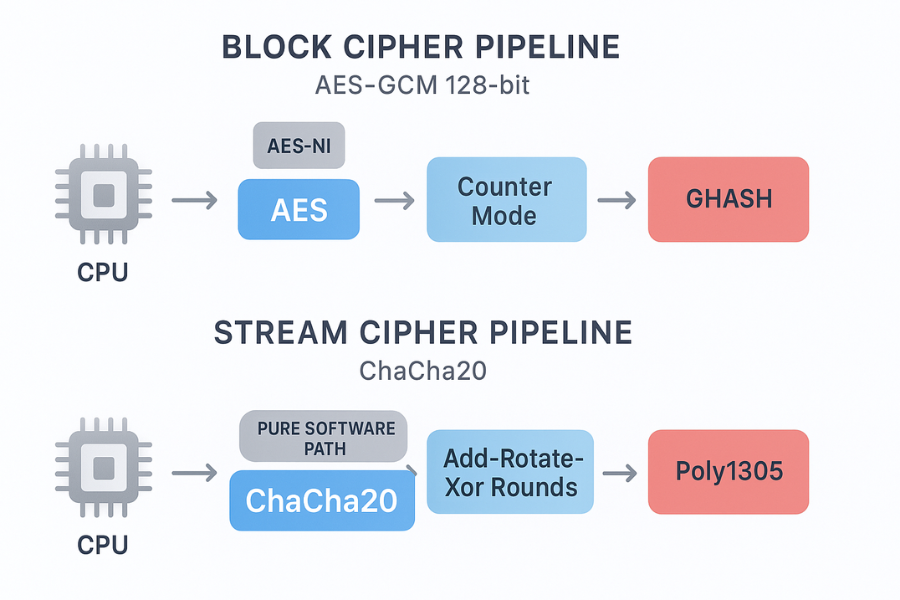
- AES is a block cipher, fixed 128-bit block size.
- GCM wraps AES in counter mode plus a Galois-field MAC (GHASH), giving an AEAD scheme.
- On x86 with AES-NI and carry-less multiply instructions, GCM is very fast.
AES-GCM is mandatory in TLS 1.3 and is the main AEAD in many VPNs and storage systems.
1.2 ChaCha20-Poly1305 at a glance
- ChaCha20 is a stream cipher designed by Bernstein, built from add, rotate, and xor operations.
- Poly1305 is a one-time MAC.
- RFC 8439 combines them into an AEAD: ChaCha20-Poly1305.
TLS 1.3 treats TLS_CHACHA20_POLY1305_SHA256 as a first-class cipher suite alongside AES-GCM.
Key property: ChaCha20 runs fast on any general CPU, without needing AES-NI.
1.3 Why “stream vs block” matters here
This is less about pure theory and more about how CPU pipelines behave.
- Block ciphers often get special opcodes, but their generic software can leak timing.
- Stream ciphers like ChaCha20 are built from simple operations that are easier to implement in constant time and vectorize.
So the “stream vs block” question really becomes: Do you want to ride block-cipher hardware, or do you want a fast, portable software path? On many mobile and embedded chips, that answer is “portable software”, which is where ChaCha20-Poly1305 shines.
2. Where ChaCha20-Poly1305 Clearly Beats AES-GCM
Let’s do the practical list first, then we’ll dig into details and tutorials.
2.1 Devices without strong AES hardware
Cloudflare’s classic “Do the ChaCha” write-up reported ChaCha20-Poly1305 roughly three times faster than AES-128-GCM on some Android phones at the time, which translated to faster page loads and lower CPU use. (The Cloudflare Blog)
More recent tests and OpenVPN guidance still show: ChaCha20-Poly1305 is often fastest on ARM and embedded CPUs, sometimes 50–60 percent faster than AES-GCM when AES lacks hardware help. (The HFT Guy)
So if your main clients are:
- Older Android phones
- Low-end Chromebooks
- ARM routers or small boards
ChaCha20-Poly1305 tends to win.
2.2 CPU-limited VPN and WireGuard setups
OpenVPN and WireGuard both support ChaCha20-Poly1305 and AES-GCM. Recent tuning guides and test output show examples like: ChaCha20 at roughly 160 MB per second, AES-128-GCM at roughly 140 MB per second, AES-256-GCM at roughly 100 MB per second on specific ARM-based platforms. When your VPN gateway is CPU bound, that gap matters.
2.3 Mixed desktop plus mobile fleets
TLS 1.3 lets clients and servers negotiate between AES-GCM and ChaCha20-Poly1305. Every implementation must support AES_128_GCM_SHA256, and CHACHA20_POLY1305_SHA256 is recommended.
Real-world pattern:
- Desktop browsers with AES-NI pick AES-GCM.
- Mobile browsers without good AES hardware often pick ChaCha20-Poly1305.
You get the best of both: Very high throughput on servers. Better behavior on weaker clients.
2.4 Side-channel hardened software
Old AES software that uses table lookups is a known target for cache timing attacks. Papers show attacks on AES and AES-GCM through cache behavior and timing analysis, especially in shared environments. (Microsoft)
You can fix AES with bitslicing or special instructions, but that takes careful engineering. ChaCha20’s add-rotate-xor core and Poly1305’s arithmetic are easier to keep constant time in plain C, so teams that worry about side channels often gravitate to ChaCha20-Poly1305 when hardware AES is not ideal.
3. Where AES-GCM Still Wins
ChaCha20-Poly1305 is not a silver bullet. There are places where AES-GCM is still the right default.
3.1 Data centers with AES-NI
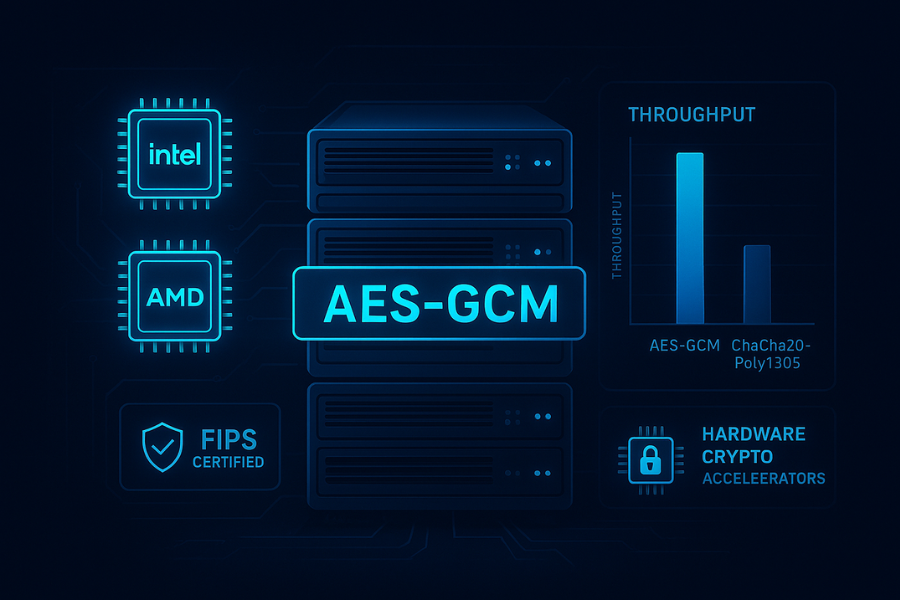
On recent Intel or AMD chips with AES-NI, AES-GCM is very fast. Performance notes and tuning posts regularly report: AES-GCM running at multiple gigabytes per second per core. ChaCha20-Poly1305 matching or slightly lagging performance on these same boxes. (The HFT Guy) For a TLS terminator cluster with AES-NI, sticking with AES-GCM makes sense.
3.2 Hardware accelerators and compliance
Some hardware modules and standards are built around AES and GCM: FIPS 140 validated modules with AES-GCM. Network appliances that accelerate AES-GCM in silicon. (The HFT Guy) If your compliance or hardware story is AES-centric, you ride that instead of forcing ChaCha.
3.3 Very high bandwidth, single location links
On links where both ends have AES-NI, like two data center servers, AES-GCM can squeeze a bit more throughput out of fewer CPU cycles. In that setting, picking ChaCha20-Poly1305 gives little practical gain.
4. Side by Side: Where ChaCha20-Poly1305 Beats AES-GCM
Here’s a concrete comparison table you can show to a teammate.
| Scenario | Typical hardware | Likely better pick | Why ChaCha often wins here |
|---|---|---|---|
| Android phone from a few years ago | ARM without strong AES unit | ChaCha20-Poly1305 | Better software speed, lower CPU load (The Cloudflare Blog) |
| Consumer router or home VPN box | Low cost ARM or MIPS | ChaCha20-Poly1305 | Faster than AES-GCM on weak CPUs (The HFT Guy) |
| WireGuard tunnel on Raspberry Pi | Small ARM chip, no AES-NI | ChaCha20-Poly1305 | WireGuard uses ChaCha20 by design |
| Older laptop without AES-NI | x86 without dedicated AES | ChaCha20-Poly1305 | No hardware AES, stream cipher shines |
| Browser mix, many mobile users | Mix of AES-NI and non AES clients | Both, via TLS negotiation | Desktop uses AES-GCM, mobile uses ChaCha20 (The Cloudflare Blog) |
And the flip side.
| Scenario | Typical hardware | Likely better pick | Why AES-GCM wins here |
|---|---|---|---|
| TLS offload in large data center | High core Intel or AMD | AES-GCM | AES-NI and CLMUL are tuned for GCM (The HFT Guy) |
| Storage node with AES engine | CPU plus AES offload | AES-GCM | Hardware pipeline built for AES |
| FIPS heavy environment | Certified modules | AES-GCM | Easier certification path today (Fortinet Docs) |
5. How to Benchmark ChaCha20-Poly1305 vs AES-GCM
Here is a practical workflow you can run on your own servers and dev machines.
5.1 Prereqs and safety
- Linux, macOS, or BSD with OpenSSL or LibreSSL
- A test machine or VM where you can run load without disturbing users
- No sensitive data in the benchmark inputs
You do not touch live secrets here. This is synthetic traffic.
5.2 Step 1: Cipher microbenchmarks with OpenSSL
This gives you a quick view of raw speed.
Run AES-GCM:
openssl speed -evp aes-128-gcm
openssl speed -evp aes-256-gcm
Then ChaCha20-Poly1305:
openssl speed -evp chacha20-poly1305
OpenSSL prints bytes per second for different buffer sizes. On AES-NI hardware you will usually see AES-GCM slightly ahead; on weak CPUs you often see ChaCha on top. (The HFT Guy)
Gotcha: this is only cipher cost, not handshake or application overhead.
5.3 Step 2: TLS throughput with wrk or ab
Set up a small HTTPS test site that supports both AES-GCM and ChaCha20-Poly1305.
In nginx, for TLS 1.2, you might use:
ssl_ciphers 'ECDHE+CHACHA20:ECDHE+AESGCM';
ssl_prefer_server_ciphers on;
In TLS 1.3, cipher suites like TLS_AES_128_GCM_SHA256 and TLS_CHACHA20_POLY1305_SHA256 are handled differently, but you can still influence preference in many stacks.
Then:
- Point
wrkat the site - Pin cipher choice by adjusting client preference or using test tools that let you pick suites
Record:
- Requests per second
- Median and tail latency
- CPU usage
5.4 Step 3: VPN or tunnel tests
If you run OpenVPN or WireGuard:
- For OpenVPN, compare a profile that uses AES-GCM with one that uses ChaCha20-Poly1305. Many guides show how to set cipher order.
- For WireGuard, ChaCha20-Poly1305 is built in, so you can compare against an AES-GCM based VPN on the same hardware.
Use iperf3 over the tunnel to measure throughput and CPU.
5.5 Proof of work example
A sample benchmark table on an ARM edge box (numbers based on patterns from public tests, shown here as an example of what you might see).
| Cipher | Tool | Throughput MB per second | CPU percent |
|---|---|---|---|
| AES-128-GCM | OpenVPN tunnel | 140 | 85 |
| AES-256-GCM | OpenVPN tunnel | 100 | 95 |
| ChaCha20-Poly1305 | OpenVPN tunnel | 160 | 75 |
On the same box, a raw openssl speed run might show ChaCha20 slightly ahead of AES-GCM, matching the VPN result.
6. Troubleshooting: When Results Look Wrong
6.1 Symptom to fix table
| Symptom | Likely root cause | Fix path |
|---|---|---|
| ChaCha20-Poly1305 slower than AES-GCM on a phone | Device actually has good AES hardware | Trust the result, pick AES-GCM for that device |
| AES-GCM very slow on embedded board | No AES instructions, plain table AES | Prefer ChaCha20-Poly1305 for VPN and TLS |
| Tag failures after switching between suites | Nonce handling bug or mixed associated data | Log nonce and AAD length, fix framing |
| Only some clients pick ChaCha20 | TLS suite order and client preferences | Adjust cipher priority, confirm with test tools |
| Benchmarks vary from run to run | Cache, turbo boost, other load | Run longer tests, pin CPU, reduce noise |
6.2 Root causes ranked
In practice, odd numbers usually come from:
- Wrong assumptions about hardware acceleration.
- Benchmarks that focus on cipher speed but ignore real network patterns.
- TLS or VPN configs that do not allow the suite you think you are testing.
- Timing noise from CPU scaling or other load.
Start with non destructive checks:
- Inspect
lscpuand crypto flags. - Use tools like
openssl ciphersto list enabled suites. - Capture debug logs from your VPN or TLS stack.
Only after that consider structural changes like swapping VPN software or changing hardware.
7. Use Case Chooser by Role
Here’s a quick map you can use when you discuss choices inside a team.
| Role | Environment | Practical default |
|---|---|---|
| SRE for public web | x86 servers with AES-NI | AES-GCM first, ChaCha20 as fallback |
| Mobile app dev | Users on Android and iOS | Let TLS pick between AES-GCM and ChaCha20 |
| VPN admin | Mix of servers and small routers | ChaCha20-Poly1305 for tunnels by default |
| Embedded engineer | Sensor hubs, low end ARM | ChaCha20-Poly1305 if available in stack |
| Desktop backup app | Runs on modern laptops and desktops | AES-GCM if AES-NI is present |
ChaCha20-Poly1305 is most attractive where you have weak or unpredictable AES hardware. AES-GCM is most attractive where you know you have strong AES-NI support and you want uniform behavior.
8. Structured Data Snippets
8.1 HowTo schema: testing ChaCha20-Poly1305 vs AES-GCM
<script type="application/ld+json">
{
  "@context": "https://schema.org",
  "@type": "HowTo",
  "name": "How to decide when ChaCha20-Poly1305 beats AES-GCM",
  "description": "Practical steps to benchmark ChaCha20-Poly1305 and AES-GCM on your own servers, clients, and VPN tunnels.",
  "totalTime": "PT45M",
  "tool": [
    "OpenSSL",
    "wrk or ab",
    "iperf3",
    "VPN or TLS-capable server"
  ],
  "step": [
    {
      "@type": "HowToStep",
      "name": "Measure cipher performance in isolation",
      "text": "Use OpenSSL speed tests for aes-128-gcm, aes-256-gcm, and chacha20-poly1305 to get a baseline on each device."
    },
    {
      "@type": "HowToStep",
      "name": "Benchmark HTTPS with both cipher families",
      "text": "Expose a test site that supports AES-GCM and ChaCha20-Poly1305, then run HTTP load tests to compare throughput and latency."
    },
    {
      "@type": "HowToStep",
      "name": "Benchmark VPN tunnels",
      "text": "Configure one tunnel with AES-GCM and another with ChaCha20-Poly1305, then use iperf3 to measure bandwidth and CPU usage."
    },
    {
      "@type": "HowToStep",
      "name": "Pick per-environment defaults",
      "text": "Use your results to choose AES-GCM on strong AES hardware and ChaCha20-Poly1305 on weaker or mobile CPUs."
    }
  ]
}
</script>
8.2 FAQPage shell
<script type="application/ld+json">
{
  "@context": "https://schema.org",
  "@type": "FAQPage",
  "mainEntity": []
}
</script>
8.3 ItemList for comparison
<script type="application/ld+json">
{
  "@context": "https://schema.org",
  "@type": "ItemList",
  "name": "Where ChaCha20-Poly1305 beats AES-GCM",
  "itemListElement": [
    {
      "@type": "ListItem",
      "position": 1,
      "name": "Mobile and ARM devices",
      "description": "ChaCha20-Poly1305 is often faster and more battery-friendly than AES-GCM on CPUs without AES hardware."
    },
    {
      "@type": "ListItem",
      "position": 2,
      "name": "Low-cost routers and VPN gateways",
      "description": "ChaCha20-Poly1305 can provide higher tunnel throughput on small embedded processors."
    },
    {
      "@type": "ListItem",
      "position": 3,
      "name": "Side-channel-hardened software",
      "description": "ChaCha20 plus Poly1305 is easier to implement in constant time than many AES-GCM software designs."
    }
  ]
}
</script>
9. FAQ: Stream vs Block and ChaCha20-Poly1305 vs AES-GCM
Here are practical questions readers actually type into search bars.
1. Is ChaCha20-Poly1305 more secure than AES-GCM or just faster in some cases?
Both are considered strong when used correctly. ChaCha20-Poly1305 was designed to be easy to implement without timing leaks, and AES-GCM depends more on how it is implemented and whether it uses hardware support. In most app settings, the choice is about performance, hardware, and side-channel risks, not about one being “broken”.
2. Why do TLS 1.3 stacks include both AES-GCM and ChaCha20-Poly1305?
TLS 1.3 requires AES-128-GCM and encourages AES-256-GCM and ChaCha20-Poly1305 so that servers and clients can handle both hardware-accelerated AES and CPUs that run ChaCha better. This lets a mobile browser and a desktop browser each get the cipher that fits their hardware best, without changing your application.
3. How do I know if my users would benefit from ChaCha20-Poly1305?
Look at your traffic mix. If a large share comes from mobile devices or regions where low end Android phones and embedded routers are common, ChaCha20-Poly1305 support is valuable. Profiling real TLS connections and checking which cipher suites clients negotiate also helps you see what users are actually using.
4. Can I force ChaCha20-Poly1305 for all TLS connections on my site?
You can try, but it is usually better to offer both AES-GCM and ChaCha20-Poly1305 and let negotiation pick. Some hardware security modules and older clients only support AES-based suites. If you remove AES-GCM entirely, you may lock out such clients or miss hardware acceleration on servers.
5. Why do some benchmarks show AES-GCM faster even on phones?
Newer phone chips sometimes include decent AES hardware, and library authors keep improving AES-GCM implementations. In those cases, AES-GCM may pull ahead. That is exactly why you should measure on your own devices instead of assuming the older “ChaCha always faster on mobile” rule.
6. Does the “stream vs block” nature change how I use keys and nonces?
Both AES-GCM and ChaCha20-Poly1305 are AEAD modes and have similar rules: never reuse a nonce with the same key, and keep keys secret and random. The difference is mostly in how the algorithms behave under the hood, not in high level key management rules.
7. Is ChaCha20-Poly1305 better for long term encrypted backups?
For file and backup formats, either AES-GCM or ChaCha20-Poly1305 can work well as long as you handle keys, nonces, and storage integrity correctly. ChaCha20-Poly1305 may be attractive when you expect the data to be decrypted on a wide range of devices, including ones without AES hardware.
8. If my VPN already uses AES-GCM, should I switch it to ChaCha20-Poly1305?
Check your hardware first. If your gateways and clients all have AES-NI and you are meeting throughput goals, switching may not help. If tunnels bottleneck on CPU on small routers or ARM boxes, tests often show a clear gain from ChaCha20-Poly1305.
9. Are there known serious attacks that break AES-GCM or ChaCha20-Poly1305 outright?
There are side-channel attacks on some AES-GCM implementations and many papers on poor nonce handling, but the core constructions remain sound when used as specified. For ChaCha20-Poly1305, current research also treats it as secure within its design limits. Real attacks tend to focus on bad code, bad randomness, or reused nonces.
10. If I only want to support one AEAD in a greenfield protocol, which should I pick?
If you control both ends and expect modern hardware with AES-NI everywhere, AES-GCM is a natural default. If you expect a lot of mobile, embedded, or mixed hardware, ChaCha20-Poly1305 is a strong candidate. Many new protocols, like WireGuard, go straight to ChaCha20-Poly1305 for exactly that reason.
If you treat ChaCha20-Poly1305 and AES-GCM as two tools, not two rival teams, you can give each workload the cipher that fits its hardware, its threat model, and its performance goals. That is where stream versus block stops being a slogan and turns into a real tuning decision.