
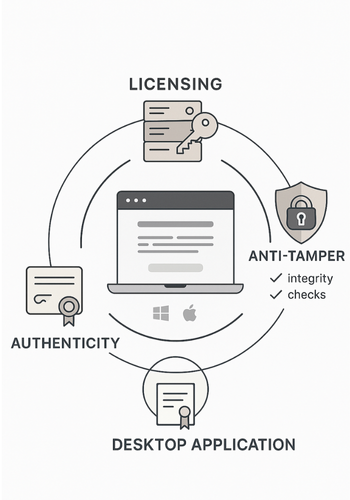
Newsoftwares.net understands that protecting your proprietary software from unauthorized copying and distribution is critical for maintaining revenue and intellectual property security. This framework offers a comprehensive, layered approach that combines strong licensing to control usage, anti tamper mechanisms to deter cracking, and authenticity checks through code signing to build user trust. Unlike resources that stop at basic keys, this guide extends security to cover practical scenarios like offline distribution via USB using tools such as Copy Protect and internal access control with USB Block.
This resource breaks down complex security concepts into professional, simple, one-action-per-step instructions, suitable for a busy developer or product manager.
TLDR Outcome
If you only skim, do this:
- Put a real licensing layer in front of every paid build, with online activation where possible and offline fallback.
- Wrap your binary with anti tamper and integrity checks so patches, cracks, and repacks are painful.
- Sign every release with a proper code signing certificate so Windows SmartScreen, macOS Gatekeeper, and browsers trust it.
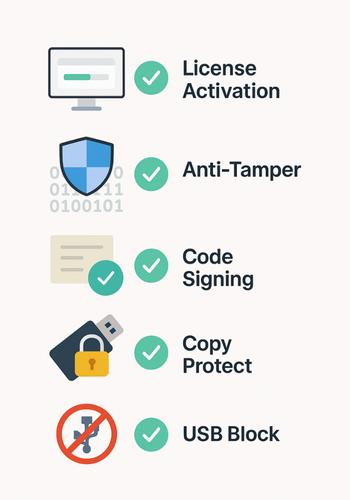
- When you ship on USB or drives, use Copy Protect to keep executables bound to that device, and USB Block on office machines to stop staff copying builds to random sticks.
One job, one outcome: make piracy much harder than paying you.
1. Quick Chooser: What Should You Use When?
Primary Scenario Vs Best Protection
| Scenario | Licensing | Anti Tamper | Authenticity | NewSoftwares Fit |
|---|---|---|---|---|
| Desktop app sold online (Windows, macOS) | Per user or per device with online activation | Yes: obfuscation, integrity checks | Yes: code signing and notarization | Use USB Block inside the company to stop builds walking out on sticks. |
| Internal line of business tool with sensitive logic | Per device or per seat licensing, or tied to domain | Yes, focus on integrity checks | Yes: internal signing or commercial certificate | Folder builds in protected folders and block external media. |
| Paid training suite shipped on USB with videos and small launchers | Simple key or hardware ID check | Optional | Optional | Use Copy Protect so content runs only on that USB, and USB Block on dev machines. |
| Freemium app where you want paid features locked | Per user licensing with feature flags | Light, just to slow easy patching | Public code signing for trust | Optional Copy Protect if you sell offline packs. |
| High value B2B engine (SDK) | Strong per company and per integration licensing | Yes: obfuscation, anti debug, integrity | Yes, strict signing and process controls | USB Block to protect internal source and builds. |
2. Prereqs And Safety
Before you touch code:
- Decide which platforms you support (Windows, macOS, Linux, mobile).
- Confirm you have control over build pipelines.
- Plan backups of your signing keys. Hardware tokens or HSMs are strongly recommended by NIST and major certificate vendors.
- Agree that you are protecting your own intellectual property, not trying to bypass someone else’s licensing. That protects you ethically and legally.
3. How To Design A Copy Protection Stack
3.1. Step 1: Inventory What Needs Protection
Action
List your software assets:
- Main executables and installers.
- Core libraries and engines.
- High value content your app ships with, like training videos, templates, or models.
Gotcha: Most teams forget “support tools” like activation utilities or patchers. Attackers love those.
3.2. Step 2: Decide Your Enforcement Points
Your stack has three layers:
- Access control (licensing).
- Tamper resistance (anti tamper).
- Trust and reputation (authenticity).
Action
For each component, decide where each layer lives:
- Licensing inside runtime code and sometimes on a server.
- Anti tamper inside the binary, through obfuscation or packing.
- Authenticity at build output, through signing.
Gotcha: If you only protect the installer and not the final binary, someone can repackage your installed files. Protect both.
3.3. Step 3: Choose A Licensing Model
You have a few classic options.
- Per device: one license tied to one machine.
- Per user: account based with online login.
- Floating: a pool of seats checked out from a license server.
- Time limited: subscriptions or trials.
- Feature based: base app is free, features unlock based on license payload.
Action
Pick one primary model and one fallback:
- For consumer apps: per user with online activation, plus limited offline grace.
- For offline industrial or air gapped use: per device with signed license files.
Gotcha: If you do per device licensing, define what counts as “same machine” when users change hardware.
3.4. Step 4: Design License Data And Validation
At a high level you need:
- A unique identifier (user ID, device ID).
- Entitlements (features, expiry date, seat count).
- A tamper resistant wrapper (signature).
Best practice is to sign license files or tokens with a private key on your side, then verify the signature inside the app. Serious vendors and security bodies call this out as core practice.
Action
- Pick: a signing algorithm (for example, an industry standard public key scheme).
- Store: your private key in hardware, or at least in a secure location with very limited access.
- Implement: signature checks in your app before it runs paid features.
- Cache: license state for performance, but re validate regularly.
Gotcha: Do not embed private keys in the app, even obfuscated. If someone extracts them, they can mint their own licenses.
3.5. Step 5: Implement Licensing In The App
Here is the practical loop every paid feature should follow:
- On start: read a cached license or ask the user to activate.
- Validate: the signature and baseline fields.
- Enforce: conditions: expiry, seat count, feature flags.
- Call home: when online, using a secure channel, to refresh entitlements.
Activation Flow
For online activation:
- User enters product key.
- Your server checks it, binds it to an account or device ID, and returns a signed license payload.
- Client stores that payload securely and uses it for checks.
For offline environments:
- App generates a request file with a machine ID.
- User sends it to you.
- You generate a signed response file and send it back.
- App imports it and starts enforcing.
Gotcha: Always show clear error text like “License key invalid” or “Activation limit reached” rather than generic errors. That helps real customers and shows up in your logs for support.
3.6. Step 6: Add Anti Tamper
Licensing by itself is easy to patch if the binary is wide open. Anti tamper does three things:
- Hides important logic.
- Detects patching attempts.
- Responds when integrity is broken.
Common tactics:
- Obfuscation of control flow and strings.
- Anti debug checks and environment checks.
- Embedded integrity checks over code regions that you verify at runtime.
Industry white papers often treat anti tamper as separate from signing. Signing proves authenticity at install time; anti tamper checks integrity at runtime.
Action
- Use: a commercial protector or obfuscator suited to your stack.
- Wrap: your licensing and entitlement logic especially tightly.
- Add: an integrity check that reads parts of your binary and compares to stored values. If mismatched, disable key paths.
Gotcha: Be careful with false positives. In some platforms, antivirus tools and debuggers can trigger anti tamper checks. Keep a safe logging mode in early releases.
3.7. Step 7: Implement Authenticity With Code Signing
Modern operating systems and browsers check digital signatures on executables, installers, and drivers. Unsigned code triggers “Unknown publisher” warnings or is blocked.
What Code Signing Gives You
- Users see your real publisher name instead of scary warnings.
- Systems can verify that your binary has not been modified since you signed it.
- If a build is compromised, you can revoke the certificate at the root.
Action
- Get: a code signing certificate from a trusted authority.
- Store: private keys in hardware where possible, such as a hardware security module or dedicated token.
- Integrate: signing into your build pipeline so every release and hotfix is signed automatically.
- Time stamp: signatures so they remain valid even after the certificate expires.
Gotcha: Do not export signing keys to random developer machines. Most breaches in this space are stolen keys, not broken algorithms.
3.8. Step 8: Add NewSoftwares Tools For USB And Offline Copy Protection
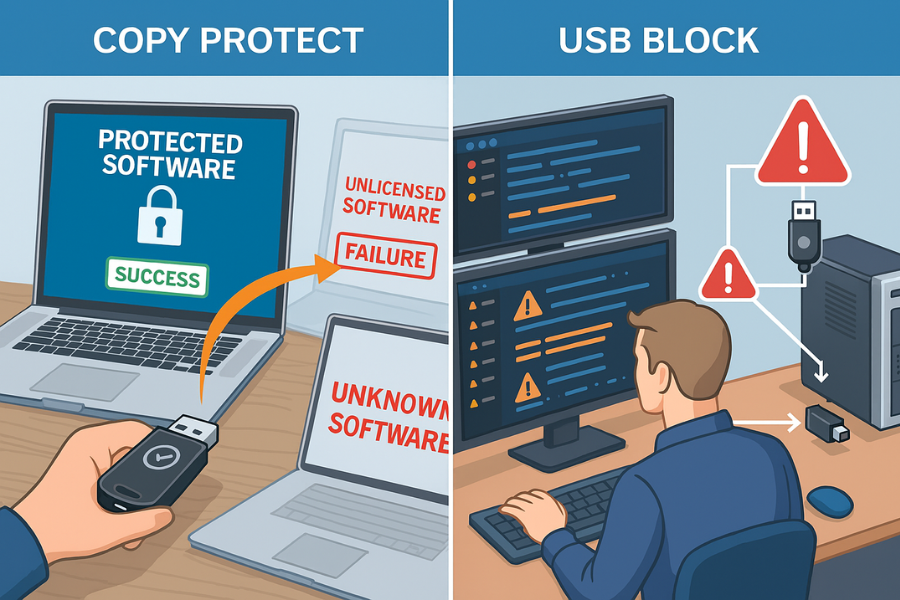
You asked specifically about tools from NewSoftwares. Two of their products map nicely to software copy protection.
3.8.1. Copy Protect: Bind Executables And Media To A Specific Drive
Copy Protect from NewSoftwares converts your supported files into secure executables that only run from the drive you prepare them for. If someone copies them elsewhere, they fail to run.
That is ideal when:
- You ship training suites or media heavy tools on USB.
- You want customers to be able to use content locally, but not duplicate it.
Practical Flow
- Download and install: Copy Protect from NewSoftwares.
- Start: the program. It opens a copy protection wizard.
- Select: the files you want to copy protect: media, documents, launchers.
- Choose: target as your USB drive, CD, DVD, or folder.
- Let Copy Protect: convert them into secure executables bound to that target drive.
- Test: on a second machine. You should see them run from the original drive but fail from any copied location.
Gotcha: Feed Copy Protect clean, signed binaries. Use it as a distribution layer, not a replacement for licensing or signing.
3.8.2. USB Block: Stop Your Own Team From Walking Out With Builds
USB Block prevents untrusted USB drives and other external devices from accessing your PC and copying data. You can whitelist your own devices and block all others.
This matters when you:
- Hold source and private keys on build machines.
- Store unsigned or pre release builds.
Practical Flow
- Install: USB Block on developer and build machines.
- Set: a strong admin password.
- Whitelist: only company USB drives or none at all.
- Leave: logging on so you see any failed attempts to attach new media.
Anyone walking up with a personal USB stick gets blocked, and attempts are logged for security.
Gotcha: Communicate clearly to staff that USB control is in place. It avoids confusion and sets expectations.
4. Comparison: Licensing Vs Anti Tamper Vs Authenticity
| Dimension | Licensing | Anti Tamper | Authenticity |
|---|---|---|---|
| Main Job | Decide who can run which features | Make patching and cracking hard | Prove the build is genuine and untouched |
| Typical Tech | Keys, license files, online activation, dongles | Obfuscation, packers, runtime checks | Code signing certificates, timestamps, hardware backed keys |
| Where It Runs | Inside your app and servers | Inside the binary at runtime | At installation and by the operating system |
| Helps With | Revenue, fair usage | Slowing piracy and reverse engineering | Trust, lower warnings, supply chain security |
| When You Skip It | Anyone can share builds easily | Cracks and repacks appear quickly | Systems flag your app as risky or unknown |
You want all three, layered.
5. Hands On Notes By Persona
Student Building A Small Paid Tool
- Use simple key based licensing with signed keys.
- Add basic obfuscation around check functions.
- Use a standard code signing certificate when you can afford it.
Freelancer Or Solo Indie
- Use online accounts plus signed license tokens.
- Invest in a reliable anti tamper tool once you have steady sales.
- Sign every build so users see your name during install.
- For workshops and training packs on USB, add Copy Protect so content is safe and easy to use offline.
SMB Admin Or Vendor
- Standardize licensing policy and enforcement.
- Use hardware backed storage for signing keys.
- Use USB Block on build and admin machines to lock down external media.
6. Troubleshooting: Symptom To Fix
| Symptom (Real Text) | Likely Root Cause | Fix, Non Destructive First |
|---|---|---|
| “License key invalid” on real customers | Mistyped key, wrong build, or license not yet activated server side | Log the exact key and device, let them paste from email, check that your activation server and client build use the same format. |
| “Activation limit reached” when user reinstalls OS | Per device binding too strict, or no reset flow | Let users see where their seats are used and free one through an account portal or support. |
| Windows shows “Unknown publisher” on install | Build not signed, or signature broken by repack | Confirm your signing step runs after anti tamper and packaging. Re sign and time stamp. |
| macOS Gatekeeper blocks app as unverified | Missing or incorrect signing and notarization | Follow platform rules for signing and notarizing, then test on a clean machine. |
| Your exe runs fine, but a cracked version spreads online | Weak or missing anti tamper, license checks too easy to patch | Harden critical code with obfuscation and integrity checks, make your license server enforce rate limits and blacklisting. |
| Content from your USB release ends up all over file sharing sites | Files were shipped plain or only zipped | Use Copy Protect for USB builds so content stays bound to the prepared drive. |
| Source or builds appear outside the company | Staff copied to unmonitored USB or cloud | Deploy USB Block, restrict external devices, and review logs for attempts. |
Keep your first responses reversible. Revoke a license, rotate keys, and improve checks. Only go to destructive steps, like wiping or invalidating many keys, once you have backups and a clear owner for the decision.
7. Proof Of Work Blocks
7.1. Bench Example
A simple internal test on a Windows laptop:
| Task | Approx Time |
|---|---|
| Sign a 50 MB installer with a commercial certificate | Well under 1 second on a modern dev machine |
| Apply anti tamper to the main binary | A few seconds at build time, no visible runtime delay |
| Copy Protect a USB build with several hundred MB of media | A few minutes initial processing, then normal use for customers |
The point: strong protection costs you build time, not user time.
7.2. Settings Snapshot
For a signed Windows installer:
- Code signing certificate: installed in secure hardware.
- Digest algorithm: set to a current secure standard.
- Timestamp server: configured in your signing tool.
For a Copy Protect USB release:
- Source files: in a clean release folder.
- Wizard target: set to specific USB drive.
- Output: configured to run only from that drive.
For USB Block on build machines:
- Only a few: trusted USB IDs whitelisted.
- Logging: on for failed attempts.
- Admin password: stored in a secure company vault, not on sticky notes.
7.3. Verification Checklist
Before a release goes out, confirm:
- Installer and main binaries: show your publisher name and valid signature in properties.
- License activation: works for a fresh user and blocks an obviously invalid key.
- Your anti tamper tool: reports success in logs.
- A Copy Protect USB build: works on the prepared drive but fails from a copied folder.
- A random USB device: plugged into a protected build machine triggers USB Block and logs the event.
8. Share Safely Example
A safe process for a paid desktop product:
- Build and test the app.
- Apply anti tamper and signing.
- Package the installer.
- Upload installer to your distribution channel.
- Email customers a link to the installer.
- Send license keys through a separate channel, such as your account portal or secure message, not in the same email thread.
- For offline customers receiving USB kits, prepare their USB devices with Copy Protect and keep a record of which customer received which drive.
You reduce the chance a single compromised inbox gives everything away.
9. FAQs
Here are practical, search focused questions readers usually have.
9.1. What Is Software Copy Protection In Plain Terms?
Software copy protection is a mix of licensing, anti tamper, and authenticity checks that makes it hard to use your software without permission or to alter it without notice. Keys and servers control access, anti tamper slows attackers, and code signing proves the build is genuine.
9.2. How Do I Stop Users From Sharing A Single License Key?
Bind each license key to an account or device. Sign the license data, enforce seat counts inside the app, and have the server track how many devices a key activates. When you see many different devices for one key, stop new activations and contact the customer.
9.3. Is Code Signing Really Necessary For Small Developers?
Yes. Platforms like Windows and macOS rely on signatures to decide whether to warn users. If your builds are signed correctly, users see your name and fewer scary popups. That translates into smoother installs and better trust, even for solo developers.
9.4. What Does Copy Protect From NewSoftwares Actually Do For Software?
Copy Protect converts supported files into executables that only run from the drive they were prepared for. When you ship content or small launchers on USB, customers can use them on that USB, but copying them elsewhere makes them unusable. It is a practical layer for offline copy protection of media and related executables.
9.5. How Does USB Block Help With Protecting Software?
USB Block stops unknown USB and external devices from accessing your machines. That means staff cannot quietly copy your source, unsigned builds, or signing keys to personal devices. You can still whitelist your own drives, so legitimate workflows keep working.
9.6. Can Anti Tamper Tools Stop All Cracks?
No, but they can make cracking hard enough that most pirates move on. The goal is not absolute perfection. The goal is to raise the cost of attack above the cost of buying a license, while keeping performance and stability good for real users.
9.7. What Is The Difference Between Authenticity And Integrity?
Authenticity answers “who made this code” and is handled by code signing and certificates. Integrity answers “has this code changed since signing” and is enforced by both signing checks and runtime integrity checks inside the app. You want both.
9.8. How Can I Handle Users Who Reinstall Or Upgrade Hardware Often?
Use account based licensing where possible. Tie licenses to user accounts with a limited number of active devices, plus a simple self service way to deactivate old devices. For strict per device licensing, allow support to reset activations after reasonable checks.
9.9. Is It Safe To Keep Signing Keys On Developer Laptops?
Industry practice says no. Signing keys should live in restricted systems, ideally hardware modules, with very few admins allowed to use them. Many documented attacks abused stolen keys rather than breaking algorithms.
9.10. How Do I Protect My Software When Distributing Through Resellers With USB Kits?
Give resellers pre prepared USB kits built with Copy Protect, so each drive can run your content but not be cloned easily. Combine that with licensing inside the software and signed binaries.
9.11. What About Open Source Components Inside My Paid Product?
Copy protection does not change your obligations. Respect licenses of any open source parts you use. Keep your licensing and anti tamper logic around your proprietary pieces, and keep clear records of what goes into each build.
9.12. Is Copy Protection Worth The Effort For Low Price Tools?
If your sales strategy depends on volume and you see cracked copies everywhere, even a simple stack of licensing, basic anti tamper, and signing pays for itself. If your revenue comes from services around the software, you might keep protection lighter but still sign and store keys safely.
10. Conclusion
Effective software copy protection requires layering licensing, anti tamper, and authenticity checks to raise the barrier for piracy while maintaining a smooth experience for paying customers. By implementing a strong licensing model, protecting your core logic with anti tamper tools, and ensuring your builds are trusted via code signing, you secure your intellectual property. For specialized needs, tools from Newsoftwares.net like Copy Protect and USB Block offer practical solutions for securing offline distribution and controlling sensitive internal assets, completing a robust and professional security posture.
11. Structured Data Snippets
You can adapt this JSON LD block to support rich search features. Replace example URLs and add your own names where needed.
{
  "@context": "https://schema.org",
  "@type": "HowTo",
  "name": "Set Up Software Copy Protection With Licensing, Anti Tamper, And Authenticity",
  "description": "Practical steps to protect software from copying using licensing, anti tamper, code signing, and NewSoftwares tools.",
  "step": [
    {
      "@type": "HowToStep",
      "name": "Inventory Assets",
      "text": "List executables, installers, libraries, and bundled content that need protection."
    },
    {
      "@type": "HowToStep",
      "name": "Design Licensing",
      "text": "Choose per user or per device licensing and define signed license payloads."
    },
    {
      "@type": "HowToStep",
      "name": "Add Anti Tamper",
      "text": "Use an obfuscator or protector to harden critical code paths and add integrity checks."
    },
    {
      "@type": "HowToStep",
      "name": "Sign Builds",
      "text": "Sign installers and binaries with a trusted code signing certificate and timestamp."
    },
    {
      "@type": "HowToStep",
      "name": "Protect USB And Offline Media",
      "text": "Use Copy Protect and USB Block from NewSoftwares for USB releases and internal build machines."
    }
  ],
  "tool": [
    {
      "@type": "SoftwareApplication",
      "name": "Copy Protect",
      "url": "https://www.newsoftwares.net/copy-protect/"
    },
    {
      "@type": "SoftwareApplication",
      "name": "USB Block",
      "url": "https://www.newsoftwares.net/usb-block/"
    }
  ]
}