
Shared Links, Password Gates, and Metadata: What Cloud Actually Protects
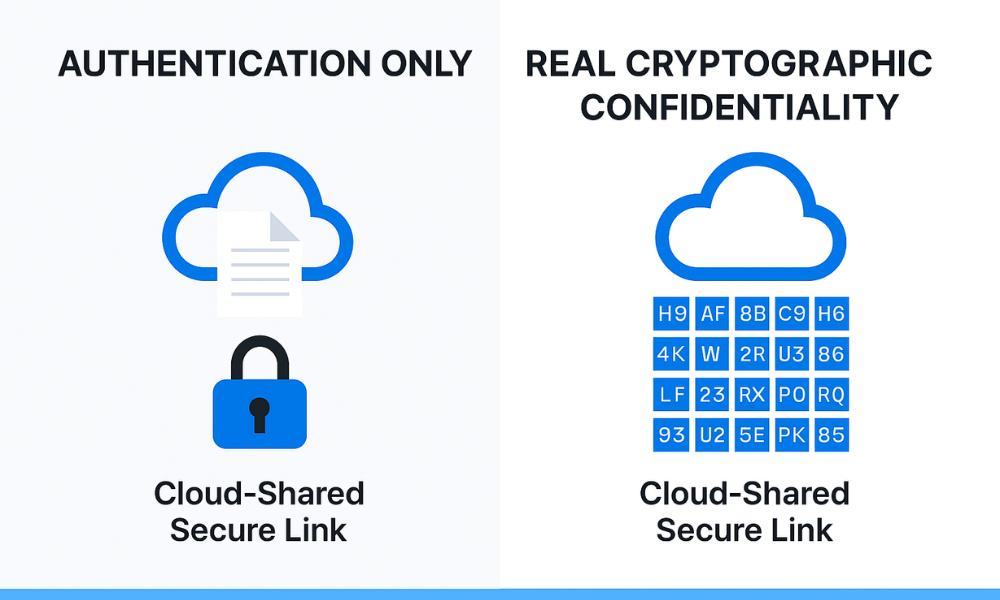
This executive guide, created by the security experts at Newsoftwares.net, dissects the hidden security flaws in cloud sharing. Sharing a cloud link feels simple: paste it, and the file is instantly accessible. But beneath the convenience, the security model is a complex balancing act between ease of use and strict data protection. Most users assume a shared link is secured because they added a password or an expiration date. That assumption is often incomplete, or flat, out wrong. This guide isolates the hidden risks of shared links and provides action steps to secure your most sensitive data before it leaves your device, ensuring verifiable data confidentiality and user convenience.
Sharing a cloud link feels simple: paste it, and the file is instantly accessible. But beneath the convenience, the security model is a complex balancing act between ease of use and strict data protection. Most users assume a shared link is secured because they added a password or an expiration date. That assumption is often incomplete, or flat, out wrong.
A shared link exposes data at the intersection of your settings and the cloud provider’s architecture. The security risks aren’t in transit (they use HTTPS/TLS), but in key ownership and metadata leakage. The security gap isn’t external, it’s between the access control you set (a password) and the data confidentiality the provider maintains (which is usually none).
This guide isolates the hidden risks of shared links and provides action steps to secure your most sensitive data before it leaves your device.
Critical Cloud Sharing Flaws Summary
- Password Gate $\ne$ Encryption: Cloud passwords on shared links are merely an authentication gate against unauthorized viewers. They offer zero protection against the cloud provider itself, nor do they prevent the decryption of the content if the file is stolen. Encryption is the true data protection.
- Metadata is Always Exposed: Cloud providers, including Google Drive and Dropbox, log and analyze metadata for every shared link, who accessed it, the time, file path, and even file size and modification time. This intelligence is visible to the provider regardless of your security settings.
- Use AES-256 Client, Side: For sensitive data, bypass cloud security settings entirely. Use Zero, Knowledge Encryption (ZKE) on your device with tools like Cryptomator before uploading and sharing the file. This ensures the cloud provider stores only incomprehensible ciphertext.
1. The Deception of Password Protection on Shared Links
A core misunderstanding exists between password protection and cryptographic encryption. This difference determines whether your file is merely inconvenient to access or mathematically inaccessible.
Password Protection: The Weakest Link
Password protection acts as an authentication gate. It requires a user to enter a correct credential before the system grants read access to a resource.
The fundamental security flaw: If an attacker successfully bypasses, steals, or cracks the password (which is often simplified by dictionary attacks or credential stuffing), the underlying file is immediately exposed in plaintext format. Password protection secures access, it does not secure the information itself.
The failure is evident in historical software. Older PDF password protection, for instance, sometimes works by simply flagging the document as “protected.” Other PDF readers can be programmed to ignore that flag entirely and open the file without any prompt, demonstrating a complete lack of confidentiality.
Encryption: The Absolute Guard
Encryption is the mathematical transformation of data (plaintext) into an unreadable format (ciphertext) using a cryptographic key. If a file is encrypted, and the attacker steals the file or guesses the password gate, they gain access only to scrambled, randomized letters, symbols, and numbers.
The gold standard for symmetric file encryption today is AES-256. This cipher uses a 256, bit key length and is considered virtually impossible to break using current brute, force methods. When AES-256 is used:
- Data remains useless even if the password is stolen.
- The system requires a Key Derivation Function (KDF) to convert the human password into the strong 256, bit key required by the cipher.
Case Study: Why Legacy ZIP Protection Fails
The original encryption used in the ZIP format, ZipCrypto, is a textbook example of a weak security gate. Despite being highly compatible and easy to use, ZipCrypto is critically flawed because it is highly vulnerable to a known, plaintext attack (KPA).
If an attacker obtains or guesses a tiny piece of known data within the archive (sometimes as little as two or three bytes), they can often bypass the password and find the internal key representation within a few hours on a standard personal computer. Security experts warn that many ZipCrypto files “can be easily broken with off, the, shelf hacking tools”.
Action Mandate: Never use ZipCrypto for sensitive data. Always select AES-256 encryption in modern archiving tools (like 7, Zip or WinRAR) to ensure true confidentiality.
2. Shared Link Features: Security Controls vs. Security Guarantees
Cloud providers offer several features to enhance shared links, such as password gates, time limits, and download restrictions. These are access controls, but they do not provide key control or data sovereignty.
Link Expiration and Revocation
Time, bound sharing is a simple, effective risk mitigation strategy. Features like Dropbox’s link expiration allow the sender to set a specific date when the link automatically stops working. Once the link expires, nobody can view the file, minimizing the window of exposure if the link is accidentally shared further.
- Revocation: All major providers allow administrators to revoke access instantly. When a collaborator leaves the team, their shared link can be terminated immediately, ensuring the organization maintains data control.
Download and Copy Restrictions
Platforms like Google Drive and Dropbox offer the ability to prevent users from downloading, printing, or copying files shared via a link.
While this restriction complicates data theft, forcing an attacker to rely on screenshots or local screen recording, it is not a cryptographic guarantee. The data is still displayed in plaintext on the recipient’s screen. This feature is best used to pause collaboration or prevent accidental editing during an audit, not for securing highly sensitive, proprietary data.
Table 1: Cloud Shared Link Security Controls
| Control Feature | Function | Security Guarantee Provided | Example Platform |
| Password Gate | Requires credential input for access. | Authentication (Who can access the link). | Dropbox, OneDrive |
| Expiration Date | Automatic link invalidation after set time. | Access Control (Duration of exposure). | Dropbox, OneDrive, SharePoint |
| No Download/Copy | Prevents file saving, printing, and modification | Data Usage Restriction (Complicates theft/editing). | Google Drive, Dropbox |
| Encryption (Client, Side) | Scrambles data before upload. | Confidentiality (Guarantees data is unreadable by provider). | Cryptomator, rclone |
3. Metadata Leakage: What the Cloud Provider Still Knows
Even with the strictest shared link settings, password, expiration, and no download, the cloud provider and the network infrastructure log a substantial amount of activity and intelligence related to the file and its users.
File and Object Metadata
Every file object stored in the cloud carries essential metadata that is never encrypted by default server, side encryption. This information is valuable to the provider for indexing, analytics, and service management.
Metadata exposed through standard sharing:
- File Size and Timestamps: The exact size of the file and its last modification time are visible to the provider.
- File Path and Names: Cloud Storage systems log and analyze object metadata, which includes the file’s location and often the filename itself (unless using Zero, Knowledge Encryption).
- Access Audit Logs: Providers track who accessed the link, when, and which IP address was used. Administrators can pull file exposure reports showing external sharing activity.
This intelligence collection is a crucial element of the cloud provider’s business model (e.g., using AI to analyze object metadata to derive cost and security insights).
The Zero, Knowledge Solution to Metadata Leakage
Zero, Knowledge Encryption (ZKE), offered by platforms like Cryptomator, solves metadata leakage by moving encryption to the client and including name obfuscation.
When you use a ZKE tool, the original file and folder names are mathematically replaced with unreadable, random strings before they are uploaded to the cloud. The cloud provider only sees encrypted content and encrypted filenames, denying them the context necessary to index or analyze the data meaningfully.
Security Mandate: For highly sensitive internal documents, legal files, or trade secrets, client, side encryption that supports filename and folder obfuscation is required.
4. Tutorial: Implementing Secure, Client, Side Encryption for Sharing
The highest security posture for file sharing is achieved by encrypting the file locally before generating the cloud share link. This ensures the cloud provider only ever handles ciphertext. We use 7, Zip as a readily available cross, platform tool.
Prerequisites and Best Practices
- Tool Required: 7, Zip must be installed on your system.
- Safety Warning: You must transmit the encryption password to the recipient using a separate, secure communication channel. Never send the password and the shared file link in the same email or message. Use Signal, SMS, or a verbal phone call.
Steps: Creating an AES-256 Encrypted Archive (7-Zip)
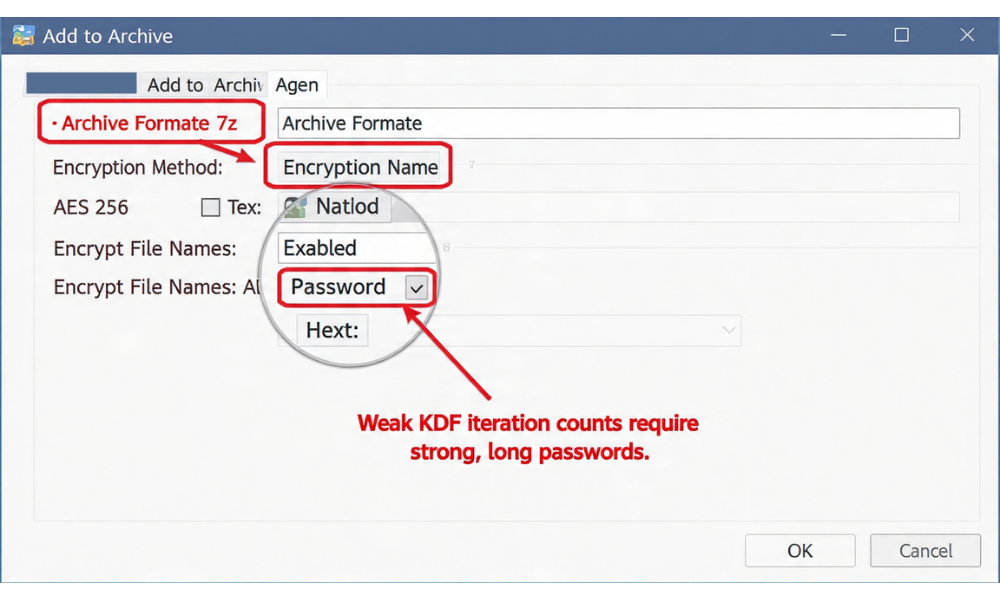
- Select Files and Start Archiving: Right, click the file or folder you need to share securely. Navigate to the 7, Zip context menu option, then click Add to Archive…
- Set Encryption Standards: In the “Add to Archive” window:
- Set the Archive format to 7z. (This is recommended over ZIP to avoid the weak ZipCrypto algorithm and guarantee AES-256 support).
- Under Encryption, confirm that the Encryption method is set to AES-256.
- Enter Password: Create a strong, unique passphrase (at least 8 characters with mixed case and numbers is a minimum). Enter it and re, enter it to confirm.
- The Critical Step: Encrypt File Names: Check the box labeled “Encrypt file names”. This prevents metadata leakage. If this box is left unchecked, the archive’s internal list of contents is visible, exposing intellectual property and data context to anyone with the file.
Proof of Work: Secure Settings Snapshot (7-Zip)
| Setting | Value | Security Rationale |
| Archive Format | 7z | Guarantees strong AES-256 encryption |
| Encryption Method | AES-256 | The gold standard symmetric encryption cipher |
| Encrypt file names | ON | Critical step to prevent metadata leakage |
| Password Strength | Unique, 8+ characters (minimum) | Compensates for the KDF’s efficiency (low iteration count) |
Verification: Confirming the Password Gate Works
To confirm your encryption succeeded, attempt to open the newly created 7z file and enter an incorrect password (e.g., mistype one character). The attempt should fail immediately with an error like “Wrong Password”. This verifies that the tool has failed its internal header check, confirming the password gate is active and functional.
Step 5: Sharing the File and Key Separately
- Upload and Share Link: Upload the encrypted
.7zfile to your cloud storage (Dropbox, Drive, etc.). Create the standard shared link. - Transmit Password: Send the password to the recipient via an out, of, band, secure channel (e.g., Signal or an SMS message). This prevents an attacker who intercepts the link from automatically obtaining the key.
5. Troubleshooting and Key Derivation Weakness
Even using AES-256, your file’s security is only as strong as the Key Derivation Function (KDF) that secures the password.
Key Derivation Function (KDF) Weakness in Archivers
Most archivers use KDFs like PBKDF2 (Password, Based Key Derivation Function 2). The purpose of the KDF is to intentionally make password guessing computationally expensive by performing a high number of iterations.
The weakness in many commercial implementations, including 7, Zip, is the low KDF iteration count. While AES-256 itself is robust, the password protection mechanism that secures the key is weak against specialized cracking hardware (GPUs/ASICs).
- The Problem: Due to low iteration counts (estimated at around 1,000 for some implementations), 7, Zip encryption can be cracked approximately 176 times faster than systems using industry, recommended PBKDF2 settings (600,000 rounds).
- The Fix: Compensate for this inherent KDF speed by mandating a significantly longer, more random password (25+ characters) for highly sensitive archives. A high, entropy password is the only defense when the KDF is weak.
Troubleshooting Cloud Sharing Problems
| Symptom / Observation | Root Cause | Fix / Action |
| Cloud link requires password, but file opens immediately in plaintext once password is given. | You used a password gate, but no true encryption was applied. | Re, encrypt the file using AES-256 with a strong KDF (VeraCrypt/Cryptomator/7, Zip). |
| Recipient sees file structure (names/folders) inside the archive but cannot open content. | Encrypt file names was not checked during 7, Zip creation. | Delete the archive, and re, create it with filename encryption enabled (Step 4). |
| Recipient cannot decrypt the file using the password you sent. | Key Exchange Failure (Password was sent over an insecure channel or mistyped). | Verify the password via phone call or secure chat (Signal), ensure there are no leading/trailing spaces or typos. |
| You try to open the cloud link, but it returns an error page. | Link expired or was manually revoked. | Check the access policy settings and extend or re, enable the link. If revoked, it must be shared again. |
6. Frequently Asked Questions (FAQs)
1. Is it safer to use a time, limited link or a password, protected link
Both features should be used together. The password ensures authentication (only those who know the secret can access). The time limit ensures exposure control (if the password leaks, the access window is closed).
2. Can the cloud provider access my files if I set a password and an expiration date
Yes. Your password only secures the authentication gate. The data itself is secured by the provider’s default Server, Side Encryption (SSE-S3), for which the provider controls the keys. They can view or be compelled to surrender your data, regardless of your link settings. True protection requires Client, Side Encryption.
3. Does sharing a file link expose my IP address to the cloud provider
Yes. The cloud provider logs and audits every access request, including the IP address that requested the link. While this IP is visible to the provider, it is generally not exposed to other users of the shared link unless you are using a peer, to, peer file, sharing platform (like torrents).
4. Why is AES-256 encryption useless if I lose my password
AES-256 is mathematically robust, meaning there are no backdoors. If you lose the password, the Key Derivation Function (KDF) that secures the key cannot be reversed. Forgetting the password or key for strong encryption leads to permanent, irreversible data loss.
5. What is the fundamental difference between symmetric and asymmetric encryption
Symmetric encryption (like AES-256) uses a single key for both scrambling and unscrambling data, which is fast and efficient for large data sets. Asymmetric encryption (like RSA) uses a public key for encryption and a private key for decryption, which is slower but essential for secure key exchange and digital signatures.
6. Does the No Download setting truly prevent theft
No. While it restricts the ability to download or copy the file through the cloud interface, an attacker can still view the plaintext data on their screen and capture it using external methods like screenshots or screen recording tools. It is a control feature, not a cryptographic safeguard.
7. How can I ensure my shared encryption password is secure during transmission
Always use a separate, end, to, end encrypted channel to transmit the password. Tools like Signal, which use the Signal Protocol for strong E2EE, are ideal for this task, ensuring the key cannot be intercepted during transmission.
8. What does “obfuscating the directory structure” mean in Zero, Knowledge encryption
It means the ZKE tool scrambles not just the file names, but also the hierarchy and names of the folders that contain the files. The cloud provider and third parties cannot tell how the data is organized, limiting the context they can gather from the exposed metadata.
9. Can I share a VeraCrypt container over the cloud
Yes. You should store the unmounted VeraCrypt file container in your cloud folder and share the encrypted file itself. The recipient must also have VeraCrypt installed and must be given the correct volume password separately.
10. What encryption method does my service use if it claims “256, bit encryption” at rest
It almost certainly uses AES-256. However, this typically refers to Server, Side Encryption (SSE-S3), where the provider manages the key. While the encryption is strong, it does not guarantee confidentiality from the provider itself.
11. Does using a password manager eliminate the need for strong KDFs
A password manager protects your master password using strong KDFs like Scrypt or high, iteration PBKDF2. If you then use a strong password generated by the manager, it further improves security, but you must confirm that the file archiver (like 7, Zip) uses a strong KDF to protect the file itself.
12. What specific metadata about the shared link is logged by the provider
Cloud providers log Admin Activity (changes to permissions/configuration) and Data Access (who read the file) audit logs. These logs record the identity of the user, the time of access, and which files were accessed, providing a forensic trail.
13. What is the alternative to using SSE-KMS for regulatory compliance like SOX
SSE-KMS is often chosen for compliance because it offers robust auditability and key policy control over FIPS 140, 2 Level 3 validated HSMs. The customer can define access policies and track every request made to the key, which is essential for SOX requirements.
14. What are the main characteristics of a brute, force attack against a shared link password
Brute, force attacks use automated tools (bots) to systematically guess passwords or credentials from pre, existing lists. Symptoms often include many failed login attempts originating from the same IP address or failed attempts targeting a single account from multiple IPs.
15. Is it safe to store my recovery key/password for an encrypted file in the same cloud folder
No. Storing the key and the encrypted file together in the same location creates a single point of failure. If the cloud account is compromised, the attacker immediately gains both the cipher and the key. Store the recovery key on an offline, external device or a dedicated password manager.
Conclusion
Sharing files via a password, gated link provides only a thin layer of authentication, not true data confidentiality, and always exposes critical file metadata to the cloud provider. To achieve the necessary level of data sovereignty for sensitive information, users must adopt a **client, side encryption** workflow using tools like 7, Zip. This guarantees that the data is mathematically secured by AES-256 before upload and that the encryption key is transmitted via a separate, secure channel. This workflow converts a shared link from a security risk into a secure, verifiable delivery mechanism for impenetrable ciphertext.
ager.15