
Secure Sharing 101: Exchange Keys and Passwords Without Leaking Them
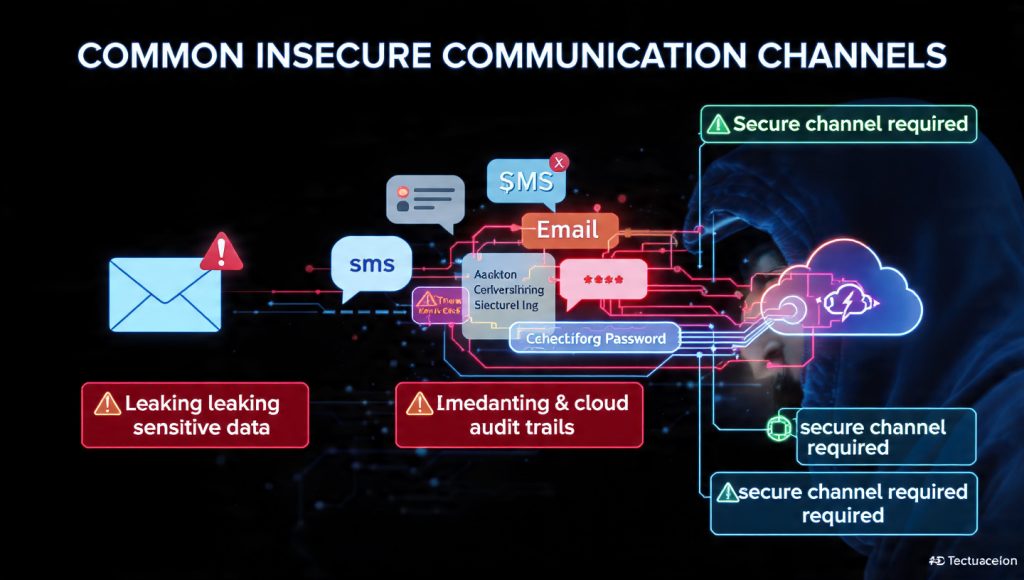
This executive guide, created by the security experts at Newsoftwares.net, provides the definitive strategy for secure key exchange. You can stop leaking sensitive secrets through insecure channels like email and SMS today by implementing three verified cryptographic methods that ensure zero eavesdropping risk. By prioritizing End, to, End Encryption (E2EE) and verifiable identity assurance, this guide ensures your secrets are protected from centralized logging and external compromise, promoting robust security and data confidentiality.
You can stop leaking sensitive secrets through insecure channels like email and SMS today by implementing three verified cryptographic methods that ensure zero eavesdropping risk.
Zero, Risk Checklist Summary
- Rapid, Ephemeral Secrets: Use Signal or WhatsApp and verify the Safety Number via a secondary, trusted channel (a trusted voice call or in, person comparison) for immediate assurance.
- Long, Term, Verifiable Identity: Use GPG/PGP to encrypt the secret using the recipient’s public key, ensuring the key fingerprint is verified out, of, band to confirm cryptographic identity.
- Avoid Conventional Methods: Never use standard email, SMS, or plain shared cloud links for high, value secrets. These communication methods are fully logged by centralized systems, are readable by administrators, and fundamentally lack the necessary End, to, End Encryption (E2EE).
Proof of Work: The Zero, Knowledge Advantage

Most communication services rely on Transport Layer Security (TLS) encryption, which protects data in transit. However, true secure sharing requires End, to, End Encryption (E2EE). This distinction is critical for understanding security guarantees.
Platforms that implement E2EE, particularly those using the Signal Protocol, ensure the symmetric session keys used for decryption exist only on the sender’s and recipient’s devices. The service provider’s server acts merely as a secure, unintelligent relay for the encrypted data. This cryptographic architecture guarantees a principle known as zero, knowledge: the service provider cannot read the contents of the messages, effectively shielding the communication from compromised servers, malicious system administrators, or legal requests targeted at the platform.
This stands in stark contrast to traditional communication methods, such as corporate email or standard cloud storage. While these services typically use TLS encryption during transmission, the message content often sits unencrypted on the server’s disk, or it is decrypted by the server upon arrival before being re, encrypted for delivery to the recipient. This decryption step on the server creates a critical point of failure that true E2EE bypasses.
1. The Cleartext Trap: Evaluating Risk in Common Sharing Methods
The habit of transmitting passwords, API keys, or security tokens through common, everyday channels relies on a profound misunderstanding of modern data security and infrastructure logging. These methods fail not because the connection is unencrypted, but because the content’s lifespan and visibility exceed acceptable security standards.
Why Email and SMS are Fundamental Security Failures
Standard email services rarely implement true E2EE by default. The content of an email is encrypted during transmission (via TLS), but upon reaching the provider’s server, it is often accessible to the provider and stored in cleartext on backup systems. This means that if a provider’s server is breached, or if an attacker gains administrative credentials, they can access the entire message history, including any exposed secrets.
SMS text messages present a similar vulnerability. They are not secured with end, to, end encryption. Copies of texts are stored and backed up in the cloud by mobile carriers to prevent information loss. This makes the content vulnerable to carrier compromise or potential subpoena by law enforcement. Relying on carriers for the confidentiality of sensitive keys is inherently high, risk.
The Flaw in “Out, of, Band” Separation
A common, outdated security defense suggests sending the encrypted file via email and the corresponding decryption password via a separate channel, like SMS or a phone call. This is referred to as “out, of, band” communication.
This defense is designed to thwart eavesdropping on a single channel. If an adversary compromises only the email provider, they get the file but not the key. If they compromise only the cellular provider, they get the key but not the file. However, a modern, motivated adversary often monitors both email and cellular traffic simultaneously, or possesses credentials granting access to both centralized services. Monitoring multiple common digital channels is standard operating procedure for advanced threats, rendering this separated transmission strategy trivial to bypass. True security demands that the secret itself is cryptographically protected and bound exclusively to the intended recipient.
The Illusion of Control: Cloud Links and Logging Risks
Cloud storage platforms like Dropbox, Google Drive, and OneDrive are designed for convenience and scalability, not zero, knowledge security.
When sharing via a public link, providers rely on Security Through Obscurity: the link URL contains a long, random string to prevent accidental discovery or casual brute, force guessing. While this is effective against non, targeted attacks, it is not a cryptographic barrier. For high, value secrets, this lack of cryptographic binding is unacceptable.
While cloud providers protect files at rest (typically using AES-256 encryption) and encrypt data in transit (TLS), they fundamentally retain the master keys necessary to decrypt the data. This means that if an attacker compromises the administrative layer, or if the provider’s internal team is compromised, the data can be viewed. Many security features, such as setting a required password or an expiration date for externally shared links, are often restricted to paid Professional or Enterprise tiers.
A more significant risk is Metadata Fingerprinting via Audit Logs.
Cloud storage solutions maintain comprehensive audit trails for compliance and security monitoring. For example, SharePoint and OneDrive audit logs capture precise sharing events, including AccessInvitationCreated, SharingSet, SharingRevoked, the User Principal Name (UPN) of the acting sender, and the identity and group type of the target recipient.
Sharing a secure key via a cloud link, even if the file itself is password, protected, generates a permanent, non, repudiable log entry confirming that a specific secure key exchange event occurred between two identified parties at a precise moment in time. This metadata leakage confirms the communication event, regardless of the file’s content. E2EE protocols, conversely, are explicitly designed to minimize or eliminate this metadata footprint, such as Signal retaining only the account creation date and last connection time. Therefore, cloud links are fundamentally unsuitable for communications requiring high privacy or whistleblower, level security.
2. Method 1: Instant, Forward, Secure Sharing (End, to, End Messaging)
The most practical and fastest method for secure, ephemeral secret exchange is using E2EE messengers. The security foundation here is the Signal Protocol, which ensures key compromise today does not unlock communication from yesterday or tomorrow.
The Mechanism of Forward Secrecy
The Signal Protocol integrates the Double Ratchet Algorithm. This algorithm continuously derives new symmetric keys for every message exchanged. If an attacker successfully compromises and obtains a key from a current session, they cannot calculate or derive the keys used to decrypt messages sent in the past (backward secrecy) or messages that will be sent in the future (forward secrecy). This architectural feature is paramount for preventing the total collapse of security following a momentary security breach or key compromise.
How, To: Verifying Keys Using Signal Safety Numbers
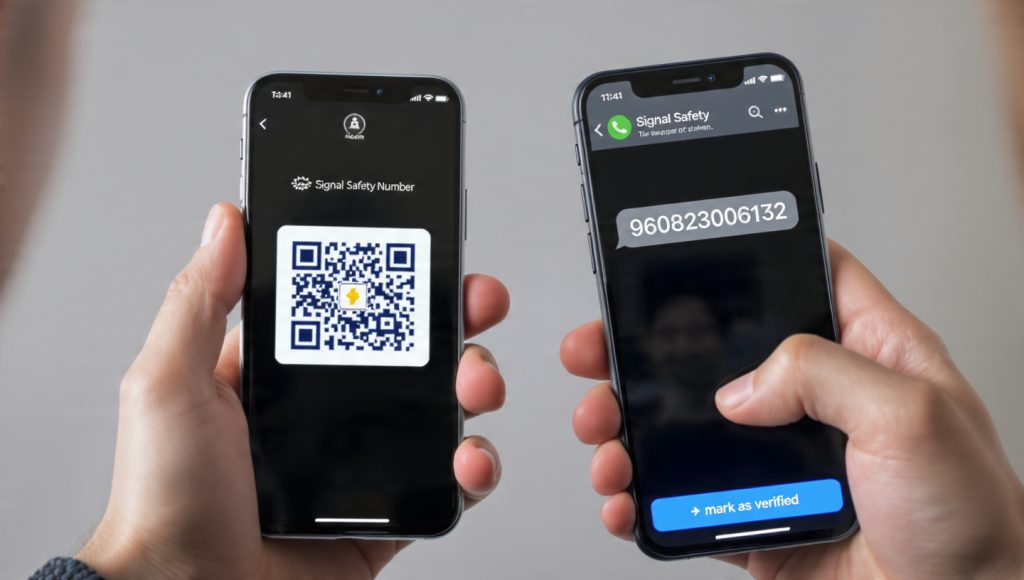
While E2EE is automatic in platforms like Signal, the initial exchange of public keys remains vulnerable to a Man, in, the, Middle (MITM) attack, where a malicious actor swaps the recipient’s public key with their own. The only way to defeat this is through out, of, band verification using the Safety Number.
Prerequisites and Safety:
Both parties must use Signal. The platform is preferred because it collects only minimal metadata (account creation date and last connection time). Note that if keys change, any messages sent just before the change may not be delivered.
The following procedure outlines the mandatory steps for verifying cryptographic identity:
| Action | Detail/UI Label | Gotcha/Proof of Work |
| 1. Locate the Safety Number | Open the chat, tap the contact name/chat header, then select View Safety Number. | The number is only generated and visible after the initial message request between the two parties is accepted. |
| 2. Compare the 60, Digit String | The user will see a 60, digit numeric string and a corresponding QR code. | Best Practice: If users are physically together, scanning the QR code is fast and eliminates manual transcription errors. |
| 3. Compare Out, of, Band (Critical) | If the users are remote, one party must read the 60 digits aloud to the recipient over a separate, highly trusted channel (e.g., a phone call). | Anti, MITM Check: This non, digital verification step defeats an active MITM attacker attempting to swap the public key during the initial handshake. |
| 4. Mark as Verified | Tap the Mark as verified button once the strings match. | This verification status is only applied to the local device. The other party must also perform this action on their device to reflect the status. |
| 5. Confirm Status | A checkmark symbol will appear in the chat header by the contact’s name. | This visual confirmation indicates that the encryption key is stable and authenticated against the confirmed identity. |
Second, Order Key Management: Handling Alerts
Signal alerts users whenever a safety number changes. This typically occurs when a contact switches to a new phone or reinstalls the application, triggering the generation of a new identity key pair.
If a safety number has been explicitly marked as verified, any subsequent change forces a manual approval process before the user can send any new messages. This security friction is intentionally designed to force the user to notice and address the key rotation before continuing sensitive dialogue. If a safety number changes unexpectedly or frequently, the operational procedure dictates that the user should assume an active MITM attempt is possible and sensitive communication should be paused until physical or verified re, authentication can occur.
3. Method 2: The Gold Standard (PGP/GPG Asymmetric Cryptography)
Pretty Good Privacy (PGP) and its open, source implementation, Gnu Privacy Guard (GPG), are the gold standard for secrets requiring verifiable identity, longevity, and non, repudiation. This method is essential for sharing secrets like software signing keys, SSH keys, or long, term internal configuration passwords.
PGP relies on asymmetric encryption: the sender uses the recipient’s publicly available key to encrypt the data, and only the recipient’s corresponding private key can decrypt it.
Key Sizing and Asymmetric Strength
The computational strength of asymmetric encryption (like RSA/ECC, used in GPG) requires keys to be significantly longer than symmetric keys (like AES). To achieve the same cryptographic resistance as a 256, bit symmetric key, asymmetric keys must be at least 2048 bits, with 4096 bits generally preferred in modern implementations. This higher key size contributes to the increased computational overhead of asymmetric encryption compared to symmetric methods.
How, To: Exchanging Public Keys and Encrypting Files with GnuPG
The most important step in GPG/PGP is the secure exchange and verification of the public key fingerprint. Without this, the system is susceptible to the same key, swapping attacks seen in E2EE messaging.
Prerequisites and Safety:
Users must have GnuPG installed (Version 2.0 or newer is recommended). The user’s private key passphrase must be protected using a robust password manager.
Sender: Exporting the Public Key
| Step | Command and Action | Contextual Explanation |
| 1. Export Public Key (Text Format) | gpg --armor --export > sender_public.asc |
The --armor option converts the key from its native binary format into an ASCII, armored text block. This format is necessary for reliably sharing the key via text, based channels (email, web forms) without data corruption. |
| 2. Securely Deliver Public Key | Send the sender_public.asc file or the block of text to the recipient. |
Since the public key is mathematically designed to be exposed, this transmission does not require E2EE, the secret key remains private. |
Recipient: Importing and Verification (The Trust Step)
| Step | Command and Action | Contextual Explanation |
| 3. Import Key | gpg --import sender_public.asc |
This adds the sender’s public key to the recipient’s local keyring, allowing the recipient to encrypt messages intended only for the sender. |
| 4. Verify Fingerprint (Mandatory) | gpg --list-key --fingerprint |
ACTION: The recipient must obtain the full fingerprint string and compare it with the sender over a trusted, non, digital channel (e.g., voice chat, video call, or signed paper). This step validates the key’s authenticity, establishing trust and preventing future Unusable public key errors. |
Recipient: Encrypting the Secret
| Step | Command and Action | Contextual Explanation |
| 5. Encrypt the Secret | echo "The database password is X8Yz1" | gpg --encrypt --recipient <Recipient's User ID or Email> --output secret.gpg |
The secret is piped directly to the GPG command, which encrypts it using the recipient’s public key. Only the recipient’s private key can reverse this process. |
Sender: Verification of Success
The sender receives the secret.gpg file and attempts decryption.
gpg --decrypt secret.gpg
If successful, the original message is displayed after the sender enters their private key passphrase. If the decryption fails with the message gpg: decryption failed: No secret key, the sender is confirmed to be missing the necessary private key needed for decryption.
The Web of Trust
GPG’s use of manual fingerprint verification is foundational to its philosophy: the Web of Trust (WOT). Unlike centralized Public Key Infrastructure (PKI), which relies on a small number of centralized Certificate Authorities (CAs), WOT requires users to explicitly verify and digitally sign each other’s keys to establish distributed trust. This difficult, manual verification process protects users against the failure or compromise of a single centralized authority, which is a known weak point in systems relying on PKI. The high friction involved in this verification process is a necessary trade, off for GPG’s robust identity guarantees.
4. Strategic Key Exchange: Comparing Security Tools
The optimal method for secure key exchange is a risk mitigation strategy that balances required speed, anonymity, and the level of key verification assurance needed.
Summary Comparison: Secure Key Exchange Methods
The following table summarizes the strategic application, security foundation, and logistical overhead of the primary methods discussed:
| Method | Use Case | Security Foundation | Trust Mechanism | Setup Difficulty | Admin Control/Logging |
| E2EE Chat (Signal) | Ephemeral secrets, rapid communication | Double Ratchet Algorithm | Safety Number (Peer, to, Peer Verification) | Low | Minimal Metadata Only |
| PGP/GPG | Long, term identity, digital signing | RSA/ECC Asymmetric Key Pair | Web of Trust (Fingerprint Verification) | High (Requires CLI skill) | None (Local Encryption) |
| Time, Limited Cloud Link | Sharing large files with temporary access | TLS in Transit, Password/Expiration | Revocation/Expiration (Time, based control) | Very Low (Browser, based) | High (Full Audit Log Visibility) |
| PAKE Protocols (OPAQUE) | Secure System Authentication/Login | Zero, Knowledge Proof (Password, based) | Password/Server Challenge | Expert/Development Level | Low (Prevents cleartext password logging) |
Contextual Trade, Offs
PGP/GPG requires a significant learning curve related to command, line interface usage, keyring management, and the explicit assignment of trust to keys. The setup time and reliance on manual verification are high barriers to entry. In contrast, cloud link configuration is instantaneous but relies heavily on paid tiers to enforce security features like password protection and time, based link expiration.
The Role of Password Authenticated Key Exchange (PAKE)
PAKE protocols, such as SRP-6a and the newer OPAQUE, address a distinct challenge: enabling a user to authenticate to a server and negotiate a secure session key without ever transmitting the cleartext password over the network.
The Secure Remote Password (SRP) protocol, particularly version 6a, is mature and widely adopted in standards like TLS-SRP. However, modern cryptographers often favor newer designs like OPAQUE, which offer stronger theoretical security properties and better resistance against modern precomputation attacks. The fundamental purpose of PAKE is to secure login credentials and session negotiation between a client and a system, ensuring the server never has to store or see the cleartext password, thereby protecting user accounts even if the server’s password database is persistently compromised. PAKE is therefore not a replacement for GPG or Signal in peer, to, peer file sharing, but a critical tool for securing centralized login systems.
Verdict by Persona
- For the Busy Executive (Prioritizing Speed and Convenience): The recommended solution is Signal. The automatic, immediate E2EE provided by the app offers a huge time saving, provided the initial, mandatory Safety Number verification step is performed once per contact.
- For the Security Researcher (Prioritizing High Assurance and Longevity): The required method is GPG. This is the only option that offers digital signatures, non, repudiation, and the robust identity assurances necessary for verifiable, long, term secrets.
5. Troubleshooting Key Exchange and Decryption Failures
In cryptography, failure messages are highly specific and point directly to a protocol, configuration, or key management issue. Troubleshooting secure sharing relies on understanding the exact error string and its root cause.
Troubleshooting Table: Cryptographic Errors and Fixes
| Symptom/Exact Error String | Root Cause | Non, Destructive Test/Fix | Last, Resort Option |
gpg: decryption failed: No secret key |
The required Private Key needed to decrypt the message is missing from the keyring, or is inaccessible/unlocked. | Verify the private key is imported and unlocked using gpg --list-secret-keys. If the key is used by a password manager (pass), running pass init <gpg-id> may re, encrypt and fix keyring access. |
If the private key is definitively lost, the encrypted file is cryptographically unrecoverable. Request the sender re, encrypt and re, send the data using a new, known, good public key. |
gpg: skipped: Unusable public key |
The public key is expired, has been revoked, or the recipient’s local trust level assigned to the key is too low (e.g., not ultimately trusted). | Set the trust level to ultimate manually, or verify the key’s expiration date. Check for algorithm mismatches, especially in newer GPG versions using AEAD/OCB ciphers that older clients cannot read. |
Ask the sender to re, export the public key block, explicitly confirming its validity and expiry status. |
Key exchange failed: could not agree on key exchange parameters |
The client and server (or the two GPG installations) cannot agree on a common encryption or key exchange algorithm (a cipher suite incompatibility). | Ensure both software clients (GPG or specific protocol implementation) are fully updated. If the issue involves GPG, manually edit key preferences to disable modern, sometimes incompatible, authenticated encryption algorithms (AEAD/OCB) that older recipients may not support. | Re, generate the key pair using standard, universal, and highly compatible algorithms (e.g., RSA 4096 / AES256). |
| “Safety number change alert” (Signal/WhatsApp) | The contact has rotated their identity key by installing the app on a new device or reinstalling the client. | Immediately compare the new 60, digit number via an outside channel (e.g., a voice call). If verified, manually approve the change. | Safety Precaution: If the key changes frequently or without a clear explanation from the user, discontinue sensitive communication until an MITM attack can be definitively ruled out. |
The most common causes of cryptographic failures, ranked by frequency, are: 1. A missing private key required for decryption. 2. An expired or untrusted public key used for encryption. 3. An algorithm or cipher mismatch between different software versions.
The inability to recover data without the correct private key is not an error, it is the fundamental security feature of strong cryptography. Any attempts to bypass the cryptographic requirement for data recovery inherently undermines the entire security model.
6. Frequently Asked Questions (FAQs)
1. Is sending a password via SMS “out of band” enough security
No. While separating the file and the password protects against compromise of a single channel, both email and SMS traffic are routinely logged, stored, and accessible by providers. For robust security, the secret itself must be cryptographically protected using E2EE before transmission, eliminating reliance on channel separation.
2. If I use an encrypted cloud link, can the service provider still read the file
Yes. Major cloud platforms employ AES-256 encryption for data at rest, but they retain the master keys necessary for decryption. Because they do not implement true zero, knowledge E2EE for general shared links, authorized administrators can technically access and read the file contents.
3. What happens if my Signal safety number changes unexpectedly
A change signifies that the encryption keys used for your communication have been reset, typically because your contact reinstalled the application or switched devices. If the number was previously verified, Signal mandates a manual approval before new messages are sent. If the change is unexpected, it is prudent to assume an MITM attack is possible and immediately re, verify the number.
4. Why is PGP/GPG key verification so complicated
GPG utilizes a decentralized Web of Trust model, which relies on manual, out, of, band fingerprint verification to confirm identity and establish authenticity. This complexity is necessary because GPG prioritizes non, repudiation and long, term identity assurances over the simplicity of automated E2EE chat verification.
5. What is the difference between asymmetric and symmetric keys for sharing
Symmetric encryption (like AES-256) uses one shared secret key, making it fast and efficient for bulk data (e.g., AES). Asymmetric encryption (like RSA) uses a public key for encryption and a private key for decryption, which is slower but essential for secure key exchange and digital signatures.
6. Can brute, force attacks guess the long URLs used by Dropbox
Dropbox links rely on long, random strings for security through obscurity. While the length makes random guessing statistically impractical, it is not cryptographically protected. Sensitive data should be protected by a secondary password (often a paid feature) and an expiration date in addition to the URL length.
7. How can I ensure my shared encryption password is secure during transmission
Always use a separate, end, to, end encrypted channel to transmit the password. Tools like Signal, which use the Signal Protocol for strong E2EE, are ideal for this task, ensuring the key cannot be intercepted during transmission.
8. What does “obfuscating the directory structure” mean in Zero, Knowledge encryption
It means the ZKE tool scrambles not just the file names, but also the hierarchy and names of the folders that contain the files. The cloud provider and third parties cannot tell how the data is organized, limiting the context they can gather from the exposed metadata.
9. Can I share a VeraCrypt container over the cloud
Yes. You should store the unmounted VeraCrypt file container in your cloud folder and share the encrypted file itself. The recipient must also have VeraCrypt installed and must be given the correct volume password separately.
10. What encryption method does my service use if it claims “256, bit encryption” at rest
It almost certainly uses AES-256. However, this typically refers to Server, Side Encryption (SSE-S3), where the provider manages the key. While the encryption is strong, it does not guarantee confidentiality from the provider itself.
11. Does using a password manager eliminate the need for strong KDFs
A password manager protects your master password using strong KDFs like Scrypt or high, iteration PBKDF2. If you then use a strong password generated by the manager, it further improves security, but you must confirm that the file archiver (like 7, Zip) uses a strong KDF to protect the file itself.
12. What specific metadata about the shared link is logged by the provider
Cloud providers log Admin Activity (changes to permissions/configuration) and Data Access (who read the file) audit logs. These logs record the identity of the user, the time of access, and which files were accessed, providing a forensic trail.
13. What is the alternative to using SSE-KMS for regulatory compliance like SOX
SSE-KMS is often chosen for compliance because it offers robust auditability and key policy control over FIPS 140, 2 Level 3 validated HSMs. The customer can define access policies and track every request made to the key, which is essential for SOX requirements.
14. What are the main characteristics of a brute, force attack against a shared link password
Brute, force attacks use automated tools (bots) to systematically guess passwords or credentials from pre, existing lists. Symptoms often include many failed login attempts originating from the same IP address or failed attempts targeting a single account from multiple IPs.
15. Is it safe to store my recovery key/password for an encrypted file in the same cloud folder
No. Storing the key and the encrypted file together in the same location creates a single point of failure. If the cloud account is compromised, the attacker immediately gains both the cipher and the key. Store the recovery key on an offline, external device or a dedicated password manager.
Conclusion
Secure key exchange requires practitioners to move past simple encryption techniques and adopt methods that prioritize verifiable identity and metadata minimization. The correct tool must be chosen based on the required trust model: Signal for fast exchanges requiring forward secrecy, or GPG for high, assurance identity and longevity. The most common security failures stem not from flawed algorithms, but from relying on convenience channels (Email, SMS) that are fundamentally designed to log and retain data under centralized control. Recognizing that metadata about a communication event can be as damaging as the secret content itself dictates shifting all sensitive communications to zero, knowledge E2EE platforms. This strategic adoption of verified cryptographic tools is the only way to achieve true confidentiality and minimize liability in the modern digital landscape.
Action Plan Checklist
- Audit Channels: Immediately cease using non, E2EE channels (standard Email, SMS, public cloud links without strong E2EE wrapping) for all secrets, credentials, and cryptographic keys.
- Verify Identity: Implement a mandatory policy to verify the safety numbers of all critical contacts on E2EE messaging applications via a trusted voice call or physical meeting.
- Establish Trust: If using GPG, always verify the full public key fingerprint out, of, band before encrypting any sensitive material, ensuring alignment with the Web of Trust model.
If managing the complex GPG keyrings and manually troubleshooting protocol failures consumes excessive operational time, organizations should consider adopting dedicated, secure password management vaults that abstract this cryptographic complexity while enforcing enterprise, level security guarantees.