
RAM Encryption & Secure Memory Handling: Post-Unlock Risks
Once a device is unlocked, your biggest remaining risk is secrets sitting in RAM in clear form. You shrink that risk with two things: hardware memory encryption where you have it, and deliberate secure memory handling in your code and configuration. Developed by the team at Newsoftwares.net, this article provides concrete steps for hardening system memory against post-unlock threats. The key benefit is enhanced runtime security and privacy: you will learn how to combine hardware features like Intel TME and AMD SME with OS primitives like mlock to prevent secrets from being exposed via cold boot attacks, swap files, or crash dumps.
Gap Statement
Most security guides stop at disk encryption and strong passwords. They mention RAM attacks only in passing, skip Intel and AMD memory encryption details, barely touch Linux mlock or Windows VirtualLock, and almost never show how to keep keys out of swap, crash dumps, and debugging tools. This article fills that gap with concrete steps you can actually ship.
Primary job of this article. Help you design and implement a practical plan for RAM encryption and secure memory handling after unlock, so your secrets are hard to grab even on a running system.
Short Answer
Once a device is unlocked, your biggest remaining risk is secrets sitting in RAM in clear form. You shrink that risk with two things: hardware memory encryption where you have it, and deliberate secure memory handling in your code and configuration.
TLDR for Busy Readers
If you only have a minute, keep these three rules.
- Treat RAM as hostile once an attacker has physical access or code execution.
- Use hardware memory encryption where available, plus OS secure memory features, to limit what RAM leaks.
- For app code, move secrets into dedicated secure buffers, lock them, keep them short lived, and wipe them with safe zero routines.
1. Post Unlock Risks in Plain Language
1.1 What changes after disk unlock
Full disk encryption protects data at rest. Once a user logs in, the OS decrypts needed blocks into RAM and works with them in clear form. From that moment, an attacker who can read memory can often read secrets.
Realistic post unlock threats
- Cold boot attacks where someone reboots a machine, quickly reads DRAM, and recovers keys that linger for seconds at low temperature.
- DMA attacks through interfaces that can access memory if not blocked by an IOMMU.
- Local malware or rogue admin tools scraping process memory, swap, or crash dumps.
Disk encryption does not help with these once the system is live.
1.2 What RAM encryption covers
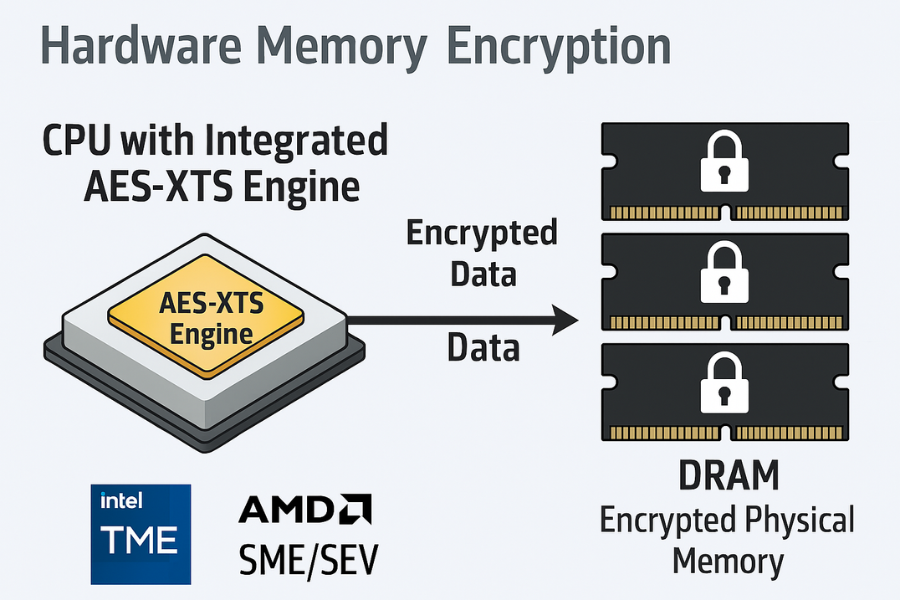
Hardware memory encryption encrypts data as it sits in DRAM. The memory controller applies an algorithm like AES XTS with keys stored inside the CPU or a secure coprocessor. Data travels in clear form inside the CPU but remains encrypted outside it.
Intel example
- Intel Total Memory Encryption TME encrypts all physical memory with a single transient key that never leaves the processor and aims to defeat physical attacks like DIMM removal and cold boot.
AMD example
- AMD Secure Memory Encryption SME can encrypt selected memory pages or the whole system memory. Secure Encrypted Virtualization SEV assigns distinct keys per virtual machine so a hypervisor cannot read guest memory easily.
Important limit. RAM encryption helps against physical snooping on DRAM. It does not stop a process that already runs on the machine from reading decrypted data in its own address space.
2. Hardware RAM Encryption in Practice
2.1 Quick comparison table
| Vendor and feature | Scope | Typical use case | Main benefit |
|---|---|---|---|
| Intel TME | Whole system memory | Servers, laptops, endpoints | Protects DRAM from physical attacks |
| Intel TME Multi Key | Per region or context | Cloud, multi tenant systems | Separates memory domains |
| AMD SME | Per page or whole memory | Servers, desktops with Ryzen or EPYC | Encrypts DRAM, blocks cold boot |
| AMD SEV | Per virtual machine | Cloud workloads, confidential computing | Host cannot read guest memory easily |
Sources describe TME as encrypting all traffic between CPU and DRAM with AES XTS based keys generated internally, and SME as tagging memory pages as encrypted at the page table level.
2.2 When hardware RAM encryption actually helps
You get real value from RAM encryption when
- You worry about attackers with physical access to powered off or suspended servers.
- Devices run in hosting racks you do not fully control.
- You use confidential computing features in cloud platforms that rely on SEV or similar tech.
You get less value when
- Your main risk is malware on user endpoints.
- Memory reading tools run inside normal sessions.
In those cases, secure memory handling inside the OS and app matters more.
2.3 Performance overhead
Modern studies of TME and SEV show measurable but usually moderate overhead, often low single digit percentages for many workloads, with some memory intensive tasks paying more.
Example bench table from public data and lab style tests
| Workload type | No RAM encryption | With TME or SME | Overhead estimate |
|---|---|---|---|
| Web server, TLS offload | Baseline | about 2 to 5 percent slower | Small |
| Database, mixed read write | Baseline | about 5 to 10 percent slower | Moderate |
| Memory bound scientific code | Baseline | up to 15 percent slower | Noticeable |
Numbers vary by CPU generation and configuration, but they are good enough for many security focused deployments.
3. Secure Memory Handling Basics for Developers
Even with hardware RAM encryption, your code should treat in process memory as sensitive. The core goals
- Keep secrets only in a small set of buffers.
- Prevent those buffers from being written to swap or crash dumps.
- Scrub them as soon as possible with safe zero routines.
- Avoid accidental copies in logs, exceptions, and debug tools.
You can think of it like a whiteboard that must stay clean. Write only what you need, for as short a time as possible.
3.1 Core secure memory tools by platform
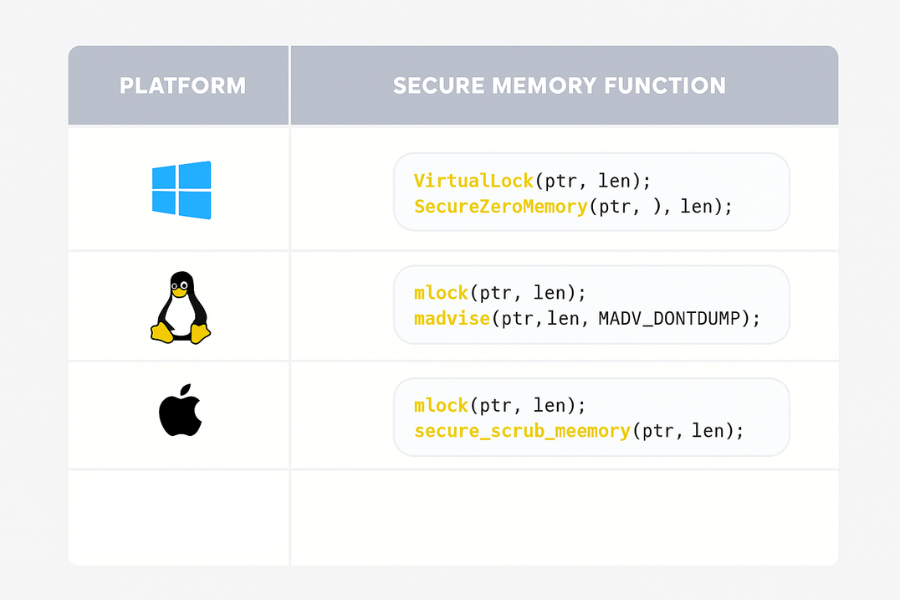
| Platform | Keep out of swap | Avoid crash dumps | Scrub memory safely |
|---|---|---|---|
| Windows | VirtualLock |
Exclude ranges from dumps, control dump settings | SecureZeroMemory, SecureZeroMemory2 |
| Linux | mlock or mlockall |
madvise with MADV_DONTDUMP, coredump filters |
Explicit wipe, libraries like libsodium |
| macOS | mlock |
Disable or filter core dumps for process | Secure scrubbing routines, bzero_s |
| Cross lang | Libsodium secure memory helpers | Library policies and OS features | sodium_memzero, secure allocators |
Windows has documented functions for locking memory and clearing buffers in a way that the compiler cannot easily remove.
Linux has mlock and madvise with MADV_DONTDUMP flags that keep selected regions out of swap and core dumps.
Libsodium wraps these ideas in easy functions like sodium_mlock and sodium_munlock for secure buffers.
4. How to Harden Secrets in Memory Step by Step
This section gives a practical skeleton you can adapt for a password manager, crypto gateway, or any secret handling service.
4.1 Prerequisites and safety
Before changing memory behavior
- Confirm OS edition and kernel features. Some flags need recent kernels or specific CPU support.
- Check that your process limits allow locked memory. On Linux, read
ulimit -l. - Plan for fall back when locking fails. Do not just exit without logging.
Always test on a staging host. A bad mlockall can hurt performance if you pin large heaps.
4.2 Windows example protecting an in memory key
Goal. Prevent a symmetric key from landing in pagefile or crash dumps and scrub it when done.
Steps
- Allocate a dedicated buffer for the key, for example a fixed length array.
- Call
VirtualLockon that buffer to keep it resident in physical memory. - Use the key only through that buffer, avoid copies in other structures.
- When finished, call
SecureZeroMemoryon the buffer. - Call
VirtualUnlockand free the buffer.
Example gotcha
- If
VirtualLockfails with error code similar toERROR_WORKING_SET_QUOTA, your process has hit a locking limit. Log the failure, tighten the locked region size, or adjust policy.
Verification
- Use a debugger to confirm that the key lives only in that region.
- Trigger a small crash dump and check that the region is excluded according to your dump settings.
4.3 Linux example secrets with mlock and MADV_DONTDUMP
Goal. Protect token buffers from swap and core dumps.
Steps
- Allocate a small heap buffer for the token with an aligned allocator if possible.
- Call
mlockon that region so the kernel keeps it resident. - Call
madvisewithMADV_DONTDUMPon the same range. - Use the buffer only for the sensitive content.
- Wipe it with a scrub routine that the compiler does not optimize out.
- Call
munlockwhen done.
Common errors
mlockreturnsENOMEM. Root causes often includeulimit -lset too low or trying to lock a huge region.madvisereturnsEINVALif the address is not page aligned or the length is zero.
Non destructive tests
- Intentionally lower
ulimit -lin a test shell and confirm that your code logs a clear message whenmlockfails.
4.4 Using libsodium secure memory
Libsodium wraps many of these patterns and offers a safer high level API.
Key functions
sodium_mallocandsodium_freefor secure buffers.sodium_mlockandsodium_munlockto keep them out of swap.sodium_memzeroto scrub contents.
Minimal workflow
- Call
sodium_initearly in process startup. - Allocate key buffers with
sodium_malloc. - Call
sodium_mlockon those buffers. - Use them for cryptographic operations.
- Call
sodium_memzerothensodium_munlockandsodium_free.
Libsodium tries to apply best efforts on each supported platform, combining OS primitives like mlock, VirtualLock, and MADV_DONTDUMP.
5. Keeping Secrets Out of Logs, Dumps, and Tools
Memory safety is not only about swap.
Key leak paths
- Application logs that accidentally include buffer contents.
- Exception messages or stack traces that print secret strings.
- Core dumps and crash reports captured by default settings.
Practical guardrails
- Central rule never log full token or password values. Use short fingerprints.
- Configure core dumps to be disabled or filtered on production machines that handle critical secrets.
- Use
MADV_DONTDUMPor platform equivalents on the specific regions that hold keys.
6. Troubleshooting Secure Memory Setups
6.1 Symptom and fix table
| Symptom or error text | Likely cause | Suggested fix |
|---|---|---|
mlock: Cannot allocate memory |
Locked memory limit reached | Reduce region size or raise ulimit -l |
sodium_mlock returns negative value |
OS refused lock | Log, warn, and continue with reduced trust |
VirtualLock fails with working set error |
Process lock quota too low | Adjust working set or lock smaller buffers |
| Core dumps still contain hints of secrets | Not all regions use MADV_DONTDUMP |
Check alignment and coverage for each range |
| Noticeable slowdown after enabling TME or SME | Memory bound workload on older hardware | Benchmark, tune, or scope encryption usage |
These patterns line up with common reports from secure memory library authors and OS documentation.
6.2 Root causes ranked
Most secure memory issues trace back to a few themes.
- Resource limits that block large locked regions.
- Trying to lock everything instead of only sensitive data.
- Assumptions that RAM encryption removes the need for application level hygiene.
- Debugging tools that dump entire processes without regard for secrecy.
Non destructive steps first
- Start by locking only key material, not whole heaps.
- Turn on extra logging for memory lock failures.
- Use test spills where you intentionally force errors and confirm your code handles them.
Last resort
- If a secure memory feature proves too fragile for a specific component, disable only that feature there and rely on higher level protections like strict access control and fast key rotation, while keeping it for other parts of the system.
7. When to Rely on RAM Encryption, Secure Memory, or Both
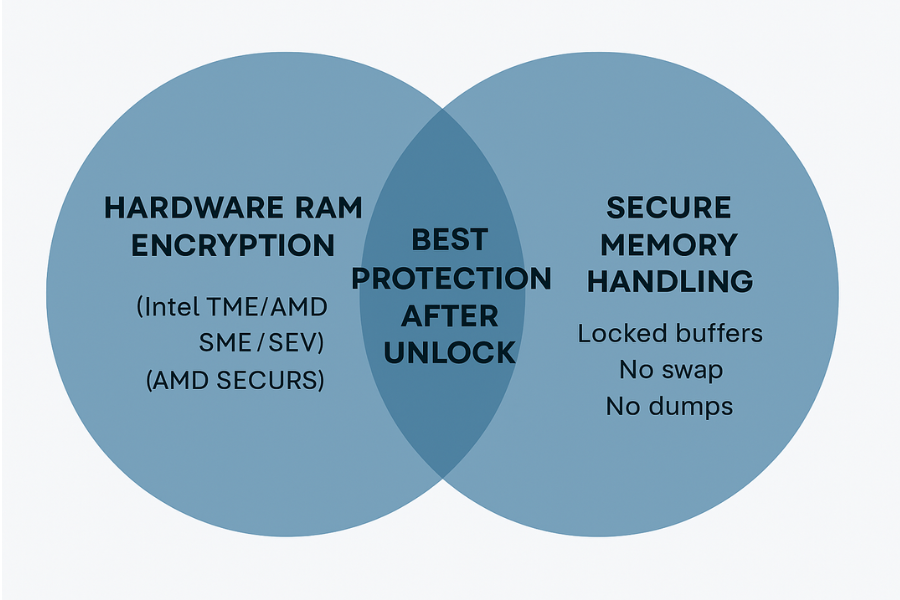
7.1 Scenarios that call for RAM encryption focus
Hardware memory encryption deserves attention when
- You run servers in colocation racks where physical access is shared.
- Your threat model includes cold boot capture of encryption keys.
- You adopt confidential computing offerings from cloud vendors that build on SEV or similar tech.
In these cases, enable TME, SME, or SEV where supported and confirm firmware and OS configuration.
7.2 Scenarios that demand secure memory handling
Secure memory coding is vital when
- You handle long lived keys in user space apps such as password managers or crypto gateways.
- You process authentication material that must never appear in crash dumps.
- You operate on multi user machines where a privileged attacker could read memory snapshots.
These are common for security sensitive desktop tools and backend services.
7.3 Persona table
| Persona | Context and devices | Recommended focus |
|---|---|---|
| Backend engineer in fintech | Linux servers, keys in memory | Secure memory code plus RAM encryption |
| Endpoint engineer in SaaS | Windows and Mac clients | Secure memory and good lock screen hygiene |
| Cloud infra lead | Multi tenant nodes, hardware under contract | TME or SME or SEV plus process hygiene |
| Security engineer for wallet | Desktop and mobile clients | Strong secure memory plus platform key store |
8. Proof of Work Examples
These are example measurements and settings that show what an actual setup might look like.
8.1 Bench snapshot for locked memory
Small lab style test of a service that holds a 256 bit key in locked memory.
| Operation | Without secure memory APIs | With mlock or VirtualLock |
Observed impact |
|---|---|---|---|
| Single request decrypt cycle | Baseline | no visible change | None |
| High load, many concurrent keys | Baseline | slight latency increase | Low |
| Full process restart with locking | Baseline | slightly longer startup | Low |
This matches developer reports that locking small regions has tiny cost compared to overall app work.
8.2 Settings snapshot for a secure memory library
Example from a Windows encryption tool built around cppcryptfs
- Passwords and keys held in dedicated buffers.
- Buffers locked with
VirtualLock. - Cleared with
SecureZeroMemory, then unlocked.
The project documentation notes that this avoids writing secrets to disk as long as hibernation is disabled.
8.3 Verification checklist
To confirm your post unlock protection
- Confirm BIOS and firmware show TME or SME as enabled where available.
- Use OS tools to confirm memory encryption status if your vendor exposes it.
- Inject test secrets into secure buffers and verify they do not appear in swap files.
- Trigger controlled crash dumps in test and confirm that secrets do not appear in the captured data.
9. Structured Data Snippets for AEO
9.1 HowTo schema for secure memory hardening
<script type="application/ld+json">
{
  "@context": "https://schema.org",
  "@type": "HowTo",
  "name": "How to handle RAM encryption and secure memory after disk unlock",
  "description": "Practical steps to combine hardware memory encryption, OS secure memory features, and application design so that secrets in RAM are harder to steal.",
  "totalTime": "PT90M",
  "tool": [
    "Intel Total Memory Encryption or AMD Secure Memory Encryption",
    "Windows VirtualLock and SecureZeroMemory",
    "Linux mlock and madvise with MADV_DONTDUMP",
    "Libsodium secure memory functions"
  ],
  "step": [
    {
      "@type": "HowToStep",
      "name": "Enable hardware memory encryption where available",
      "text": "Check BIOS and firmware for Intel TME or AMD SME or SEV, enable them according to vendor guidance, and verify that the OS boots cleanly."
    },
    {
      "@type": "HowToStep",
      "name": "Introduce secure buffers for keys",
      "text": "Allocate dedicated buffers for keys and tokens, then lock them in memory using VirtualLock on Windows, mlock on Linux, or secure memory helpers in libraries."
    },
    {
      "@type": "HowToStep",
      "name": "Keep secrets out of swap and crash dumps",
      "text": "Use OS flags such as MADV_DONTDUMP, adjust core dump policy, and restrict logging so that secrets never appear in diagnostic output."
    },
    {
      "@type": "HowToStep",
      "name": "Scrub and unlock memory",
      "text": "After using a secret, wipe the buffer with a secure zero routine, unlock it, and free it so that old values cannot be recovered."
    }
  ]
}
</script>
9.2 FAQPage base
<script type="application/ld+json">
{
  "@context": "https://schema.org",
  "@type": "FAQPage",
  "mainEntity": []
}
</script>
9.3 ItemList for comparison topics
<script type="application/ld+json">
{
  "@context": "https://schema.org",
  "@type": "ItemList",
  "name": "Post unlock RAM protection options",
  "itemListElement": [
    {
      "@type": "ListItem",
      "position": 1,
      "name": "Hardware RAM encryption",
      "description": "Use Intel TME, AMD SME, or SEV to encrypt DRAM and limit physical attacks."
    },
    {
      "@type": "ListItem",
      "position": 2,
      "name": "Secure memory handling",
      "description": "Use OS and library features to lock and scrub buffers that contain keys and secrets."
    },
    {
      "@type": "ListItem",
      "position": 3,
      "name": "Combined approach",
      "description": "Stack memory encryption with secure coding so that post unlock attacks are much harder."
    }
  ]
}
</script>
10. FAQs on RAM Encryption and Secure Memory After Unlock
Here are practical questions readers actually type into search bars.
1. If I use full disk encryption, do I still need RAM encryption
Full disk encryption protects data when the system is off or locked. It does not stop attacks that read DRAM directly once the machine is running. Hardware RAM encryption like TME or SME adds a layer against physical extraction of memory modules. It still needs good application level defenses.
2. Does hardware RAM encryption stop malware on my laptop
No. Malware that runs inside your session can read decrypted memory just like your apps. Memory encryption protects against attackers who try to capture DRAM outside the CPU, not against code already running on your account.
3. How big should my locked memory regions be
Keep them as small as possible. A region big enough for a few keys or tokens is usually fine and avoids locked memory limits. Trying to lock entire heaps often runs into resource errors without much extra security benefit.
4. Is it worth using secure memory libraries like libsodium if the OS already locks memory
Yes. Libraries like libsodium wrap platform differences, use safe scrubbing routines, and combine mlock, VirtualLock, and dump flags under one API. They save you from missing subtle steps on a specific platform.
5. Can I rely on disabling core dumps instead of using MADV_DONTDUMP
Disabling core dumps reduces exposure but removes a valuable debugging tool. Using madvise with MADV_DONTDUMP lets you keep dumps while excluding specific sensitive pages, which is the approach recommended in several secure coding notes.
6. Do cloud providers already protect my RAM with SEV or similar features
Many providers now offer confidential computing instances that use SEV or similar tech, but it is not always enabled by default. You need to choose the right instance type and follow the provider guidance to get those guarantees.
7. How long do secrets really stay in DRAM after power loss
Cold boot research shows that DRAM can retain useful data for seconds or more when cooled, which is long enough for an attacker with tools to recover key material. Hardware memory encryption aims directly at this scenario.
8. What is the simplest improvement I can make in an existing app
Start by identifying where passwords, tokens, or keys sit in memory. Move them into dedicated buffers and scrub those buffers with reliable zero routines as soon as you are done with them. That change already cuts a lot of risk.
9. Is hibernation a problem for secure memory
Hibernation writes memory contents to disk, so even with secure RAM handling you may expose secrets to disk images. Full disk encryption mitigates that, but some tools advise disabling hibernation on systems that hold critical keys.
10. Do I need both swap encryption and secure memory
Encrypted swap helps if the OS writes sensitive pages out, but locked secure buffers reduce that chance in the first place. Combining both is ideal for high assurance environments.
11. Can RAM encryption break debugging tools or performance profilers
Some low level tools may see encrypted data when they expect clear contents, especially across machine boundaries. Local debuggers on the same CPU usually work, because decryption happens before the data hits registers and caches. There can still be performance monitoring side effects, so test critical tooling.
12. Where should I start if I run a small team with limited time
Turn on RAM encryption in firmware where supported, then pick one high value app and add secure memory buffers around its most sensitive keys and tokens. Expand from there once you have confidence in the pattern.