
Expert Report on Mitigation Strategies for “Password, Protected File Rejected” Errors in Digital Communications
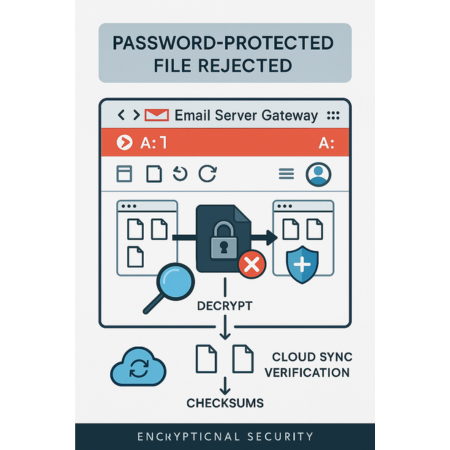
This executive report, prepared by the security experts at Newsoftwares.net, details the mandatory strategies for resolving email attachment rejection. The frequent occurrence of “Password, Protected File Rejected” errors is a standardized consequence of modern email security architectures, reflecting an inherent conflict between the goals of confidentiality and content integrity. Attempting to force an encrypted attachment through an email gateway is procedurally unsound. This report provides definitive workarounds, focusing on transitioning the transfer mechanism to secure cloud sharing and mandating strict cryptographic best practices, ensuring successful file delivery and sustained confidentiality.
I. Executive Summary: The Conflict Between Confidentiality and Integrity

The frequent occurrence of “Password, Protected File Rejected” errors is a standardized consequence of modern email security architectures, reflecting an inherent conflict between the goals of confidentiality and content integrity. Organizations employ sophisticated Mail Transfer Agents (MTAs) and security gateways to protect recipients by enforcing content security policies. When a file, particularly a compressed archive, is protected by encryption and a password, the contents are rendered opaque to these automated security scanners.
1.1. Overview of the Rejection Phenomenon
The rejection of encrypted attachments is not a deficiency in the mail system but rather a deliberate feature of security protocols. Security gateways, including those used by major providers like Google, must scan attachments for malware, viruses, and policy, violating executable files (e.g., .exe, .dll). Encryption, by design, guarantees confidentiality but simultaneously defeats this automated inspection mechanism. If the system cannot inspect the content to verify its integrity, the default and most secure operational procedure is to reject the payload outright, often explicitly blocking “Password, protected archives with archived content”.
1.2. Strategic Mitigation Focus
Attempting to force an encrypted attachment through an email gateway is procedurally unsound and typically leads to failure. Consequently, the mitigation strategy must focus on two definitive shifts: the transfer mechanism and the key exchange mechanism.
The primary operational solution involves transitioning the transfer mechanism from direct email attachment to secure, permission, based link sharing via auditable cloud storage platforms (e.g., OneDrive, Google Drive, Dropbox). This bypasses the stringent MTA attachment scrutiny while maintaining enterprise, level content scanning on the upload server.
The secondary solution, essential for ensuring confidentiality, requires strict adherence to mandatory cryptographic best practices (specifically AES-256) and the implementation of a secure, out, of, band protocol for key transmission. Successful file delivery hinges entirely upon professional adherence to these procedural and technical security standards.
II. Deconstructing Email Gateway Rejection Policies and Mechanisms
File rejection errors are generated based on explicit security policies designed to mitigate the threat landscape, which is heavily dominated by malware transmission through attachments. Understanding these policies, particularly for dominant platforms like Gmail and Microsoft Exchange/Outlook, is essential for designing effective workarounds.
2.1. The Malware Scanning Imperative in Consumer and Enterprise Email
2.1.1. Gmail’s Explicit Policy and Technical Barriers
Gmail enforces rigorous content integrity rules, specifically blocking messages that contain file types historically used for spreading viruses, such as executables (.exe, .apk, .js). This policy extends to these files even when they are compressed or nested within standard archives (like .zip or .tgz).
The critical technical barrier occurs when an archive is password, protected. Gmail explicitly blocks “Archives whose listed file content is password protected” and “Archives whose content includes a password protected archive”. This occurs because Gmail’s content filters and scanning utilities, which process messages and attachments up to 1MB, cannot access or inspect the content encapsulated within an encrypted layer. Furthermore, Gmail’s system administrators acknowledge that the platform is technically unable to open or inspect attachments that are password, protected files or archives, including password, protected ZIP files. For very large files, this problem is exacerbated, as Gmail does not convert or scan files larger than 10MB, providing another strong justification for immediate rejection of unknown content.
While Google Workspace administrators possess the capability to customize rules to reject, quarantine, or modify messages based on file type or size, these administrative controls do not circumvent the fundamental technical inability of the scanner to decrypt content. Therefore, when encountering a password, protected archive, the system correctly defaults to a restrictive “potential security issue” rejection message.
2.1.2. Microsoft Outlook and Exchange Environment Filtering
Microsoft Outlook environments also utilize blocking mechanisms to protect users from high, risk file types. For professional environments utilizing Exchange accounts, the default email size limit is lower (typically 10 MB for the entire message) compared to consumer limits (20 MB for Outlook.com/Gmail), making size a common rejection factor. When Outlook blocks a file type, the recommended solution is consistent with Gmail’s guidance: upload the file to a secure cloud platform (OneDrive or SharePoint) and send a link instead.
In complex business account scenarios, rejection can sometimes be attributed to factors beyond simple file, type blocking. Delivery failures in enterprise environments can be caused by server, side policy limits, such as restrictions imposed by network administrators on the number or type of MIME (Multipurpose Internet Mail Extensions) components allowed in a single message. MIME encoding is used for complex attachments, and exceeding the server’s component limit can trigger a rejection, necessitating a prudent workaround such as utilizing file, sharing platforms.
2.2. Enterprise Policy Conflict and Troubleshooting
A particularly complex scenario in Microsoft 365 environments involves the internal conflict of mail flow rules, especially those associated with Office Message Encryption (OME). Security policies often utilize triggers like the #encrypt keyword to automatically encrypt outgoing messages. If a mail flow rule is misconfigured to apply this encryption logic to incoming messages containing such a tag, the system can attempt to re, encrypt a message that is already entering the domain, resulting in a permanent failure error, such as 550-5.7.162 OmeEncryptionAgent; Permanent Failure... ETR encryption only applies to outgoing mail.
This type of error represents a critical administrative failure, distinct from a standard malware rejection. It requires policy auditing by the system administrator to narrow the scope of the mail flow rule, ensuring it applies only to internal senders and external receivers, preventing the internal security infrastructure from rejecting legitimate inbound communications.
2.3. Interpreting Server Error Codes
Server error messages provide crucial context for troubleshooting. Gmail errors often append identifiers such as gsmtp (Google SMTP) for standard protocol errors, or gcdp (Google Custom Domain Policies) for errors resulting from customized administrative rules. Recognizing these identifiers helps administrators determine whether the failure is a system, wide limitation or a configuration oversight.
The rejection mechanisms employed by modern email services demonstrate that relying on low, level manipulation, such as renaming the file extension (e.g., changing a protected .rar to .txt), is an unstable and professionally unacceptable practice. While this superficial change might bypass simplistic, older filters that rely solely on extensions, robust platforms like Gmail utilize “file type detection” that identifies the content regardless of the arbitrary file name assigned. Thus, circumventing filtering through renaming is a short, term, insecure measure that fails to address the underlying security policy intent and should be strongly discouraged for secure data transfer.
III. Modern Cryptographic Archiving Standards and Configuration
When secure archiving is necessary, the choice of cryptographic standard and the proper configuration of the archive are non, negotiable requirements for professional communication. Procedural security begins with correct data encapsulation.
3.1. Standardization on AES-256 Encryption
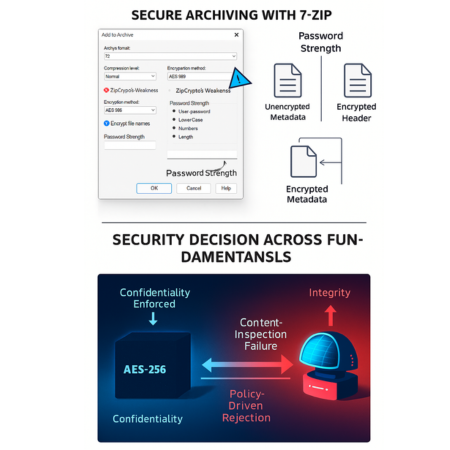
The persistence of the older ZIP encryption standard (ZipCrypto) presents a significant security liability. ZipCrypto is fundamentally weak, highly vulnerable to known, plaintext attacks, and lacks adequate measures to slow exhaustive password search efforts. For any transfer of sensitive information, this standard is considered obsolete and must be prohibited.
The mandatory standard for archival encryption is the Advanced Encryption Standard (AES) with a 256, bit key length. Tools like 7, Zip and WinRAR provide robust implementation of AES-256. Although the ZIP archive container can support AES-256, professional guidance suggests prioritizing the 7z archive format, as AES-256 is the only encryption method it supports, reducing the risk of accidental fallback to the weak ZipCrypto standard. Furthermore, compatibility notes indicate that native support for AES-256 encrypted ZIP files has historically been inconsistent across operating systems, such as Windows 10, reinforcing the need for platform, independent tools. AES-256 implementations via cross, platform tools like 7, Zip, VeraCrypt, or AES Crypt are available for Windows, macOS, and Linux, guaranteeing interoperability across technical teams.
3.2. Achieving True Confidentiality: Encrypting the Archive Header
A common procedural error that undermines cryptographic security is the failure to encrypt the archive’s metadata (header). If only the contents of the file are encrypted, critical information such as the list of file names contained within the archive remains readable to anyone possessing the compressed file. Knowing the structure and names of the contents is a significant aid to an attacker.
To mitigate this metadata leakage vulnerability and ensure true confidentiality, the user must explicitly select the “Encrypt file names” option during the archive creation process. In 7, Zip, this setting is typically available when the archive format is set to 7z, ensuring that the archive header itself is encrypted and rendering the file list inaccessible without the key. Security validation processes should not merely confirm that AES was used, but must specifically verify that the implementation included archive header encryption, as proper user configuration is as vital as the algorithm choice itself.
3.3. Key Strength Requirements
The strength of any cryptographic defense is constrained entirely by the weakest link, which is invariably the password used for key derivation. To uphold the integrity of AES-256 encryption, the corresponding passphrase must meet stringent complexity requirements. Standard protocols typically mandate a password that is at least 8 characters long and includes a heterogeneous mix of at least one capital letter, one lowercase letter, and one numeral.
Comparative Cryptographic Standards for Archiving
| Standard | Encryption Algorithm | Vulnerability Profile | Required Configuration | Recommendation Status |
| ZipCrypto | Proprietary/Weak | Known, plaintext attack susceptibility, easily brute, forced | N/A (Often default in older tools) | Deprecated / Do Not Use |
| AES-256 (7z Format) | AES-256 | Strong (Dependent only on key strength) | Mandatory: Encrypt File Names/Archive Header | Mandatory Standard |
| AES-256 (ZIP Format) | AES-256 | Strong (If implemented correctly) | Often requires third, party tools, checks for file name encryption vary | Conditional / Use 7z Preferred |
IV. Strategic Mitigation: The Shift to Secure Cloud Sharing
The universal recommendation from major email providers, security experts, and enterprise administrators for overcoming attachment rejection and size limits is the definitive strategic shift to secure cloud sharing.
4.1. Bypassing MTA Scrutiny and Ensuring Integrity
Sharing files via a secure link from a cloud service (e.g., Google Drive, Dropbox, OneDrive) is the most effective method for bypassing the email gateway’s attachment scanner, as the email payload consists only of a URL. This resolves the size constraint issue, as cloud platforms offer significantly higher transfer limits (typically 100 GB to 250 GB for dedicated services, compared to the email cap of 20–25 MB).
While the email MTA is bypassed, the content integrity requirement is still met by the cloud provider. Services like Microsoft Defender for Storage implement automated malware scanning upon file upload. Similarly, secure cloud platforms automatically scan uploads for anti, virus and ransomware patterns, ensuring the file’s safety before the recipient accesses the link.
4.2. Comparative Platform Implementation and Control
Cloud platforms vary in their security feature sets, necessitating selection based on the sensitivity and lifecycle of the data. Services like Google Drive and OneDrive are fundamentally built around permission, based sharing, allowing users to define access by specific email addresses or organizational boundaries.
Dedicated file delivery platforms, such as Dropbox Transfer, are optimized for one, time secure delivery (e.g., sending a finalized contract) rather than persistent collaboration. These services offer enhanced controls, including the ability for Professional plan customers to set custom passwords and specific expiration dates for the link, providing a robust, time, bound delivery mechanism.
4.3. Implementing Controlled Access and Link Management
The adoption of cloud links shifts the risk management burden from ensuring successful delivery to actively managing access permissions. Since the file persists on the cloud server, explicit control management is essential.
4.3.1. Granular Access and Ephemerality
Access control must leverage granular settings, such as restricting access to “Specific people” rather than generic options like “Anyone with the link”. This includes defining permissions (e.g., allowing editing versus view, only access).
Furthermore, all shared links for sensitive data must be ephemeral. Services like Dropbox allow users to set specific expiration dates for shared links, guaranteeing that the file becomes inaccessible after the defined cutoff, reducing the window of opportunity for unauthorized access.
4.3.2. Mandatory Link Revocation Protocol
A crucial procedural element is establishing a protocol for link revocation. Unlike email, where the file is static upon delivery, cloud sharing is stateful, the shared file exists indefinitely until deleted or permissions are revoked. If a recipient’s account is compromised in the future, the persistent link becomes a vulnerability.
Therefore, secure professional practice mandates that access must be actively terminated immediately after the recipient confirms successful download and viewing. Platforms like OneDrive and SharePoint provide explicit “Manage access” options, allowing the sender to remove direct access and revoke unrestricted sharing links. The inability to easily retract an insecure link, or the failure to enforce mandatory expiration and revocation, transforms the convenience of cloud sharing into a long, term risk management burden.
Email Gateway Policy vs. Cloud Sharing Paradigm
| Feature | Email Attachment (e.g., Gmail) | Secure Cloud Link (e.g., OneDrive, Dropbox) |
| Rejection Mechanism | Policy, based (Cannot scan content), Size limits | Rare (Rejection only on DMCA/Malware flag) |
| Password Protected Archives | Explicitly Blocked | Accepted (Scanning occurs upon upload) |
| Max Transfer Size (Typical) | 20 MB , 25 MB | 100 GB , 250 GB+ (Plan dependent) |
| Access Control Method | None (File is static once delivered) | Permission, based, Revocation, Expiration dates |
| Risk Profile | Short, term delivery failure, Long, term persistence on server | Long, term link management burden (requires explicit revocation) |
V. Best Practices for Out, of, Band Key Exchange (Secure Key Transmission)
For an encrypted file to maintain security, the key required for decryption must be transmitted to the recipient via a separate, trusted channel. This procedure, known as out, of, band key exchange, enforces a defense, in, depth approach.
5.1. The Inherent Risk of Email Key Transmission
Sending an encrypted file and its password in the same email defeats the purpose of encryption entirely. Sending the password in a separate, subsequent email offers only marginal improvement but remains fundamentally insecure. Both messages are stored indefinitely on the same email server and are vulnerable to simultaneous retrieval if the recipient’s account is later compromised. This failure mode highlights that the goal of secure key exchange must be focused not merely on confidentiality during transit, but on non, persistence on mail servers.
5.2. Mandating Channel Separation
The decryption key must travel via a channel that is cryptographically separate from the channel used to transmit the encrypted file. The selection of the key transmission channel should be based on its guarantee of E2EE (End, to, End Encryption) and data ephemerality.
5.2.1. Dedicated Secure Sharing Platforms
The optimal method involves utilizing platforms designed specifically for the secure sharing of credentials and small secrets. Professional password management platforms, such as Bitwarden Send or 1Password’s sharing feature, are engineered for this purpose. Bitwarden Send, for instance, provides robust end, to, end encryption (AES-256) and critical administrative features like password protection, defined maximum access limits, and customizable self, destructing messages.
These dedicated services offer significant advantages over simply sending an encrypted file, as they incorporate stronger security hygiene, including better memory management to prevent passwords from lingering in computer memory, which can be exploited by other processes. The organizational control and auditing capabilities provided by these professional platforms make them superior for enterprise use compared to ad, hoc consumer tools.
5.2.2. Ephemeral Link Services and Secure Messaging
For temporary or anonymous key transfers, ephemeral link services (e.g., 1ty.me or privnote.com) can be used. These platforms allow the sender to securely transmit the key via a single, use URL that is immediately destroyed after the first access, ensuring the key does not reside indefinitely on any server.
Alternatively, end, to, end encrypted messaging applications offer an audited and robust channel suitable for key transmission. Signal Private Messenger, highly recommended for its uncompromising privacy protocols, utilizes audited E2EE, making it a reliable channel for sending short keys when dictated orally is impractical.
Secure Key Transmission Methods
| Method | End, to, End Encryption (E2EE) | Data Persistence/Lifetime | Access Control Features | Best Use Case |
| Separate Email Message | No (Typically not E2EE) | Indefinite (High Persistence) | None | Avoid (Inadequate Security) |
| Secure Messenger (e.g., Signal) | Yes (Audited E2EE) | Persistent (Requires manual deletion) | Limited (Ephemeral chat/disappearing messages) | Ad, hoc, high, trust, low, volume exchange |
| Ephemeral Link Services (e.g., 1ty.me) | Varies by service | One, time view/Self, destructing | Link, based security, limited. | Temporary, anonymous key transfer |
| Professional Send Service (e.g., Bitwarden Send) | Yes (AES-256 E2EE) | Temporary (Customizable Auto, Delete) | Password protection, Max access limits | Enterprise, compliant, high, volume key sharing |
VI. Consolidated Operational Protocol and Summary
Resolving “Password, Protected File Rejected” errors requires shifting from an attachment, centric mindset to a controlled, permission, based link management protocol, underpinned by strong cryptography and strict adherence to key exchange separation.
6.1. Definitive Action Checklist for Secure File Transmission (The 4, Step Protocol)
The following steps define the mandatory protocol for transmitting sensitive files successfully and securely:
- Preparation and Archiving:
- Mandate AES-256: Utilize a recognized cryptographic tool (e.g., 7, Zip, WinRAR) to encrypt the file using the AES-256 standard.
- Encrypt Header: Crucially, select the “Encrypt file names” option to ensure the archive header and file list are protected, preventing metadata leakage.
- Strong Key: Use a robust, complex passphrase that meets or exceeds the required length and character diversity.
- File Hosting and Link Generation:
- Cloud Upload: Upload the encrypted archive to a secure, enterprise, approved cloud storage platform (OneDrive, SharePoint, Dropbox Transfer).
- Malware Scrutiny: Rely on the cloud provider’s automated security scanning at the time of upload, which fulfills the integrity check that the MTA rejected.
- Access Control and Link Transmission:
- Granular Permissions: Generate a sharing link with strict permissions, restricting access to “Specific people” or identified organizational units.
- Time Limitation: Set a mandatory expiration date on the sharing link to ensure access is time, bound (e.g., 7 or 30 days).
- Link Delivery: Transmit only the cloud link via standard email, bypassing the MTA attachment scanner.
- Out, of, Band Key Exchange and Revocation:
- Channel Separation: Transmit the decryption key via a dedicated, secure, non, email channel (e.g., Bitwarden Send, Signal, or an ephemeral link service).
- Verify and Revoke: Confirm successful download and decryption by the recipient. Immediately and explicitly revoke access to the file using the platform’s “Manage access” or “Revoke link” features to prevent future data exposure should the recipient’s account become compromised.
7. Frequently Asked Questions (FAQs)
1. Why do email systems reject password, protected files?
The rejection is a deliberate security policy resulting from a conflict between confidentiality and integrity. Encryption (password protection) prevents Mail Transfer Agents (MTAs) and security gateways from scanning the file contents for malware, viruses, or policy, violating executables. Since the system cannot verify the file’s integrity, the default and most secure action is to reject the opaque payload.
2. Is renaming the file extension (e.g., from .zip to .txt) an effective workaround?
No, this is an unstable and professionally unacceptable practice. While renaming might bypass old, simplistic filters that rely solely on file extensions, modern platforms (like Gmail) use robust “file type detection” to identify the true content regardless of the arbitrary name. This method fails to address the underlying security policy and should be strongly discouraged for secure data transfer.
3. What is the mandatory cryptographic standard I should use for archiving?
The mandatory standard is the Advanced Encryption Standard (AES) with a 256, bit key length. You must avoid the weak, obsolete ZipCrypto standard. Professional practice strongly recommends using the 7z archive format with AES-256, as this format is designed to guarantee the use of the stronger cipher.
4. What is the most critical procedural step when creating the encrypted archive?
The most critical step is explicitly selecting the “Encrypt file names” option during archive creation. Failure to do so leaks the archive’s metadata (the internal file list and folder structure), providing valuable intelligence to an attacker even if the file content remains encrypted.
5. Why is using a cloud link to share the file safer than sending it as an attachment?
A cloud link bypasses the size limits and the strict content scanning policies of the Mail Transfer Agent (MTA). The file is stored on the cloud server, where it undergoes automated anti, malware scanning, fulfilling the content integrity check that the MTA rejected. This transitions the delivery mechanism to a controlled, permission, based environment.
6. What does “out, of, band” key exchange mean, and which channel should I use?
Out, of, band key exchange means transmitting the decryption password/key via a channel cryptographically separate from the file payload channel. The key should be sent via a dedicated, secure, non, email channel, such as an audited end, to, end encrypted messenger (like Signal) or a professional send service (like Bitwarden Send) that offers customizable auto, deletion features.
7. How does the cloud sharing paradigm shift the risk management burden?
The shift transfers the security responsibility from fighting the email gateway’s policies to actively managing the file’s access lifecycle. You gain control features like link expiration and revocation, but you must assume the long, term burden of actively terminating access immediately after the recipient confirms viewing, rather than letting the persistent link become a future vulnerability.</p;
Conclusion: Procedural Security as the Final Defense Layer
The rejection of password, protected files by email gateways is a rational security decision stemming from the inherent incompatibility between content scanning requirements and cryptographic opacity. Modern operational security dictates that sensitive data transfer must transition from the insecure, limited framework of direct email attachments to the controlled, auditable environment of cloud sharing.
Successfully preventing these errors is ultimately a matter of procedural adherence. The shift to cloud storage transfers the security responsibility from fighting the MTA’s policies to managing the access lifecycle of the shared file. By mandating the use of strong, correctly configured AES-256 archiving (with encrypted file names) and strictly separating the file payload channel from the key transmission channel (using dedicated secure services), organizations can ensure both the successful delivery and the sustained confidentiality of their information assets.