
Securing Vault Reorganization: Safe Merging and Splitting Protocols for E2EE Team Collaboration
This expert report, prepared by the security specialists at Newsoftwares.net, provides the definitive protocol for safe encrypted vault management. Securely reorganizing confidential team data without risking silent corruption requires strictly controlling the encryption boundary. Do not move encrypted files between different vaults. This report details the three validated methods for vault merging and splitting based on security, scale, and compliance needs, ensuring data integrity and professional security.
Securely reorganizing confidential team data without risking silent corruption requires strictly controlling the encryption boundary. Do not move encrypted files between different vaults. This report details the three validated methods for vault merging and splitting based on security, scale, and compliance needs.
The Core Conflict and Safest Solutions Summary
- Safest Client, Side Method: Unlock both the Source Vault and Destination Vault locally, then copy the files between the cleartext virtual drives. This forces correct client, side re, encryption using the destination vault’s unique key.
- Scalable Team Method: Adopt a managed End, to, End Encryption (E2EE) solution, such as Cryptomator Hub, which uses zero, knowledge key brokering and Role, Based Access Control (RBAC) to manage team access without relying on shared passwords or risking data corruption during merges.
- Advanced Method: Utilize atomic synchronization utilities like Rclone for high, volume, server, side movement, but only with a verified, shared encryption configuration to avoid cleartext exposure or structural damage.
Section 1: Why Vault Merges Fail: The Key Segregation Barrier
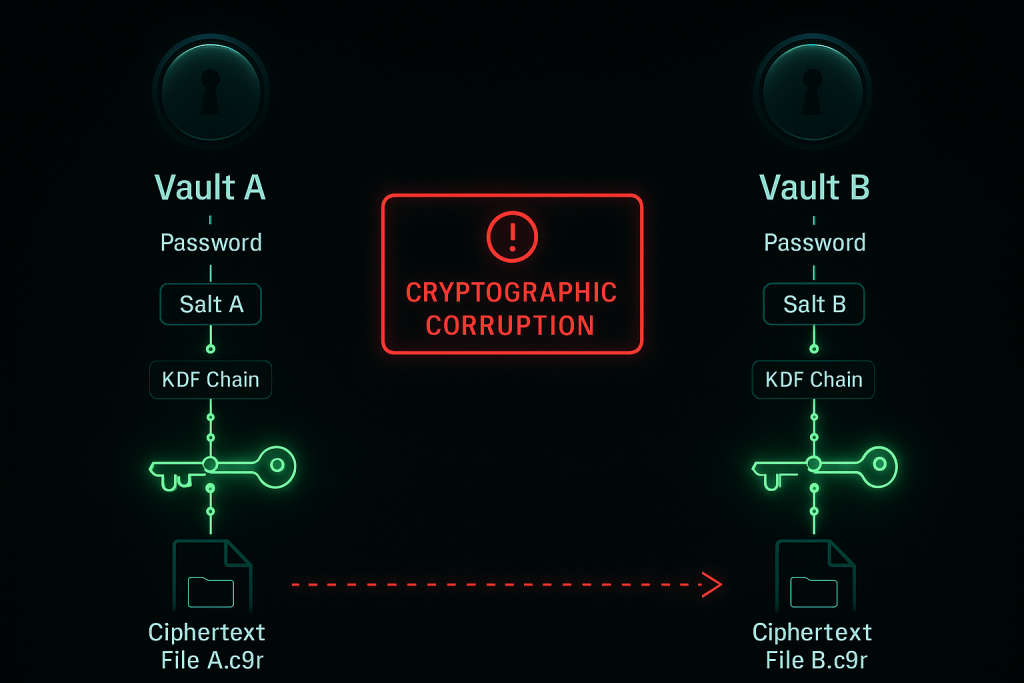
When technical teams manage data security, the instinct might be to treat encrypted vault containers like any other folder structure. However, attempting to merge or split vaults by manipulating the underlying encrypted files in the cloud storage location is the single greatest risk to data integrity.
The Critical Flaw: Same Password Does Not Equal Same Key
A fundamental security principle in client, side encryption is key segregation. Two separate encrypted containers (vaults) never share the same derived master key, even if the user applies the identical master password to both during creation. When a vault is initiated, the application uses the master password along with unique, randomized cryptographic salt and key derivation functions (KDFs) specific to that container. This process generates a unique vault key.
This key segregation means that if an administrator creates Vault A and Vault B using the password “Q4$Project,” the resulting cryptographic keys held within the vault headers are mathematically distinct.
The critical failure occurs when a user attempts to manually copy the encrypted files, the cipher text files, often recognizable by obfuscated names ending in extensions like .c9r, from Vault A’s underlying cloud storage folder and drop them into Vault B’s cloud storage folder. Vault B’s software client will recognize the files exist but will be unable to decrypt them because it lacks the original key material required to match the cryptographic file headers.
The Danger of Silent Corruption
The failure resulting from key misalignment is known as cryptographic corruption. Unlike a file system error that immediately halts operations, cryptographic corruption is often silent. The cloud provider and the file system still see valid, correctly named encrypted files in the directory structure. The vault remains technically “healthy” from a structural perspective.
This silent failure mode is particularly dangerous because the problem won’t be apparent until a team member attempts to access that specific merged file days or weeks later. By the time the user encounters the error (“Unable to decrypt header of file”), the original, uncorrupted data in the source vault may have already been archived, overwritten, or deleted based on the assumption that the merge was successful. This delayed failure eliminates the chance for a simple undo or restore, transforming a simple merge error into an irreversible data loss event.
The E2EE Collaboration Trade, Off
E2EE is powerful because it enforces a zero, knowledge architecture, ensuring the cloud service provider (the server) cannot read the data. This security gain, however, introduces complexity in team collaboration, specifically concerning concurrent modifications and conflict resolution.
Standard collaborative tools (like shared cloud documents) allow the server to decrypt and merge competing edits instantly. Since E2EE servers cannot decrypt the content, they have no mechanism to compare and combine differing versions of the same file edited simultaneously by two team members.
This design constraint is why client applications, such as Cryptomator, must manage synchronization conflicts locally. If two encrypted files with the same base name are detected, the Cryptomator client detects the conflicting pattern in the encrypted filename and resolves it by renaming the cleartext file (e.g., appending a suffix like (Created by Alice).odp). While data integrity is maintained through this client, side renaming, teams must accept that they sacrifice the automated, seamless merging functionality of non, encrypted collaborative tools.
Section 2: Method 1: The Guaranteed Safe Merge (Cleartext Consolidation)
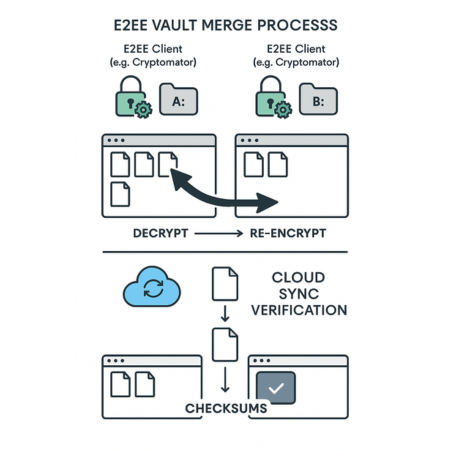
The fundamental solution to safely merging content between two vaults that use independent keys is to handle all movement only within the client’s cleartext view. This forces the E2EE application to handle the cryptographic heavy lifting correctly.
2.1 Prerequisites and Safety Checks
Before initiating any movement between independent vaults, these steps must be confirmed to mitigate operational risk:
- Local Capacity Verification: The computer performing the merge must have enough free local hard drive space to simultaneously hold the cleartext version of all files being moved, plus system overhead. The data will temporarily exist outside of the encryption boundary on the local machine during the decryption and re, encryption pipeline.
- Backup Confirmation: Verify that both the source and destination vaults have recent, successful cloud synchronization timestamps and are fully backed up. Corrupted vault structures are sometimes fixable by replacing a damaged
masterkey.cryptomatorfile with a backed, up version. - Client Stability: Ensure the latest stable version of the desktop E2EE client (e.g., Cryptomator) is installed to guarantee the most current security fixes and compatibility with the current vault version format.
2.2 How, To Skeleton: Merging Two Independent Vaults
The process leverages the desktop client’s virtual drive functionality, which provides the decrypted view necessary for safe data movement.
The Goal: Transfer files from Vault A (Source) to Vault B (Destination) by utilizing the operating system’s copy mechanism across the cleartext virtual drives, forcing re, encryption using Vault B’s unique key.
Step, by, Step Tutorial
- Unlock and Assign Drives:
Action: Open the E2EE application (e.g., Cryptomator). Unlock both the Vault A (Source) and Vault B (Destination) containers. Assign distinct and easily identifiable virtual drive letters to each vault (e.g., A: for Source and B: for Destination).
- Access Cleartext Views:
Action: Open two separate instances of File Explorer (Windows) or Finder (macOS). Navigate one window to the cleartext virtual drive of Vault A (Source) and the other to the cleartext virtual drive of Vault B (Destination).
- Initiate the Transfer:
Action: Select the files or folders designated for merging within Vault A’s cleartext view. Drag, drop, or initiate a move/copy command to Vault B’s cleartext view.
Technical Note on Move Operations: It is important to understand that when moving files between two different file systems, and a virtual drive is treated as a separate file system, the operating system does not perform a true “move.” Instead, it simulates the move by executing a “copy, then, delete” sequence. The files are decrypted on the fly from Vault A, copied and simultaneously re, encrypted into the structure of Vault B, and then the original cleartext files are deleted from the Vault A virtual drive (triggering the deletion of the original encrypted files in Vault A’s cloud folder).
- Confirm Cloud Synchronization:
Action: After the local file transfer is complete, confirm that the underlying cloud synchronization client (e.g., Dropbox, Google Drive, OneDrive) has successfully processed the new encrypted files uploaded from Vault B’s local storage folder to the remote cloud server. This confirmation is vital for ensuring the data is protected and remote team members can access it.
2.3 Verification Proof of Work
The merge is only complete and verified when the following checks are performed. Administrators should document these results as proof of integrity.
Verification of Safe Vault Merge
| Action | Verification Method | Expected Result |
| Transfer Completion | Check file counts, folder sizes, and checksums in the Vault B cleartext view. | File count and size totals match the source, and all files open without errors. |
| Integrity Check | Close and re, open Vault B, then access a random sample of 5, 10 newly merged files. | No “Unable to decrypt header” errors. The cleartext view is stable. |
| Encryption Confirmation | Examine the underlying cloud storage folder for Vault B. | New, uniquely obfuscated filenames (FHTa55bH... sUfVDbEb0gTL9hZ8nho.c9r) corresponding to the merged cleartext files are visible. |
2.4 Splitting a Vault Safely
The mechanism for safely splitting a vault (segregating a subset of files into a new container) works identically to merging. First, a new Destination Vault (B) is created with its own unique key material. Then, the Source Vault (A) and the Destination Vault (B) are unlocked simultaneously. The administrator copies the necessary segregated files from A’s cleartext view to B’s cleartext view. This process generates a new, independently keyed vault specific to a new team, project, or access group, minimizing unnecessary exposure.
Section 3: Method 2: The Collaboration Solution (Managed Key Brokering)
For large teams requiring ongoing collaboration, auditability, and rapid changes to permissions, the manual cleartext copying method is inefficient and prone to human error. Managed E2EE services solve these problems by centralizing key management and access control while maintaining the zero, knowledge guarantee.
3.1 Architecting Zero, Knowledge Team Access
Solutions like Cryptomator Hub transition E2EE security from an individual password challenge to an integrated, managed system. The Hub functions strictly as a key broker. It manages encrypted access tokens through user and device key pairs.
Crucially, the Hub never possesses the vault keys in cleartext, meaning that even if the Hub infrastructure were compromised, the vault contents could not be decrypted (zero, knowledge principle).
This approach enables two major security enhancements:
- Separated Authentication: The actual verification of user identity is handled by an existing identity provider (IdP) like Keycloak. The IdP verifies the user before access to the encrypted vault keys is granted. This separation isolates authentication from key management, minimizing the service provider’s role in credential handling, aligning with client, side encryption best practices.
- Role, Based Access Control (RBAC): Instead of relying on sharing a single, static master password, which is neither secure nor manageable, the Hub allows administrators to assign granular permissions. Access to specific vaults can be granted or revoked instantly via a centralized dashboard without changing the vault’s underlying master password.
This structural shift drastically improves the security posture of collaborative E2EE data. Standard E2EE sharing relies on the master password, which lacks both revocability (without resetting the password for every user) and auditability. Managed systems meet compliance requirements (such as GDPR or HIPAA) by providing auditable access management while strictly upholding the non, negotiable security boundary of zero, knowledge.
3.2 Comparison Skeleton: Team E2EE Collaboration Models
Choosing the right approach depends on the scale, compliance needs, and frequency of data reorganization required by the organization. The following table compares the operational realities of the three validated methods.
Team E2EE Collaboration Model Comparison
| Feature | Cleartext Copy (Manual) | Managed Hub (e.g., Cryptomator Hub) | Atomic Sync (Rclone) |
| Security Risk (Operational) | High (temporary cleartext exposure, risk of human error) | Very Low (Zero, Knowledge maintained, controlled access) | Moderate (Configuration error risk, localized key exposure) |
| Access Control | None (Shared Master Password) | Granular RBAC, Auditable, and Instantly Revocable | Configuration file based (binary access control via key file integrity) |
| Conflict Resolution | Manual cleartext review required by user | Automatic naming conflict resolution by client | Configurable strategy (newer, older, or larger file winner) |
| Use Case | One, time archiving, small file count merges. | Ongoing, dynamic team collaboration with strict compliance requirements. | Automated backup replication, large, scale splitting, server, side movement. |
| Setup Time / Cost | Low / Free (Desktop application) | High (Requires infrastructure integration) / Subscription | Moderate (Command, line interface learning curve) / Free (Open source) |
Section 4: Method 3: Advanced Vault Management (Rclone for Splitting and Sync)
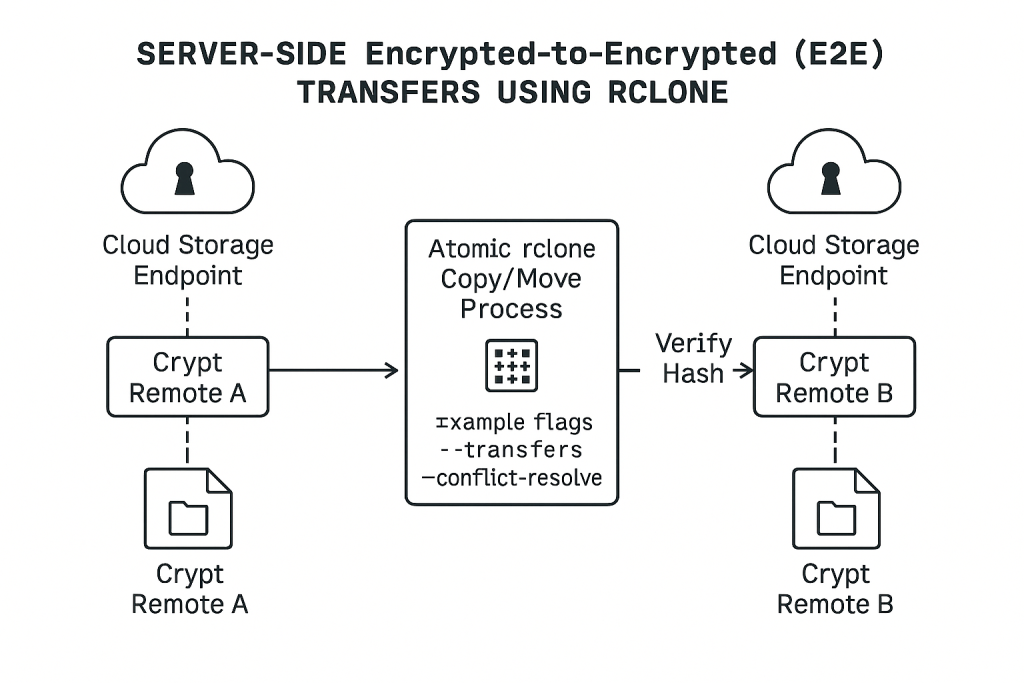
For power users or administrators managing large datasets where moving files through a local virtual drive is impractical due to speed or volume limitations, command, line utilities offer an advanced, automated solution. Rclone, configured with the appropriate Cryptomator compatibility, enables atomic, encrypted file movement suitable for automated splitting or replicating vaults.
4.1 Prerequisites for Rclone
This method requires a higher degree of technical precision:
- Software and Stability: Rclone must be installed on a server or machine with guaranteed bandwidth stability.
- Configuration Management: A detailed
rclone.conffile must be created. This configuration must define both the underlying cloud provider remotes and the specializedcryptremote that maps to the Cryptomator vault structure. - Key Exposure Warning: Rclone requires the Cryptomator vault password or key information to be stored within its configuration file to function. This creates a highly localized, elevated key exposure risk that necessitates strict filesystem permissions and securing the configuration file itself.
4.2 How, To Skeleton: Splitting a Vault via Rclone Copy/Move
The technique focuses on server, side management of the encrypted data structure, utilizing Rclone’s ability to handle the encryption boundary defined in its configuration.
Step, by, Step Tutorial (Encrypted, to, Encrypted Split)
- Define Cloud and Crypt Remotes:
Action: Ensure the
rclone.confcorrectly defines the source and destination cloud locations (e.g.,Gdrive_Source:,Gdrive_Dest:). Next, define two separatecryptremotes (VaultA_CryptandVaultB_Crypt) pointing to these respective cloud folders. If splitting a single, existing source vault into two new cloud locations for management purposes, it is critical that thesecryptremotes share the same encryption key material. - Execute Atomic Copy:
Action: Use the
rclone copycommand to atomically transfer the desired subfolders or files from the source vault remote to the destination vault remote. Rclone performs this copy in a manner that ensures file integrity is maintained during transfer.Example Command:
rclone copy VaultA_Crypt:Projects/ProjectX VaultB_Crypt:Archives/ProjectX --transfers 4 --progressThe--transfers 4flag controls concurrent file transfers, optimizing speed, and--progressprovides real, time status. - Verify Integrity:
Action: Unlike standard cloud transfers, Rclone automatically verifies file hashes after transfer completion. The administrator should check the output summary for confirmed file transfers and zero reported errors, guaranteeing cryptographic integrity.
4.3 Dealing with Encrypted Conflicts in Bisync
When Rclone is used for two, way synchronization (Bisync), it offers advanced control over concurrent modifications that is superior to the automatic renaming mechanisms of typical cloud clients.
Rclone uses the --conflict-resolve CHOICE flag to define a strategy for managing concurrent changes to the same file.
--conflict-resolve newer: The file with the more recent modification time is automatically selected as the winner and copied without renaming.--conflict-resolve larger: The physically larger file is considered the winner, regardless of modification time. This is useful if concurrent saving operations result in an incomplete or partially truncated version of the file.--conflict-resolve none(Default): If no choice is specified, Rclone maintains the default behavior of renaming both files to keep them, similar to the strategy employed by standard cloud providers.
Section 5: Data Integrity, Synchronization, and Failure Recovery
For administrators, anticipating and fixing vault corruption is essential. Failure recovery often relies on understanding how the encryption client and the cloud sync client interact.
5.1 Synchronization Conflict Naming Conventions
When multiple team members access and modify data concurrently, the risk of synchronization conflict rises.
- The Conflict Mechanism: The conflict initially occurs when the cloud provider detects two conflicting versions of the encrypted filename. However, the E2EE client detects this unexpected pattern in the encrypted filename.
- Cleartext Resolution: Instead of leaving the user with multiple obfuscated encrypted names, the client (e.g., Cryptomator) decrypts the file and resolves the conflict by renaming the cleartext file to include a suffix reflecting the origin or timestamp (e.g.,
businessPitch (Created by Alice).odp). - Cloud Client Intervention: A known vulnerability arises when the underlying cloud synchronization client (OneDrive, Dropbox) intervenes before the E2EE client can process the conflict. This results in suffixes that are not Cryptomator, specific, such as
(1)or appending the PC name (-MY-PC-NAME.c9r) to the encrypted file. When the cloud client alters the encrypted structure, it increases the risk of file header corruption or structure misalignment.
Administrators must recognize that the application favors atomic operations (treating the file as a whole) because splitting a file into parts significantly increases the chance of synchronization conflicts resulting in differing part versions (e.g., file.part1 and file.part2 (1)), which are impossible to reassemble. This preference for atomicity is a critical compromise that simplifies conflict management while ensuring data integrity.
5.2 Troubleshoot Skeleton: Vault Corruption and Data Recovery
This troubleshooting guide addresses common failures encountered during or after vault management operations, prioritizing non, destructive fixes.
Vault Corruption Symptoms and Fixes
| Symptom/Error String | Root Cause (Ranked) | Non, Destructive Test/Fix | Last Resort (Data Loss Warning) |
Vault unlocks, but files displayed in the virtual drive are still encrypted names (e.g., M2PMHI3DCF4TKO3MYH4Q...) |
1. Encrypted files were manually dropped into the cleartext view (vault inside vault structure). 2. Key file or structure misalignment. | Verify: the user is viewing the correct virtual drive, not the underlying cloud sync folder directly. Relocate the corrupted encrypted folder outside of the vault structure. | Use the Cryptomator Sanitizer tool (if vault version compatible) to attempt decryption. |
“Unable to decrypt header of file” or Unsupported vault version 7 |
1. Sync interruption or partial transfer leaving a damaged file header. 2. Vault version mismatch with recovery tools. | Action: Locate and replace the latest intact masterkey.cryptomator file from a prior backup (ensure version consistency, e.g., v6 or v7). |
Attempt restoration using the Cryptomator Sanitizer command, line tool. Check if Sanitizer supports the current vault version. |
| VeraCrypt reports: “Incorrect password or not a VeraCrypt volume” | Volume header damaged by a third, party application or malfunctioning hardware component. | Action: Use VeraCrypt’s internal function: Tools > Restore Volume Header to restore the embedded backup header. |
Disable interfering applications (such as antivirus software performing real, time scanning) and attempt remounting. |
Unexpected files with suffixes like (1) or (Created by PC Name) appear in the encrypted storage folder |
Cloud synchronization client initiated an automatic conflict resolution rename on the cipher text. | Action: Manually unlock the vault and open the cleartext file(s). Determine the correct version based on content or timestamp and manually delete the outdated copy to resolve the duplication. | N/A (Data is safe, only duplicated). |
Last Resort Warning: Sanitizer Tool
The Cryptomator Sanitizer is designed for file recovery following structural damage. A critical warning is necessary: Sanitizer often lags behind the latest application and vault version updates. For example, older Sanitizer versions may not support Vault Version 7, rendering it temporarily unusable for recovery until the tool is updated or its functions are integrated into the main application. Always confirm the compatibility of the recovery tool before relying on it.
Section 6: Security and E2EE Governance for Team Collaboration
Effective E2EE vault management requires establishing strict usage governance policies that account for the technical limitations of zero, knowledge architecture.
6.1 Concurrent Modification: The E2EE Pitfall
The challenge of concurrent modification is severe in E2EE environments. If multiple people modify the same file concurrently, resulting in simultaneous uploads, the risk of irrecoverable data destruction increases significantly. When a synchronization client detects two differing versions, it may append suffixes like (1) to both file components, making it impossible to reconstruct the original, usable file.
Policy Solution: Teams must adopt a clear, enforced policy against simultaneous editing of sensitive files stored directly within E2EE vaults. If high, concurrency, real, time editing is mandatory, work should be done in a collaborative, non, E2EE environment first (like a network drive or Google Docs). The final, authoritative, and sensitive version should then be archived into the E2EE vault. This ensures the protection of the final state without risking loss during active development.
6.2 The Importance of Protecting Metadata
While E2EE is highly effective at protecting content confidentiality, it does not guarantee anonymity or full protection of related metadata. Metadata, which includes access timestamps, file sizes, sender/recipient information, and connection frequency, can still be analyzed by third parties to reveal communication patterns and tracking data.
For administrators performing merges and splits, this means minimizing the time cleartext metadata is exposed. Although the manual cleartext consolidation (Method 1) is necessary for cryptographic safety, rapid, complete synchronization immediately following the transfer is essential. This reduces the window during which the local file modification timestamps on the administrator’s device might reveal activity patterns.
6.3 Verdict by Persona
The optimal strategy for vault management is entirely dependent on the organizational structure and security requirements. Administrators must select the method that balances security, scale, and operational overhead.
Vault Management Method Recommendation by Persona
| Persona | Primary Security Need | Recommended Vault Management Method |
| Freelancer / Individual | Simple, reliable backup and archival. | Method 1: Cleartext Consolidation. Safe, requires no specialized infrastructure, and is zero cost. |
| SMB Administrator (5–50 Users) | Auditable access control, rapid team scaling, and revocability. | Method 2: Managed Key Brokering (Hubs). Provides governance, audit logs, and strong zero, knowledge security for ongoing projects. |
| Enterprise Operations Team | High, volume automation, server, side splitting, and disaster recovery. | Method 3: Rclone for Atomic Replication. Used in conjunction with managed RBAC (Method 2) for access control, Rclone handles large data movements efficiently. |
Section 7: Essential FAQs (PAA Optimization)
1. Does using the same password for two vaults mean they share the same key
No. Even if the master password is identical, the vault creation process uses unique, randomized salt and key derivation functions. This guarantees key segregation, meaning you must never move encrypted files between vaults, as it will cause irrecoverable data corruption.
2. Is it safe to use a third, party backup tool to sync the encrypted vault files
It is safe, provided the backup or synchronization tool treats the entire encrypted vault folder as a single atomic unit. Tools must copy or move the entire folder structure, including configuration and master key files, without attempting to modify the internal file arrangement.
3. How does Cryptomator handle concurrent edits when multiple team members are working
The underlying cloud provider first handles the raw conflict. Cryptomator then detects the resulting conflicting encrypted filename pattern and resolves it by renaming the file in cleartext (e.g., appending the user or device name). Team members must then manually review the resulting cleartext files to determine the correct version to retain.
4. What is the difference between E2EE and TLS/Encryption in Transit
Encryption in Transit (Transport Layer Security, or TLS) secures data only between your device and the server. E2EE secures the data from the sending client to the receiving client, ensuring the cloud server cannot read the data content at any point (zero, knowledge).
5. Can a malicious server compromise my files in a managed E2EE solution
In a robust E2EE architecture (like Cryptomator Hub), the server acts only as a key broker and does not hold cleartext keys. However, vulnerabilities discovered in certain E2EE platforms have shown that a malicious server could potentially tamper with file integrity or inject data through metadata attacks if cryptographic design flaws are present.
Conclusions and Recommendations
The analysis of cloud encryption in 2025 demonstrates a critical security gap between marketing claims and verifiable implementation. The fundamental shift in data protection is moving away from trusting a provider’s policy (even E2EE) toward establishing technical assurance through exclusive key ownership.
The analysis of cloud encryption in 2025 demonstrates a critical security gap between marketing claims and verifiable implementation. The fundamental shift in data protection is moving away from trusting a provider’s policy (even E2EE) toward establishing technical assurance through exclusive key ownership.
For organizations requiring the highest level of data confidentiality, two pathways offer verifiable security:
- Enterprise Control (HYOK): Implementing a custom Client, Side Encryption solution using an isolated Key Management System (KMS) and open, source tools like Tink. This achieves the maximum level of control, enforces separation of duties, and places the technical defenses of zero, knowledge entirely within the organization’s purview. This solution is required for entities operating under strict regulatory regimes.
- Commercial Verification (Audited ZKE): Selecting a commercial Zero, Knowledge provider that submits to frequent, public, third, party security audits (like Internxt or verified systems like Tresorit, despite historical implementation notes). It is mandatory to choose providers based in privacy, friendly jurisdictions, such as Switzerland, which offer an increased buffer against legal compulsion attempts under the CLOUD Act or similar foreign statutes.
Any cloud service whose key management process is opaque, failing to detail how keys are derived, authenticated, and stored (as observed with Sync.com), must be considered unsuitable for sensitive data. Security in 2025 is predicated on verifiable cryptographic proof, not proximity to the data.