
Why Local Encryption Plus Secure Backups Beat Every Ransomware Trend
This executive overview, created by the security experts at Newsoftwares.net, provides the definitive defense against modern ransomware and double extortion. Stop relying on the firewall as your only defense. The modern ransomware attack, exemplified by groups like LockBit, now follows a two, part threat: data encryption and data exfiltration (double extortion). Waiting until a threat actor is inside your network is too late. The only way to guarantee business continuity and render the attacker’s effort useless is by implementing a layered defense before the breach, defined by local encryption (making stolen data unusable) and air, gapped, immutable backups (ensuring rapid, guaranteed recovery). When executed correctly, you transform a catastrophic data breach into a simple device re, imaging task. This strategy ensures both verifiable security and operational recovery, minimizing financial and legal risk.
Stop relying on the firewall as your only defense. The modern ransomware attack, exemplified by groups like LockBit, now follows a two, part threat: data encryption and data exfiltration (double extortion). Waiting until a threat actor is inside your network is too late.
The only way to guarantee business continuity and render the attacker’s effort useless is by implementing a layered defense before the breach. This strategy is defined by local encryption (making stolen data unusable) and air, gapped, immutable backups (ensuring rapid, guaranteed recovery). When executed correctly, you transform a catastrophic data breach into a simple device re, imaging task.
This is the technician’s overview to making your data mathematically untouchable.
Three Security Mandates Against Ransomware Summary
- Neutralize Double Extortion with Encryption: Use Full Disk Encryption (FDE) or File Container Encryption (e.g., VeraCrypt) to ensure that even if the attacker steals sensitive documents, the resulting exfiltrated files are incomprehensible ciphertext.
- Mandate the 3, 2, 1 Rule: Maintain at least three copies of all critical data, stored on two different media types, with at least one copy stored off, site or logically isolated (air, gapped).
- Harden the Recovery Key: Whether you use BitLocker or VeraCrypt, your encryption is only as secure as the recovery key. Store your 48, digit key physically offline, on paper or an encrypted USB drive, separate from the secured machine.
1. Deconstructing the Modern Ransomware Playbook
Ransomware attacks are no longer brute, force file scrambles. They are complex operations involving reconnaissance, lateral movement, and targeted destruction of recovery options. To defeat ransomware, you must understand its targets.
The Attack Chain: From Phishing to Exfiltration
Modern groups like LockBit systematically bypass traditional network security using stolen credentials, phishing, or exploiting public, facing applications (e.g., Log4Shell). Once initial access is secured, the playbook focuses on three critical objectives:
- Lateral Movement and Credential Theft: Attackers don’t encrypt immediately. They use living, off, the, land tools like Windows PowerShell and PsExec to move across the network, seeking high, value targets, usually file servers, domain controllers, or critical databases. They steal credentials using tools like Mimikatz or PasswordFox to escalate privileges and access sensitive systems.
- The Double Extortion Pivot: This is the most damaging trend. Before any encryption occurs, the threat actor exfiltrates massive volumes of sensitive data (PII, IP, financial records) to their own storage network. If the victim refuses to pay the ransom to unlock their files, the attacker threatens to publish or sell the stolen data, doubling the pressure and legal risk.
- The Final Blow: Shadow Copy Destruction: The attacker’s last preparatory step is eliminating local recovery options. They use commands to interact with the Windows Volume Shadow Copy Service (VSS) and delete any existing shadow copies. This action ensures the victim cannot perform a rapid, local rollback and forces them into a lengthy data restoration process or, critically, payment.
When network segmentation fails, ransomware is quarantined to the device it first infected, leaving file servers and databases untouched. When local encryption is used, data exfiltration is rendered useless.
2. Countermeasure Layer 1: Local Encryption Against Exfiltration
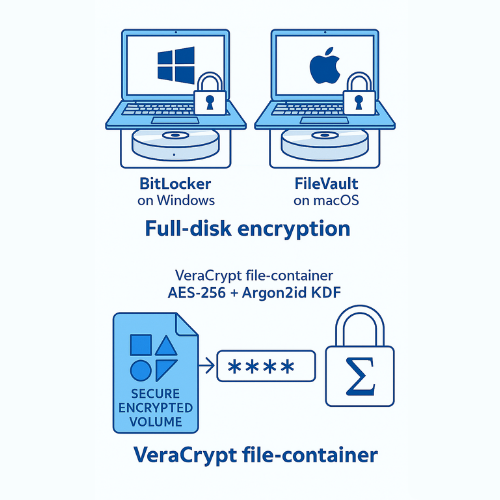
The primary defense against double extortion is to ensure that even if the attacker breaches the network and steals the file, the data payload is nothing but scrambled ciphertext. This requires mandatory Full Disk Encryption (FDE) for all endpoints and targeted container encryption for highly sensitive files.
Whole Disk Encryption (WDE) vs. File Containers
| Encryption Method | Use Case | Primary Threat Mitigated | Key Tool Examples |
| Whole Disk Encryption (WDE / FDE) | Protecting the entire OS and all contents on mobile devices (laptops, phones). | Cold Theft (physical loss of device) and Ransomware Exfiltration. | BitLocker (Windows Pro/Enterprise), FileVault (macOS). |
| File Container Encryption | Securing specific folders, external drives, or cross, OS files. | Targeted Data Exfiltration and protection against file, scanning malware. | VeraCrypt, Cryptomator. |
FDE: The Defense Against Physical and Logical Theft
Full Disk Encryption secures every sector of the hard drive, including the operating system and temporary files. FDE is transparent to the user once the key is provided at boot, but it offers a critical defense: without the key derived from the user’s password, the hard drive is mathematically inaccessible, even if removed and placed in another machine.
This mechanism protects directly against data exfiltration. If a threat actor, having gained access to a user’s session, downloads an encrypted file container to steal it, the file remains secured by its secondary encryption layer. If they steal unencrypted files from a disk protected by FDE, that data is only exposed while the system is actively running. If the system is offline, the drive is locked by the FDE.
Tutorial: Implementing the Gold Standard Container (VeraCrypt)
VeraCrypt is an open, source, cross, platform solution (Windows, macOS, Linux) trusted for creating encrypted containers or volumes. It is widely preferred by security experts for its transparency and advanced Key Derivation Function (KDF) options.
Prerequisites and KDF Selection (Argon2id)
VeraCrypt supports multiple Key Derivation Functions (KDFs), which transform your human, memorable password into the cryptographic key. You must avoid older, less secure KDFs.
The mandate is to choose Argon2id. Unlike PBKDF2, which is vulnerable to GPU, accelerated parallel cracking due to low memory requirements, Argon2id is a memory, hard KDF. It requires substantial RAM to process, making mass, parallel brute, force attacks economically prohibitive for attackers using specialized ASIC or GPU clusters.
| KDF Comparison: Security vs. Hardware Attack | PBKDF2 | Argon2id |
| Security Type | CPU, intensive (Time, hard) | Memory, hard and CPU, intensive |
| Vulnerability to Attack | Highly vulnerable to massive parallel brute force attacks (GPUs, ASICs) | High resistance to specialized hardware parallelization |
| Recommendation | Only for broad compatibility, Avoid if possible | Mandatory for new, highly sensitive containers |
Steps: Creating a VeraCrypt Encrypted Container (Windows)
- Launch the Wizard: Open VeraCrypt and click Create Volume.
- Select Volume Type: Choose Create an encrypted file container. (This option secures data within a single file that can be stored anywhere, including cloud sync folders).
- Standard Volume: Select Standard VeraCrypt volume (default).
- Specify Location: Click Select File and choose a location and filename for your container (e.g.,
SecureArchive.hc). This file functions like any regular file. - Choose Encryption Options: In the encryption settings, ensure AES-256 is selected as the algorithm. Crucially, verify that the Key Derivation Function is set to Argon2id (Recommended for new volumes).
- Set Size and Password: Define the container size (e.g., 50 GB). Set a strong, unique password.
- Finalize: Click Format to create the volume.
Verification and Key Management (Proof of Work)
- Verification Check: To confirm the container is secured, attempt to mount the volume using an incorrect password. The system must fail to open the virtual drive, confirming that the derived key is incorrect.
- Key Backup: The volume password is the sole access mechanism. If lost, the data is unrecoverable. Ensure the password is stored in an audited password manager or written down and physically secured (e.g., in a safe).
- Anti, Ransomware Bonus: VeraCrypt has introduced fixes to prevent the presence of hidden volumes from being detectable. This feature, while not mandatory, adds plausible deniability against sophisticated state, level coercion.
3. Countermeasure Layer 2: Secure Backups Against Encryption
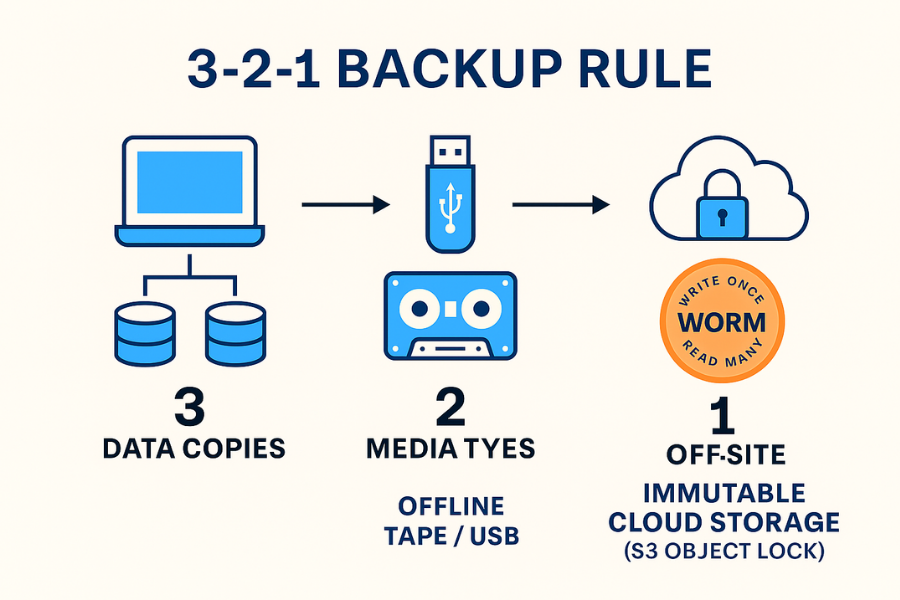
Ransomware succeeds when the victim cannot restore files without paying. The goal of a secure backup strategy is to create a copy of data that is mathematically impossible for the attacker to reach, modify, or delete.
The 3, 2, 1 Rule: The Minimum Standard
- 3 Copies of Data: The original working copy, plus two backup copies.
- 2 Different Media Types: Store copies on different media (e.g., local disk + cloud storage, or NAS + tape) to protect against a single media failure.
- 1 Copy Off, site/Air, Gapped: At least one copy must be logically or physically separated from the network where the ransomware is deployed.
The Air Gap Mandate
The primary weakness of the 3, 2, 1 rule is that if the third copy is merely sitting on an accessible, non, segmented network share, lateral movement allows the ransomware to find and encrypt it. The solution is the air gap.
An air gap creates network isolation between the primary data and the recovery data.
| Air Gap Type | Mechanism | Ransomware Defense |
| Physical Air Gap | Disconnecting storage media (tape, external USB) from all network, connected devices. | Absolute protection, the malware cannot physically jump the gap. |
| Logical Air Gap | Network Segmentation and Immutable Cloud Storage. | Prevents the infected machine from communicating with the backup server or deleting cloud files. |
Tutorial: Implementing a Logical Air Gap (Immutable Storage)
For most businesses, constantly swapping tapes or USB drives is inefficient. The solution is using immutable cloud storage (Write Once, Read Many , WORM) features offered by major cloud providers, such as S3 Object Lock.
Immutable storage guarantees that, even if an attacker gains administrator credentials and full network access, they cannot modify or delete the backup files until a specified retention period expires.
Steps: Setting up S3 Object Lock (Immutable Cloud Backup)
- Bucket Creation: When creating a new S3 bucket (or equivalent cloud storage container), the Object Lock feature must be enabled during the creation process. Gotcha: This feature cannot be added later. Enabling Object Lock also automatically enables versioning for the bucket, which is critical for recovery.
- Retention Mode Selection:
- Governance Mode: Protects objects from being deleted by most users, but allows specific administrators with the
s3:BypassGovernanceRetentionpermission to alter retention settings or delete objects if necessary (e.g., for testing or emergency maintenance). - Compliance Mode: Provides the highest protection. No user, not even the root AWS account, can overwrite or delete the object version or alter its lock settings until the retention date expires. This mode is non, negotiable for critical, regulated data.
- Governance Mode: Protects objects from being deleted by most users, but allows specific administrators with the
- Set Retention Period: Specify a mandatory retention time (e.g., 90 days). Once set in Compliance Mode, this date cannot be shortened.
- Data Backup: Configure your backup software (Veeam, Commvault) to utilize the new immutable S3 bucket as the off, site destination.
- Verification: Attempt to manually delete a test object protected by the Compliance Mode. The deletion must fail, confirming the immutability policy is active.
Network Segmentation: Isolating the Backup Network
For local backups, creating a logically segmented network acts as an internal fence. Ransomware should never be able to directly communicate with the dedicated backup storage.
- Principle of Least Privilege: Ensure the backup server or NAS only has network access permissions required for its primary job: receiving data from production servers.
- Access Control Lists (ACLs): Implement strict firewall rules (ACLs) to block all unnecessary traffic between the production network and the backup network. Only specific ports and IP addresses should be allowed to transmit data to the backup repository.
- Dedicated Credentials: Use unique credentials for the backup service account that do not have administrative privileges over the production network. If ransomware steals the backup admin credentials, they still cannot use them to move laterally back into the primary network.
4. Troubleshooting and Recovery: When the Defense Triggers
When an attack occurs, having strong encryption and backups is useless if you cannot successfully recover the system. Ransomware exploits specific Windows failure points, Volume Shadow Copies and BitLocker recovery modes.
The Volume Shadow Copy (VSS) Disaster
Ransomware often targets and disables the Volume Shadow Copy Service (VSS) or deletes existing shadow copies, typically resulting in VSS errors during recovery attempts.
Troubleshoot Table: VSS Errors and Ransomware Indicators
| Symptom / Exact Error String | Root Cause | Non, Destructive Test | Mitigation Strategy |
| VSS failed to process snapshot: Insufficient storage available (Error 0x8004231f) | VSS requires 10, 15% of total drive capacity for snapshots, low disk space caused failure. | Run vssadmin list writers in an administrative command prompt to check the status. |
Clear non, critical disk space. If space is adequate, restart the VSS service. |
| All system restore points constantly deleted | Ransomware or malware is running a script (often PowerShell) to systematically delete shadow copies. | Check Event Viewer for VSS errors (Error 0x80042308). | ACTION: Immediately disconnect the infected machine from the network. Do not attempt to restore until the device is cleaned with antivirus software. |
VSS service is missing, VSSAdmin List Writers gives Catastrophic Failure |
Ransomware successfully disabled/deleted the VSS service entirely. | Check Windows Services list for Volume Shadow Copy Service. | Requires rebuilding or re, registering VSS components (advanced fix, often necessitating OS repair or system image restore). |
BitLocker Recovery Loop Management
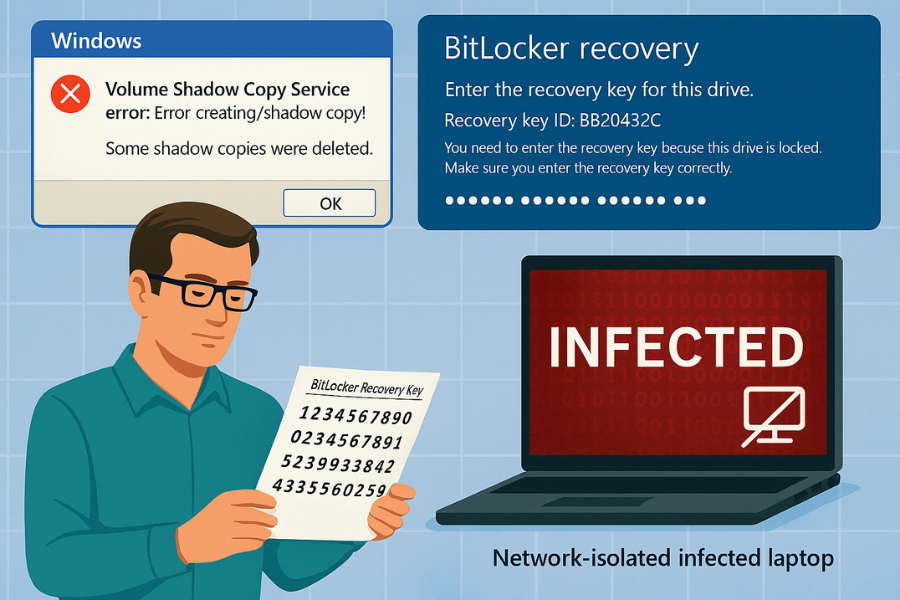
BitLocker leverages the Trusted Platform Module (TPM) chip to hold encryption keys, ensuring the system environment hasn’t been tampered with. If a BIOS update, firmware change, or hardware replacement occurs, the TPM sees the change and forces the device into the BitLocker recovery screen, demanding the 48, digit key.
Troubleshooting the Recovery Loop
- Unlock the Drive: On the recovery screen, select Skip this drive (if applicable) or access the command prompt (Troubleshoot > Advanced Options > Command Prompt).
- Unlock via Recovery Key: Use the command
manage-bde.exe -unlock C: -rp <48-digit BitLocker recovery password>. - Disable Protection: Once unlocked, permanently disable the current protector (the TPM key that is failing) to allow the system to boot without requesting the key again:
manage-bde.exe -protectors -disable C:. - Resume Protection: After the system boots normally, open an elevated PowerShell window and run
Resume-BitLocker -MountPoint "C:"to re, enable TPM protection using the new, stable configuration.
Final Warning: Key Failure is Data Loss
The ultimate reality of AES-256 encryption is that it has no backdoor. If you lose the 48, digit recovery key for BitLocker or forget the unique password for your VeraCrypt container, the data is permanently inaccessible. The solution to key failure is preparation: Never store recovery keys on the device itself. Print it and store it in a physical safe, or save it to a separate, encrypted USB drive.
5. Frequently Asked Questions (FAQs)
1. Does Full Disk Encryption (FDE) stop ransomware from encrypting my files
FDE (like BitLocker) protects against data access if the device is lost or stolen. It will not stop a ransomware program from encrypting files once the operating system is running and the drive is unlocked. Its primary value against modern ransomware is ensuring that data exfiltration results in useless, scrambled ciphertext.
2. Why is ZipCrypto dangerous, even with a strong password
ZipCrypto is an obsolete, fatally flawed stream cipher that is highly vulnerable to known, plaintext attacks. Attackers can find the internal encryption key by knowing or guessing only a tiny fragment of the file content, often within hours, regardless of how complex your password is. Always use AES-256.
3. What is the biggest weakness of relying on cloud provider backup encryption (Server, Side Encryption)
If you rely solely on Server, Side Encryption (SSE), the cloud provider holds the encryption keys. If an attacker gains full administrator access to your cloud account, they can easily access those keys and decrypt your data. Client, Side Encryption (CSE) using tools like Cryptomator eliminates this risk by keeping key control entirely on your local device.
4. What is the difference between PBKDF2 and the recommended Argon2id Key Derivation Function
Both protect passwords, but Argon2id is a modern memory, hard function. PBKDF2 uses minimal memory, allowing attackers to use cheap, parallel GPU hardware to test billions of passwords quickly. Argon2id requires massive memory per guess, which makes large, scale brute, force attacks economically infeasible.
5. How often should I test my backups, and what should I check for
You should test your recovery process regularly, at least quarterly, checking for three things: 1) Can you successfully access and retrieve the required file from the off, site, air, gapped copy? 2) Can you perform a full bare, metal restore of the operating system? 3) Do the recovery keys/passwords still work?.
6. Does the use of local encryption (VeraCrypt) slow down my computer significantly
In most modern systems, the impact is minimal. Encryption tools leverage AES-NI, a dedicated hardware acceleration feature in most Intel and AMD processors. This means the CPU can encrypt/decrypt faster than the hard drive can transfer data, resulting in negligible performance loss (often less than 5%).
7. Should I encrypt data that is stored on a local desktop computer inside a secure office
NIST guidance technically requires FDE only for mobile devices that leave the secure facility. However, FDE is considered “cheap and easy insurance” for all endpoints. Given the risk of insider theft or accidental loss, using FDE on desktops is strongly recommended as a baseline protection measure.
8. What does “Encrypt file names” do in file container software like 7, Zip or Cryptomator
This crucial option encrypts the metadata (file names, directory structure) of the archive itself. Without it, an attacker can still view the file names (e.g., “Q3-2025 Financial Report.xlsx”) even if the contents are scrambled. Encrypting names hides the context, denying the attacker valuable intelligence.
9. How does network segmentation prevent ransomware from spreading laterally
Network segmentation isolates high, value targets (like backup servers and core databases) from standard user workstations. If an employee’s laptop is infected, the malware is stranded on that asset because firewall rules prevent it from traversing the network and attacking segregated servers.
10. What is the difference between a Physical Air Gap and a Logical Air Gap
A Physical Air Gap involves removing the storage medium (tape or USB drive) and severing all wired/wireless connections. A Logical Air Gap uses network policies (segmentation) or immutable cloud features (Object Lock) to make the backup storage inaccessible to the malware, even if the system is compromised.
11. Can I use my backup recovery key to unlock my BitLocker drive
Yes. The 48, digit numerical recovery key, which should be stored separately (on paper or USB), is specifically designed to bypass the TPM security check and manually unlock the encrypted drive if the TPM fails or the boot process is interrupted.
12. Why is data integrity important alongside encryption
Encryption guarantees confidentiality (secrecy). Data integrity ensures the data has not been modified or tampered with. For backups, integrity is vital, you need assurance that the data you retrieve is the original, uncorrupted version, especially since attackers often try to delete or corrupt VSS recovery points.
13. What is a WORM solution, and why is it essential for backup
WORM stands for “Write Once, Read Many.” This technology, often implemented via S3 Object Lock, creates immutable storage. Once the backup data is written, it cannot be modified, deleted, or overwritten by anyone, including the system administrator, until a retention period expires. This defeats targeted deletion attacks by ransomware.
14. If I lose my VeraCrypt password, is there a recovery mechanism
No. VeraCrypt is intentionally designed to provide zero recovery options if the password is lost. If recovery were possible without the key, the entire cryptographic guarantee would be broken. Forgetting the password must be treated as permanent data loss, emphasizing the need for robust key management.
15. What are the common methods LockBit uses to steal initial access credentials
LockBit affiliates commonly use Remote Desktop Protocol (RDP) or VPN brute force attacks, exploit public, facing application vulnerabilities, and employ malware (like PasswordFox) to dump credentials from web browsers and Windows systems memory (LSASS).
Conclusion
The defense against modern ransomware is not singular, but layered, relying on a synthesis of cryptographic barriers and strategic data isolation. By making local encryption mandatory with memory, hard KDFs like Argon2id and implementing a rigorously applied 3, 2, 1 backup rule that mandates air, gapped or immutable storage, organizations neutralize the two, pronged threat of double extortion and data loss. This preparation transforms a system compromise into a non, catastrophic event, securing business continuity through verifiable, unassailable data recovery mechanisms.