
LUKS and VeraCrypt: Expert Guide to Secure Linux Block Storage and Cross, Platform Containers
This executive report, prepared by the security experts at Newsoftwares.net, provides the definitive technical guide for Linux encryption. Stop guessing which Linux encryption method is right for your data. You need native speed and deep integration for system security (LUKS) or guaranteed cross, platform access (VeraCrypt containers). This report delivers the specific technical commands, KDF configurations, and recovery steps missing from basic tutorials, ensuring your deployment meets high security and performance standards for verifiable, convenient protection.
Stop guessing which Linux encryption method is right for your data. You need native speed and deep integration for system security (LUKS) or guaranteed cross, platform access (VeraCrypt containers). This report delivers the specific technical commands, KDF configurations, and recovery steps missing from basic tutorials, ensuring your deployment meets high security and performance standards.
Direct Answer: The Encryption Choice
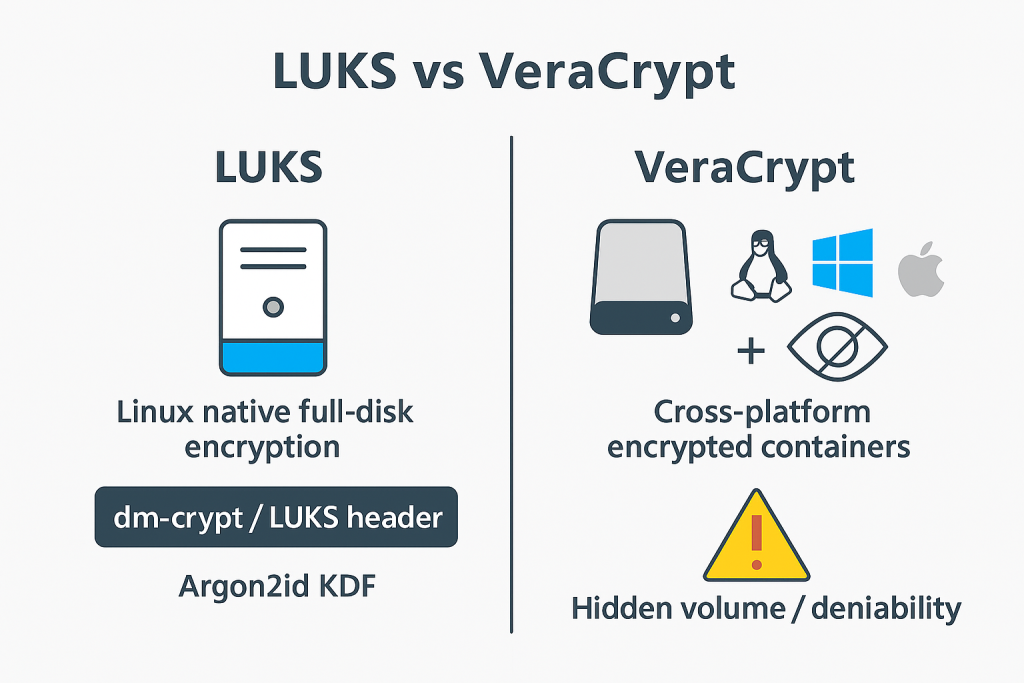
The choice between Linux Unified Key Setup (LUKS, managed by dm-crypt) and VeraCrypt depends fundamentally on portability and integration requirements. LUKS is the kernel, native standard, ideal for whole, disk and operating system encryption, offering seamless speed and robust integration. VeraCrypt, conversely, operates at the application layer and excels at creating portable file containers that function identically across Linux, Windows, and macOS systems.
The Encryption Use, Case Chooser
Choosing the appropriate technology requires weighing performance against access needs. LUKS provides superior performance when hardware acceleration is available, while VeraCrypt’s unique features, such as plausible deniability, address specific high, stakes security requirements.
| Feature | LUKS/dm-crypt (Linux Native) | VeraCrypt (Cross, Platform) |
| Primary Use Case | Full Disk Encryption (FDE), System Volume Protection (Root, Swap, Home). | Encrypted File Containers, Non, System Partitions, Multi, OS Data Exchange. |
| Portability | Low. Requires non, standard software for access on other operating systems. | High. Native application available on major operating systems (Linux, Windows, macOS). |
| Key Derivation Function (KDF) | LUKS2 defaults to Argon2id. Configurable PBKDF2 options available. | PBKDF2-HMAC (various hashes) or Argon2id, enhanced by Personal Iterations Multiplier (PIM). |
| Hidden Volumes/Denial | Not supported natively. Only achievable via detached headers or complex partition mapping. | Excellent, robust support for Plausible Deniability via Hidden Volumes. |
| Performance | Kernel, level integration, maximizes AES-NI hardware acceleration for high throughput. | Application, level (FUSE), mounting requires more CPU time due to higher KDF iteration counts. |
| Integrity | Highly resilient. Uses XTS mode, data corruption is restricted to 16, byte blocks. | Highly resilient. Uses XTS mode, data corruption is restricted to 16, byte blocks. |
II. LUKS Deep Dive: Setting Up High, Security Linux Storage
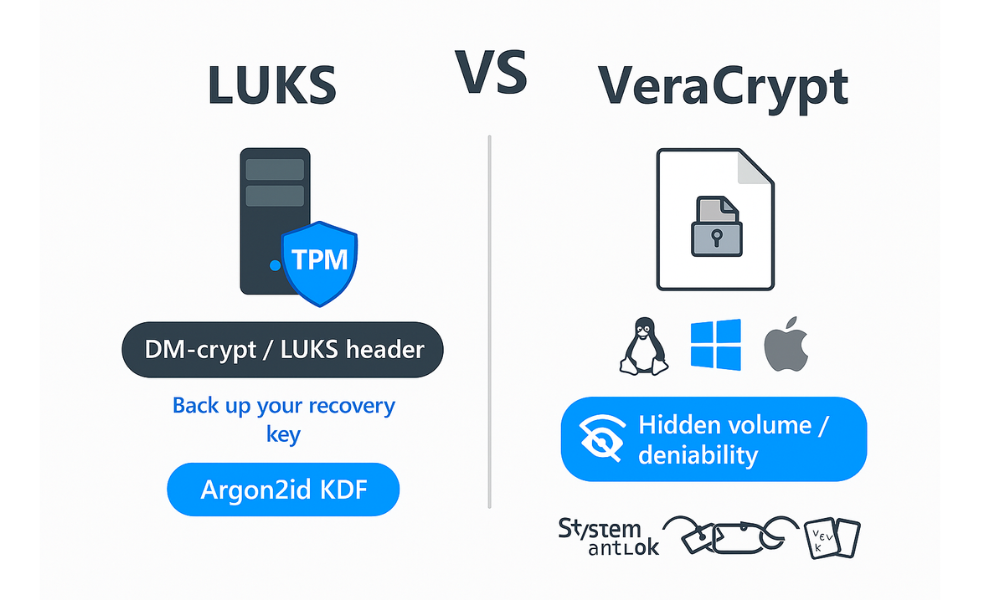
LUKS is the de facto standard for disk encryption within the Linux ecosystem. It leverages the kernel’s device mapper subsystem (dm-crypt) for efficient, secure block, level encryption. For modern deployments, careful attention must be paid to the Key Derivation Function (KDF) and post, formatting sanitation procedures.
The Argon2id Advantage: Why PBKDF2 is Legacy
The security of an encrypted volume relies heavily on the quality of the KDF used to transform the user’s password into the master encryption key. LUKS2 has modernized its defaults, favoring Argon2id over the older PBKDF2 standard.
Argon2id offers a superior defense mechanism: memory, hardness. This property means that attempting to break the password requires significant amounts of both time and memory. This defends effectively against specialized hardware attacks, such as those using Application, Specific Integrated Circuits (ASICs) or Graphics Processing Units (GPUs). While PBKDF2 is still secure if sufficient iterations and salt are used, its primary defense is simply time, hardness, making it easier for an attacker with powerful, parallel hardware to exploit. Argon2id is currently the cryptographer’s preferred standard, offering maximum protection for sensitive data, even if it has not yet achieved the slow, moving FIPS certification often required in regulated environments.
| Factor | Argon2id (LUKS2 Default) | PBKDF2 (Legacy/FIPS) |
| Algorithm Goal | Memory, hard and time, hard | Iteration, hard |
| Resistance to Attacks | Strong against GPU, ASIC, and high parallelism. | Moderate, weaker against modern specialized hardware. |
| Recommended Use | General Linux FDE/Locker, maximum personal security. | Regulatory environments requiring FIPS certification, legacy systems. |
Prerequisites and Safety Measures
Before beginning any block, level formatting, the analyst must ensure the necessary package is installed and confirm the risks involved.
- Software Requirement: The
cryptsetup-lukspackage must be installed. On Debian/Ubuntu, based systems, this is typically done viasudo apt install cryptsetuporyum install cryptsetup-lukson RHEL/CentOS systems. - Hardware Check: Verify that the system’s CPU supports AES-NI instructions. These instructions are critical for achieving high, speed encryption necessary to maintain SSD performance without noticeable lag.
- Device Identification: Use the
fdisk -lorlsblkcommands to confirm the correct target device (e.g.,/dev/sdc1). Gotcha: Formatting the wrong partition results in permanent data loss. - Critical Risk: Formatting is destructive. A backup of the LUKS header is mandatory. Without it, data recovery from a forgotten passphrase or header corruption is cryptographically impossible.
How To : Setting Up a LUKS Volume (Argon2id Focused)
This procedure focuses on setting up a modern, highly secure LUKS2 volume using the recommended Argon2id Key Derivation Function and the high, performance AES-XTS cipher.
- Preparation (Optional Wiping):
Action: To prevent low, entropy data (like old file remnants) from making usage patterns obvious before encryption is applied, consider a full random wipe. While time, consuming, it ensures initial maximum entropy.
dd if=/dev/urandom of=/dev/sdc1 bs=4M status=progress - LUKS Format (Argon2id):
Action: Initialize the partition for LUKS2. Using
--key-size 512activates XTS-512, which is essentially two AES-256 keys, and--pbkdf argon2idselects the strongest KDF available.sudo cryptsetup luksFormat --type luks2 --cipher aes-xts-plain64 --key-size 512 --pbkdf argon2id /dev/sdc1 - Verification:
Verify: Check the successful formatting and KDF parameters.
sudo cryptsetup luksDump /dev/sdc1 - Open the Volume Mapping:
Action: Provide the passphrase to decrypt the master key and map the encrypted partition to a logical device name in /dev/mapper.
sudo cryptsetup luksOpen /dev/sdc1 my_encrypted_dataThe device is now accessible at/dev/mapper/my_encrypted_data. - Critical Security Step: Zero, Filling the Mapped Device:
Action: This step is essential to achieve robust confidentiality beyond merely encrypting the contents. Writing zeros to the mapped device ensures the underlying physical disk blocks are written with random, looking ciphertext, preventing the disclosure of usage patterns (i.e., whether the volume is half, full or empty).
sudo dd if=/dev/zero of=/dev/mapper/my_encrypted_data bs=4M status=progress - Format the Filesystem:
Action: Create the desired filesystem on the now, opened and zero, filled mapped device. Ext4 is robust for general use. XFS is suitable for very large volumes but cannot be shrunk later.
sudo mkfs.ext4 /dev/mapper/my_encrypted_data - Mount and Verify:
Action: Create a mount point and mount the newly formatted volume.
sudo mkdir /mnt/data_lockersudo mount /dev/mapper/my_encrypted_data /mnt/data_lockerVerify: Confirm the mount status using
df -h.
Proof of Work: Performance Benchmarks (AES-NI)
The performance difference between hardware, accelerated and software encryption is an architectural decision, not a mere optimization. Systems supporting Intel AES-NI instructions can achieve speeds up to 10 times faster than software, only implementations. This is non, negotiable for modern Linux systems leveraging fast SSDs, where software encryption can become a bottleneck.
| Algorithm | Key Size (bits) | AES-NI Status | Encryption Speed (MiB/s) | Decryption Speed (MiB/s) |
| aes-xts | 256 | Enabled | 1373.2 , 1501.9 | 1425.4 , 1482.9 |
| aes-xts | 256 | Disabled | 127.0 , 170.4 | 151.6 , 174.6 |
| Observation | ~10x Faster | Critical for SSD performance |
Advanced Security: Detached Headers
The LUKS header contains crucial metadata, including key slots, salt values, and cipher configuration. Because the header is stored locally, its presence signals that the disk contains a LUKS volume, compromising deniability.
Detaching the LUKS header addresses this by storing the header file on external media (e.g., a secured USB drive or network share). Without the header, the data disk appears as completely random, indistinguishable from a wiped drive. Decrypting the volume without the header, which holds the unique SALT, is cryptographically impossible.
Procedure for Header Management:
- Backup the Header (Essential Safety):
Action: Back up the first 4097 sectors to ensure capture of both primary and secondary LUKS2 headers and all associated JSON metadata.
sudo dd if=/dev/sdc1 of=/path/to/safe/place/luks_header_sdc1.bak bs=512 count=4097 - Restore the Header (If Damaged):
Action: If the primary header is damaged, restore the backup before attempting to open the volume.
sudo cryptsetup luksHeaderRestore /dev/sdc1 --header /path/to/safe/place/luks_header_sdc1.bak - Open with Detached Header (Maximum Deniability):
Action: To open the volume using the external header, specify its location explicitly.
sudo cryptsetup --header /path/to/header.bak luksOpen /dev/sdc1 detached_data
III. VeraCrypt Deep Dive: Portable Containers and PIM
VeraCrypt is an established fork of the discontinued TrueCrypt project, offering robust application, level encryption suitable for file containers and non, system partitions. Its core value lies in cross, platform portability and its advanced deniability features.
The Power of Portability and Denial
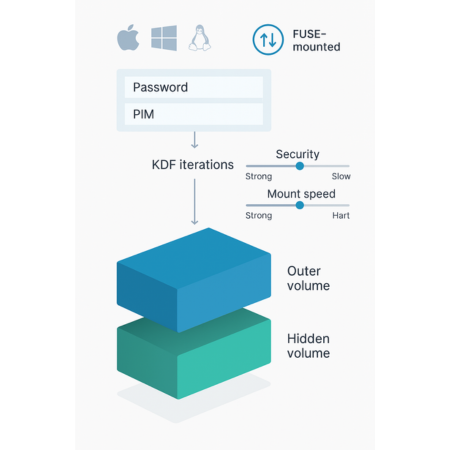
Unlike LUKS, which is kernel, bound to Linux, VeraCrypt containers are universally readable across Windows, macOS, and Linux. This makes it the superior choice for professionals exchanging sensitive files across different operating systems. Furthermore, VeraCrypt provides a critically important feature for high, adversarial environments: Hidden Volumes. This allows users to create a secret, second encrypted volume within the free space of an already created “outer” volume, offering plausible deniability if forced to disclose the password to the outer volume.
Understanding the Personal Iterations Multiplier (PIM)
The Personal Iterations Multiplier (PIM) is a security innovation introduced in VeraCrypt 1.12. PIM serves two functions: introducing an optional second secret parameter and allowing the user precise control over the key derivation function (KDF) performance.
The security of a VeraCrypt key derivation is based on the combination of the password, the KDF used (PBKDF2 or Argon2id), and the number of iterations. PIM is an extra secret parameter that an attacker must guess in addition to the password.
For expert users, PIM allows precise tuning of mount latency versus security. Leaving the PIM empty or setting it to 0 uses the default maximum iteration counts (e.g., 500,000 for non, system containers using SHA-512 or Whirlpool). Using a custom PIM allows speeding up mounting/booting, which may be desirable if the password is already exceptionally strong or if mount performance is critical.
Table: VeraCrypt PIM Calculation (Non, System Volumes)
| KDF Algorithm | Default Iterations (PIM=0) | Custom PIM Formula (PIM > 0) | Impact |
| PBKDF2-HMAC (all hashes) | 500,000 iterations | $15000 + (PIM \times 1000)$ | Allows precise tuning of security vs. mount latency. |
| Argon2id | Default parameters equivalent to PIM=12 | Not applicable (Argon2 uses memory/time parameters) | Argon2 is inherently resource, intensive and memory, hard. |
How To : Creating a VeraCrypt File Container (CLI)
While a GUI is available, the Command Line Interface (CLI) is required for seamless scripting and integration into automated workflows.
- Prerequisites:
Action: Ensure VeraCrypt is installed. If compiling from source, dependencies include
build-essential,yasm, andlibfuse-dev. - Start Creation:
Action: Use the text, mode, guided volume creation process.
veracrypt -t -c - Volume Selection:
Action: Follow the prompts to select “Create an encrypted file container” and choose “Standard VeraCrypt volume”.
- Encryption Settings:
Action: Accept the recommended defaults: AES-256 encryption and SHA-512 hash algorithm. These are robust for most users.
- Size and Password:
Action: Specify the container size (e.g.,
5G) and set a strong password. - PIM Input:
Action: When prompted for PIM, enter a custom value (e.g.,
500for increased iterations) or leave it blank/zero to utilize the default high security setting. - Format:
Action: Generate random mouse movements to increase the cryptographic randomness pool, then wait for the container formatting process to complete.
How To : Mounting the Container Safely (FUSE Options)
VeraCrypt volumes are mounted using the FUSE (Filesystem in Userspace) system. While a standard mount is simple, complex scenarios require explicit permission controls.
- Standard Mount:
Action: This is suitable for single, user access.
sudo veracrypt /path/to/container /mnt/veracrypt - Advanced/Shared Mount (UID/GID Control):
Action: When the container needs to be mounted and owned by a specific user or group (e.g., in a server environment or shared workspace), FUSE options must be applied. First, identify the desired User ID (UID) and Group ID (GID) using the
idcommand.veracrypt -t --fs-options="rw,uid=1000,gid=1000,fmask=0007,dmask=0007" --mount /path/to/veracrypt/container /path/to/mount/point - Unmount and Verification:
Action: Always ensure volumes are properly unmounted to prevent file system corruption and secure the data.
sudo veracrypt -d /mnt/veracryptVerify: Confirm that no VeraCrypt volumes remain mounted using
veracrypt -l.
Share it Safely
The primary advantage of VeraCrypt is that the container file itself can be transferred securely across platforms. However, the critical components, the password and the PIM value, must be exchanged via a secure, out, of, band channel, such as an end, to, end encrypted messaging service. This prevents key intercept during transfer, maintaining the security of the portable container.
IV. Troubleshooting and Data Recovery
Encryption systems are designed for maximum data confidentiality, meaning they are inherently unforgiving of errors. Data recovery relies almost entirely on preemptive header backups and correctly identifying common user errors.
Root Causes (Ranked by Frequency)
- Passphrase Entry Errors: This accounts for a majority of failed attempts, often stemming from keyboard layout mismatches (e.g., QWERTY vs. AZERTY) or subtle differences in typing during initial setup.
- Header Corruption: Accidental overwrite or physical media damage to the beginning sectors of the device, where the LUKS or VeraCrypt metadata is stored.
- VeraCrypt Device Conflicts: Application, level conflicts where VeraCrypt attempts to map a device to a slot number (
dm-X) already occupied by an existing kernel device mapper volume (such as LVM or another LUKS volume), resulting in “device busy” errors.
Non, Destructive Tests First
Before attempting any potentially destructive fixes, verify the volume integrity.
- LUKS Integrity Check: Run
cryptsetup luksDump /dev/sdc1. If the command executes and displays readable metadata (cipher, key slots, KDF settings), the header is likely intact. If it fails or outputs garbage data, the header is corrupted. - VeraCrypt Status Check: Check for active VeraCrypt volumes and verify kernel module status using
veracrypt -l.
Symptom $\to$ Fix Table
| Symptom / Error String | Root Cause | Non, Destructive Test/Fix | Last Resort (Data Loss Warning) |
| LUKS: “No key available with this passphrase” | Keyboard layout mismatch, Caps Lock error, or passphrase error. | Action: Try entering the passphrase under a known, alternative keyboard layout. If successful, add the correct passphrase to a free key slot. | If header backup exists, restore it using cryptsetup luksHeaderRestore <device> --header <backup_file>. |
| VeraCrypt: “Operation failed due to device busy” or volume disappears after mounting. | Kernel conflict over device mapper slot allocation (e.g., dm-1 is already in use). | Action: Try mounting to a higher, unused slot number (e.g., use --slot=15 in the CLI command). |
Check FUSE library installation and kernel version compatibility. |
LUKS partition is unreadable, luksDump fails or shows garbled data. |
Header metadata is corrupted or accidentally overwritten. | Action: If no header backup is available, attempt raw filesystem recovery on the volume using backup superblocks (e2fsck -n -b <superblock>). |
If no header backup exists, and the primary key slot metadata is destroyed, the data is unrecoverable. |
The Last Resort Warning
If the passphrase is forgotten or the LUKS header is destroyed without a backup, the data is permanently irretrievable. Encryption fundamentally guarantees that without the correct cryptographic keys (which are protected by the passphrase and stored in the header), the underlying data remains inaccessible. The only viable last resort is restoring a previously created header backup using cryptsetup luksHeaderRestore.
V. Security Review and Final Verdict
Encryption Resilience (XTS Mode)
Both LUKS and VeraCrypt volumes achieve high resilience against localized data corruption due to their use of the XTS (XOR, encrypt, XOR Tweakable block cipher) mode of operation. XTS ensures that the encryption of any specific block is mathematically independent of all other blocks.
The consequence of XTS is that if a single bit is damaged on the physical disk, the resulting corruption is restricted to a small 16, byte block in the decrypted file. This means that filesystem or data damage will not cascade throughout the entire volume, a significant advantage over legacy stream ciphers. Furthermore, VeraCrypt offers optional cascading encryption (e.g., Serpent(Twofish(AES))) for those seeking layering beyond standard AES-256.
Verdict by Persona
The choice between LUKS and VeraCrypt is highly use, case specific.
- Student/Home User: LUKS is recommended for system and main drive encryption. Its kernel integration provides unnoticeable speed (especially with AES-NI) and requires minimal ongoing maintenance.
- Freelancer/Consultant (Multi, OS): VeraCrypt Containers are the mandatory choice for project files that must be shared and accessed securely across client platforms (Windows, macOS) without relying on niche third, party decryption utilities.
- SMB Admin/High, Security User: LUKS should be used for all server block storage. For sensitive data archives requiring maximum secrecy, implement LUKS with Detached Headers. This offers cryptographic deniability, making the volume appear inert if the header is stored separately.
VI. Frequently Asked Questions (FAQs)
1. Is LUKS inherently more secure than VeraCrypt
LUKS utilizes Argon2id by default, which is cryptographically stronger against modern GPU/ASIC brute, force attacks due to its memory, hardness. However, VeraCrypt offers plausible deniability via hidden volumes, a critical feature LUKS lacks, making VeraCrypt potentially “more secure” in specific adversarial scenarios where deniability is paramount.
2. Can I use a keyfile instead of a passphrase with LUKS
Yes. LUKS supports keyfiles, which can be any binary or text file, offering the ability to use true random bytes as a key component, which cannot be typed on a keyboard. This keyfile is added to an unused key slot using cryptsetup luksAddKey --key-file keyfile /dev/device.
3. How often should I backup my LUKS header
Backup the header immediately after volume creation and whenever key slots are modified (e.g., adding a keyfile or changing a passphrase). The header is the single point of access to the encrypted data.
4. What is the best PIM value to use for VeraCrypt containers
For maximum computational security, leave the PIM blank or set it to zero. This forces VeraCrypt to use the highest default iteration count (500,000 for non, system containers). A non, zero PIM should only be used if the user needs to specifically tune for faster mounting performance.
5. Does AES-NI work with VeraCrypt’s multi, layered encryption schemes
Yes. VeraCrypt utilizes hardware acceleration specifically for the AES portion of any cipher. Even if a multi, cipher cascade (e.g., Serpent, Twofish, AES) is selected, the AES step benefits from the hardware acceleration, resulting in significant speed improvements.
6. What happens if I forget my LUKS passphrase
The data is permanently lost. Strong encryption ensures that if the passphrase or associated key material is lost, there is no technical backdoor, recovery mechanism, or authority that can access the data.
7. Why should I zero the partition before LUKS formatting
It is recommended to write zeros to the mapped encrypted device after formatting the header and opening the volume, but before creating the filesystem. This step prevents analysis of the underlying physical disk blocks from determining how much data is actually stored (disclosure of usage patterns).
8. Is it safe to use a USB stick as a keyfile
It is safe and highly recommended, as it adds a factor of physical security beyond the password alone (two, factor authentication). However, the physical media must be secured against unauthorized copying or theft.
9. What filesystem should I use inside my encrypted volume
Ext4 is a highly stable, feature, rich choice for general Linux use. For very large volumes (terabytes), XFS offers high throughput, but users should note that XFS filesystems cannot be shrunk later.
10. Can I shrink an encrypted volume
Yes. If using Ext4, the user must first shrink the internal filesystem using resize2fs before shrinking the underlying LUKS partition or logical volume container. XFS does not support shrinking.
11. Does LUKS support plausible deniability
Not natively through hidden volumes like VeraCrypt. However, using a detached header achieves cryptographic deniability, as the volume appears as inert random data without the external header file.
12. How can I check if my LUKS header is corrupt
Run cryptsetup luksDump <device>. If the command fails to read the signature or key slot metadata, the header is corrupted. Backups should be verified by running luksDump directly against the backup file as well.
13. Can VeraCrypt volumes be automatically mounted at boot on Linux
Automatic mounting requires configuration of system scripts and background processes. Since VeraCrypt is not kernel, native, its automation is often less seamless than LUKS, which is integrated directly into the Linux startup sequence via crypttab and initramfs.
14. What are the space requirements for a LUKS2 header
LUKS2 headers occupy space at the beginning of the partition. The primary and secondary headers are generally stored within the first few sectors, and the dd command to back up the header captures 4097 sectors (about 2MB) to ensure all metadata is included.
15. Why does VeraCrypt rely on the device busy error workaround
VeraCrypt relies on the kernel’s device mapper (dm-*) infrastructure through FUSE. If VeraCrypt attempts to map a volume to a low device number already in use by another kernel service (like LVM or LUKS), it generates a “device busy” error. The workaround involves forcing VeraCrypt to use a higher, typically unoccupied, device slot number.
Conclusion
The decision between LUKS and VeraCrypt is a strategic one, balancing native Linux integration and speed against cross, platform portability and advanced deniability features. LUKS, with its default Argon2id KDF, is the superior choice for high, performance system encryption, particularly when paired with detached headers for maximum secrecy. VeraCrypt is the mandatory tool for multi, OS consultants requiring portable containers and plausible deniability. In either case, the deployment must be accompanied by rigorous key management, mandatory header backups, and correct CLI configuration to ensure cryptographic integrity and access resilience against catastrophic data loss.