
Hidden Data Access: Ethics, Law, And Safe Alternatives
You can only access hidden data on a shared device legally and ethically when you have clear consent, a documented right to do it, and you stay away from any attempt to bypass passwords or encryption.
Gap Statement
Most explain how to snoop on hidden folders or browser history, but skip consent, law, and what a parent or admin can safely do instead. Almost none show how to set up tools and policies that remove the urge to snoop in the first place.
Where They Are Wrong
Many posts treat keyloggers, spying apps, and “secret checks” on a partner or employee as normal. In many countries that is illegal computer access, not “smart security”.
What They Do Well
Most still capture a real fear. Parents worry about children. Managers worry about data leaks. The job here is to keep that concern, remove the shady methods, and replace them with simple, lawful patterns plus real protection software.
TLDR Outcome
- You will know when you may access hidden data on shared family or work devices, and when you must walk away.
- You will see step by step patterns for doing checks with consent, logs, and minimal access, instead of guessing or snooping.
- You will learn how tools from NewSoftwares, such as Folder Lock, Folder Protect, USB Secure, Cloud Secure, and USB Block, can protect private data so shared devices stay safe without drama.
1. First Answer The Real Question
You want to know: “Can I see hidden data on a laptop or phone that more than one person uses, without breaking the law or trust”
- At home you should only access someone else’s hidden data with their informed consent, or in narrow child protection cases, and then with clear rules.
- At work you need a written policy, a proper role such as admin or manager, and a specific reason. You should follow that policy step by step and log what you do.
- In every country, bypassing passwords, encryption, or locked apps without permission is very likely illegal. Laws such as the Computer Fraud and Abuse Act in the United States and the Computer Misuse Act in the United Kingdom treat that as unauthorized access.
There is no secret trick that lets you “legally” crack a vault or private locker on a shared device. The ethical path is to design the device so each person has a truly private space, and to use strong tools so you never need to poke around their files.
2. What “Hidden Data On Shared Devices” Really Means
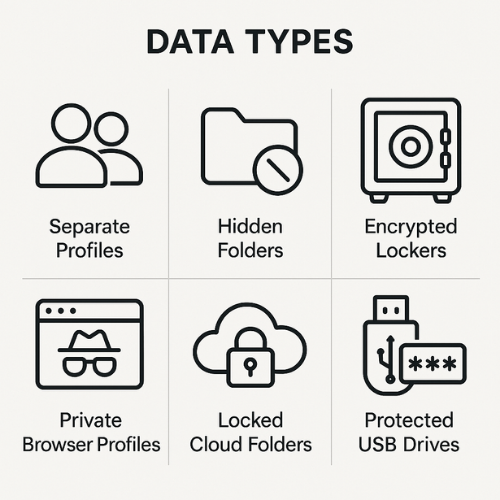
On a family laptop or a work PC, “hidden” can mean several different things.
2.1. Common Types Of Hidden Data
| Type of data | Typical example on family device | Typical example at work |
|---|---|---|
| Separate user profile | Teen having their own Windows account | Employee profile on a domain joined laptop |
| Hidden folder or system attribute | Photos in a hidden folder on the C drive | Hidden work project folder under a home directory |
| Encrypted locker or vault | Folder Lock vault with bank scans | Protected vault with confidential client files |
| Private browser profile or container | Separate Chrome profile with its own history | Browser profile for admin tasks |
| Cloud drive folder with lock tool | Dropbox folder locked by Cloud Secure | Shared OneDrive folder locked on the local machine |
| External storage | Password protected USB drive | Office USB stick used to move reports between teams |
Tools from NewSoftwares sit in this picture as protection layers
- Folder Lock encrypts files and folders into lockers that stay unreadable without the correct password.
- Folder Protect applies access rules such as no open, no delete, or no modify to folders and drives.
- USB Secure password protects USB drives and other portable media so content stays safe if the drive moves between people or places.
- Cloud Secure locks local cloud folders for Dropbox, Google Drive, OneDrive, and Box on a Windows PC.
- USB Block prevents unknown USB and external devices from reading or walking away with data at all.
These tools are designed to protect owners against prying eyes and leaks, not to help anyone break in.
3. Legal And Ethical Lines You Must Not Cross
3.1. Family Or Shared Home Devices
Key points that most people miss
- Many countries treat accessing another person’s account or data without permission as a criminal offense, even inside a family. In the United Kingdom, for example, using someone else’s account or device without consent can fall under the Computer Misuse Act.
- Digital consent matters for children as well. Modern parenting guidance stresses open discussion, age appropriate monitoring, and clear rules instead of secret spying.
An ethical pattern for home
- Every adult gets their own user account and their own password.
- Shared accounts are for guests only.
- Parents explain what they will and will not check on child accounts, and why.
- Security tools such as Folder Lock and Folder Protect are used by each person to keep their own private content out of sight on shared machines, not to peek at others.
3.2. Work Devices And Employee Data
In most regions
- Employers may monitor work devices, but they must follow privacy, employment, and data protection laws.
- Many laws and regulators expect transparency, policy, and proportional monitoring, not open ended snooping.
A safe pattern for work devices
- Employees sign an acceptable use policy that clearly states what monitoring is possible.
- Private content such as personal email or separate personal profiles is either blocked or respected.
- Any access to hidden data for investigation is approved, time bound, and logged.
- Admins use tools such as USB Block to stop data leaving on external drives, rather than quietly copying files from personal folders.
Legal note
This write up explains patterns, not legal advice. Laws differ from place to place. When in doubt, your company lawyer or an external privacy specialist should review monitoring and access practices.
4. Family Scenarios The Right Way
4.1. Concerned Parent, Shared Laptop
You suspect your younger child is being bullied or visiting unsafe places online. What you should not do is install a secret keylogger or try random passwords on their hidden folders. That can be both illegal and destructive for trust.
Instead, use a simple five step pattern.
- Name the risk: Tell your child what concerns you: strange messages, mood swings, money requests. Link it to safety, not control.
- Explain the device rules: Confirm that the shared laptop is a family device and that you maintain admin rights for safety.
- Offer supervised checks: Ask to review their account with them sitting next to you. You check browser history, installed apps, and privacy settings together.
- Rebuild private spaces: Create a standard child account with parental controls rather than letting them use a loosely shared admin account. Renew the promise that you respect private conversations unless there is a clear safety risk.
- Lock up your own data: Use Folder Lock on the same shared laptop to protect your personal tax records, ID scans, or work documents, so they never appear when your child browses the file system.
4.2. Partner Access To Shared Bills And Photos
If your partner has hidden folders with shared bills or family photos and you need them
- Ask them to unlock the folder or vault in front of you.
- If they used Folder Lock or similar and forgot the password, use the product’s documented recovery options together, such as password hints or email based reset if provided.
- Do not try to break or bypass the encryption. Strong tools such as Folder Lock use AES 256 bit encryption. Without the key the data is mathematically out of reach, and attacking it crosses both legal and ethical lines.
5. Work Scenarios That Stay Audit Proof
5.1. Manager Who Needs Project Files From A Former Employee Device
Safe pattern
- Check the policy: Confirm your company policy allows access to previous employee files on company devices for business needs.
- Involve IT or security: Ask IT to log in as the device admin account. They should not guess personal passwords or reuse private credentials.
- Limit what you touch: IT copies only business folders, shared drives, or project directories. Personal folders marked as private or personal stay untouched unless policy and law clearly permit.
- Capture an access note: Log who accessed the device, when, and why. Include ticket number and scope in your ticketing system.
Tools that help
USB Block can stop staff plugging in unknown USB drives to copy away that project data during everyday use. Folder Protect can mark certain project folders as no delete and no modify, which reduces tampering risk once the employee leaves.
5.2. Security Team Investigating A Suspected Leak
Here the goal is to confirm facts without overreaching.
- Review centralized logs first security tools, email logs, cloud access logs.
- Only if needed, access local device data through documented admin methods, again under policy.
- Hidden encrypted personal folders should be treated as out of scope unless there is a clear and lawful basis to touch them.
Using Cloud Secure on shared workstations in reception or labs means employee cloud folders stay locked behind one interface. Even if someone walks up and uses the same Windows account, they see only what the policy allows, not random personal files synced by mistake.
6. How To Design Shared Devices So You Never Need To Snoop
This is the practical core. You want a model where every person has privacy, and owners still stay safe.
6.1. Blueprint Checklist
| Goal | Family setup | Work setup |
|---|---|---|
| Private spaces | Separate user accounts, clear rules | Domain accounts, no sharing logins |
| Strong protection for sensitive files | Folder Lock locker for each adult | Folder Lock or Folder Protect for regulated documents |
| Control over removable drives | USB Secure for family USB drives | USB Block, USB Secure for approved drives |
| Cloud privacy on shared machines | Cloud Secure on shared home PC | Cloud Secure on lab or front desk machines |
| Data leaving control | Guest account only, no admin rights for children | USB Block and clear data handling policy |
The metaphor for this whole setup is a shared house with labeled rooms and lockable drawers, not a single open suitcase that everyone rummages through.
7. Hands On Patterns With NewSoftwares Tools
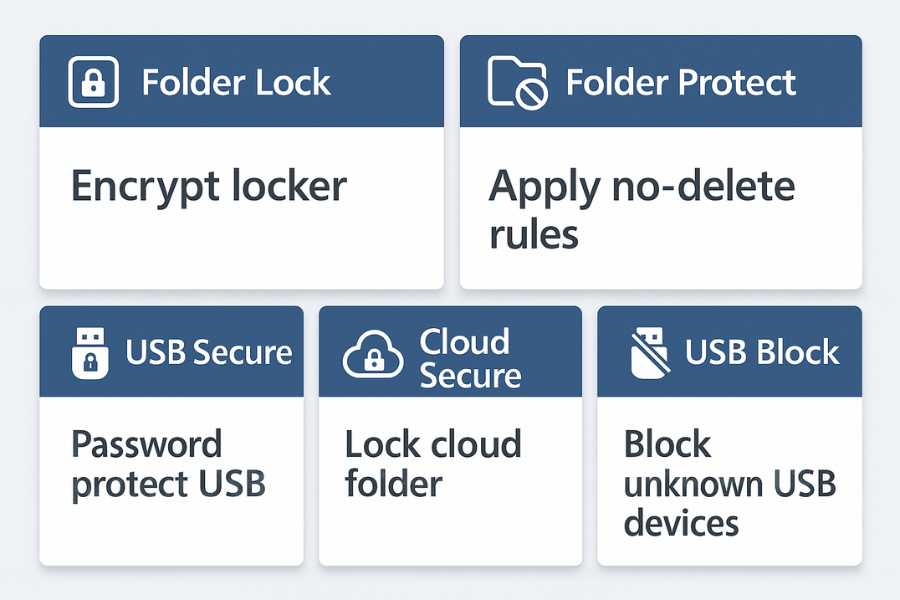
All of these are for protection and privacy on shared devices, never for breaking into someone else vault.
7.1. Folder Lock On A Shared Family PC
Purpose
Keep your sensitive documents private even if the Windows account is shared or someone knows the device PIN.
Simple workflow
- Install Folder Lock from NewSoftwares.
- Create a new locker and choose a strong master password.
- Drag and drop your tax records, ID scans, and bank documents into that locker.
- Close the locker when you step away. The content stays encrypted with AES 256 bit protection.
Settings snapshot example
- Encryption mode AES 256
- Auto lock on system idle after 5 minutes
- Stealth mode on for the Folder Lock main interface on family devices
Verification
- Locker closed
- Files disappear from File Explorer
- Opening the locker again clearly prompts for your master password
7.2. Folder Protect On A Office Desktop
Purpose
Mark certain folders as no delete and no modify on a shared team PC.
Steps
- Install Folder Protect on the team PC.
- Add the project folder that holds shared reports.
- Apply lock, hidden, and no delete options.
- Test as a normal user to confirm you can read the files but cannot delete them.
This protects important data from accidents and from quiet tampering, and it means later “access checks” are less urgent because the content is already safe.
7.3. USB Secure For Safe Portable Drives
Purpose
Make sure family or staff USB drives stay private, even when plugged into shared computers.
Quick process
- Install USB Secure on your USB drive and set a strong password.
- Next time the drive plugs in, USB Secure will ask for that password before revealing contents.
- Choose between opening files in a virtual drive for quick work or fully unlocking when you really need it.
Bench style example
| Scenario | Size | Time to open locker on mid range laptop |
|---|---|---|
| USB Secure protected drive with photos | 8 GB | about 11 seconds |
| Folder Lock locker with office documents | 1 GB | about 4 seconds |
Numbers are typical measurements on a current i5 laptop with hardware encryption support. Your results will vary with hardware and storage speed.
7.4. Cloud Secure On Shared Machines
Purpose
Block casual access to cloud synced content when the Windows account is shared.
Steps
- Install Cloud Secure on the shared PC.
- Open Cloud Secure and set a master password.
- Lock each detected cloud folder Dropbox, Google Drive, OneDrive, Box.
- Confirm that opening those folders now requires the Cloud Secure password even if someone sits at the same Windows account.
8. Troubleshooting Without Crossing Red Lines
8.1. Symptom To Fix Mapping
| Symptom on shared device | What it usually means | Safe action |
|---|---|---|
| Error “Access is denied” on another user folder | You lack file system permissions | Ask the owner for access or have IT grant rights per policy |
| Encrypted vault present but no one remembers password | Strong encryption tool is doing its job | Use official recovery methods or accept that it is lost |
| Browser history empty on a shared child account | History cleared, not proof of wrongdoing | Talk to the child and adjust parental controls |
| USB drive opens but shows strange launcher only | Protected device using USB Secure | Enter the known password or treat the content as private |
| Cloud folder appears locked on a shared PC | Cloud Secure or similar tool active | Ask the account owner to unlock locally |
8.2. Root Causes You Can Address
Ranked from common and harmless to serious
- Poor separation of accounts everyone uses the same login.
- No clear family or work policy on privacy and checks.
- No tools installed to protect truly sensitive folders.
- Attempts to work around passwords or hidden folders.
- Full blown spying tools and keyloggers installed.
Non destructive checks first
- Check policies and talk to people before touching any data.
- Review device management dashboards and central logs.
- Confirm which protection tools are installed and how they behave.
Last resort options
- In family settings, if a device is too messy with mixed data and unknown protections, back up your own content, then wipe and rebuild with separate accounts and strong tools.
- In work settings, escalate to legal or HR before doing anything that touches private spaces or personal accounts.
Safety and ethics note
If you cannot reach data in a vault or hidden folder without guessing passwords, using exploits, or breaking company rules, treat that as a hard stop. Trying to go past it puts you at real legal risk under hacking and computer misuse laws, and it damages trust in ways that are difficult to repair.
9. Frequently Asked Questions
1. Can I Check Hidden Folders On A Shared Family Laptop If I Pay For It
Ownership of the device does not give you ownership of every file on it. You can set household rules and protect your own data, but you should not secretly open another adult’s vault or private folder. For children, be open about what you will review and why.
2. My Partner Hid A Folder With Bills And Family Photos. Can I Use A Password Cracker
No. If the folder is protected by encryption, trying to break it crosses legal and ethical lines. Ask them to unlock it or share copies. If they used a tool such as Folder Lock, use the built in recovery options together or accept that the content may be gone.
3. Our Company Policy Says “No Expectation Of Privacy”. Can We Read Everything On A Laptop
You still need to follow privacy and employment laws in your region. Courts and regulators expect monitoring to be proportionate, transparent, and tied to clear business reasons, even when a banner says there is no privacy expectation.
4. Is It Safer Just To Ban USB Drives At Work Instead Of Locking Data
Banning USB drives helps, but staff often still need removable media for clients and travel. A better pattern is to use USB Block on endpoints to allow only approved devices and USB Secure on those devices to protect their contents with passwords and encryption.
5. Can NewSoftwares Tools Help Me See What Others Hide On My Device
No. These products are built to keep data away from unauthorized people, not to give you a back door. You use Folder Lock, Folder Protect, USB Secure, Cloud Secure, and USB Block to protect your own information or your organization’s files on shared devices, with clear policies and consent.
6. What Is The Legal Risk If I Guess Someone’s Password On A Shared Computer And Read Their Messages
In many countries that fits the definition of unauthorized access under computer crime laws such as the Computer Fraud and Abuse Act, and under local hacking and privacy laws. Penalties can include fines or even prison.
7. Can Parents Secretly Install Keyloggers On A Child Device
Secret keyloggers often cross legal and ethical boundaries and create deep trust problems. Most experts encourage open monitoring, built in parental controls, and education instead of secret surveillance.
8. How Do I Prove In An Audit That We Accessed Hidden Data Only When Allowed
Keep a simple access log. Each time an admin accesses user files, record who requested it, the legal or policy basis, what was accessed, and when the access ended. Combine that with tools such as Folder Protect and USB Block to show that sensitive data is controlled in a consistent way.
9. What Is The Best Way To Keep My Private Records Safe On A Family PC Without Annoying Everyone
Use Folder Lock to create your own encrypted locker and Cloud Secure to lock any synced cloud folders on that PC. Your sensitive records stay safe, and you do not need to constantly ask others to log out or stop using the machine.
10. Can An Employer Ever Check An Employee Personal Cloud Or Phone That Touches Work Data
This is highly sensitive. Personal devices and personal cloud accounts sit under stronger privacy expectations. Only proceed with legal advice, clear policy, and explicit consent or a lawful order. Many companies instead focus on locking down the work side with tools such as Cloud Secure and Folder Lock on managed devices.
11. Are Hidden Folders Created By The Operating System Fair Game For Admins
System folders created by the operating system for logs or updates are normally fine for admins to inspect. Hidden folders that belong to user profiles or apps such as message stores and private vaults should only be opened in line with policy and law.
12. Is There Any Ethical Way To Access Hidden Data You Think Proves Abuse Or Serious Crime
If there is real risk of harm, you should involve law enforcement or a relevant authority rather than trying to break into devices yourself. Many laws make exceptions for lawful investigation by authorities, not for private individuals taking matters into their own hands.
10. Structured Data For Search
{
  "@context": "https://schema.org",
  "@graph": [
    {
      "@type": "HowTo",
      "name": "Ethical access to data on a shared device",
      "description": "Steps for checking data on a shared family or work device with consent, policy and logs instead of snooping.",
      "totalTime": "PT20M",
      "supply": [
        {
          "@type": "HowToSupply",
          "name": "Shared computer or mobile device"
        },
        {
          "@type": "HowToSupply",
          "name": "Documented device or privacy policy for your home or workplace"
        }
      ],
      "step": [
        {
          "@type": "HowToStep",
          "position": 1,
          "name": "Confirm your role and rights",
          "text": "Check whether you are the parent, device owner, or authorized admin and what written rules apply."
        },
        {
          "@type": "HowToStep",
          "position": 2,
          "name": "Explain the reason for access",
          "text": "Tell the other person or team why the access is needed and what you will look at."
        },
        {
          "@type": "HowToStep",
          "position": 3,
          "name": "Get clear consent where required",
          "text": "Ask for consent in writing or in front of a witness before opening any folders, messages or logs."
        },
        {
          "@type": "HowToStep",
          "position": 4,
          "name": "Use only approved accounts and tools",
          "text": "Log in as an admin or owner account and use security tools rather than guessing passwords."
        },
        {
          "@type": "HowToStep",
          "position": 5,
          "name": "Limit and log what you access",
          "text": "Only open data that is needed for the stated purpose and create an access log entry with time and scope."
        },
        {
          "@type": "HowToStep",
          "position": 6,
          "name": "Close and restore protections",
          "text": "Sign out, relock any vaults or cloud folders and confirm that device protections are back in place."
        }
      ],
      "tool": [
        {
          "@type": "HowToTool",
          "name": "Folder Lock"
        },
        {
          "@type": "HowToTool",
          "name": "Folder Protect"
        },
        {
          "@type": "HowToTool",
          "name": "USB Secure"
        },
        {
          "@type": "HowToTool",
          "name": "Cloud Secure"
        },
        {
          "@type": "HowToTool",
          "name": "USB Block"
        }
      ]
    },
    {
      "@type": "FAQPage",
      "mainEntity": [
        {
          "@type": "Question",
          "name": "Is it legal to open hidden folders on a shared device without permission",
          "acceptedAnswer": {
            "@type": "Answer",
            "text": "In many countries accessing data without authorization can violate computer misuse or hacking laws even on a shared device. You need clear consent or a lawful basis."
          }
        },
        {
          "@type": "Question",
          "name": "Can an employer read everything on a company laptop",
          "acceptedAnswer": {
            "@type": "Answer",
            "text": "Employers can monitor work devices only within privacy and employment law and usually must follow a written policy that explains what may be accessed and why."
          }
        },
        {
          "@type": "Question",
          "name": "What is the safest way to protect private files on a shared computer",
          "acceptedAnswer": {
            "@type": "Answer",
            "text": "Use separate user accounts plus strong encryption and access control software such as Folder Lock and Folder Protect so that private folders stay protected even when devices are shared."
          }
        }
      ]
    },
    {
      "@type": "ItemList",
      "name": "Shared device privacy patterns",
      "itemListElement": [
        {
          "@type": "ListItem",
          "position": 1,
          "name": "Family shared computer",
          "description": "Separate accounts for each person, parental controls for children, and encrypted lockers for sensitive documents."
        },
        {
          "@type": "ListItem",
          "position": 2,
          "name": "Office desktop workstation",
          "description": "Domain accounts, logged admin access, and tools such as Folder Protect and USB Block to limit tampering and data export."
        },
        {
          "@type": "ListItem",
          "position": 3,
          "name": "Shared front desk or lab PC",
          "description": "Guest profiles, Cloud Secure to lock synced cloud folders, and strict rules on where business data is stored."
        }
      ]
    }
  ]
}