
The Handshake: How to Securely Share Encrypted Files the Right Way
Encrypt the file locally, share the resulting ciphertext via a short-lived link, and deliver the decryption key on a fundamentally different communication channel. The core principle is simple: key separation. Set an expiry, limit downloads, and keep a clear mechanism to revoke access instantly.
The Problem of Key Separation
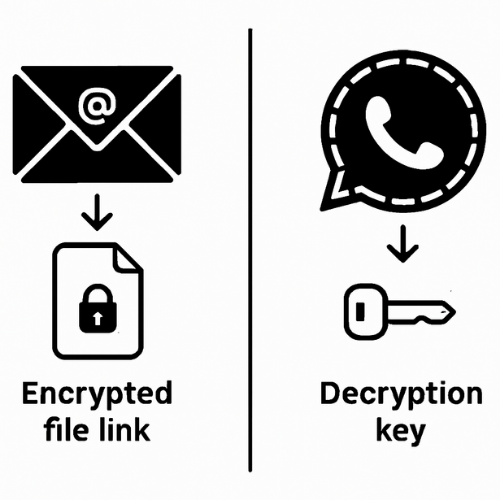
Most sharing guides skip the hard parts: the necessary out-of-band key exchange, ensuring filename privacy, and knowing what to do when a recipient simply cannot open the file. They also mistakenly confuse storage encryption (which the host can break) with true end-to-end sharing. This guide provides actionable methods and clean troubleshooting steps that keep your data safe.
Key Outcomes
Upon mastering these methods, you will achieve the following:
- You will confidently send an encrypted file and its key through different, secure channels.
- Your shared links will auto-expire, and you can revoke them in a matter of seconds.
- Your recipient will be able to open the file successfully on Windows, macOS, Linux, iOS, or Android.
Prerequisites and Safety Checklist
Before sharing any sensitive data, follow these steps:
- Choose a Threat Level: Private documents require local encryption plus separate key exchange.
- Turn on Multifactor: Enable multifactor authentication for any cloud account you use to host the ciphertext.
- Back Up and Test: Back up your original file before you encrypt it. Test a small sample file with a friend or colleague.
- Never Paste the Key: Do not paste the decryption key into the same email or chat that carries the link.
The Models of Secure Sharing in Plain English
For genuine privacy, you must understand the distinction between the security models.
| Model | What You Send | Who Holds the Key | What the Host Can Read | Good For |
| Local Encrypt + Generic Link | Ciphertext file + key by a second channel | You and Recipient | Nothing but metadata (size, time) | Universal across devices |
| End-to-End Link from an E2EE App | Special link that wraps key material | You and Recipient App | Host cannot decrypt | Smooth user experience inside one app |
| “Encrypted at Rest” Cloud Link | Normal link, no client key | Cloud can decrypt on serve | Host can read content | Low risk files only |
Always use Model One or Two for real content privacy. Model Three is not private from the provider.
How to Do It: Three Working Methods
Method 1. 7-Zip Archive with AES-256 and Separate Key Exchange
This method is universal, free, and preserves privacy even if the link leaks.
Steps
- Install 7-Zip (or Keka/The Unarchiver on macOS).
- Add to Archive: Right-click the file or folder. Choose Add to archive.
- Set Encryption: Set Archive format to 7z. Under Encryption, set Encryption method to AES-256.
- Hide Names: Enter a strong passphrase. Tick Encrypt file names.
- Send Separately: Click OK. Send the
.7zfile (ciphertext) as your link. Deliver the passphrase on a different channel (Signal or a phone call).
Gotcha: Do not pick ZIPCrypto. That option is fundamentally weak. Use AES-256 only.
Verify It Worked: The web host cannot preview the archive. Inside the archive, file names look scrambled. Opening the file prompts for a passphrase.
Method 2. End-to-End Link from an E2EE Storage App
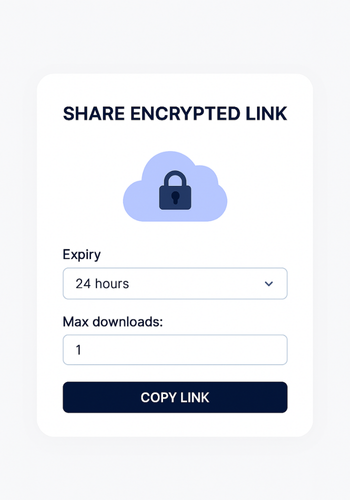
This method offers the easiest user experience within a specific ecosystem.
Steps
- Install the App: Install the E2EE app (e.g., Tresorit, pCloud with Crypto) and log in.
- Upload and Share: Upload the file into an end-to-end folder or vault. Select the file and click Share > Encrypted link.
- Set Limits: Set Expiry to 24 hours. Set Max downloads to a low number (1 or 3).
- Send: Copy the link and send it. If you added an optional passphrase, send that in a different channel.
Gotcha: Browser previews will likely not work. Tell the recipient upfront that they might need the app.
Method 3. Public-Key Sharing with OpenPGP or age
This is the most secure method for recurring partners, as no shared secret ever passes in chat.
Steps with OpenPGP (GnuPG)
- Import Key: Import the recipient’s public key.
- Encrypt: Run
gpg --encrypt --recipient "Their Name" file.pdf. - Send: Send the resulting
.gpgfile by any channel. The recipient opens it with their private key and passphrase.
Gotcha: Key verification matters. You must confirm the recipient’s public key fingerprint over a voice call or an in-person check to prevent man-in-the-middle attacks.
Keys, Links, Expiry, and Revocation: Practical Rules
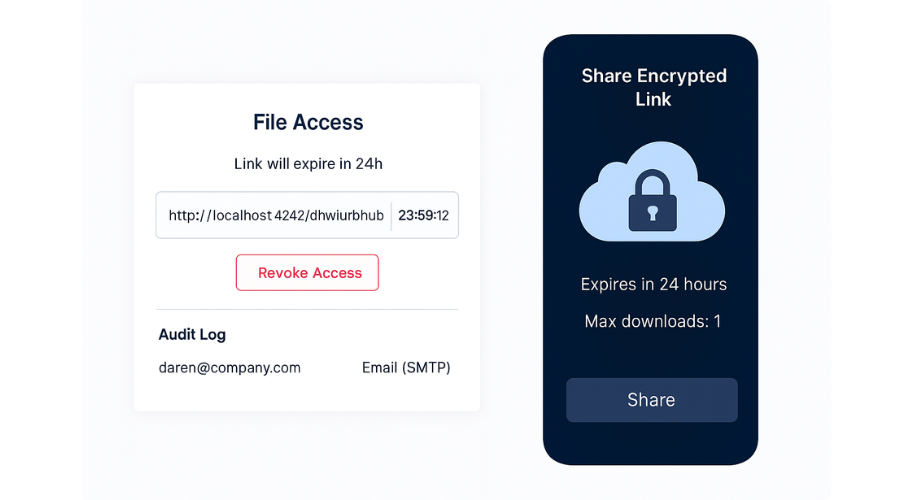
- Keys Travel Out-of-Band: Send the link by email, but the key by Signal or a voice call.
- Links Expire by Default: Default to 24 hours unless your process demands longer.
- Revoke on Confirmation: When the recipient confirms, “Got it,” revoke the link immediately in your cloud dashboard.
- Keep an Audit Note: Log who got the file, the link expiry, and the channel used for the key.
Use-Case Chooser Table
| Need | Best Method | Why |
| One-off share to a client on Windows | 7-Zip AES-256 + Signal Key | No install for them beyond 7-Zip, strong privacy. |
| Repeat shares with the same partner | OpenPGP or age | No passphrase exchange is needed each time. |
| Mixed OS team with mobile | End-to-end storage link | Easiest user experience and offers quick revocation. |
| Strict filename privacy | 7-Zip or client-side vault | Header encryption hides file names from the host. |
Common Errors and Clean Fixes
| Exact Message or Symptom | Cause | Fix |
| Wrong password | Typos or an extra space. | Type, do not paste. Use a plain text editor to confirm the string. |
| Cannot open file as archive | Host tried to preview the 7z. | Tell the recipient to download and open with 7-Zip or Keka. |
| File names are readable on the cloud | Header encryption was off. | Recreate the archive with Encrypt file names ticked. |
| Link says expired | You set a short Time-To-Live (TTL). | Create a new link and confirm the recipient’s clock/timezone. |
| Corrupt download | Interruption or scanner rewrite. | Use a checksum, re-upload, and disable “scan on download” if allowed. |
Frequently Asked Questions (FAQs)
What is out-of-band key exchange?
It means you send the decryption key through a different channel than the link. For example, email for the link and Signal or a phone call for the key. A stolen inbox alone is then useless to the thief.
Is a password on a generic cloud link enough protection?
Better than nothing, but it’s not true privacy. The provider (Google, Dropbox, etc.) can still access your content on their servers. For real privacy, use local encryption (like 7-Zip) or an end-to-end (E2EE) link.
Do I need to hide filenames?
Yes, if the file names reveal sensitive information (e.g., Executive_Salary_Audit_Q4.xlsx). Use 7-Zip with “Encrypt file names” or a client-side vault that encrypts headers. Otherwise, a snooper sees the name even if they can’t open the content.
How long should a secure link live?
Default to 24 hours. For high-risk or one-time downloads, use single-use links or set the expiry to just a few hours. The shorter the Time-To-Live (TTL), the safer the share.
What if the recipient cannot install software?
Send a 7z archive and give them clear instructions on how to download and use a free utility like 7-Zip or Keka. Most corporate environments allow these minimal tools.
Can I reuse the same passphrase for different shares?
No. You should use a unique, strong passphrase for every individual share or recipient. If a key is ever compromised, you only lose access to that one specific file, not everything you’ve encrypted.
Is PGP (GnuPG) still useful?
Yes, for recurring partners. It’s excellent because you never have to exchange a passphrase again. Your private key does all the decryption. Just be sure to verify the recipient’s key fingerprint carefully during the initial setup.
If I lose my passphrase, can a service recover the file?
No, not with local encryption (like 7-Zip). There is no “reset password” button or key escrow. Your file is only as safe as your recovery plan.
What metadata still leaks?
Your content is private, but the cloud host still sees the upload time, the file size, your IP address, and when the link was accessed. Your entire sharing footprint is still recorded.
Conclusion: Key Separation is King
Securely sharing an encrypted file is a two-step process: encrypting the file and safely delivering the key. The most effective security measure is key separation: ensuring that a compromise of the link channel (email) does not expose the key channel (Signal). By adopting AES-256 local encryption, short link expiries, and a reliable out-of-band key exchange, you take full control of your data’s privacy and minimize the window for any unauthorized access.