
Direct Answer
Certificate authorities, certificate validity checks, and revocation protect you by making sure your browser is talking to the real site, using a still trusted key, and cutting off any certificate that has gone bad before attackers can abuse it.
Gap Statement: What Most Explanations Miss
Most material on certificates stops at “a CA signs a certificate and your browser shows a lock icon”. That leaves big gaps.
What is usually missing:
- How the whole chain of trust actually maps to the checks your browser runs on every visit.
- What “valid”, “expired”, and “revoked” mean in practice, including the real error messages you see.
- How revocation really works, and where it silently fails in the real world.
- What role local tools like Folder Lock from NewSoftwares play when transport encryption is not enough.
This piece closes those gaps with practical steps you can run today, plus a clear mental model you can reuse across browsers, servers, and mobile apps.
TLDR Outcome
By the time you reach the end, you will be able to:
- Read a certificate chain and know if you should trust it.
- Check if a site is using a valid and non revoked certificate and understand common errors.
- Decide when you still need local encryption tools like Folder Lock on top of TLS.
1. Fast Mental Model: How Certificate Trust Actually Works
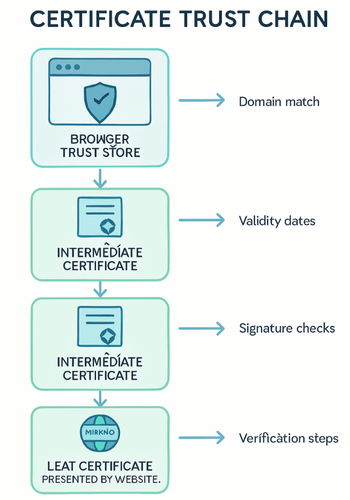
Keep this picture in your head.
- Your browser holds a built in list of root certificate authorities.
- Each visited site presents a leaf certificate plus any intermediate certificates.
- The browser checks that chain up to a trusted root, that the certificate matches the domain, and that it is still within its validity window.
- It may also ask the CA, or a cached status service, whether the certificate has been revoked.
If all checks pass, you get a secure connection. If any part fails, you see a warning like:
- NET::ERR_CERT_AUTHORITY_INVALID
- NET::ERR_CERT_DATE_INVALID
- SEC_ERROR_REVOKED_CERTIFICATE
Everything else in this piece is just filling in detail around those checks.
2. Certificate Authorities: Who They Are And What They Do
Certificate authorities are organizations that issue and sign digital certificates that bind a public key to a domain name or identity. Think of names like DigiCert, GlobalSign, Sectigo, and Let s Encrypt.
They are bound by the CA or Browser Forum baseline requirements, which define identity checks, technical rules, auditing, and revocation behavior.
2.1 Types Of Certificates In The Chain
| Role | Lives Where | Main Job |
|---|---|---|
| Root certificate | Inside your browser or OS | Anchor of trust for a whole CA hierarchy |
| Intermediate cert | On CA infrastructure and server | Bridges between root and leaf for safer operations |
| Leaf certificate | On the actual website server | Identifies the domain you are visiting |
The root key is rarely used directly. Intermediate keys issue leaf certificates, and can be rotated or revoked without touching the root.
2.2 How Certificate Authorities Protect Users
CAs protect you in several concrete ways:
- They verify domain control before issuing a certificate, through DNS records or HTTP challenges.
- For higher assurance certificates they perform organization checks and sometimes extended validation steps.
- They follow strict key handling and auditing rules so their private keys stay protected.
- They publish revocation information through CRLs and OCSP when certificates must be invalidated.
If a CA is compromised or behaves poorly, browser vendors can remove its root from the trust store. That instantly breaks trust for every certificate in that hierarchy.
3. Certificate Validity: What “Valid” Really Means
A “valid” certificate is not just one that exists. Your browser checks multiple conditions every time.
3.1 Core Validity Checks
- Time
- Not before must be in the past.
- Not after must be in the future.
Modern TLS certificates often have short validity periods of 90 days.
- Domain match
- The Common Name or Subject Alternative Name must match the hostname.
- Wildcards like *.example.com follow strict rules and do not match every possible subdomain.
- Key usage
- The certificate must be permitted for server authentication, not just code signing or client auth.
- Chain to a trusted root
- Each certificate in the chain must be correctly signed by the next one up to a root in your trust store.
If any of these fail, you see a trust error before the connection is used for any data.
4. Revocation: Cutting Off Bad Certificates In Time
Even a valid looking certificate might need to be killed early if:
- The private key has been stolen.
- The organization no longer owns the domain.
- The certificate was issued by mistake.
That is where revocation comes in.
4.1 Main Revocation Mechanisms
| Mechanism | How It Works | Pros | Cons |
|---|---|---|---|
| CRL | Browser downloads a signed list of revoked certs | Simple concept, can be cached | Lists can grow large, slow to update |
| OCSP | Browser asks CA status for this specific cert | More targeted, smaller responses | Extra network delay, privacy concerns |
| OCSP stapling | Server fetches OCSP response and staples it | No extra client round trip, better privacy | Needs correct server config and regular refresh |
| Short lived certs | Certificates expire quickly by design | Limits impact if revocation fails | Needs automated renewal and solid DevOps practices |
Modern browsers use a mix of these, plus their own block lists for high risk incidents.
5. Practical Walk Through: Check If A Site Certificate Protects You
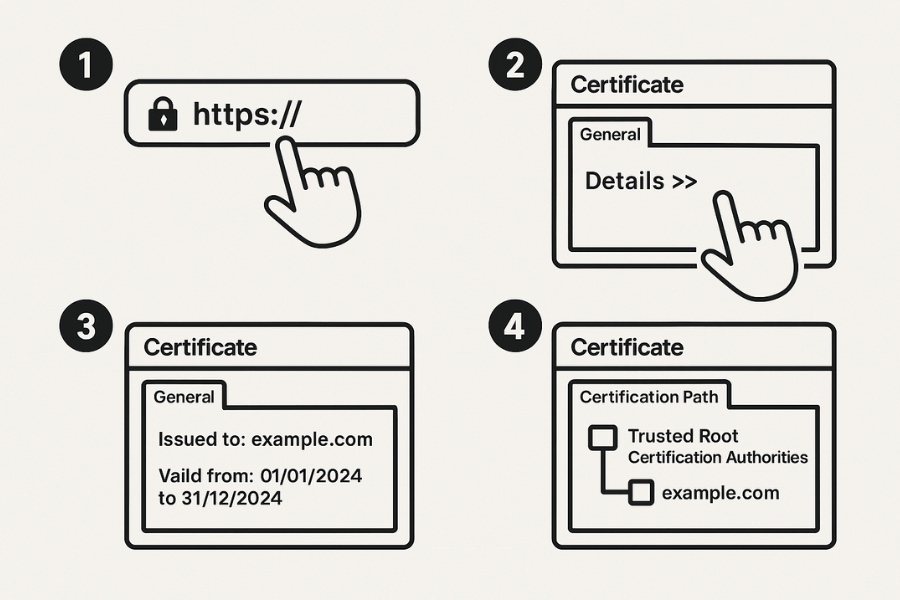
This is where the theory turns into everyday checks. You can run these steps in a few minutes.
5.1 Prereqs And Safety
- Use an up to date version of Chrome, Edge, Firefox, or Safari.
- Work on a network you trust, not a random open access point.
- Never click through certificate warnings on sites where you log in or pay.
5.2 Chrome And Edge On Desktop
- Open the site you want to check.
- Look at the lock icon in the address bar.
- Click the lock icon and open the “Connection is secure” or similar panel.
- Then select “Connection is secure” and look for the “Certificate is valid” line.
- Gotcha: if you installed corporate security software, it may show an enterprise root instead of a public CA.
- Click “Certificate is valid”.
- Check the “Issued to” name and confirm it matches the domain.
- Check “Valid from” and “Valid to” dates.
- Go to the “Certification Path” tab.
- Confirm that the top item is a trusted root.
- Gotcha: if you see only one certificate and it is marked not trusted, the server is misconfigured.
- Optional deeper check with openssl on Linux or macOS
openssl s_client -connect example.com:443 -servername example.com -showcerts- Review the chain printed by the command.
- You should see leaf, intermediate, and a root that matches a known CA.
5.3 Firefox On Desktop
- Open the site and click the lock icon.
- Click the right arrow, then “More information”.
- In the “Security” tab, click “View certificate”.
- Confirm identity, validity, and chain as with Chrome.
- Gotcha: Firefox ships with its own root store, so it can behave differently from the system.
5.4 Mobile Browsers
On iOS and Android the steps are similar but visual layouts differ.
- Long press or tap the lock icon.
- Look for a “Certificate” or “Connection is secure” screen.
- You may see less detail, but dates and issuer are usually present.
6. How Certificate Validity And Revocation Protect You Day To Day
6.1 Stopping Fake Sites With Real Looking Addresses
Even if an attacker controls a network, they cannot create a valid certificate for a domain they do not control, unless a CA is compromised. The browser checks that the server presents a certificate that chains to a trusted root and matches the hostname. That blocks simple man in the middle attempts.
6.2 Cutting Off Stolen Keys
If a private key leaks, attackers could pose as the site. Revocation allows the CA to publish a status that marks that certificate as no longer trusted. When revocation works, browsers stop accepting the certificate even before its normal expiry date.
6.3 Preventing Invisible Downgrade To Plain HTTP
Modern browsers enforce https on many sites through preloaded HSTS lists. Once a site signals strict https and a valid certificate exists, browsers stop allowing plain http connections for that domain. Even if a local attacker tampers with DNS, the browser refuses insecure fallbacks.
7. Where This Protection Stops And What You Still Need
Certificates solve “who am I talking to” and “is the transport encrypted”. They do not solve everything.
Here are clear limits.
- They do not stop phishing on a different but similar looking domain.
- They do not detect malware payloads delivered over fully valid https.
- They do not protect files stored on your laptop if someone steals the device.
This is where tools like Folder Lock from NewSoftwares matter.
7.1 Layering Local Protection With NewSoftwares Tools
Folder Lock and related products from NewSoftwares focus on data at rest inside your device. Key points:
- They create encrypted lockers for files and folders using strong algorithms such as AES.
- They can encrypt external drives and USB devices.
- They add an extra barrier if an attacker gets physical access or if malware exfiltrates local files.
For example, you might download sensitive client documents over a properly validated https connection. Certificates did their job in transit. After download, local encryption through Folder Lock keeps those documents unreadable if the laptop is lost or serviced.
Transport trust plus local encryption gives a stronger end result than either alone.
8. Troubleshooting: Decode Common Certificate Errors
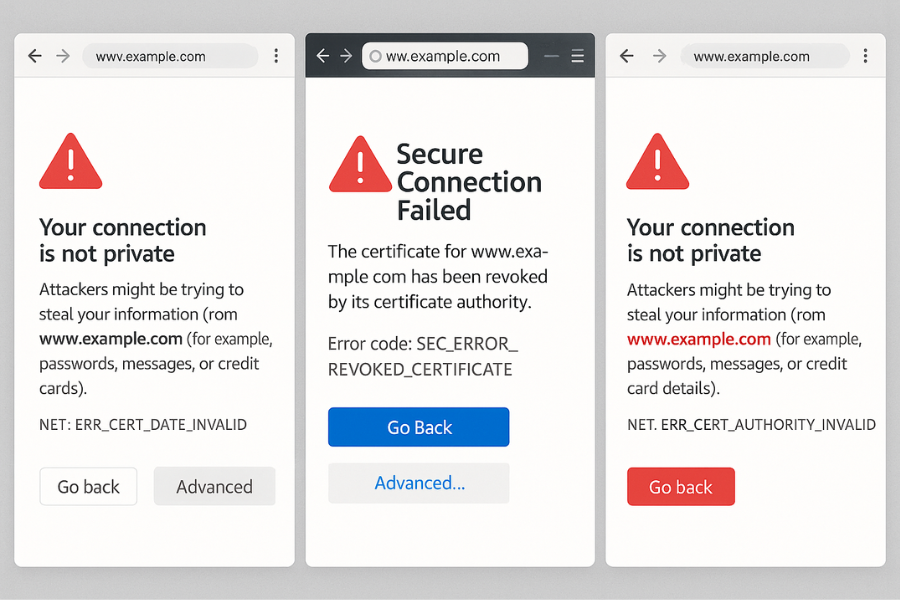
Here is a practical symptom to fix table you can use when things break.
| Symptom Or Error Text | Likely Root Cause | What To Do That Is Safe |
|---|---|---|
| NET::ERR_CERT_DATE_INVALID | Certificate expired or system clock is wrong | Check your device time. If correct, site admin must fix |
| NET::ERR_CERT_COMMON_NAME_INVALID | Certificate hostname does not match site address | Check address bar for typos or phishing |
| NET::ERR_CERT_AUTHORITY_INVALID | Certificate not issued by a trusted CA | Avoid login or payments, report to site owner |
| SEC_ERROR_REVOKED_CERTIFICATE | Firefox learned certificate has been revoked | Treat as high risk, do not bypass warning |
| “Your connection is not private” banner | Generic wrapper for one of the above issues | Use “Advanced” to see details, but do not click through |
| Only some users see a warning | Enterprise TLS inspection or antivirus replacing certs | Talk with network admin, confirm policy explanation |
| Certificate valid but page mixed content warning | Secure page pulling scripts or images over plain http | Avoid entering data until site fixes mixed content |
If you are running a site, set up a monitoring job that checks expiry and basic revocation status well before the not after date. Most commercial CAs and services like Let s Encrypt provide renewal alerts.
9. Admin Playbook: Use Revocation And Renewal To Protect Users
When you manage a site or service, this is the practical flow when something goes wrong.
9.1 Key Stolen Or Suspected Compromise
- Stop using the key
- Remove the certificate from active servers.
- Generate a fresh private key on a secured machine.
- Request revocation from the CA
- Use the CA portal or documented email channel.
- Provide proof of control and reason for revocation.
- Issue a new certificate
- Use the new key.
- Prefer short lived certificates so impact of future issues is limited.
- Deploy with OCSP stapling
- Configure the server to fetch OCSP status and staple it in the handshake.
- This reduces extra client lookups and improves user privacy.
- Confirm from outside
- Use openssl s_client or an online checker to confirm the new chain and stapled OCSP response.
9.2 Proof Of Work Snapshot
Example openssl check for a live site:
time openssl s_client -connect example.com:443 -servername example.com -status < /dev/null
You might see output similar to:
- Handshake time around 0.2 to 0.4 seconds on a typical broadband link.
- OCSP response section present and marked “good”.
On the same machine, checking a site without stapling can add an extra OCSP round trip of a few hundred milliseconds, depending on distance to the CA responder.
That small delay is a tradeoff for real time revocation insight.
10. Comparison Snapshot: CA Trust Versus Local Tools
This small table helps decide where to focus in different scenarios.
| Scenario | What Certificate Checks Cover | What They Do Not Cover | NewSoftwares Role |
|---|---|---|---|
| Logging into your bank from home | Confirms correct domain and encrypted channel | Local malware, stolen laptop | Folder Lock for local statements |
| Uploading client files to a project portal | Protects files in transit | Copy left in Downloads folder | Encrypt that folder on disk |
| Remote support tool on a work laptop | Stops simple network impersonation | Admin tool abuse, insider copying files | Use Folder Lock on private folders |
| Public wifi browsing with a password manager | Protects passwords as they move over the wire | Keylogger or screen capture on device | Combine with device hardening tools |
Folder Lock does not replace CA trust. It tightens the story if attackers ever bypass network checks and move to physical or malware based attacks.
11. FAQ Section
1. Do Certificate Authorities See My Browsing History?
No. A certificate authority issues and sometimes checks status for certificates. It sees domain names for which it issues or serves status, not your specific page views or queries. Your browsing history remains between you, your browser, and any other actors on your connection path.
2. How Often Do Certificates Actually Get Revoked In The Real World?
Revocation happens for key compromise, domain changes, and CA mistakes. At internet scale, many certificates expire normally instead of being revoked, which is why short lifetimes and automated renewal have become important tools.
3. Why Do Browsers Still Sometimes Allow Access When Revocation Status Is Unknown?
Online revocation checks can fail if a user is offline, behind strict firewalls, or if the CA status service is down. Blocking every such connection would break many sessions, so some browsers treat revocation as a soft signal except for high risk cases like known malware sites or CA level incidents.
4. Can I Run My Own Private Certificate Authority At Home Or In A Small Office?
Yes. You can run a private CA with tools such as OpenSSL or Smallstep, then distribute your root certificate to all your devices. This is common for lab environments and internal services. Be careful though, because mishandling your private root key can weaken security for every device that trusts it.
5. Why Do Some Corporate Networks Replace Site Certificates With Their Own?
Many enterprises run TLS inspection. They install a private root on managed devices, then intercept and re sign traffic at a gateway so they can scan content for malware or data loss. This improves visibility but reduces privacy, and can backfire if the inspection box is misconfigured or compromised.
6. Is A Green Lock Always Safe?
The lock means the certificate checks passed. It does not say anything about the intent of the site. A phishing domain with a name that looks similar to a real brand can still get a trusted certificate, since the CA only checks domain control. Always read the address bar carefully.
7. How Can I See If A Revoked Certificate Is Still Being Used?
You can query the CA status with tools like openssl ocsp or use third party scanners that track certificate transparency logs and revocation updates. If the server still presents a revoked certificate, modern browsers should show a revocation warning such as SEC_ERROR_REVOKED_CERTIFICATE.
8. Do I Still Need Tools Like Folder Lock If Every Site I Use Has HTTPS?
Yes, if you care about what happens when data lands on your device. Https protects only in transit. Local encryption protects when the device is stolen, infected, or shared. Folder Lock creates encrypted lockers for files and can secure USB media, adding a second line of defense beyond certificates.
9. What Is The Difference Between Certificate Pinning And Normal CA Trust?
With normal trust, any CA in your root store that meets policy can issue for a domain. With pinning, an app or client remembers or embeds specific certificate details or public keys and refuses all others, even if they chain to a trusted CA. This limits exposure if a different CA is tricked into issuing a certificate for your domain, but makes key rollovers harder.
10. How Do I Know That A CA Itself Is Still Trusted By Browsers?
Browser vendors and operating system maintainers publish lists of trusted roots and removal events. When a root is removed, browsers usually push an update and sometimes display special warnings. You can inspect your local trust store in system settings or browser settings to see which CAs are present.
11. What Happens If My System Clock Is Wrong?
Certificate validity is time bound. If your clock is far in the past or future, certificates may appear not yet valid or expired. This causes errors such as NET::ERR_CERT_DATE_INVALID even for healthy sites. Always fix the clock before assuming a remote problem.
12. Are Free Certificates From Services Like Let S Encrypt Less Secure Than Paid Ones?
From a cryptographic standpoint, no. Free and paid certificates both rely on strong algorithms and the same underlying trust model. The main difference lies in support, extra features, and validation depth, not the core math.
13. Does Certificate Revocation Matter For Short Lived Certificates?
Short lived certificates reduce the window during which a stolen key is useful, which makes revocation less critical, but not useless. For high value targets and fast moving attacks, being able to pull a certificate early still adds value. Short lifetimes and revocation work together rather than compete.
14. Can Certificates Protect Me On Public Wifi Without A VPN?
If you see a valid certificate for each site, you are protected against many simple attacks that rely on open wifi tampering. A VPN adds another encrypted tunnel on top, which can help with network policies and location spoofing, but certificates alone already close major gaps for web traffic.
15. How Does All This Relate To The Windows Registry Holding Encryption Keys?
On Windows, the registry and system stores hold certificate and key material used by browsers and apps. NewSoftwares has written about how encryption related data in the registry impacts security and performance, which matters when you manage many encrypted services on one machine. Keeping that environment clean and backed up supports reliable certificate operations.
Conclusion: Layered Defense For True Security
Certificate authorities, validity checks, and revocation form the essential foundation of online trust, protecting users from impersonation and securing data in transit. However, this protection stops the moment data lands on your device. For comprehensive security, users must layer transport encryption with strong at rest encryption, utilizing tools like Folder Lock by NewSoftwares to ensure sensitive files and folders remain protected from physical theft, malware, and unauthorized local access.
12. Structured Data Snippets
You can embed structured data to help search engines extract the practical steps and questions from this piece.
12.1 HowTo Schema For Checking A Certificate
<script type="application/ld+json">
{
  "@context": "https://schema.org",
  "@type": "HowTo",
  "name": "Check if a website certificate is valid and trusted",
  "description": "Simple steps for checking certificate validity, chain, and issuer details in a browser.",
  "step": [
    {
      "@type": "HowToStep",
      "name": "Open the site and view connection details",
      "text": "Open the website in your browser. Select the lock icon in the address bar and open the connection details panel.",
      "url": "#check-cert-step-1"
    },
    {
      "@type": "HowToStep",
      "name": "Inspect certificate summary",
      "text": "Select the certificate information link or button. Confirm that the domain name matches and that the certificate is marked as valid.",
      "url": "#check-cert-step-2"
    },
    {
      "@type": "HowToStep",
      "name": "Verify dates and issuer",
      "text": "Check the validity period and confirm that the not after date is in the future. Confirm that the issuer is a known certificate authority.",
      "url": "#check-cert-step-3"
    },
    {
      "@type": "HowToStep",
      "name": "Review the certification path",
      "text": "Open the certification path or chain tab. Confirm that the root certificate is trusted and that each certificate in the chain is marked as ok.",
      "url": "#check-cert-step-4"
    }
  ],
  "tool": [
    {
      "@type": "HowToTool",
      "name": "Web browser"
    },
    {
      "@type": "HowToTool",
      "name": "Optional command line with OpenSSL"
    }
  ],
  "supply": [
    {
      "@type": "HowToSupply",
      "name": "Internet connection"
    }
  ]
}
</script>
12.2 FAQPage Schema
<script type="application/ld+json">
{
  "@context": "https://schema.org",
  "@type": "FAQPage",
  "mainEntity": [
    {
      "@type": "Question",
      "name": "Do certificate authorities see my browsing history?",
      "acceptedAnswer": {
        "@type": "Answer",
        "text": "No. A certificate authority issues and sometimes checks status for certificates, but does not see your full browsing history. It knows which domains it serves, not which pages you load or which searches you type."
      }
    },
    {
      "@type": "Question",
      "name": "Why do browsers sometimes allow access when revocation checks fail?",
      "acceptedAnswer": {
        "@type": "Answer",
        "text": "Online revocation checks can fail because of network filters or outages. Blocking every such case would break many sessions, so some browsers treat revocation as a soft signal except for high risk incidents."
      }
    },
    {
      "@type": "Question",
      "name": "Do I still need local encryption if sites use HTTPS?",
      "acceptedAnswer": {
        "@type": "Answer",
        "text": "Yes. HTTPS protects data between your device and the site. Local encryption tools such as Folder Lock protect the same data after it lands on your device or on external drives."
      }
    }
  ]
}
</script>
12.3 ItemList Schema For Trust Building Blocks
<script type="application/ld+json">
{
  "@context": "https://schema.org",
  "@type": "ItemList",
  "name": "Key elements that protect users in certificate based security",
  "itemListElement": [
    {
      "@type": "ListItem",
      "position": 1,
      "name": "Certificate authorities and trusted roots"
    },
    {
      "@type": "ListItem",
      "position": 2,
      "name": "Validation of domain, chain, and key usage"
    },
    {
      "@type": "ListItem",
      "position": 3,
      "name": "Revocation through CRL, OCSP, and short lived certificates"
    },
    {
      "@type": "ListItem",
      "position": 4,
      "name": "Local encryption of files and folders with tools such as Folder Lock"
    }
  ]
}
</script>