
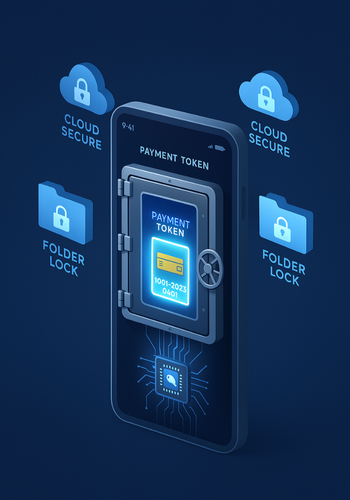
Newsoftwares.net specializes in providing the security tools that complement the advanced cryptographic techniques used by banks to protect your mobile payment apps. This framework explains the two biggest defenses: tokenization, which swaps your real card number for a substitute, and device keys, which cryptographically bind that substitute to your phone’s secure hardware. By understanding this process and adding local encryption using Folder Lock and Cloud Secure, you ensure security, privacy, and convenience, making your entire financial ecosystem robust against threats.
This resource offers a step-by-step breakdown of the payment security flow, from card enrollment to transaction completion, alongside actionable steps for individual data protection.
Gap Statement
Most explainers stop at “banks use tokenization and secure elements” and move on. What usually goes missing: How the app, wallet, token service, and bank actually talk to each other. What “device keys” really are and where they live. What changes when a phone is lost, rooted, jailbroken, or cloned. How a normal person or a product team can check whether an implementation is doing the right thing. Where extra tools like Folder Lock and Cloud Secure from NewSoftwares can strengthen the pieces banks do not cover, such as local card scans, exported statements, and synced backups. This piece closes those gaps with concrete flows, settings, and real error messages.
TLDR Outcome
If you only have a minute, this is what matters.
- Banks protect payment apps by replacing card numbers with EMV payment tokens and binding those tokens to device keys stored in secure hardware or trusted environments.
- Every tap or in app payment uses a fresh cryptogram generated from those keys, so replayed data fails, and stolen databases only hold tokens with limited value.
- You can harden your side by keeping device OS updated, turning on strong lock and biometrics, using secure vaults like Folder Lock for wallet cards and statements, and locking synced cloud folders with Cloud Secure so financial data remains encrypted even outside the bank’s infrastructure.
1. One Core Idea: Tokens Plus Device Keys
At a high level:
- The real card number (PAN) stays safely with the issuer or its token service.
- The payment token is what the mobile app or wallet actually uses in the transaction.
- The device key lives inside secure hardware or a trusted environment and helps sign each transaction so the bank knows it came from the right phone and the right app.
EMV payment tokenization standards define how that token is created, limited to a device or merchant, and managed across the whole ecosystem.
On modern phones, the secure hardware is usually:
- A secure element in the phone or embedded in the SIM for OEM wallets like Apple Pay.
- A trusted execution environment or similar hardware backed security area for host based card emulation solutions like some Android wallets.
The device key never leaves those protected areas in plain form. Cryptographic operations run inside them and only release signed results.
2. Walk Through A Mobile Payment From Start To Finish
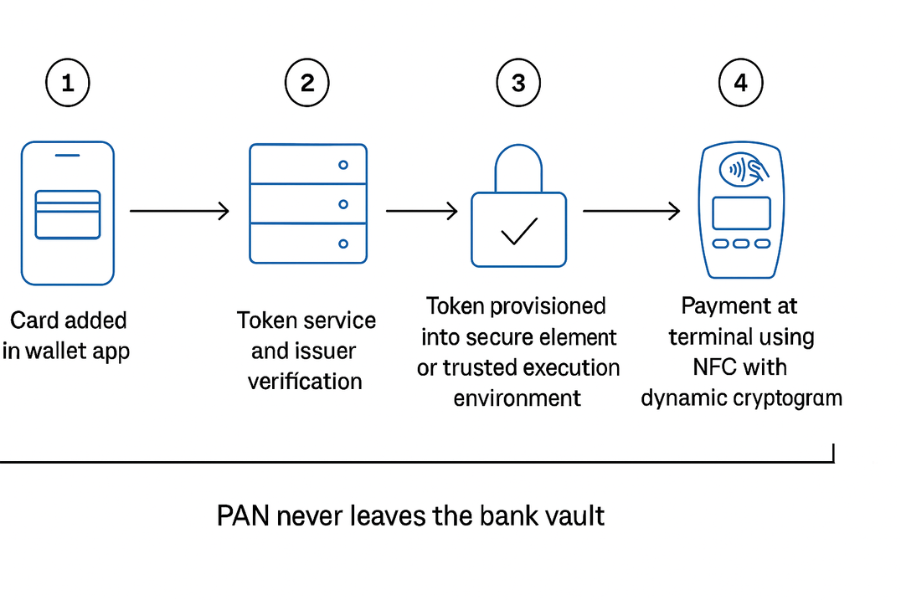
Let’s break a typical card addition and payment into clear steps. We will focus on how banks encrypt and bind things, not on user interface decoration.
2.1. Stage 1: Card Enrollment And Token Request
- You open your bank app or a wallet like Apple Pay or Google Pay and tap “Add card.”
- The app collects card data either from a scan, typed input, or existing account records.
- Instead of storing the full PAN locally, the app sends a tokenization request through a secure channel to a token service provider, often run by the network branded on the card or the bank itself.
The request contains:
- Card number and expiry.
- Device information and identifiers.
- Wallet or app identifier acting as token requestor.
The channel runs over TLS with strong ciphers, so data in transit is already encrypted.
2.2. Stage 2: Issuer Checks And Token Creation
On the issuer side:
- The token service and bank perform ID and verification checks, often using 3DS or similar authentication and risk scoring.
- If everything looks valid, the token service creates a payment token that maps to the real PAN but only in a secure vault.
- The token is bound to a “domain,” such as a device, wallet, merchant, or channel. The EMV standard calls this domain controls.
The crucial step: the vault holds the PAN and mapping; the app never sees the PAN again after this point.
2.3. Stage 3: Provisioning To Device Keys
The token now needs to live next to a device key. For secure element based wallets, the flow looks like this.
- The token service encrypts a package containing the payment token and parameters under a key shared with the secure element or its management platform.
- The package is delivered through the wallet service to the phone, then into the secure element, where it is decrypted and stored.
- Inside that secure area, keys are generated or derived to sign future transactions. They never leave that environment in plain form.
For cloud tokenization or host based card emulation, a similar concept applies, with more reliance on trusted execution environments and backend token services.
At the end of provisioning:
- Your phone holds a token, bound to that device and app.
- The bank and token service know which token belongs to which account and device.
2.4. Stage 4: A Real Payment At The Terminal Or In An App
When you pay in store with a wallet:
- You unlock the phone and authenticate, which allows the wallet to access the secure element.
- The wallet asks the secure element to create transaction data that includes the payment token, dynamic cryptogram, and other EMV data.
- The cryptogram is a short, unique value derived from the token, a secret device key, and transaction details such as amount and merchant.
- The phone passes this to the terminal using NFC, QR, or other channel.
In an in app purchase:
- Your app calls the wallet or bank SDK.
- The SDK either uses device based cryptography or a secure call to the backend token service to produce similar signed data.
On the bank side:
- The processor and issuer validate the cryptogram and token domain, and then map the token back to the PAN in a secure vault if the checks pass.
Result: even if someone logs traffic at the merchant or sniffs a database, they get only limited use tokens and cryptograms that fail outside the intended context.
3. Use Case Chooser: Tokenization Models And Device Key Options
Different banks and wallets pick slightly different architectures.
| Situation | Token Style | Device Key Location | Portability | Admin Control |
|---|---|---|---|---|
| OEM wallet like Apple Pay | Network token with EMV domain controls | Secure element on device | Tied to device, can be reissued on new device | High, via issuer and token service management |
| Android wallet using HCE | Network token held in cloud with device key in trusted execution | Multi device support, still bound per device instance | Controlled by issuer and wallet backend, more flexible device changes | |
| Bank specific app using in app tokenization | Issuer token or network token; device keys in app and backend | Very flexible for promotions and card lifecycle | Managed directly by the bank’s mobile and security teams | |
| Browser based checkout with token on file | Merchant or PSP token, device fingerprinting instead of SE key | Works on many devices; weaker device binding | Domain controls mostly at merchant and processor level |
As a user you do not see these details, but you do feel the effects when you switch phones, add cards again, or see how often a bank challenges you.
4. How-To: Harden Your Payment Apps And Surrounding Data
You cannot rewrite your bank’s code, but you can choose better setups and protect the data the bank does not cover.
4.1. Prereqs And Safety
- Update OS and banking apps.
- Turn on biometric or strong PIN for device unlock.
- Make sure you have secure backup methods for the phone and any wallet app, so a lost device does not mean chaos.
4.2. Step 1: Prefer Wallets And Apps That Clearly Use Tokenization
Action: In your region, choose payment options that state they use EMV tokenization and secure elements. Wallets like Apple Pay and Google Pay publish that they replace PAN with device specific tokens stored in secure hardware and backed by EMV standards. Look for wording such as “device account number”, “payment token”, or “tokenization” in bank and wallet documentation.
Gotcha: If a bank app still shows full PAN and expects you to type it for every payment without mentioning tokens, treat that as a legacy flow and prefer token based options where possible.
4.3. Step 2: Lock Your Own Device Keys Behind A Stronger Vault
Banks protect their keys. You should do the same for data orbiting those keys.
Action: Install Folder Lock on your Windows PC and Folder Lock on your phone. Use them to keep:
- Screenshots of cards and QR codes.
- Exported bank statements and CSV files.
- 3DS backup codes and password lists.
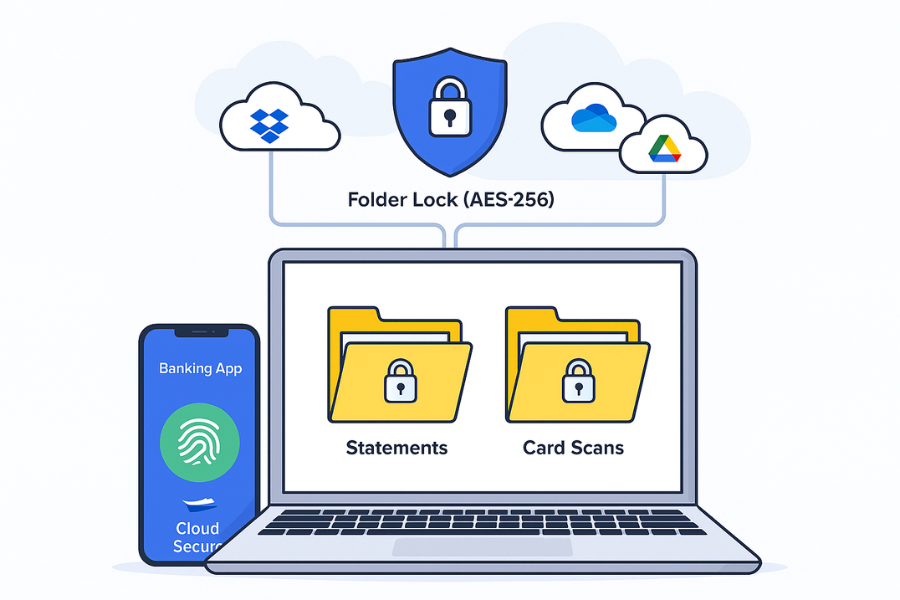
Folder Lock uses AES 256 bit encryption and creates on the fly encrypted lockers or vaults on desktop and mobile. It also includes an encrypted wallet section where you can store card numbers, bank accounts, and other payment details in one protected place instead of plain notes.
Gotcha: Move anything sensitive into these lockers, then delete originals from photo gallery, downloads, and the recycle bin so they do not linger in unencrypted form.
4.4. Step 3: Lock Synced Payment Data In The Cloud With Cloud Secure
Banks cannot protect your local export folders or synced archives. You can.
Action: On your PC or laptop:
- Install Cloud Secure from NewSoftwares.
- Let it detect Dropbox, Google Drive, OneDrive, and other cloud folders.
- Set a single master password that locks all cloud accounts on that machine.
Cloud Secure keeps those cloud folders locked on the machine while letting background sync run, so files stay protected at rest even when sync clients are logged in. Use this for:
- Payment gateway exports.
- Accounting tool backups.
- Card reconciliation files.
Gotcha: Cloud Secure protects access on the device. It is not a replacement for good cloud account passwords and 2FA at the provider level.
4.5. Step 4: Turn On App Level Controls In The Banking App
Most banks now support extra features beyond OS lock.
Action: Open the bank app:
- Turn on in app PIN or biometric requirement for every login or payment.
- Enable push alerts for all card transactions.
- Switch on location checks or other contextual checks if your bank offers them.
This means that even if someone stole your device and bypassed the lock, the banking app still asks for more proof.
Gotcha: Alerts only help if they are visible. Make sure your phone is not muting notifications from the banking app.
4.6. Step 5: Keep Rooted And Jailbroken Devices Off Your Payment List
Tokenization and device keys rely on OS trust. Rooting or jailbreaking breaks that.
Action: If a device is rooted, jailbroken, or running unofficial firmware, keep banking and wallet apps off it. Many banks already block such devices; token provisioning or payments will fail with messages like:
- “This device does not meet security requirements.”
- “Cannot provision card on this device.”
Use a clean, up to date phone as your payment device.
Gotcha: If a phone came second hand, check for signs of tampering or debug ROMs before trusting it with payment apps.
5. Security Specifics: What Is Really Encrypted
Banks use several cryptographic building blocks under the umbrella of tokenization.
- AES and other symmetric ciphers protect data at rest in secure elements and HSMs.
- Public key cryptography helps set up secure channels between wallet, token service, and issuer, and can sign device binding steps.
- Token domain controls limit where a token is valid: one device, one merchant, one channel, or a combination.
- Dynamic data elements like transaction counters and unpredictable numbers feed into the cryptogram so the same token produces different values every time.
Your own encryption tools, such as Folder Lock, echo some of these ideas at the user level: AES 256 bit encryption for local lockers and encrypted wallets, plus master passwords to control access.
6. Proof Of Work: How Much Overhead Does This Add
Banks and networks tune these systems to feel instant. Typical patterns from vendor descriptions and field experience look like this:
| Task | Typical Timing And Impact |
|---|---|
| Initial token provisioning for a new card | A few seconds to pass ID checks and receive token from token service. User mostly sees bank app screens and an SMS or push challenge. |
| Cryptogram creation for a tap to pay | Milliseconds inside secure element or TEE. The user sees a near instant response at the terminal, similar to contactless cards. |
| Encryption in Folder Lock for a folder of statements | Under a minute to create a new locker, then copy speed similar to normal disk writes due to on the fly encryption. |
Most of the “wait” comes from user interaction during enrollment, not from cryptography.
7. Troubleshoot: Common Symptoms And Fixes
| Symptom (What You Actually See) | Likely Root Cause | Safe First Steps |
|---|---|---|
| “Card not eligible for mobile payments” | Issuer does not support tokenization for that product or region | Confirm support on the bank site, then try a different card or wallet. |
| “Cannot add this card. Contact your bank.” | ID checks or risk scoring failed; sometimes wrong details | Confirm card details, try again once, then call support rather than repeated attempts. |
| “This device does not meet security requirements” when adding a card | Rooted, jailbroken, or insecure device detected | Remove root or use a different device. Banks often block provisioning on modified OS builds. |
| Tap to pay works once then fails repeatedly | Token or device key state out of sync; counters or risk checks triggered | Remove card from wallet, add it again to get a fresh provisioned token. If issue persists, contact issuer. |
| Online checkout shows an old card that no longer exists in the app | Merchant or PSP token on file not updated after card reissue | Update saved payment methods on the merchant account and consider deleting unused tokens. |
| Folder Lock vault asks for password but you forgot it | Strong local encryption doing its job | Keep master passwords safe; if recovery is not possible, rely on your bank and cloud records instead. Reset and create a new vault going forward. |
| Cloud drive on PC shows all statements to anyone logged in | Cloud client left open on a multi user computer | Install Cloud Secure and lock cloud folders behind a master password so casual users cannot browse them. |
Always start with non destructive fixes: remove and re add the card, reboot device, clear wallet cache. Only wipe a phone or reset a router when you have backups and instructions ready.
8. Verdict By Persona
Student Or Heavy Everyday User
- Use the main wallet supported by your bank, keep OS updated, and rely on tokenization by default.
- Store card photos, IDs, and recovery codes in Folder Lock Mobile rather than plain gallery or notes.
Freelancer Or Consultant Handling Client Payments
- Use tokenized payment apps for personal and business cards.
- Keep invoices, exports, and chargeback files in Folder Lock lockers and lock synced copies with Cloud Secure on your work PC.
SMB Or Bank Product Owner
- Ensure your mobile payment flows follow EMV tokenization standards and 3DS best practices.
- Document device security requirements clearly.
- On staff devices, require encrypted lockers like Folder Lock for sensitive exports, and Cloud Secure on shared desktops so finance data is never left open.
9. FAQs
9.1. What Is Tokenization In Payment Apps In Simple Terms
It is the swap of your real card number for a stand in token that only the bank and token service can map back, using secure vaults and EMV rules. The app and merchant work with the token, not the PAN, which shrinks the damage from data breaches.
9.2. What Exactly Is A Device Key In This Context
A device key is a cryptographic key stored in secure hardware or a trusted execution environment on your phone. It helps sign payment data so the bank can confirm that a token based transaction came from your enrolled device and not a copy on another phone or emulator.
9.3. How Do Tokenization And Device Keys Stop Replay Attacks
Because every transaction uses a fresh cryptogram based on the token, device key, and transaction specific data. If someone replays earlier data, the bank sees wrong values or counters and declines it. The token’s domain controls also block use from new merchants or devices.
9.4. What Happens When I Change Or Lose My Phone
When you move to a new phone, you usually need to add cards again. That triggers new token provisioning, fresh device keys, and invalidates old ones. Banks and token services track which tokens belong to which devices and can suspend them when you use “find my device” or report theft.
9.5. Is A Payment Token Stored On My Device Or In The Cloud
Often both play a role. Secure element wallets store tokens and keys locally in hardware, while cloud tokenization keeps mapping in token service vaults and uses device keys and risk checks to allow each transaction. Mobile banking apps often use a mix of local secure storage and backend tokens.
9.6. Where Does Folder Lock Fit If Banks Already Encrypt Everything
Banks encrypt their side and secure the token and device key. Folder Lock protects your side: card images, wallet backups, statements, and finance exports on your devices. It gives you AES 256 bit encrypted lockers and secure wallets, which complement the protections inside payment apps.
9.7. How Does Cloud Secure Help With Payment Security
Cloud Secure locks Dropbox, Google Drive, OneDrive, Box, and similar folders on your PC or mobile device behind a single password while keeping sync active. It is ideal for locking down payment exports, reconciliation files, and statement archives on shared or office computers.
9.8. Can Developers Access The Raw Device Keys From Their Apps
They should not and generally cannot. Secure elements and trusted environments expose APIs for cryptographic operations, not raw keys. Access to keys is restricted to trusted system components and hardware security modules on the issuer side.
9.9. Why Does My Bank Still Ask For SMS Codes If Everything Is Tokenized
Tokenization protects card data and transaction integrity. SMS or app based codes support strong customer authentication and regulatory needs, especially in online and card not present flows. Both layers work together: one protects data, the other verifies you.
9.10. What Are The Biggest Weaknesses If Tokenization Is Done Poorly
If domain controls are too broad, a stolen token might work from more devices or merchants than needed. Weak ID checks during token provisioning also open doors for fraudsters to enroll stolen cards into wallets. That is why EMVCo and networks stress ID and verification plus tight domain control.
9.11. Does Tokenization Change Anything For Merchants
Yes. Merchants and processors often store tokens instead of PANs, which cuts the scope of compliance and lowers the value of any compromise. Many modern payment gateways and networks now issue merchant specific tokens to support this.
9.12. How Do I Check If My Banking App Is Using Modern Patterns
Look for support pages that mention EMV tokenization, 3D Secure, mobile wallets, and device binding. Check if the app works on rooted devices: if it still runs, that is not a good sign. You can also watch how card provisioning behaves when you change phones; modern setups reissue tokens rather than simply copying data.
10. Conclusion
The security of mobile payments is achieved through layered encryption: tokens replace the card number, device keys bind the token to secure hardware, and dynamic cryptograms prevent replay attacks. This EMV standard flow is the core defense. Users enhance this security by using Folder Lock and Cloud Secure from Newsoftwares.net to apply AES 256 bit encryption to all surrounding sensitive data statements, scans, and cloud archives ensuring comprehensive protection across the entire digital financial lifecycle.
11. Structured Data Snippets
You can adapt this JSON LD for better search features.
{
  "@context": "https://schema.org",
  "@graph": [
    {
      "@type": "HowTo",
      "name": "Understand How Banks Encrypt Payment Apps With Tokenization And Device Keys",
      "description": "Step by step view of how banks and wallets use EMV payment tokenization, secure elements and device keys to protect mobile payments, plus extra protection for user data with Folder Lock and Cloud Secure.",
      "step": [
        {
          "@type": "HowToStep",
          "name": "Choose Tokenized Payment Options",
          "text": "Pick bank apps and wallets that state they use EMV tokenization and secure elements so your real card number stays out of merchant systems."
        },
        {
          "@type": "HowToStep",
          "name": "Enroll Your Card And Create A Payment Token",
          "text": "Add your card to the wallet or banking app, complete ID checks and let the issuer create and store a payment token mapped to your account."
        },
        {
          "@type": "HowToStep",
          "name": "Bind The Token To Device Keys",
          "text": "Let the wallet provision the token into secure hardware or trusted execution on your phone, where device keys will sign future transactions."
        },
        {
          "@type": "HowToStep",
          "name": "Make A Payment With Dynamic Cryptograms",
          "text": "Pay in store or in app so the wallet sends the token and a fresh cryptogram derived from device keys and transaction details to the bank."
        },
        {
          "@type": "HowToStep",
          "name": "Protect Local Payment Data With Folder Lock And Cloud Secure",
          "text": "Store scans, statements and exports in AES encrypted lockers with Folder Lock and lock synced folders on PCs with Cloud Secure."
        }
      ],
      "tool": [
        {
          "@type": "SoftwareApplication",
          "name": "Folder Lock",
          "url": "https://www.newsoftwares.net/folderlock/"
        },
        {
          "@type": "SoftwareApplication",
          "name": "Folder Lock Mobile",
          "url": "https://apps.apple.com/pk/app/folder-lock/id372925917"
        },
        {
          "@type": "SoftwareApplication",
          "name": "Cloud Secure",
          "url": "https://www.newsoftwares.net/cloud-secure/"
        }
      ]
    },
    {
      "@type": "FAQPage",
      "mainEntity": [
        {
          "@type": "Question",
          "name": "What is tokenization in payment apps?",
          "acceptedAnswer": {
            "@type": "Answer",
            "text": "Tokenization replaces your real card number with a payment token stored and managed by the issuer and token service, so mobile apps and merchants handle only limited use data instead of full PAN."
          }
        },
        {
          "@type": "Question",
          "name": "What are device keys in mobile payments?",
          "acceptedAnswer": {
            "@type": "Answer",
            "text": "Device keys are cryptographic keys stored in secure hardware or trusted environments on the phone, which sign token based transactions so banks can verify they came from the correct device."
          }
        },
        {
          "@type": "Question",
          "name": "Where do Folder Lock and Cloud Secure help with payment app security?",
          "acceptedAnswer": {
            "@type": "Answer",
            "text": "Folder Lock and Cloud Secure encrypt and lock the files, scans and exports that surround your payments so sensitive data stays protected on devices and in the cloud."
          }
        }
      ]
    },
    {
      "@type": "ItemList",
      "name": "Key Methods Banks Use To Encrypt And Secure Payment Apps",
      "itemListElement": [
        {
          "@type": "ListItem",
          "position": 1,
          "name": "EMV payment tokenization",
          "description": "Replace PAN with EMV payment tokens controlled by token service providers and issuers."
        },
        {
          "@type": "ListItem",
          "position": 2,
          "name": "Secure elements and trusted execution environments",
          "description": "Store payment tokens and device keys in secure hardware areas that never expose raw keys."
        },
        {
          "@type": "ListItem",
          "position": 3,
          "name": "Dynamic cryptograms",
          "description": "Generate one time cryptograms per transaction so replayed data fails at issuer checks."
        },
        {
          "@type": "ListItem",
          "position": 4,
          "name": "Strong customer authentication",
          "description": "Use biometrics, PINs and risk based checks like 3DS to confirm it is really the cardholder."
        },
        {
          "@type": "ListItem",
          "position": 5,
          "name": "Local and cloud encryption for user data",
          "description": "Use tools such as Folder Lock and Cloud Secure to encrypt statements, card scans and exports on devices and in synced folders."
        }
      ]
    }
  ]
}