
Welcome. This detailed playbook, built around security solutions from Newsoftwares.net, addresses the core HIPAA Security Rule expectations for data encryption. It provides a layered strategy for protecting PHI (Protected Health Information) by combining server-side controls with endpoint hardening using Folder Lock, USB Secure, and Cloud Secure, ensuring maximum privacy and security convenience for both data at rest and in transit.
Quick Disclaimer
This is practical education, not legal advice. Your compliance or legal lead still has the final word.
HIPAA Encryption Playbook: Protecting PHI At Rest And In Transit
Direct Answer
You keep HIPAA happy on encryption when three things are true: PHI at rest is strongly encrypted, PHI in transit always rides inside TLS, and the keys and audit trail around that encryption are solid enough that you can explain them in plain language to an auditor.
Gap Statement
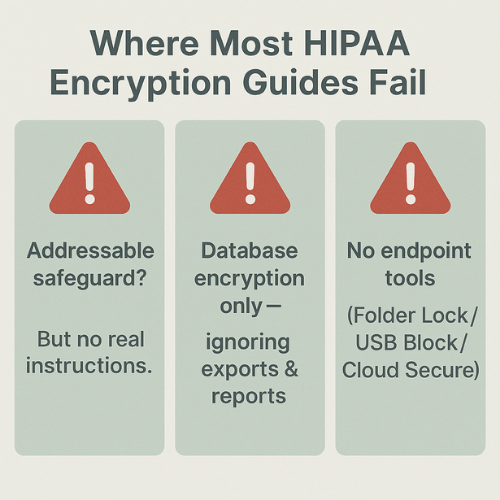
Most explanations about “HIPAA encryption” do the same three unhelpful things:
- They repeat that encryption is an “addressable safeguard” and then stop, without telling you what “reasonable and appropriate” looks like in actual systems.
- They talk about database encryption, but ignore exports, report dumps, synced folders and USB copies where a lot of breaches actually start.
- They never show how endpoint tools such as Folder Lock, Folder Protect, USB Block, USB Secure or Cloud Secure can turn policy language into concrete controls that auditors can see and test.
This write up has a single job:
turn “encrypt PHI at rest and in transit” into a repeatable set of steps you can screenshot, document and defend.
TLDR Outcome
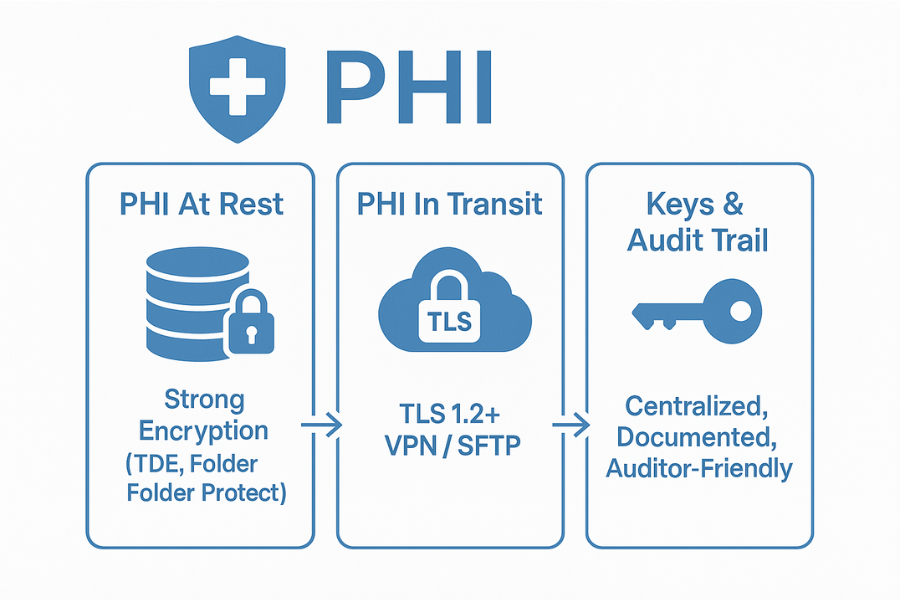
If you follow this end to end, you will:
- Design a clear encryption plan for PHI at rest and in transit that matches HIPAA expectations and current expert practice.
- Implement database transparent encryption and field-level encryption where they actually matter, not everywhere “just in case”.
- Wrap the “last mile” around that stack with NewSoftwares tools so PHI exports, synced folders and removable media do not blow up your effort.
1. HIPAA, PHI And Encryption In Plain Language
1.1. What HIPAA Actually Says About Encryption
HIPAA’s Security Rule splits controls into “required” and “addressable” implementation specs. Encryption is addressable for both data at rest and in transit, which means:
- You must assess risk and decide if encryption is reasonable and appropriate.
- If you decide against it, you must document why and put an equivalent safeguard in place.
- In practice, current guidance treats strong encryption as the normal answer for PHI in most settings.
A big benefit: if stolen PHI is encrypted with a strong algorithm and the keys are not compromised, regulators may not treat the incident as a reportable breach, which avoids notification chaos and some penalties.
1.2. PHI At Rest Vs PHI In Transit Vs PHI In Use
Use this simple view when you design controls.
| State of PHI | Typical examples | Primary controls |
|---|---|---|
| At rest | Database tables, backups, file shares, archive exports, synced folders on laptops | Disk or volume encryption, database TDE, field-level encryption for specific fields, file-level encryption tools like Folder Lock and Folder Protect |
| In transit | Web portals, APIs, VPN traffic, email, SFTP transfers | TLS 1.2 or higher, secure VPNs, SFTP, authenticated email encryption |
| In use | Application memory, user sessions, analytics | Access control, least privilege, monitoring, device hardening |
This playbook focuses on at rest and in transit, while noting where “in use” matters.
2. Prereqs And Safety Before You Start Encrypting
Before you flip any switches:
- Confirm where PHI actually lives: which apps, which databases, which file shares, which cloud services, which devices.
- Take a clean backup of every database you plan to encrypt, and test a restore.
- Document current authentication, access roles and network paths.
- Decide where keys will live: simple key files, application secrets store, HSM, cloud KMS.
- Read vendor notes for your database engine on TDE and compatible features.
And one more rule:
never roll out new encryption to production first. Use a realistic staging environment.
3. How To Skeleton: From Nothing To A HIPAA Ready Crypto Stack
Each step below is structured the same way:
- One core action.
- One screenshot idea.
- One “gotcha” that catches teams in audits.
3.1. Step 1: Map PHI And Classify Where Encryption Must Live
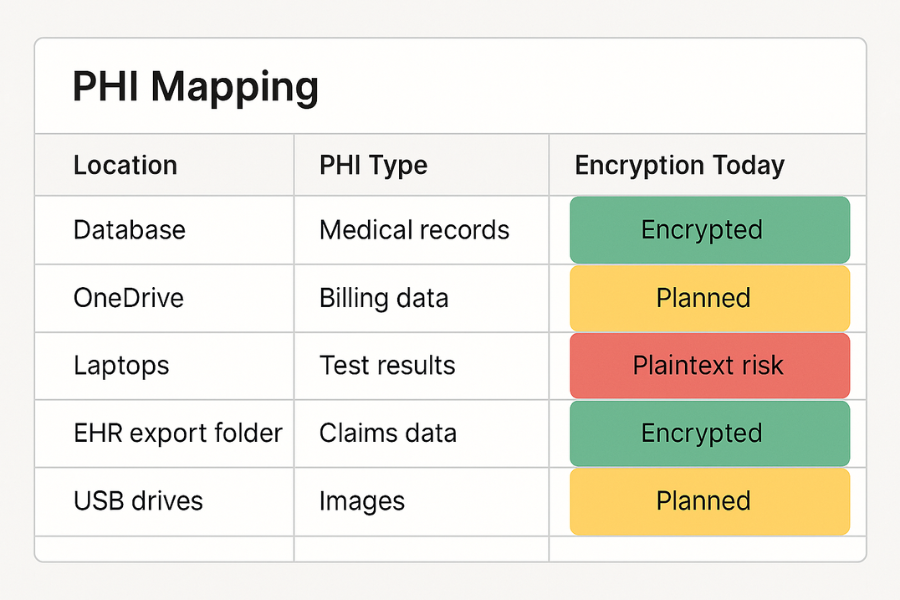
Action
Build a quick PHI map. For each item, specify:
- System name.
- Location: on-prem server, cloud provider, SaaS, laptop share.
- PHI type: full records, limited reports, logs.
- Encryption today: none, disk only, TDE, field-level, file tools.
A simple spreadsheet is enough if everyone actually uses it.
Screenshot idea
Capture the PHI map with colour tags:
- Green for encrypted at rest.
- Yellow for “encryption planned”.
- Red for “plain text at rest”.
This image goes straight into your HIPAA documentation pack.
Gotcha
Do not forget:
- CSV exports from the EHR.
- BI and analytics databases that pull PHI.
- OneDrive, Dropbox or Google Drive sync folders on laptops.
3.2. Step 2: Secure PHI In Transit First
If someone can sniff PHI on the wire, at rest controls will not save you.
Action
For every path that carries PHI:
- Enforce TLS 1.2 or higher on web portals and APIs.
- Require secure VPN tunnels for remote access into internal systems.
- Use SFTP or HTTPS based file transfer for batch files.
- Apply email encryption for PHI sent over email, or lock that down.
Confirm cipher suites follow current recommendations where you can.
Screenshot idea
Take screenshots of:
- Your load balancer or web platform TLS settings.
- A sample HTTPS call to your API showing a valid certificate.
- VPN configuration showing mandatory tunnel for PHI apps.
Gotcha
Do not leave “temporary HTTP debug endpoints” lying around. Security tests will find them.
3.3. Step 3: Encrypt PHI Databases With TDE
Transparent data encryption protects the files, not the structure of queries. It encrypts database files, logs and sometimes backups automatically, without changes to code.
Action
High level steps are similar across engines:
- Enable a master key or instance level key store.
- Create or register a database encryption key, usually using AES 256.
- Turn on TDE for each PHI database.
- Back up the master key and encryption key securely, preferably into a key management platform.
Examples:
- SQL Server: database master key, certificate or EKM key,
ALTER DATABASE ... SET ENCRYPTION ON. - PostgreSQL: engine specific or extension based TDE, or storage level encryption if engine native TDE is not present.
- Managed cloud databases: enable built-in TDE and confirm key management options (provider managed key or customer key).
Screenshot idea
For one key PHI database:
- Management console view that shows encryption set to “enabled”.
- Short SQL query output showing TDE status and cipher.
Keep that with the PHI map.
Gotcha
Losing the TDE key or master key can make the database unreadable, which is catastrophic for PHI. Always test key backup and restore steps on a non production copy first.
3.4. Step 4: Add Field-Level Encryption Where It Moves The Risk Needle
TDE protects storage. It does not hide particular values from admins or attackers who reach the database through the normal engine. For highly sensitive fields, field-level encryption can make sense: for example national IDs, social security numbers, access tokens or specific notes.
Action
Pick a small set of fields, not half the schema. Typical candidates:
- Government identifiers.
- Card or payment tokens connected with PHI.
- Security answers.
Then:
- Backup the database and schema.
- Add new encrypted columns to hold the cipher text.
- Create application functions or stored procedures that encrypt on write and decrypt on read for authorised paths.
- Generate separate keys per data domain and per environment.
- Migrate values gradually and test thoroughly.
Screenshot idea
- Schema view showing both original and encrypted columns.
- Config or secret store snippet that holds the key identifier, not the raw key.
Gotcha
Encrypting columns that drive indexes or joins can wreck performance and break queries. Many best practice notes recommend using separate fields and avoiding encryption on columns that must be searchable.
3.5. Step 5: Wrap PHI Exports And Files With Folder Lock And Folder Protect
No matter how clean your schema is, people will export data. CSV reports, PDF letters, images, intake forms. That is where many HIPAA incidents happen.
NewSoftwares tools help here.
Action
On Windows workstations that handle PHI files:
- Use Folder Lock to create encrypted lockers for PHI exports. It uses AES 256 bit encryption in virtual encrypted containers and can lock folders instantly.
- Use Folder Protect to set access rules on folders that hold PHI snapshots, such as “hidden” or “no delete”, depending on your retention policy.
Design pattern:
- Application exports go into a Folder Lock locker that is open only when a user is actively working.
- That locker sits on a disk that is already protected with full disk encryption.
- Folder Protect enforces no delete on specific evidence folders so reports cannot vanish.
Screenshot idea
- Folder Lock showing a locker called “PHI exports”, status “locked”.
- Folder Protect showing rules applied to a folder such as “Billing PHI 2025”.
Gotcha
Do not let staff export PHI to random personal folders or desktop paths. Combine Folder Lock with simple training: “All PHI exports live in this locker. Nowhere else.”
3.6. Step 6: Secure PHI In OneDrive, Dropbox And Other Sync Services With Cloud Secure
Cloud sync is convenient and dangerous. If PHI lands in synced folders, that path needs controls.
NewSoftwares Cloud Secure can lock OneDrive, Dropbox, Google Drive and Box folders on Windows and mobile so that even if someone opens the machine or tries to browse that path, they hit a password wall.
Action
On machines that sync PHI folders:
- Follow NewSoftwares’ HIPAA aware OneDrive hardening steps: strong account passwords, multi factor authentication, least privilege, BitLocker or similar on the machine, and client side encryption.
- Install Cloud Secure and lock the relevant sync folders when staff are away from the screen or when machines are shared.
- Store sensitive exports inside Folder Lock lockers located in those locked sync folders, so PHI is encrypted before it ever leaves the device.
Screenshot idea
- Cloud Secure panel showing OneDrive and Dropbox set to locked.
- File Explorer view of the synced folder containing only encrypted locker files.
Gotcha
Do not rely on the cloud provider’s encryption alone. HIPAA still sees the endpoint and sync client as part of your responsibility.
3.7. Step 7: Control Removable Media With USB Block And USB Secure
USB drives, portable disks and phones have caused many health data incidents. NewSoftwares publishes USB Block to stop unauthorised devices and USB Secure to protect authorised drives.
Action
On PHI capable workstations:
- Deploy USB Block to prompt for a password whenever a new USB storage device appears, and only whitelist drives that are part of your process.
- For approved drives that will carry PHI, install USB Secure so each drive is protected with a password at rest.
Use “compliance drives” for specific tasks, not personal ones. Record who holds each drive.
Screenshot idea
- USB Block prompt showing an untrusted device being blocked.
- USB Secure dialog on an approved drive asking for the password.
Gotcha
Never store keys for TDE or field-level encryption on the same USB drive that holds PHI. That defeats the whole purpose.
3.8. Step 8: Key Management Basics That Keep All Of This From Falling Apart
Encryption without proper key management is a trap. Good practice for HIPAA level work:
- Use AES 128 or 256 bit for most PHI workloads, following NIST guidance and vendor defaults.
- Store keys separately from the data, ideally in a hardware security module or cloud key management service.
- Use different keys for test and production.
- Rotate keys on a schedule and after incidents.
- Keep key backups offline as well, with access tightly controlled.
For endpoint products like Folder Lock or USB Secure, follow NewSoftwares best practice: strong master passwords, safe storage of license and emergency information, and documented install procedures.
3.9. Step 9: Verification: How To Know It Really Worked
Design a simple verification run for each control layer.
For databases
- Run system views that show TDE status and cipher for each PHI database.
- Check that backups are flagged as encrypted.
For field-level encryption
- Select a row directly from the database and confirm the sensitive field is unreadable.
- Hit the application as an authorised user and confirm the same value looks normal.
For endpoints
- Open a Folder Lock locker after entering the password, then close it and verify files are no longer directly readable from the file system.
- Try an unknown USB drive on a PHI workstation and confirm USB Block stops it.
- Lock a cloud folder with Cloud Secure, then try to access it from a user account without unlocking.
Keep screenshots and short notes, dated and linked back to your PHI map.
4. Comparison Skeleton: TDE Vs Field-Level Vs Endpoint Encryption
4.1. Use Case Chooser Table
| Approach | Protects what | Ideal use | When it is not enough alone |
|---|---|---|---|
| Disk or volume encryption only | Entire disk including swap and temp files | Lost laptop or stolen disk scenarios | Does not protect against attackers with database logins or application access |
| Database TDE | Database files, logs and backups | Baseline for any PHI database, on-prem or cloud | Does not hide data from admins or attackers who can run queries |
| Field-level encryption | Specific columns inside tables | Highly sensitive identifiers or notes that fewer people should see | Complex to manage at large scale, can hurt performance if overused |
| File and folder encryption on endpoints (Folder Lock, Folder Protect) | Exports, letters, scanned documents, images, synced folders | Front line protection for analysts, billing staff and clinicians working on Windows | Needs policies and training so staff actually store PHI in protected folders |
| USB Block and USB Secure | Removable storage | Clinics and offices where staff move PHI on drives | Does not secure PHI already spread across uncontrolled devices |
| Cloud Secure for sync folders | OneDrive, Dropbox, Google Drive and Box folders on devices | Teams that rely on cloud storage for PHI documents | Needs coordination with identity and cloud security teams |
TDE is the baseline for servers. Field-level encryption adds extra protection for crown jewel fields. NewSoftwares tools cover the messy real world of files, exports and drives around those servers.
4.2. Verdict By Persona
Small clinic owner
TDE may be handled by your cloud EHR vendor. Your job is making sure staff laptops, USB drives and OneDrive accounts do not leak PHI. Folder Lock, Folder Protect, USB Block, USB Secure and Cloud Secure give you a practical story to show.
Health tech startup engineer
You own the applications and databases. Make TDE a default, use field-level encryption sparingly on key columns, and design your export flow so files always land inside encrypted lockers on workstations.
Hospital security architect
You have all three layers. Use TDE everywhere PHI sits, add field-level encryption to the riskiest data sets, and standardise workstation builds with full disk encryption plus NewSoftwares endpoint tools for Windows based roles that handle PHI heavy exports.
5. Troubleshoot Skeleton
5.1. Symptom To Fix Table
| Symptom or error text | Possible root cause | Non destructive check | Next step with warnings |
|---|---|---|---|
| Application slows down after field encryption | Encrypting indexed or frequently queried columns | Check which columns changed and review query plans | Move encryption to separate fields and adjust indexes |
| “Cannot find server certificate with thumbprint” in database logs | Missing or changed TDE certificate or key | Confirm key and certificate presence on server | Restore certificate or key from secure backup, then re test on staging |
| “The certificate chain was issued by an authority that is not trusted” on PHI web portal | TLS certificate chain problem | Check expiry and chain in browser developer tools | Renew certificate from trusted authority and enforce HTTPS redirects |
| USB Block keeps interrupting clinical staff during safe workflows | Device control policy too strict or poorly explained | Review logs for blocked devices and reasons | Adjust whitelist, create labelled compliance drives and retrain staff |
| Staff still saving PHI exports to desktop in plain text | Training gap and missing defaults | Check export defaults in applications and staff habits | Change export targets to locked lockers, add quick coaching sessions |
Keep this table close to the help desk runbook.
6. Safety And Ethics: Encryption Does Not Excuse Bad Behaviour
Two key points often misunderstood:
- HIPAA treats encrypted PHI differently because unauthorised parties cannot read it, but that only holds when the encryption strength and key protection are solid.
- Wiping logs or hiding incidents because data was encrypted is not acceptable. You are still expected to investigate, fix root causes and, where necessary, report.
NewSoftwares’ own material on HIPAA and patient data emphasises the privacy and security obligations of custodians. Encryption is a tool to meet those obligations, not a shield against accountability.
7. FAQs: HIPAA Encryption, TDE And NewSoftwares Tools
1. Does HIPAA Force Me To Encrypt PHI At Rest?
HIPAA does not use the word “required” for encryption, but treats it as an addressable safeguard. In practice, most recent explanations say that strong encryption for PHI at rest is the normal choice and skipping it requires serious justification and alternative protections.
2. What Is The Difference Between TDE And Field-Level Encryption For PHI?
TDE encrypts database files and logs on disk without touching application logic, which is great for lost disks or snapshots. Field-level encryption protects specific columns, so even admins who run queries cannot see values without keys or application paths. It is more precise but more complex to manage.
3. Is AES 128 Bit Enough For HIPAA, Or Do I Need AES 256?
Several HIPAA focused notes mention AES with at least 128 bit keys as an appropriate choice, with many organisations picking AES 256 for extra headroom, especially in cloud and database settings. The key point is to follow NIST grade algorithms and manage keys properly.
4. Can I Rely Only On Disk Encryption Like BitLocker?
Disk or volume encryption is important for lost or stolen laptops, and HIPAA material often recommends it, but it does not replace TDE or field-level encryption. Once the system is running and an attacker gets valid access, disk encryption is no longer a barrier.
5. Where Do NewSoftwares Tools Fit Into A HIPAA Program?
NewSoftwares focuses on endpoint and file security: Folder Lock and Folder Protect for encrypting and controlling folders, USB Block and USB Secure for removable media, Cloud Secure for sync folders and other utilities for privacy. They complement your server and cloud encryption by protecting exports, shared machines and day to day workstations.
6. Can I Store PHI In OneDrive If I Use Cloud Secure And Folder Lock?
Storing PHI in OneDrive can be part of a HIPAA plan if you combine OneDrive’s own controls, account security, disk encryption and client side protection such as Cloud Secure and Folder Lock for synced folders and files, as NewSoftwares explains in its HIPAA aware OneDrive material. You still need an overall risk assessment and business associate agreements.
7. What Happens If I Lose A TDE Key?
If you lose the master key or certificate for a TDE protected database and have no backup, you may never decrypt that database again. That is why expert notes stress backing up keys, storing them separately and testing restoration before going live.
8. Do I Still Need Encryption If My PHI Database Is Behind A Firewall?
Yes. Firewalls reduce exposed surface but do not stop attacks that come from inside the network, stolen credentials or misconfigured services. HIPAA discussions treat encryption, access control and network security as layers that work together.
9. Is It Acceptable To Keep PHI Exports Only In Folder Lock Lockers?
If exports contain PHI, storing them only in encrypted and locked Folder Lock containers on full disk encrypted machines is a strong practice that supports HIPAA encryption expectations. You still need retention rules, access control and incident response, but your file storage story becomes far stronger.
10. How Often Should I Review My Encryption Setup For PHI?
Many HIPAA oriented recommendations call for at least annual reviews of risk, plus extra checks after significant system changes or incidents. That is a good rhythm to revisit TDE status, field-level coverage, endpoint encryption with NewSoftwares tools and key management processes.
11. Does Encrypting PHI Remove The Need To Report A Breach?
Not always. HIPAA breach rules say that if PHI is encrypted to a level that makes it unreadable and keys are not compromised, a theft may not count as a breach of unsecured PHI. If keys are exposed or encryption is weak, you may still have to report.
12. Where Should A Small Practice Start If This All Feels Like A Lot?
Start with quick wins: map PHI, enable TDE where your vendor already supports it, and roll out Folder Lock, Folder Protect, USB Block, USB Secure and Cloud Secure on the few machines that touch PHI files. From there, gradually tighten field-level encryption and key management with help from your IT and compliance partners.
Conclusion
HIPAA compliance demands a layered, documented approach to encryption, treating it as the normal answer for PHI at rest and in transit. By combining robust server-side TDE with Folder Lock and Folder Protect for file encryption, USB Secure for portable media, and Cloud Secure for cloud sync folders, you establish concrete, auditable controls at every point where PHI is exposed. This integrated strategy satisfies the “reasonable and appropriate” standard and maximizes protection against data loss and unauthorized disclosure.
8. Structured Data Snippets (JSON LD)
HowTo
{
  "@context": "https://schema.org",
  "@type": "HowTo",
  "name": "Encrypt PHI at Rest and in Transit for HIPAA Programs",
  "description": "Step by step process to encrypt PHI in databases, files, exports and sync folders using TDE, field-level encryption and endpoint tools from NewSoftwares.",
  "step": [
    {
      "@type": "HowToStep",
      "name": "Create a PHI data map",
      "text": "List every system, database, file share, sync folder and device that stores or processes PHI and classify whether it is currently encrypted at rest or not."
    },
    {
      "@type": "HowToStep",
      "name": "Secure PHI in transit",
      "text": "Enforce TLS on all PHI web portals and APIs, use VPN for remote access, and move to secure file transfer and email encryption where PHI is transmitted."
    },
    {
      "@type": "HowToStep",
      "name": "Enable transparent data encryption on PHI databases",
      "text": "Configure TDE on relational databases that hold PHI, using AES-based keys and secure key backup, and validate encryption status with database views."
    },
    {
      "@type": "HowToStep",
      "name": "Apply field-level encryption to sensitive columns",
      "text": "Encrypt selected high-risk fields such as identifiers with column-level or application-level encryption so only authorised paths can read cleartext values."
    },
    {
      "@type": "HowToStep",
      "name": "Protect PHI exports on endpoints",
      "text": "On Windows systems, use Folder Lock to keep PHI exports in encrypted lockers, Folder Protect to control access, and Cloud Secure to lock sync folders."
    },
    {
      "@type": "HowToStep",
      "name": "Control USB and external drives",
      "text": "Deploy USB Block to stop unapproved removable storage and use USB Secure to password-protect approved drives that carry PHI."
    },
    {
      "@type": "HowToStep",
      "name": "Verify and document encryption",
      "text": "Run checks to confirm database encryption, test field-level encryption round-trips, and record screenshots of endpoint tools protecting PHI files and folders."
    }
  ],
  "tool": [
    { "@type": "HowToTool", "name": "Folder Lock" },
    { "@type": "HowToTool", "name": "Folder Protect" },
    { "@type": "HowToTool", "name": "USB Block" },
    { "@type": "HowToTool", "name": "USB Secure" },
    { "@type": "HowToTool", "name": "Cloud Secure" }
  ],
  "supply": [
    { "@type": "HowToSupply", "name": "Databases and file stores containing PHI" },
    { "@type": "HowToSupply", "name": "Windows endpoints used by staff handling PHI" }
  ]
}
FAQPage
{
  "@context": "https://schema.org",
  "@type": "FAQPage",
  "mainEntity": [
    {
      "@type": "Question",
      "name": "Does HIPAA mandate encryption for PHI at rest?",
      "acceptedAnswer": {
        "@type": "Answer",
        "text": "HIPAA classifies encryption as an addressable safeguard rather than a required one, but current practice treats strong encryption of PHI at rest as the expected control unless a documented alternative of equal strength is in place."
      }
    },
    {
      "@type": "Question",
      "name": "What is transparent data encryption in a HIPAA context?",
      "acceptedAnswer": {
        "@type": "Answer",
        "text": "Transparent data encryption encrypts database files, logs and sometimes backups at the storage layer without changing application code, helping protect PHI if disks or snapshots are accessed outside the database engine."
      }
    },
    {
      "@type": "Question",
      "name": "How do NewSoftwares tools support HIPAA encryption goals?",
      "acceptedAnswer": {
        "@type": "Answer",
        "text": "NewSoftwares products such as Folder Lock, Folder Protect, USB Block, USB Secure and Cloud Secure extend HIPAA encryption programs to endpoints by protecting PHI exports, removable media and synced cloud folders on Windows devices."
      }
    }
  ]
}
ItemList
{
  "@context": "https://schema.org",
  "@type": "ItemList",
  "name": "Core controls for encrypting PHI under HIPAA",
  "itemListElement": [
    {
      "@type": "ListItem",
      "position": 1,
      "name": "Data at rest encryption",
      "description": "Encrypt PHI at rest through disk encryption, database transparent data encryption and field-level encryption for the most sensitive fields."
    },
    {
      "@type": "ListItem",
      "position": 2,
      "name": "Data in transit encryption",
      "description": "Use TLS, VPN and secure file transfer protocols for every network path that carries PHI, including web portals, APIs and batch files."
    },
    {
      "@type": "ListItem",
      "position": 3,
      "name": "Endpoint and media protection",
      "description": "Secure exports, synced folders and removable drives with file encryption and device control tools such as Folder Lock, Folder Protect, USB Block, USB Secure and Cloud Secure."
    }
  ]
}