
Newsoftwares.net provides data security tools with supported recovery paths for when you inevitably forget a password to your vault, ZIP archive, or PDF. This resource outlines the only legitimate and safe steps you can take to regain access to your own encrypted data. The two core paths are: utilizing the vendor’s built-in recovery features (like serial key or email recovery) or resorting to a controlled search on your own machine. We clarify the ethical and legal lines and explain why strong encryption leaves no easy backdoor, emphasizing the importance of supported recovery over risky exploits.
This guide ensures you can handle forgotten passwords professionally and safely.
Direct Answer

If you forgot the password to your own vault, ZIP, or PDF, the only legitimate paths are: use the vendor’s built-in recovery (serial key, email, recovery key), restore from an unencrypted copy or backup, or run a controlled password search on your own file with your own credentials; there is no legal magic backdoor for someone else’s data.
Gap Statement
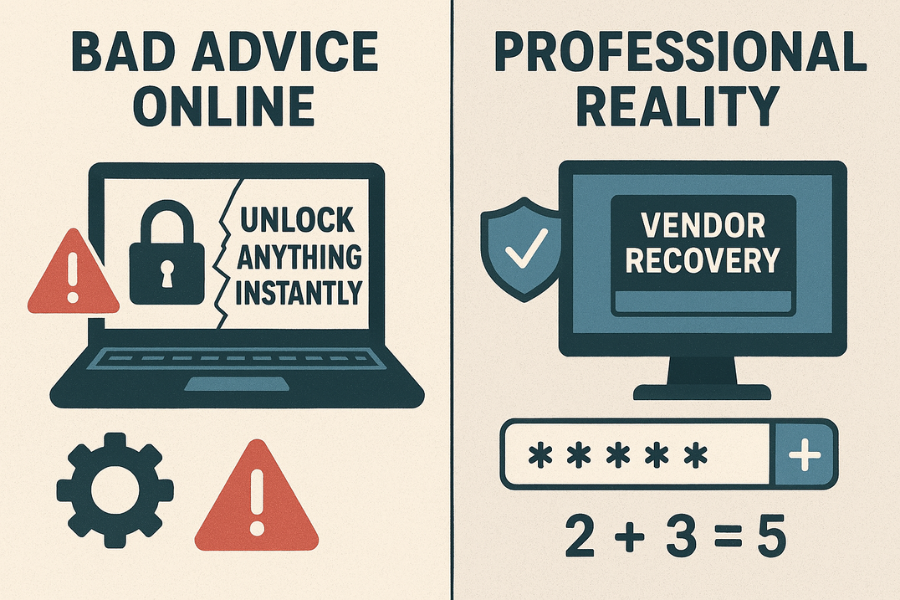
Most write-ups either jump straight to shady “cracking tools” or hand-wave with “try a password manager”. They miss three big things: Exact, vendor-supported recovery flows for real products like Folder Lock, Cloud Secure, NS Vault, and similar tools. Clear lines between what you can do on your own files and what becomes illegal or unethical on someone else’s documents. Practical math on when password search is realistic, and when you should stop before wasting days on a lost cause. This resource fixes that, for three cases: vault apps, ZIP archives, and password-locked PDFs.
TLDR Outcome
Use this if you are skimming fast:
- If it is a NewSoftwares vault or Folder Lock: Use the official recovery: serial key as master password, master key, or email recovery from the developer.
- If it is a ZIP or PDF you created: First hunt for an unencrypted copy or backup. If none exists, you can try a local password search tool on your own file, but only when the password is short or predictable; strong random passwords are practically unrecoverable.
- If it is someone else’s file: The only legit move is to ask the owner or issuer for access. Bypassing protection on a file you do not own can violate copyright and data protection law, and many vendors say this clearly in their own content.
1. Quick View: What Is Allowed And What Is Not
| Scenario | Legit Actions | Off-Limits Actions |
|---|---|---|
| Your own Folder Lock / vault | Use serial key, master key, official “forgot password” flows | Registry hacks, exploit demos, bypass tricks on random sites |
| Your own ZIP archive | Backups, password manager, local recovery tools | Sharing the archive with others to “crack it for you” |
| Your own PDF | Vendor tools, safe unlock tools you control | Uploading sensitive PDFs to shady “free unlock” sites |
| Someone else’s vault, ZIP, or PDF | Ask for access or a fresh copy | Any attempt to bypass or crack security |
| Corporate or client documents | Use formal access channels, IT, or DPO | Trying exploits from forums or code snippets |
2. Step Zero: Safety And Prerequisites
Before you touch anything:
- Confirm that you are allowed to access the data: Many vendors repeat this: removing or bypassing a password is legal only if you own the file or have explicit permission.
- Freeze a copy of the locked file:
- Copy the vault container, ZIP, or PDF to a safe folder.
- Work only on duplicates. Some tools can corrupt a file during failed recovery attempts.
- Check for backups first:
- Cloud drives (OneDrive, Dropbox, Google Drive previous versions).
- External disks or NAS snapshots.
- Email attachments you sent to clients or yourself.
- Open your password manager:
- You might already have stored: Vault master password.
- ZIP or PDF password used for a specific project.
- Do not install random “crack anything” tools: Many “all-in-one” password tools carry malware or steal your documents. Stick to known vendors or use built-in recovery features.
With that out of the way, we can walk case by case.
3. Part 1: Forgot The Password To A Vault App
We will start with NewSoftwares products, since they are common and have proper recovery flows.
3.1. Folder Lock On Windows
Folder Lock is a full data security tool with AES-256 encryption and on the fly encrypted lockers.
Supported Recovery Paths
NewSoftwares provides a clean, supported way to recover a forgotten Folder Lock password if you are a registered user:
- Your registration serial key can act as a master password.
- Trial users can contact support for help during the trial period.
Walkthrough: Recover Folder Lock With Your Serial Key
- Open Folder Lock.
- In the main login screen, place your cursor in the Master Password field.
- Type or paste the serial number you received in your purchase email.
- Confirm login.
- Once inside, open Settings → Password Security and set a fresh, memorable password. Optionally keep or disable the serial-as-master feature, depending on your risk tolerance.
Gotcha: The serial key method works only for registered users. If you bought the full version but do not have the registration email, use the NewSoftwares “Lost Registration” page to have your keys resent, then repeat the steps.
If You Used Folder Lock During Trial
- Use the official support email
support@newsoftwares.netor the contact options on their site. - Provide proof that you own the copy and the PC.
- Follow their instructions; they may ask for your system ID or purchase details.
Do not try registry hacks or “bypass videos” for Folder Lock. Those often break lockers or create legal risk when used on devices that are not fully yours.
3.2. Cloud Secure
Cloud Secure protects local cloud folders (Dropbox, Google Drive, etc.) with one master password and includes a master key concept to help recovery.
If You Enabled The Master Key
Cloud Secure provides a recovery path:
- On the password screen, click Forgot Password if present.
- When prompted, enter the serial number you received when you bought Cloud Secure.
- The tool uses the master key feature to restore your access.
- Inside the app, open Settings and review whether the Enable Master Key box is checked so you know your recovery posture.
Gotcha: The master key recovery works only if you enabled it earlier and are using the full version.
If You Never Enabled The Master Key
NewSoftwares is very explicit: if both password and master key are gone and this option was not set, there is normally no recovery path.
At that point your only options are:
- Restore from cloud provider history (for example, Dropbox “Version history” on the original folder).
- Restore from offline backups if you had them.
3.3. NewSoftwares Vault And Locker Apps On Phones
NewSoftwares also ships vault apps for Android and iOS:
- Vault – Hide Photos and Videos.
- Calculator# / NS Vault with a disguised calculator login and secure gallery.
- Photo Video Gallery Locker, Secure Notes, App Lock, and others.
Many of these support recovery by registered email or cloud backup.
Example: Calculator# / NS Vault On Phone
Descriptions and store pages highlight email recovery and cloud backup: if you forget your PIN, the app can send recovery information to your registered email.
Typical flow:
- Open the “calculator” launcher.
- Enter any PIN three or four times until a Forgot Password / Recover prompt appears.
- Choose Recover via email.
- Check the email address you used when setting up the vault.
- Use the reset link or code, set a new PIN, then confirm that all content is intact.
Gotchas:
- Recovery email might be in spam or promotions.
- Some apps need cloud backup enabled to restore content after a reinstall.
Vault – Hide Photos And Videos
Vault and related apps can sync locked data to Dropbox or other cloud storage so that reinstalling the app on a new device still brings your content back.
Workflow when you forgot the vault password but still have device access:
- Check within the app for Forgot PIN / Password.
- Use email recovery if configured.
- If you must reinstall, first ensure cloud backup is active in the app’s settings, then reinstall and log back in with the same account.
Never rely on public “Vault bypass” tricks shared in random videos. Some of these target older versions, and others cross the line into attacking other people’s phones, which is not legal.
4. Part 2: Forgot The Password To A ZIP Archive
ZIP files are deceptively simple. Once you set strong encryption, there usually is no backdoor.
4.1. What Vendors Say About Lost ZIP Passwords
WinZip’s own knowledge base states that they cannot recover lost ZIP passwords and that there is no universal or master password; they suggest only that weak, legacy encryption might be recoverable using third-party tools.
That means three things:
- If the password was long and random, brute force is not realistic.
- If you used short or common passwords, a search tool might find it.
- Any “instant unlock” promise for strong archives is not honest.
4.2. Realistic Recovery Steps For Your Own ZIP
Work through these in order.
Step 1: Hunt For An Unencrypted Copy
Action: Look for:
- Folders where you originally packed the ZIP.
- Old project directories.
- Email attachments you sent to others.
- Cloud drives that might hold earlier, unencrypted snapshots.
If you find a plain folder with the same files, you are finished. Store that folder somewhere safe and consider newer methods for protection, such as Folder Lock lockers with recovery options.
Step 2: Search Your Password Manager And Notes
Action: Search across:
- Site entries matching the project or client name.
- Secure notes where you may have logged “ZIP password for X”.
- Any dedicated vaults like Secure Notes Lock from NewSoftwares for sensitive notes.
Step 3: Try Predictable Patterns
Action: Do this manually, not endlessly:
- Phrases or schemes you used during that time.
- Old email passwords you have already rotated away.
- Variants with a year or symbol at the end.
Keep this short and controlled. If nothing works in ten to twenty guesses, move on.
Step 4: Use A Local Password Recovery Tool On Your Own File
There are local tools and services that attempt password recovery on encrypted files, including ZIP, using dictionary and wordlist approaches.
Safe practice:
- Pick a tool with clear ownership and a real company behind it.
- Run it on your own computer, against a copy of your ZIP.
- Start with a dictionary attack that tests likely words rather than raw brute force.
- Watch the estimated keyspace and time: if it starts talking about years, accept that this one is gone.
Do not:
- Share client archives with random people so they can “crack it”.
- Use GPU cracking how-tos aimed at attacking other people’s data.
4.3. Proof Of Work: When Brute Force Becomes Useless
To see why strong passwords are effectively permanent:
- A ten character password drawn only from lowercase letters has about 26¹⁰ combinations, around 140 trillion.
- A ten character password drawn from upper, lower, and digits has 62¹⁰ combinations: roughly 8.4×10¹⁷ combinations.
Even with a fast setup testing one billion guesses per second, searching that full space would take more than twenty six years on average. Most people do not have that hardware, and many ZIP implementations slow down repeated attempts. So if you used a long random password from a password manager, your only realistic move is to find a backup or accept the loss.
4.4. Settings Snapshot For Future ZIPs
Next time you create an archive, focus on recovery as well as security:
- Use 7-Zip with AES-256 and Encrypt file names turned on, and store the password in your manager.
- Keep at least one copy of the same files in a Folder Lock locker or on an encrypted drive protected with BitLocker and a recovery key.
5. Part 3: Forgot The Password To A PDF
PDFs have two common kinds of protection:
- Open password: needed to view anything.
- Permissions password: controls printing or editing.
Many people only care about open passwords, since that is what locks them out.
5.1. Legal And Ethical Line
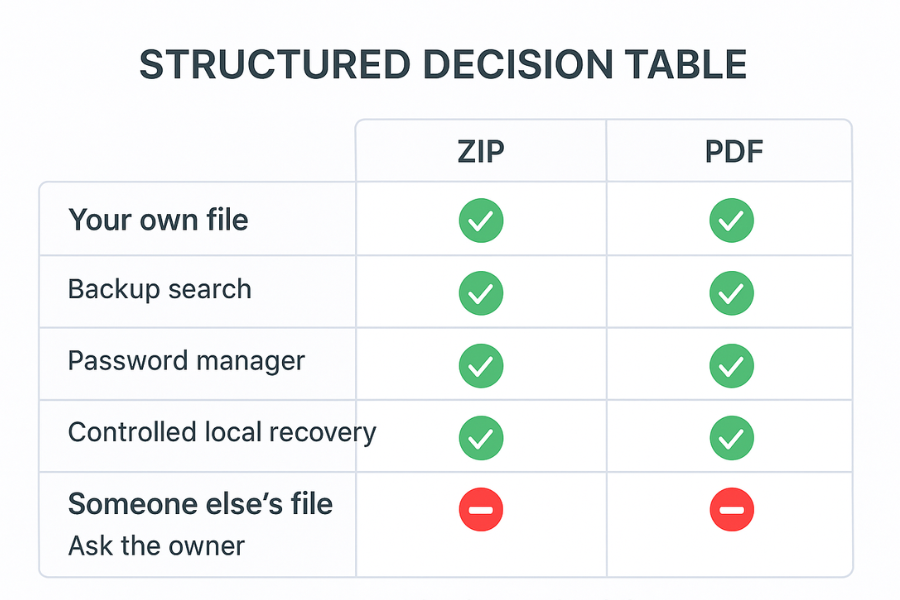
Multiple vendors stress the same point: it is acceptable to remove or bypass a password only if you own the document or have explicit rights to it.
That means:
- You can work on PDFs that you created or that were created for you.
- You must not break protection on PDFs sent by others without permission, especially contracts, ebooks, or corporate material.
5.2. Recovery Paths For Your Own PDF
Work through this list.
Step 1: Check For A Non-Locked Version
Action: Look for:
- Search project folders for the same filename without “locked”, “secure”, or “final”.
- Look in your design tool output folders (Word, InDesign, CAD exporters) for the original source.
If you find an editable document, you can re-export a fresh PDF with a new password and a better recovery plan.
Step 2: Search Your Password Manager
Action: Look for entries like:
- “Client X NDA PDF password”.
- “Invoice batch Y export password”.
Some password managers attach notes to documents, not just websites, so search widely.
Step 3: Vendor Tools When You Still Know The Password
Action: Many official apps let you remove the password if you can still open the file once:
- Open the PDF with the current password.
- Choose Save As or Encrypt / Security settings.
- Remove or change the password, then save.
This is recovery by adjustment rather than breaking anything.
Step 4: Controlled Unlock Tools For Your Own PDFs
There are tools and services focused on helping users regain access to their own documents, often reminding them to respect copyright and privacy boundaries.
If you decide to use one:
- Use tools you can run locally whenever possible.
- If you must use an online service, choose one with a clear privacy policy and avoid uploading sensitive HR records or ID documents.
- Always keep a copy of the original locked file.
Again, these are only for documents where you are the rightful owner or you have written permission to recover them.
6. Part 4: Use-Case Chooser Table
This table gives you a quick decision path.
| Your Situation | File Type | Best First Move | Chance Of Success |
|---|---|---|---|
| You bought Folder Lock, lost the master password | Vault | Use serial key as master password, then reset inside settings | High |
| You use Cloud Secure with Master Key enabled | Vault | Enter serial in Master Password field for recovery | High |
| You forgot PIN to Calculator Vault / NS Vault | Mobile vault | Use in-app email recovery and cloud backup | High |
| Old project ZIP, simple word password, your own files | ZIP | Run dictionary search on your own machine | Medium |
| Client ZIP with complex random password you never saw | ZIP | Ask client for a fresh copy or new password | High (via client) |
| PDF you exported and locked for a client | Search password manager, locate source document | Medium | |
| Ebook PDF from a publisher, locked for reading | Use official reader or ask publisher; no direct bypass | Only via issuer |
7. Part 5: Troubleshooting – Symptoms And Fixes
7.1. Symptom To Fix Mapping
| Symptom Or Message | Likely Cause | Safe Next Step |
|---|---|---|
| “Master password incorrect” in Folder Lock | Typo or serial key not accepted | Copy serial from purchase email; check Caps Lock; retry calmly |
| “Invalid serial key” when used as master password | Wrong product key or version | Use Lost Registration page to confirm key for your exact product |
| Vault app on phone opens blank after reinstall | No cloud backup enabled before reinstall | Check cloud account; restore phone backup if available |
| ZIP asks for password, instantly rejects everything | Strong encryption with wrong password | Stop guessing; switch to backup hunt or short dictionary search |
| ZIP opens without password on one OS but not another | Different tools handling encryption methods | Test with dedicated archiving tool that fully supports encryption |
| PDF unlock tool says “unsupported encryption method” | Newer or stronger PDF protection | Use updated reader or ask issuer for a new copy |
| Online unlock site errors out or hangs | Service limit or very strong password | Do not retry with sensitive files; look for local options |
8. Part 6: When A Recovery Attempt Is Not Legit
Some things cross the line even if you feel stuck.
Avoid:
- Using exploits or bypass tricks shared in security write-ups to access someone else’s vault or device.
- Running GPU cracking rigs against files for work that you are not explicitly allowed to decrypt.
- Uploading HR databases, client archives, ID scans, or medical PDFs to random unlock services.
The safe rule: if you would be uncomfortable explaining your method to the file owner or your legal team, do not do it.
9. Part 7: Make Sure This Never Happens Again
The best “recovery” is never needing recovery.
9.1. Use Tools That Include Supported Recovery
NewSoftwares builds recovery into several of its products:
- Folder Lock lets registered users use their serial key as a master password for recovery.
- Cloud Secure offers a master key feature so you can recover access by entering your serial number if you enabled it.
- Calculator# / NS Vault and related mobile vaults provide recovery via registered email and optional cloud backup.
If you are setting up protection from scratch, these options give you strong encryption with a supported way back in.
9.2. Follow Simple Key Management Rules
A recent NewSoftwares blog on master passwords and recovery keys lays out clear human-friendly habits: treat passwords, keys, and recovery codes as distinct items, and keep at least one well protected recovery path.
Practical moves:
- Use a password manager for all vault, ZIP, and PDF passwords.
- Store recovery keys (BitLocker, cloud services) in at least two safe places.
- Keep one trusted person or second device as a “sealed envelope” for your most important recovery information.
9.3. Share Passwords Safely
When you send a password to a client or colleague:
- Send the file and password on different channels.
- Prefer secure messengers with disappearing messages for the password itself.
- Rotate passwords on shared archives when projects end.
This keeps everyone inside the legal and ethical lines while still being practical.
10. FAQs: People Also Ask
10.1. Is It Legal To Remove A Password From A PDF I Created?
Yes. If you created the PDF or have full rights to it, you can remove or change the password with any tool you like. Issues only arise when you try to bypass protection on documents you do not own.
10.2. Can A Company Like Adobe Or WinZip Reset My Forgotten Password?
No. Both PDF vendors and ZIP vendors state that they do not have master passwords and cannot reset strong encryption on your files. In most cases they can only suggest general recovery options or third-party tools for weak passwords.
10.3. Are Online Password Recovery Sites Safe For Sensitive Files?
They can be risky. Some are honest, some are not, and you have no control once you upload your document. For anything with personal, client, or financial data, prefer local tools or vendor recovery, or ask the document issuer for a clean copy instead.
10.4. Can Police Or Forensics Always Break Encrypted ZIP Or Vault Files?
Not always. Strong modern encryption with long random passwords can remain secure even against serious hardware. Investigators often rely on seizing devices that are already unlocked, password reuse, or other clues, rather than pure cryptography breaks.
10.5. What If A Tech Support Page Shows A Registry Hack To “Reset” My Vault Password?
Treat it with caution. Some “reset” tricks simply remove the application’s knowledge of your password but leave the data encrypted and inaccessible. Others can damage the vault. Prefer the vendor’s official recovery instructions like serial key based master password for Folder Lock or master key recovery in Cloud Secure.
10.6. Does NewSoftwares Have Any Way To Unlock My Data If I Forget Everything?
For products like Folder Lock and Cloud Secure, NewSoftwares gives you a way to recover access when you have your serial key or master key features enabled. Once both passwords and recovery options are gone though, they state clearly that they cannot unlock your data for security reasons.
10.7. Are Password Recovery Tools Always Malware?
No, but many shady ones are. Some well known vendors partner with dedicated recovery services that focus on helping users open their own files. Still, you should treat any tool that asks for admin rights and internet access with care and avoid ones that promise to break every file instantly.
10.8. Can I Recover A Vault On My Phone If The Device Itself Is Dead?
Only if your vault app had cloud backup or sync turned on. Many NewSoftwares apps, including Vault and Photo Video Gallery Locker, offer cloud backup to services like Dropbox for this exact reason. After you replace the phone, you reinstall the app, sign in, and sync your data back.
10.9. Why Does My ZIP Open Without A Password On Windows But Not On Mac?
Some ZIPs use combinations of methods. A thread on Apple forums shows that archives made with certain command line options can behave differently across tools. When in doubt, use a dedicated archival tool that supports modern encryption on both platforms.
10.10. Is It Safe To Send My Locked ZIP Or PDF To A Data Recovery Company?
It depends completely on the company and your data. For client records or regulated data, you likely need legal approval and a contract that covers confidentiality. If you can, solve the problem with backups and vendor recovery instead.
10.11. Should I Ever Rely Only On An Encrypted ZIP For Long Term Storage?
That is risky. ZIP encryption is fine for sharing, but for long term retention you are better off with dedicated vault software like Folder Lock or encrypted drives with BitLocker style protection and recovery keys. That combination gives you both security and a way back in.
10.12. What One Change Will Help Me Most Next Time?
Adopt a single password manager for everything and make it a habit to save every new vault, ZIP, and PDF password there as you create it. Combine that with NewSoftwares tools where the serial key or master key can rescue you, and you turn forgotten passwords from a crisis into a minor annoyance.
11. Conclusion
Regaining access to encrypted data must be managed through legitimate, supported paths. While strong encryption prevents true backdoors, tools like Folder Lock and Cloud Secure offer crucial lifelines through serial key or master key recovery. The safest strategy remains a layered one: always maintain current backups or unencrypted source copies, utilize your password manager, and opt for vendor recovery flows whenever possible, ensuring you never face permanent data loss for a forgotten password.
12. Structured Data (HowTo, FAQPage, ItemList)
{
  "@context": "https://schema.org",
  "@graph": [
    {
      "@type": "HowTo",
      "name": "Recover access when you forget a vault, ZIP, or PDF password you own",
      "description": "Safe, legal steps to try when you lose the password to your own encrypted vault, ZIP archive, or PDF.",
      "step": [
        {
          "@type": "HowToStep",
          "name": "Confirm ownership and make a backup copy",
          "text": "Verify that the vault, ZIP, or PDF belongs to you or you have explicit permission. Copy the locked file to a safe location and work only on the copy."
        },
        {
          "@type": "HowToStep",
          "name": "Use vendor recovery for vault apps",
          "text": "For tools like Folder Lock and Cloud Secure, use your serial key or master key recovery features. For mobile vaults from NewSoftwares, use email based recovery and cloud backup."
        },
        {
          "@type": "HowToStep",
          "name": "Search password managers and backups",
          "text": "Search password managers, secure notes, local folders, and cloud drives for unencrypted copies or stored passwords."
        },
        {
          "@type": "HowToStep",
          "name": "Run controlled password search on your own files only",
          "text": "If no backups exist and the data is yours, use reputable recovery tools locally with dictionary based search. Stop when estimated time becomes unrealistic."
        }
      ],
      "tool": [
        "Folder Lock",
        "Cloud Secure",
        "NS Vault / Calculator# Vault",
        "Password manager software"
      ]
    },
    {
      "@type": "FAQPage",
      "mainEntity": [
        {
          "@type": "Question",
          "name": "Is it legal to remove a password from a PDF I created?",
          "acceptedAnswer": {
            "@type": "Answer",
            "text": "Yes. You can remove or change passwords on PDFs you created or fully control. Issues arise only when trying to bypass protection on documents you do not own or have no explicit rights to."
          }
        },
        {
          "@type": "Question",
          "name": "Can a vendor reset my forgotten ZIP or vault password?",
          "acceptedAnswer": {
            "@type": "Answer",
            "text": "Vendors do not keep master passwords for your encrypted content. Some, like NewSoftwares, let you recover access with your own serial key or master key features. They cannot unlock vaults without those details."
          }
        },
        {
          "@type": "Question",
          "name": "Are online password recovery services safe?",
          "acceptedAnswer": {
            "@type": "Answer",
            "text": "Safety varies. For sensitive personal or client files, prefer local recovery and vendor tools. Only upload documents to services you trust and only when you have clear rights to access the content."
          }
        }
      ]
    },
    {
      "@type": "ItemList",
      "name": "Legitimate recovery options when you forget an encryption password",
      "itemListElement": [
        {
          "@type": "ListItem",
          "position": 1,
          "name": "Vendor recovery and serial key based unlock"
        },
        {
          "@type": "ListItem",
          "position": 2,
          "name": "Backups and unencrypted source documents"
        },
        {
          "@type": "ListItem",
          "position": 3,
          "name": "Password manager search and secure notes"
        },
        {
          "@type": "ListItem",
          "position": 4,
          "name": "Local dictionary based password recovery on your own files"
        }
      ]
    }
  ]
}