
Welcome. This specialized playbook details the security requirements for FedRAMP and NIST controls concerning encryption and access management. We translate complex baselines into a practical implementation strategy, showing how to harden cloud services and endpoints using Folder Lock, USB Block, and Cloud Secure from Newsoftwares.net, ensuring verifiable security and compliance convenience for regulated data.
FedRAMP And NIST: Encryption And Access Management Playbook
Direct Answer
Encryption and access management in FedRAMP and NIST sit mainly in three places: the NIST SP 800 53 System and Communications Protection (SC), Access Control (AC) and Identification and Authentication (IA) families, plus the FedRAMP baselines that require FIPS 140 validated cryptography for all data at rest and in transit and strict role based access control on keys and systems.
Gap Statement
Most coverage of FedRAMP and NIST security controls:
- Stops at high level lists of AC 2 or SC 13 instead of showing real setups in AWS, Azure or on a Windows endpoint.
- Talks about “encrypt everything” but ignores FIPS 140 module requirements, KMS key policies and how access to audit logs and keys is actually separated.
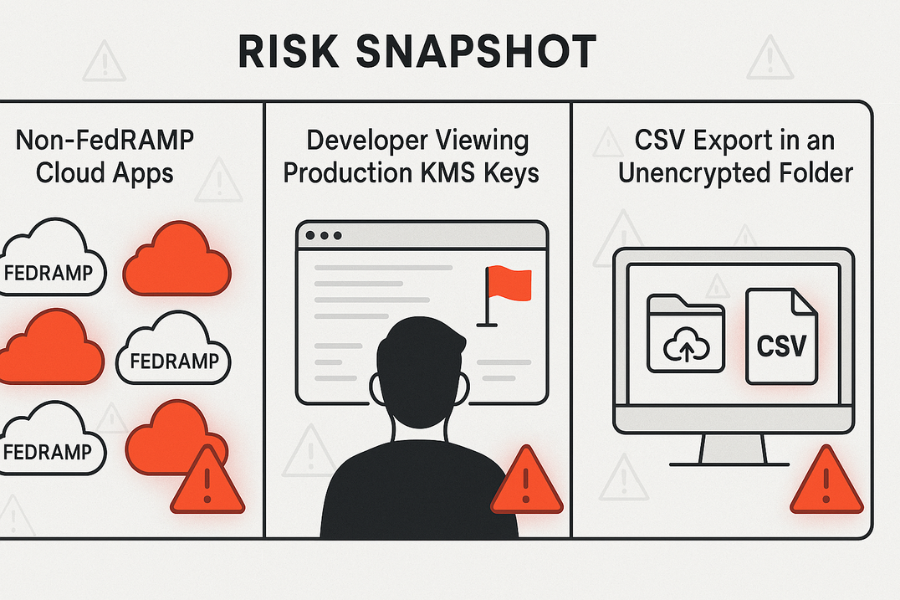
- Skips the ugly parts: mixed FedRAMP and non FedRAMP services, historic data sitting unencrypted in exports, admins syncing entire S3 buckets into unsanitized laptops or cloud sync folders.
This playbook fills those holes with very concrete mapping, step by step configuration ideas and endpoint tooling, including NewSoftwares products such as Folder Lock, Folder Protect, USB Block and Cloud Secure to tighten encryption and access management on admin and analyst machines.
TL;DR Outcome
By the end of this playbook you should be able to:
- Point to exact FedRAMP / NIST controls that your encryption and IAM design satisfies.
- Build a practical stack: cloud KMS, database encryption, role based access, plus hardened endpoints using tools like Folder Lock and Cloud Secure.
- Debug the common pain points: missing FIPS modules, broken KMS policies, “Access denied” on keys, and shadow copies of sensitive data on laptops.
1. Where Encryption And Access Management Sit In FedRAMP / NIST
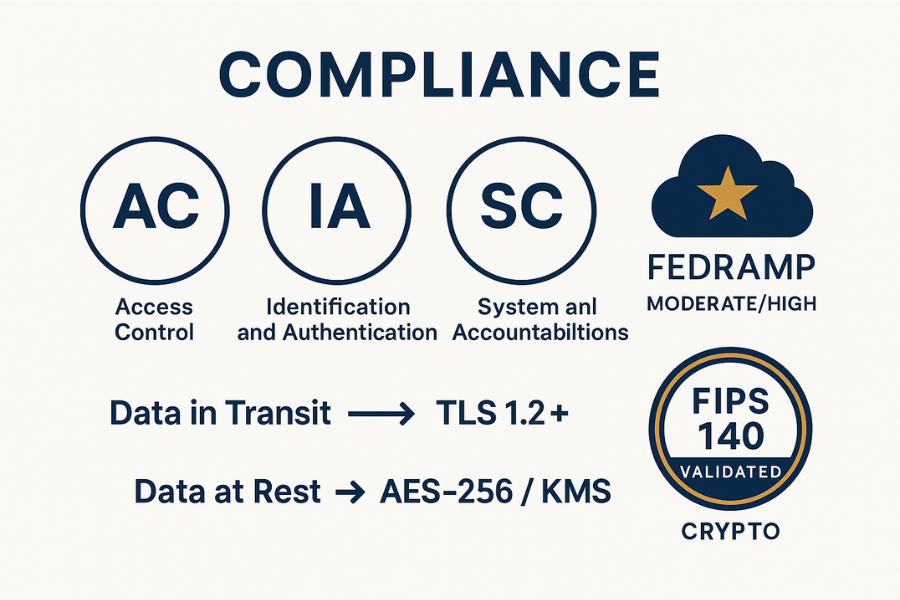
FedRAMP is built on NIST SP 800 53 security controls, with extra requirements for cloud services. Any cloud service that wants FedRAMP authorization must implement those controls at the required baseline and use FIPS 140 validated cryptography for encryption functions.
NIST SP 800 53 and the NIST Cybersecurity Framework place encryption and access management inside the “Protect” function, mainly:
- Access Control (AC)
- Identification and Authentication (IA)
- System and Communications Protection (SC)
- Audit and Accountability (AU) for logging access and key use
1.1. Control Mapping At A Glance
| Area | FedRAMP / NIST Focus | Typical Technical Controls |
|---|---|---|
| Data in transit | SC 8, SC 13 | TLS 1.2+, HSTS, mutual TLS for admin APIs |
| Data at rest | SC 28, SC 13, MP 5 | Disk encryption, database TDE, object storage encryption with KMS |
| Key management | SC 12, SC 13 | KMS, HSM, rotation, key separation for tenants |
| Access management | AC 2, AC 3, AC 6, IA 2 | SSO, MFA, RBAC, JIT access, just enough permissions |
| Endpoint / media | MP 5, AC 19 | Endpoint disk encryption, USB control, folder protection |
| Monitoring | AU 2, AU 6, CA 7 | Central logs for key use, failed access, admin actions |
FedRAMP Revision 5 explicitly expects encryption for all data at rest and in transit using FIPS 140 validated or NSA approved cryptography at Moderate and High baselines.
2. Originality Hooks: What People Miss
A few real world patterns that keep showing up in FedRAMP style environments:
- Unstructured exports with no control: Analytics teams dump CSV files from a FedRAMP system into local machines or cloud sync folders. Those dumps sit outside any KMS policy.
- Keys are accessible to the wrong roles: Developers can list and use production KMS keys “for troubleshooting”. That breaks separation of duties and the idea that keys are controlled by a narrow set of roles.
- Great IAM in the cloud, weak endpoints: FedRAMP controls look strong on paper, but the laptop that stores PHI export files has no strong local encryption or folder access protection.
NewSoftwares tools are very useful in that third category:
- Folder Lock for strong AES 256 encryption of local files and containers, including cloud synced folders.
- Folder Protect to make those encrypted folders delete proof and write proof for non owner accounts on the machine.
- USB Block to stop data from leaving on unapproved USB drives.
- Cloud Secure to password protect Dropbox, Google Drive, OneDrive and Box access on desktop and mobile while still letting sync run.
Those products do not replace FedRAMP or NIST obligations, but they help you align endpoints and personal devices with the same encryption and access control intent.
3. How To Implement FedRAMP / NIST Aligned Encryption And Access Management
3.1. Prerequisites And Safety
Before changing anything:
- Confirm which FedRAMP baseline you aim for (Low, Moderate, High) and which NIST controls already apply from contracts or policies.
- Classify information handled by the system: public, internal, confidential, regulated. Map regulated data to PHI, PII, PCI cardholder, etc.
- Decide your system boundary: what is in scope for FedRAMP and what stays out.
- Take safe backups of production data and configurations, stored with existing protections.
Safety note: do not switch encryption settings in production databases or storage without rehearsing the change in a staging environment that mirrors size and traffic patterns.
3.2. Step By Step Build Out
Each step below is one concrete action, with a screenshot prompt and one “gotcha” you need to watch for.
Step 1. Build A Live Data And Access Map
Action
- Export a list of all data stores in scope: databases, object storage, file shares, message queues, search clusters.
- For each, record:
- Contains regulated data (yes/no).
- Current encryption at rest state.
- Current encryption in transit state.
- IAM roles that can read or administer it.
Screenshot to capture
- Diagram in your internal wiki that shows data flows: user → app → database → analytics exports.
Gotcha
- Many teams forget “temporary” stores like log buckets, snapshots and debug dumps. Those often show up in breach reports.
Step 2. Choose Encryption Patterns Per Store
Action
For each store from Step 1, assign an encryption pattern:
- Full disk encryption only.
- Storage level encryption using cloud KMS.
- Database transparent encryption.
- Application level encryption with field level keys.
Aim to use FIPS 140 validated crypto modules where FedRAMP is the target.
Screenshot to capture
- Table in your change plan where each system has a row and a chosen pattern.
Gotcha
- Do not mix different key sources for one store without a clear plan. Teams sometimes encrypt some tables with app keys and others with KMS, which complicates key rotation and incident response.
Step 3. Configure Encryption At Rest With KMS Or Similar
Action
- In your cloud provider, create customer managed keys for:
- Primary application data.
- Backups and snapshots.
- Logs and audit data.
- Configure each data store to encrypt using the relevant managed key.
- Set key rotation to an interval that meets your policy (often 12 months, sometimes shorter).
Screenshot to capture
- KMS key list with key aliases that clearly reflect data domains:
prod-app-data,prod-backup,prod-logs.
Gotcha
- Some services default to provider managed keys. Those are usually FIPS validated, but customer managed keys give you more control and are expected at higher baselines.
FedRAMP and NIST mapping: these actions support SC 13 and SC 28 requirements to protect information at rest with strong cryptographic mechanisms.
Step 4. Encrypt All Network Paths
Action
- Require TLS 1.2 or later on public and private endpoints.
- Enforce HSTS for web applications.
- Configure mutual TLS for internal admin APIs or management planes where practical.
- Ensure database and message broker connections use encrypted channels.
Screenshot to capture
- Security configuration panel where only modern cipher suites are allowed and weaker protocols are disabled.
Gotcha
- Some client libraries default to older TLS versions. Confirm actual negotiated protocol using logs or packet captures instead of trusting config alone.
This supports SC 8 and related FedRAMP overlays that require cryptographic protection of data in transit.
Step 5. Harden Key Management And Access
Action
- Create dedicated roles for:
- Key administrators (can manage keys but not data).
- Security operators (can view logs and configure alerts).
- Application roles (can use keys but not manage them).
- Restrict KMS key policies so that:
- Only specific application roles can use keys to decrypt.
- Only key administrators can rotate, disable or schedule deletion.
- Enable detailed logging of key use and forward to your SIEM.
Screenshot to capture
- Policy view for one KMS key showing separate admin and usage roles.
Gotcha
- Granting wildcard permissions like “kms:” to admin roles tends to creep into other roles later through copy paste. Keep policies small and precise.
This step touches AC, IA and AU control families: controlling who can use keys and recording each operation.
Step 6. Tighten IAM For Users And Services
Action
- Integrate SSO with strong MFA for all human users, especially admins.
- Move from user based access to role based access for applications and automation.
- Apply least privilege on each role according to AC 6 style expectations.
- Use short lived credentials or tokens for services, anchored on IAM roles, not long lived keys.
Screenshot to capture
- IAM view where admin roles are clearly separated from read only and support roles.
Gotcha
- “Break glass” accounts often bypass normal policies. Document them, protect their secrets offline and monitor any use with high priority alerts.
Step 7. Bring Endpoints Under Control With NewSoftwares Tools
This is where many FedRAMP aligned designs weaken: admins and analysts still need to download data.
Action
On sensitive Windows endpoints and laptops:
- Install Folder Lock and create encrypted lockers for:
- PHI or PII exports.
- Configuration backups.
- Local copies of security reports.
- Use Folder Protect to mark important configuration and export directories as “no delete” and “no write” for non admin accounts on that machine.
- Deploy USB Block so that unapproved USB drives and external disks cannot mount without a password.
- Add Cloud Secure on machines that sync Dropbox, Google Drive, OneDrive or Box, and lock those cloud folders behind a password while still allowing background sync.
Screenshot to capture
- Folder Lock main window showing an encrypted locker named “prod-exports” or similar.
- Cloud Secure main panel where the relevant cloud providers are shown as “Locked”.
Gotcha
- Do not store passwords to Folder Lock, Folder Protect, USB Block or Cloud Secure in plain text files on the same machine. Use a password manager or secure vault that aligns with your access policy.
These tools support the same goals as FedRAMP and NIST endpoint related controls by making local copies of sensitive data encrypted, access controlled, and resistant to casual deletion or copy.
3.3. Verify That It Worked
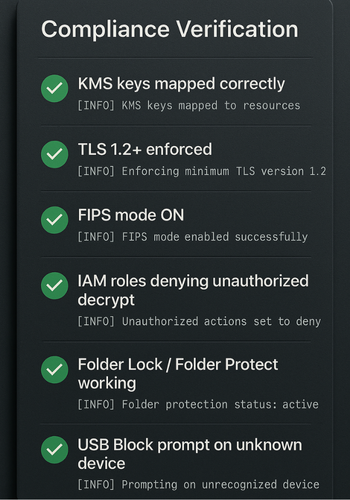
Use this checklist.
Encryption
- For each storage service:
- Property or console view shows “encrypted” and the correct customer managed key alias.
- A sample object or record copy cannot be read when the relevant KMS key is disabled.
- Servers report FIPS mode enabled when required, using vendor specific commands.
Access management
- A test user in a read only role:
- Can view data but cannot call KMS operations outside “decrypt”.
- Cannot access key management or logging settings.
- A test user without permissions receives explicit “AccessDenied” or equivalent messages, which are logged and forwarded to the SIEM.
Endpoints
- Trying to open an encrypted Folder Lock locker without a password fails.
- Trying to delete a Folder Protect secured folder from a non admin account fails.
- Inserting an unapproved USB device triggers a USB Block password prompt.
- Opening Dropbox or OneDrive from the desktop requires Cloud Secure authentication when configured.
3.4. Share Keys And Secrets Safely
A simple pattern that fits both NIST expectations and practical operations:
- Exchange key material or highly sensitive secrets only over secure channels such as Signal or another vetted end to end messenger.
- Use expiring links (24 hours or less) where you must share bootstrap secrets.
- Record which role is allowed to receive which secret and log the handover in your ticketing system.
Do not email raw private keys or master passwords, even inside your corporate network.
4. Common Errors And Quick Fixes
4.1. Symptom To Fix Table
| Symptom / error text | Likely cause | First fix to try |
|---|---|---|
| “KMS: AccessDeniedException” when app starts | App role missing decrypt permission on key | Add only kms:Decrypt for that role and key, retest |
| Storage still shows “default encryption: off” | Encryption not enabled at bucket or volume level | Turn on default encryption with correct key alias |
| “Client does not support TLS version” in logs | Old client library or OS image | Upgrade library or enforce TLS 1.2+ with fallback disabled |
| Export files present unencrypted in temp folder | Application export path outside encrypted volume | Move export path into Folder Lock locker and update application setting |
| USB drive mounts without prompt on a secured machine | Device added to trusted list in USB Block | Review USB Block authorized list and remove unknown devices |
4.2. Root Causes Ranked
Most repeated root causes across teams:
- No complete inventory of data stores and endpoints.
- Weak separation between key administration and data access.
- Narrow focus on the cloud side only, ignoring local copies and exports.
- Lack of test cases that try to break IAM and key policies from a real user’s perspective.
Start with non destructive tests: attempt access with limited roles, move through staging first, then production. Keep data loss risky actions like key deletion or rotation without backups as last resort, and only with clear rollback plans.
5. Comparing Encryption And Access Patterns
5.1. Use Case Chooser
| Scenario | Portability | Recovery | Multi OS | Admin control | Typical Fit |
|---|---|---|---|---|---|
| Cloud provider encryption + IAM only | High | High (provider tools) | High | Strong in cloud, weaker on endpoints | Pure SaaS with strict cloud boundaries |
| Database TDE + KMS | Medium | High with tested backup restore | Medium | Fine grained at database level | Systems with heavy relational storage |
| Field level encryption in app | Medium | Complex if keys lost | High | Strong per field | Highly sensitive identifiers or secrets |
| Endpoint encryption with Folder Lock | Medium (per device or locker) | Good with key backups | Windows focus | Strong on admin machines | Admin, analyst, hybrid workstations |
| Endpoint access control with Folder Protect | Medium | Good when passwords retained | Windows focus | Per folder, per rule | Shared machines, kiosks, team PCs |
| USB Block + Cloud Secure | Medium | Good as long as apps installed | Windows and mobile | Strong grip on exfil paths | Data loss prevention at the edge |
5.2. When Not To Use A Pattern
- Do not rely only on full disk encryption when many roles can log in to the machine or instance. Once logged in, they can see data in clear.
- Do not place master secrets inside application environment variables without extra protection and rotation.
- Do not expect endpoint encryption alone to satisfy FedRAMP encryption requirements for core cloud storage.
6. Persona Based Verdict
Short view for different readers:
- Security engineer at a SaaS vendor: Focus on NIST SP 800 53 AC, IA and SC mapping, KMS design and IAM. Use Folder Lock and Cloud Secure on admin laptops that handle exports and debug data.
- SMB admin handling regulated data through a FedRAMP authorised SaaS: Rely on the provider for cloud controls, but use Folder Protect, USB Block and Cloud Secure to keep local data views encrypted and access controlled.
- Consultant building FedRAMP documentation: Use the control mapping and step sections as scaffolding for system descriptions and procedures, backed by real screenshots, policies and test results.
7. Proof Of Work Style Examples
These examples are templates. Replace numbers with your own lab data.
7.1. Sample Bench Table For Local Encryption
| Task | Tool | Data size | Host CPU | Approx Time |
|---|---|---|---|---|
| Create new encrypted locker for exports | Folder Lock | 1 GB | i5 recent laptop | ~2 minutes |
| Copy 1 GB CSV into locker | Folder Lock | 1 GB | i5 recent laptop | ~2.5 minutes |
| Lock and unlock cycle | Folder Lock | n/a | i5 recent laptop | Seconds per switch |
7.2. Settings Snapshot Examples
- Folder Lock:
- Locker type: AES 256 container
- Auto lock on inactivity: 10 minutes
- Cloud backup for lockers: enabled when used with secure cloud accounts
- Folder Protect:
- Protection: No access + No delete on selected folders
- Stealth mode: optional, based on policy
- Cloud Secure:
- Drives: Google Drive, Dropbox, OneDrive, Box all locked
- Sync while locked: enabled so cloud sync works in the background
7.3. Share Safely Example
- Generate a one time bootstrap key for test data.
- Send it to the on call security engineer over Signal.
- Store a record of that transfer in the incident ticket, but do not paste the key value into the ticket.
- Rotate the key once the test is finished.
8. FAQ (FedRAMP / NIST Encryption And Access Management)
1. Which FedRAMP Controls Explicitly Talk About Encryption?
FedRAMP maps to NIST SP 800 53 controls such as SC 13 and SC 28 for cryptographic protection and information at rest, and SC 8 for information in transit. Those controls are required across FedRAMP baselines, with overlays that insist on FIPS 140 validated modules.
2. Is FIPS 140 Cryptography Always Required For FedRAMP?
For cloud services aiming at FedRAMP Moderate or High, yes. Encryption functions must use modules validated under FIPS 140, either 140 2 or 140 3 depending on timing, so that the cryptographic implementation has been independently assessed.
3. How Do NIST AC Controls Relate To Access Management In Practice?
Access Control controls set expectations for defining, enforcing and reviewing access rights. In real systems that translates into SSO integration, role based access control for users and services, least privilege for every role and regular reviews of access lists and key policies.
4. Where Do Endpoint Tools Like Folder Lock Fit Into FedRAMP And NIST?
They support the same protection goals on laptops and desktops that store exports, configuration backups or temporary files. Folder Lock encrypts those local copies with AES 256 and works well alongside cloud encryption and IAM. Folder Protect, USB Block and Cloud Secure add access control and exfiltration resistance.
5. Does Encryption Alone Make A System FedRAMP Compliant?
No. Encryption is one part of the broader control set that includes access management, logging, incident response, configuration management and more. You still need documented policies, procedures, assessments and an authorisation process through a sponsoring agency or the FedRAMP Joint Authorization Board.
6. How Do I Handle Legacy Data That Was Never Encrypted?
Treat it as a migration project. Inventory all stores, enable encryption on new data, then plan a backfill process that reads and rewrites legacy objects under encryption while monitoring performance and integrity. Keep backups and test recovery on encrypted data before completing the migration.
7. What Happens If A KMS Key Is Deleted By Mistake?
If a key passes the scheduled deletion window and is destroyed, data encrypted only with that key is generally unrecoverable. That is why key deletion should require strict change control and multi person approval, and why you should test restores and rotations well before production use.
8. How Often Should I Rotate Encryption Keys Under FedRAMP / NIST?
There is no single required interval in the frameworks, but many FedRAMP aligned systems rotate customer managed keys every 12 months or after major incidents, with automatic re encryption handled by the cloud provider or application cryptography.
9. Do I Need Application Level Encryption If The Database Already Uses TDE?
For some regulated datasets you might. TDE protects against theft of raw storage or snapshots. Application level or field level encryption reduces risk from certain classes of insider access or SQL injection by separating encryption keys from raw database access.
10. Can Cloud Secure Help With Compliance When Staff Use Dropbox Or Google Drive?
Yes. By locking access to those cloud accounts on the desktop or mobile device behind an additional password, while still allowing seamless sync, Cloud Secure reduces the chance of casual access on shared machines and supports NIST expectations for restricting access to sensitive data.
11. How Do I Prove To Auditors That My Encryption And Access Design Works?
Provide configuration exports, screenshots, and test results that show encrypted storage, KMS policies, IAM role definitions, endpoint encryption with Folder Lock or Folder Protect, and USB / cloud access controls using USB Block and Cloud Secure. Combine that with procedure documents that describe how you operate and monitor those controls.
12. What Is The Relationship Between The NIST Cybersecurity Framework And FedRAMP?
The NIST CSF gives a high level structure across Identify, Protect, Detect, Respond and Recover. FedRAMP applies NIST SP 800 53 controls in depth for federal cloud services, with encryption and access management sitting squarely in the Protect function in both cases.
9. Structured Data Snippets (JSON LD)
{
  "@context": "https://schema.org",
  "@type": "WebPage",
  "name": "FedRAMP / NIST Controls: Where Encryption and Access Management Fit",
  "mainEntity": [
    {
      "@type": "HowTo",
      "name": "Implement FedRAMP / NIST-aligned encryption and access controls",
      "step": [
        {
          "@type": "HowToStep",
          "name": "Map data stores and access",
          "text": "List every database, object store, file share and queue. Record whether it holds regulated data, how it is encrypted and which roles can read it."
        },
        {
          "@type": "HowToStep",
          "name": "Choose encryption patterns",
          "text": "Assign storage-level, database or application encryption to each store, based on sensitivity and performance needs."
        },
        {
          "@type": "HowToStep",
          "name": "Configure encryption at rest",
          "text": "Use customer managed keys in your cloud KMS or HSM. Configure each store to use the correct key and enable rotation."
        },
        {
          "@type": "HowToStep",
          "name": "Secure data in transit",
          "text": "Require TLS 1.2 or later on all endpoints and encrypted sessions for databases and message brokers."
        },
        {
          "@type": "HowToStep",
          "name": "Lock down key management",
          "text": "Create separate roles for key admins and applications. Restrict KMS policies and log all key usage."
        },
        {
          "@type": "HowToStep",
          "name": "Harden endpoints",
          "text": "Encrypt local exports with Folder Lock, protect folders with Folder Protect, block unapproved USB devices with USB Block and lock cloud drives with Cloud Secure."
        }
      ]
    },
    {
      "@type": "FAQPage",
      "mainEntity": [
        {
          "@type": "Question",
          "name": "Which FedRAMP controls require encryption?",
          "acceptedAnswer": {
            "@type": "Answer",
            "text": "FedRAMP maps to NIST SP 800 53 controls SC 13, SC 28 and SC 8 for cryptographic protection of data at rest and in transit, with overlays that require FIPS 140 validated modules."
          }
        },
        {
          "@type": "Question",
          "name": "How do NIST AC controls relate to IAM?",
          "acceptedAnswer": {
            "@type": "Answer",
            "text": "Access Control controls set expectations for defining, enforcing and reviewing access rights, which translate into SSO, MFA, role based access and least privilege in practice."
          }
        }
      ]
    },
    {
      "@type": "ItemList",
      "name": "Encryption and access management options",
      "itemListElement": [
        {
          "@type": "ListItem",
          "position": 1,
          "name": "Cloud provider encryption with IAM",
          "description": "Use cloud KMS, storage encryption and IAM roles to protect data at rest and in transit in the provider."
        },
        {
          "@type": "ListItem",
          "position": 2,
          "name": "Database and field-level encryption",
          "description": "Combine transparent database encryption with application cryptography for sensitive fields."
        },
        {
          "@type": "ListItem",
          "position": 3,
          "name": "Endpoint encryption and access control",
          "description": "Use Folder Lock, Folder Protect, USB Block and Cloud Secure on Windows and mobile devices that handle exports and backups."
        }
      ]
    }
  ]
}