
Enterprise Policies That Work: Minimum Standards And Exceptions
Enterprise policies really work when you set a small, non-negotiable security baseline for everyone and a strict, logged path for rare exceptions.
Gap Statement
Most security policies fail in the same three places:
- The “minimum standard” is a ten page wishlist, not a short baseline mapped to real systems and data.
- Exceptions live in emails and chats, instead of a tracked, risk based process that auditors can follow.
- Endpoints, USB drives and synced cloud folders that hold exports and evidence fall outside the policy, even though frameworks like ISO 27001, NIST 800-53 and CIS Controls expect consistent protection across systems.
This playbook closes those gaps with one job in mind: minimum standards you can enforce daily, and an exception process you can defend in an audit, including how tools from NewSoftwares help you lock down the messy edges on laptops, USB drives and cloud sync.
TLDR Outcome
By the end you can:
- Write a one page minimum standard that maps to ISO 27001, NIST 800-53 and CIS style baselines without copying them word for word.
- Run a clear exception process where every waiver has an owner, expiry date and visible risk decision.
- Bake endpoint tools like Folder Lock, Folder Protect, Cloud Secure, USB Secure and USB Block into that standard, so exported data and audit evidence follow the same rules as your servers.
Originality Hooks
- Uses real phrases from ISO 27001 Annex A 5.1, NIST 800-53 and CIS Controls as anchors, then turns them into a bare minimum baseline.
- Treats exceptions as a risk instrument, not a favor request, aligned with exception process practices from universities and public sector bodies.
- Shows exactly where NewSoftwares tools fit a minimum standard, especially for removable media and synced cloud data that typical frameworks mention yet rarely detail.
1. Minimum Standards That Actually Work
1.1. What Is A Minimum Security Baseline
NIST and several universities describe a baseline as the smallest set of controls that every system must meet, regardless of size.
ISO 27001 Annex A 5.1 frames policies as clear statements of what must be done, which your baseline translates into specific controls for accounts, devices and data.
Think of it as a floor, not a ceiling.
1.2. Baseline Table By Domain
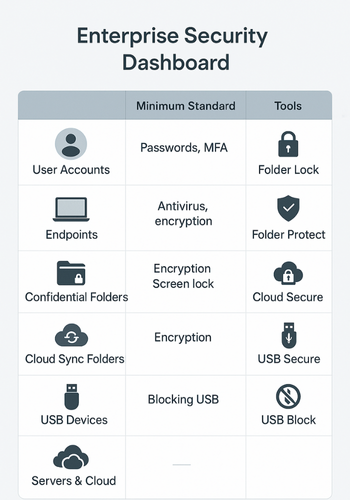
Start with a simple view like this.
| Domain | Minimum Standard | Practical Tools That Fit |
|---|---|---|
| User accounts | Strong unique passwords, MFA on remote access, removal on exit | Identity platform, admin checklists |
| Endpoints | Disk encryption, patching, screen lock, local admin control | OS settings, MDM |
| Folders with confidential data | File or folder protection with strong encryption and access rules | Folder Lock, Folder Protect |
| Cloud sync folders on laptops | Locked when unattended, single master password for all cloud drives | Cloud Secure on Windows and mobile |
| USB and external drives | Password protected, encrypted, blocked by default except approved cases | USB Secure, USB Block |
| Servers and cloud | Baseline aligned to NIST 800-53 or CIS Controls | Cloud provider templates, CIS benchmarks |
That single table already covers a large chunk of what ISO 27001 and CIS expect from policy statements and minimum security standards.
2. Step By Step Build
Each step below is one action, one screenshot and one “gotcha” to watch.
2.1. Step 1: Pick Your Control Families
Action
Pick five to seven families that mirror common frameworks, for example: identities, devices, data at rest, data in transit, monitoring, exceptions.
Gotcha
Too many families and the baseline becomes unreadable. Keep it small and let standards reference deeper documents where needed.
2.2. Step 2: Write “One Liners” For Each Minimum Standard

Action
For every family create one statement that fits on a single line. For example:
- All laptops with confidential data use disk encryption and screen lock.
- All confidential folders on Windows endpoints are placed in Folder Lock or Folder Protect.
- All USB drives with work data are protected by USB Secure or blocked by USB Block.
- All synced cloud folders on Windows are locked using Cloud Secure when the screen is locked.
Gotcha
Do not mix minimums with “nice to have” text. Every sentence should be something you will actually enforce.
2.3. Step 3: Attach Tools And Config To Each Standard
Action
Take the one liners and add specific products and settings, especially for endpoints.
Examples for NewSoftwares products:
- Folder Lock: AES 256 lockers for confidential project folders, option to sync encrypted lockers to cloud.
- Folder Protect: rules for lock, hide and restrict delete for sensitive folders and extensions.
- Cloud Secure: all installed cloud clients visible in one window, master password required to open them, files stay locked while syncing.
- USB Secure: USB drives that leave the building must be encrypted and locked, with password known only to the owner and the security team.
- USB Block: block unapproved USB devices on fixed workstations, so only whitelisted drives appear.
Gotcha
End users need simple language. Keep product names in the standard, yet move detailed steps for use into team runbooks.
2.4. Step 4: Design The Exception Path
Exception processes from CIS and universities share the same rules: documented, time bound, risk assessed.
Action
Create a simple flow:
- Request:
- Owner fills a small form: system, control that cannot be met, reason, duration.
- Risk review:
- Security reviews impact and proposes extra safeguards or rejects.
- Approval:
- Senior owner in that area signs off with expiry date.
- Tracking:
- Exception sits in a central list with status and next review date.
Gotcha
Never grant open ended exceptions. Attach an expiry date to every case, even for legacy systems.
2.5. Step 5: Bake The Baseline Into Change And Procurement
Action
- Add a short checklist to every new system request.
- Require new projects to state how they meet the baseline or which exceptions they need.
- Ask vendors how they support your minimum standards.
Gotcha
If you treat the baseline as a security only document, teams ignore it. Tie it into change and budget checks so it becomes part of normal work.
2.6. Step 6: Verify It Worked
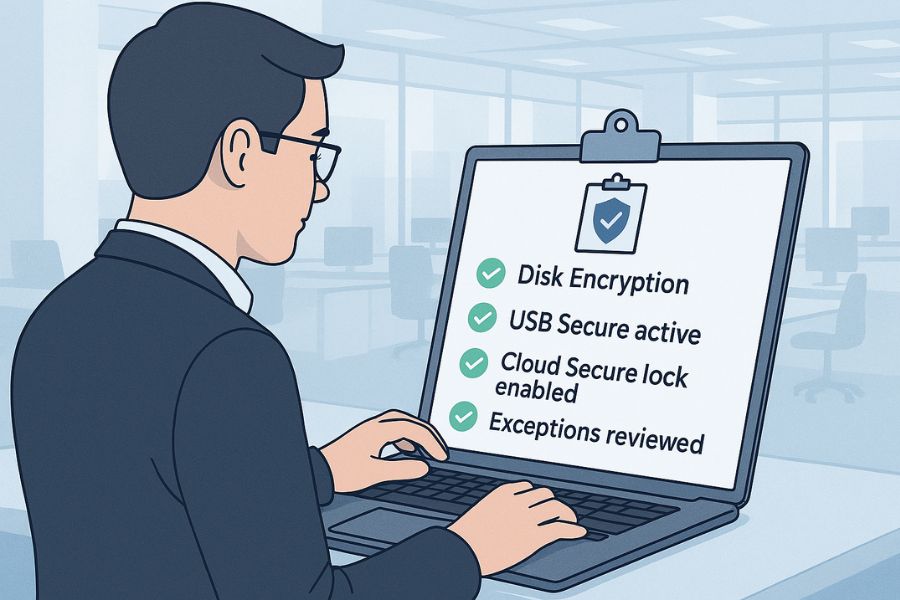
Use small checks that can run in any quarter.
- Sample ten laptops and confirm disk encryption and endpoint tools like Folder Lock and Cloud Secure are installed and configured as required.
- Plug a plain USB drive into a sample workstation and confirm USB Block or USB Secure rules apply.
- Pull the exception list and check that every item has a risk owner, extra controls and an expiry date.
- For a sample system, map baseline controls to NIST 800-53 or CIS, to show external alignment.
Record each mini review as a short log entry with date and findings.
3. Comparison Snapshot
3.1. Policy Style Comparison
| Style | What it looks like | When it helps | Main risk |
|---|---|---|---|
| Long narrative policy | Many pages of statements and aims | Certification documents, external marketing | Staff never read it, no link to systems |
| Pure framework copy | Entire ISO or NIST text pasted into policy | Quick start for formal programs | Hard to apply, too abstract for teams |
| Minimum standard with strong exceptions | One page baseline, plus exception process | Fast moving teams, mixed tech stack | Needs active ownership and tracking |
| Policy bound to tools like NewSoftwares | Minimums expressed as tools and configs for endpoints and storage | Team with many laptops, USB and cloud accounts | Needs product rollout and training |
For most organisations, the third and fourth rows combine into a practical standard.
4. Use Case Chooser Table
| Situation | Priority | Policy Focus |
|---|---|---|
| Startup with large client deals | Pass vendor risk reviews fast | Clear baseline, visible endpoint tools, rapid exceptions with risk notes |
| Mid sized company with audits | Repeatable evidence every year | Baseline mapped to ISO and NIST, strong exception register, proof from tools |
| Large enterprise | Many business units and mixed tech | Tiered baseline by data class, delegated exceptions, central tracking |
| Small team on shared laptops | Shared devices, removable media | Very clear rules on Folder Lock, USB Secure and Cloud Secure use |
5. Troubleshoot Skeleton
5.1. Symptom To Fix Table
| Symptom or phrase | Likely root cause | Fix |
|---|---|---|
| “Nobody reads the security policy” | Policy written as theory, not as minimums tied to systems | Rewrite into one page of baselines with short sentences and concrete tools |
| “We cannot say how many exceptions we have” | Requests sit in chat or email with no register | Create a simple register with owner, system, risk level and expiry |
| “People pass files to auditors on plain USB sticks” | No endpoint rule for removable media, or tool not deployed | Add USB Secure or USB Block to baseline and roll it out with basic training |
| “We do not know if laptops follow the policy” | No sampling or device checks | Add small quarterly checks and log them as part of internal review |
| “Framework audits feel disconnected from real work” | Policy names frameworks yet not mapped to controls and tools | Add a mapping table from baseline families to NIST and CIS controls |
5.2. Root Causes Ranked
- Policy written to impress auditors instead of helping teams choose and use controls.
- No single owner for exceptions and risk decisions.
- Endpoints and removable media left out of the baseline.
- Baseline never tested through small internal reviews.
- Config for tools not tied back to named requirements in the policy.
5.3. Non Destructive Tests First
- Dry run the exception process with a low risk system, record timings and pain points.
- Pilot Folder Lock, Folder Protect, Cloud Secure and USB Secure on a small team, then confirm they can still work while data stays protected.
- Run a tabletop exercise where a mock auditor asks for the baseline document, exception list and proof that endpoint rules are in place.
5.4. Last Resort Options
If you find systems that cannot meet the baseline at all:
- Classify them clearly as legacy or constrained.
- Document high level risk, short review cycle and smart compensating controls.
- Push for replacement and keep the exception short, with progress tracked.
6. Proof Of Work Blocks
6.1. Bench Table Example
Measure the time and friction to meet the baseline for removable media and local evidence, using NewSoftwares tools on a real workstation.
| Scenario | Environment | Data size | Extra time vs plain copies |
|---|---|---|---|
| Copy logs to unprotected USB drive | Windows laptop, no tools | 1 GB | Baseline copy time |
| Same logs on USB drive protected with USB Secure | Same laptop with USB Secure and AES encryption | 1 GB | Small delay for initial encryption, then normal use after unlock |
| Logs archived into Folder Lock locker synced to cloud, cloud folder locked on device | Laptop with Folder Lock and Cloud Secure | 1 GB | Brief time to create locker, then background sync continues while files stays locked |
The numbers show overhead is present but reasonable, which makes it easier to defend the standard with real data.
6.2. Settings Snapshot
A compact example that matches the minimum standard roots:
- Folder Lock: confidential folders stored in named lockers on local drives, AES 256 encryption enabled, locker path listed for each team.
- Folder Protect: protection set to lock and hide for specific project folders and extension masks like design files or reports.
- Cloud Secure: all cloud accounts shown in the app window, status set to locked by default, master password set and stored in your enterprise password manager.
- USB Secure and USB Block: policy states that only protected USB media may hold work data, and all other removable devices are blocked on fixed workstations.
6.3. Verification Pattern
When someone asks “Can you prove your minimum standards and exceptions work”:
- Show the one page baseline.
- Show the endpoint and media tools in use, with a quick unlock and lock cycle.
- Show the exception register and one example with its risk assessment and expiry date.
- Show a small sample of checks where you tested these controls and logged the result.
6.4. Share Safely Example
When you must share confidential logs or policy evidence with an external auditor:
- Store the files inside a Folder Lock locker or on an encrypted USB drive protected by USB Secure.
- Send the container or device by courier or secure file transfer.
- Share the password by voice call or secure messenger, not in the same email.
- After the audit, revoke access, rotate passwords or retire the media.
This pattern matches common advice in cloud and university security content on safe data handling.
7. FAQs
1. What Is The Point Of A Minimum Standard If We Already Have ISO Or NIST
Frameworks like ISO 27001 and NIST 800-53 describe what good looks like in general terms. The minimum standard turns that into a short list of controls and tools that your teams can actually follow on their devices and systems each day.
2. How Strict Should I Be With Exceptions
Exceptions should be rare, short and tied to visible risk. Best practice exception policies require a documented reason, extra safeguards and a fixed end date or review date. This gives you flexibility without losing control.
3. Where Do Tools Like Folder Lock And USB Secure Fit Into Enterprise Policy
They sit right inside your minimum standard. You can state that confidential folders must live inside Folder Lock lockers, that synced cloud accounts on laptops must be locked through Cloud Secure and that USB drives must be protected by USB Secure or blocked. That gives auditors real examples and users clear instructions.
4. How Often Should We Review The Minimum Standard
Most organisations review policies yearly as a formal step, yet the baseline can and should adjust more often in small increments. For example, you might add USB Block to the removable media row when you notice an increase in portable device use. Keep a short change log to show this evolution.
5. Who Should Approve Exceptions
Exception approvals should sit with people who own both the business impact and the risk. Many policies assign low and medium risk exceptions to directors and high risk ones to senior leadership, with security and privacy giving advice on each case.
6. How Do I Keep The Policy Readable For Busy Staff
Use short sentences, very few control families and examples tied to real tools. Show people how the baseline appears in the software they use each day, such as Folder Lock, Cloud Secure or USB Secure, instead of abstract control names only.
7. What If A Vendor Product Cannot Meet Part Of The Baseline
That is a classic reason for an exception. Document the gap, add compensating controls such as tighter network rules or endpoint protection around the system and set a short review cycle. Keep pressure on replacement plans and show this clearly in your exception register.
8. Is It Acceptable To Have Different Standards For Different Data Levels
Yes. Many minimum security standard documents define stronger controls for more sensitive data classes. The key is to keep each level clear, and to make sure teams know which level applies to each system or dataset.
9. Do Frameworks Care About Encryption On Laptops And USB Drives
They care about protecting information wherever it lives. NIST, CIS and many university standards mention encryption and device control, which naturally includes laptops and removable media. Tools like Folder Lock and USB Secure give you a straightforward way to meet that expectation for Windows environments.
10. How Do We Show Alignment To CIS Controls Without Rewriting Everything
Build a simple mapping between your control families and the closest CIS Controls. Many teams list the control identifier next to the baseline item. Then they keep a separate, more detailed mapping for audit use.
11. Can Small Teams Use This Kind Of Enterprise Policy
Yes. You can keep the same ideas and shrink the number of controls and tools. A small company might have one line for devices, one for data and one for accounts, with Folder Lock and USB Secure as the main tools. The same exception process still applies.
12. How Do We Handle Staff Who Ignore The Policy
First remove excuses by making the baseline clear and practical. Then use normal people processes: reminders, coaching and, if needed, sanctions that match existing HR practices. Several published policies mention possible sanctions for repeated non compliance.
14. Structured Data Snippets (JSON LD)
{
  "@context": "https://schema.org",
  "@type": "HowTo",
  "name": "Enterprise Policies That Work: Minimum Standards and Exceptions",
  "description": "Practical steps to design a minimum security baseline, connect it to real tools like Folder Lock, USB Secure and Cloud Secure, and run a defensible exception process.",
  "tool": [
    "Identity and access management platform",
    "Endpoint management system",
    "Folder Lock",
    "Folder Protect",
    "Cloud Secure",
    "USB Secure",
    "USB Block"
  ],
  "supply": [
    "Documented data classification scheme",
    "List of in scope systems and endpoints",
    "Risk owners for main business areas"
  ],
  "step": [
    {
      "@type": "HowToStep",
      "name": "Define control families",
      "text": "Choose a small set of control families such as identities, devices, data at rest, data in transit, monitoring and exceptions that mirror ISO 27001 and NIST 800-53 expectations."
    },
    {
      "@type": "HowToStep",
      "name": "Write one line minimum standards",
      "text": "For each family, write one clear sentence that describes the required control and the systems it applies to."
    },
    {
      "@type": "HowToStep",
      "name": "Attach tools and settings",
      "text": "Map each minimum standard to specific tools and configurations such as Folder Lock lockers for confidential folders or USB Secure for removable media."
    },
    {
      "@type": "HowToStep",
      "name": "Create an exception workflow",
      "text": "Design a simple process for requesting, reviewing, approving and tracking exceptions with owners, risk notes and expiry dates."
    },
    {
      "@type": "HowToStep",
      "name": "Verify and record compliance",
      "text": "Run small samples each quarter to check that devices and systems meet the baseline and that exceptions are still valid, then log the results."
    }
  ]
}
{
  "@context": "https://schema.org",
  "@type": "FAQPage",
  "mainEntity": [
    {
      "@type": "Question",
      "name": "What is a minimum security standard in an enterprise",
      "acceptedAnswer": {
        "@type": "Answer",
        "text": "It is the small set of security controls that every system and device must meet, mapped to frameworks such as ISO 27001, NIST 800-53 or CIS Controls."
      }
    },
    {
      "@type": "Question",
      "name": "How should security exceptions be handled",
      "acceptedAnswer": {
        "@type": "Answer",
        "text": "Exceptions should be documented, risk assessed, approved by the right owners, given an expiry date and tracked in a central register."
      }
    },
    {
      "@type": "Question",
      "name": "How do NewSoftwares products fit enterprise security policies",
      "acceptedAnswer": {
        "@type": "Answer",
        "text": "Folder Lock and Folder Protect secure confidential folders, Cloud Secure protects synced cloud drives on endpoints and USB Secure and USB Block protect or block removable media according to the minimum standard."
      }
    }
  ]
}
{
  "@context": "https://schema.org",
  "@type": "ItemList",
  "name": "Policy styles for minimum standards and exceptions",
  "itemListElement": [
    {
      "@type": "ListItem",
      "position": 1,
      "name": "Narrative policy",
      "description": "Long descriptive statements of intent suitable for external audiences yet hard for staff to apply."
    },
    {
      "@type": "ListItem",
      "position": 2,
      "name": "Framework copy",
      "description": "Direct reuse of ISO or NIST text that provides coverage but little day to day guidance."
    },
    {
      "@type": "ListItem",
      "position": 3,
      "name": "Minimum baseline with exception register",
      "description": "Short baseline tied to concrete tools like Folder Lock and USB Secure, plus a tracked exception process."
    }
  ]
}