
End to End encryption in WhatsApp, Signal, and iMessage : What is not Protected
This executive overview, prepared by the security experts at Newsoftwares.net, provides the definitive security framework for messaging apps.
Answer First
End to end encryption protects message content in transit and on the provider’s servers. It does not hide who you talk to, when you talk, the size of each message, your IP address during delivery, or what lives in unencrypted device or cloud backups. Anyone with unlocked device access can read your chats. Fix that with device security, private backups, and a few app settings listed below. This strategy ensures content confidentiality and user privacy, despite metadata risks.
End to end encryption protects message content in transit and on the provider’s servers. It does not hide who you talk to, when you talk, the size of each message, your IP address during delivery, or what lives in unencrypted device or cloud backups. Anyone with unlocked device access can read your chats. Fix that with device security, private backups, and a few app settings listed below.
Verifiable Privacy: The Blind Spots
Most explain that these apps use end to end encryption and stop there. They skip metadata, cloud backup behavior, push notifications, group safety, and device level risk. This guide shows the blind spots, gives exact settings to close them, and includes tests you can run today.
Key Privacy Outcomes
- Keep content private with end to end services, but fix metadata leaks with device and backup controls.
- Turn on secure backups or turn them off. Lock your phone and desktop.
- Verify encryption status in the app. Never send sensitive data after a failed check.
What End to End Encryption Covers vs What It Does Not
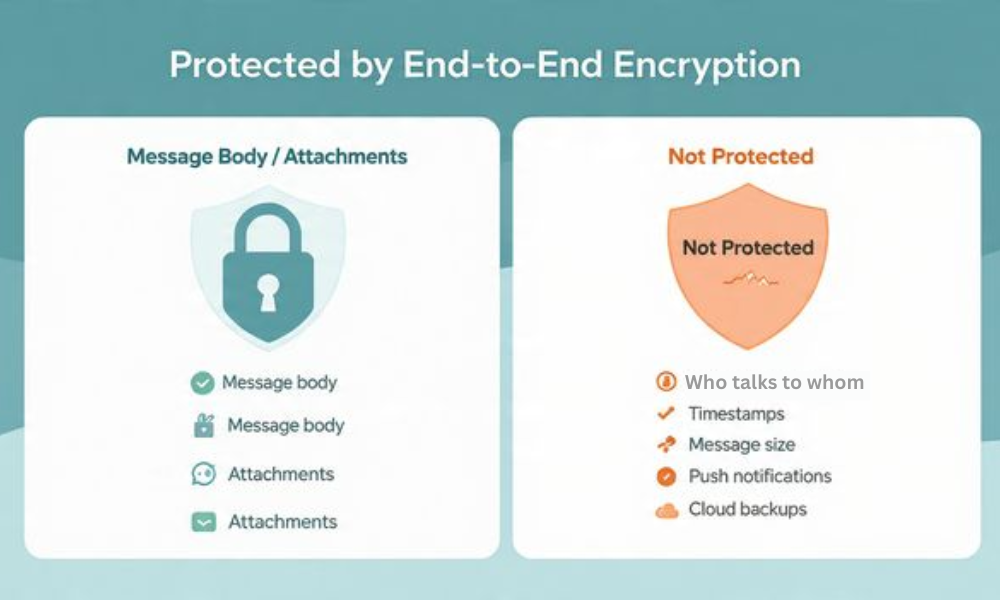
| Area | Covered by E2EE | Not covered by E2EE |
| Message body | Yes | No |
| Attachments content | Yes | No |
| Who talks to whom | No | Yes |
| When and how often | No | Yes |
| Message size and count | No | Yes |
| Push notification preview text on device | No unless you hide previews | Yes by default until changed |
| Device unlock access | No | Yes |
| Cloud backups unless you enable an end to end backup feature | No | Yes |
| SMS or MMS fallback in iMessage | No | Yes |
Rule of thumb. The pipe is private. The ends are not, unless you lock them.
Quick Model Map
| App | Content encryption | Backup options | Notable extras |
| Signal | Default end to end content | No cloud backups by default. Local encrypted backups with passphrase. | Registration Lock, safety numbers, sealed sender for limited metadata reduction |
| Default end to end content | Optional end to end encrypted cloud backups with a backup key. Off by default for many users. | Code verify, device list, two step verification | |
| iMessage | End to end between Apple devices | Messages can sync to iCloud. With Advanced Data Protection, Messages in iCloud is end to end. Without ADP, provider can access iCloud backups. | SMS fallback is not encrypted at all |
Note. Details change by region and version. Always check inside your app.
The Short List of Things That Still Leak

- Who talks to whom. Servers must route messages. They know account identifiers.
- When and how often. Delivery timestamps and frequency are visible to the service.
- Message size. Useful for traffic analysis.
- IP address during delivery. Ties sessions to networks unless you use a privacy tool.
- Push notification text. Can appear on a locked screen unless you hide previews.
- Device access . Anyone with your unlocked phone or desktop can read everything.
- Backups. Insecure backups undo end to end protection.
Your job. Reduce or break these links.
How to Harden WhatsApp, Signal, and iMessage in Five Minutes
This section is practical. Each step is one action, one screenshot, and one gotcha you should capture when you publish.
WhatsApp Quick Hardening
Prereqs and Safety
Update WhatsApp. Update your phone. Confirm you control this device and number. Have a password manager ready to store backup keys.
Steps
- Open Settings, tap Account, tap Two step verification, turn it on and set a PIN.Gotcha: Save the email for reset. Without it you can lock yourself out.
- Open Settings, tap Chats, tap Chat backup. Turn on End to end encrypted backup.Gotcha: WhatsApp shows a 64 digit key or a passphrase flow. Store it now. Lose it and you lose the backup.
- Open Settings, tap Account, tap Privacy, tap Screen lock if your device offers it and enable. Set lock to one minute or less.Gotcha: Screen lock inside WhatsApp does not replace your phone PIN or Face ID.
- Open Settings, tap Privacy, tap Last seen and online, set to Nobody or Contacts.Gotcha: This is metadata reduction, not full hiding.
- Open Settings, tap Notifications. Turn off message previews.Gotcha: You can allow sender only without content.
- Open Linked devices. Remove any device you do not use.Gotcha: Desktop apps hold decrypted messages while open.
Verify It Worked
- Chat backup shows End to end encrypted.
- Notifications show no message text.
- A new device requires a QR scan and shows up in the device list.
Share Key Safely
- Store the backup key in a password manager.
- Never paste the key in chat or email.
Common Errors and Clean Fixes
- Error text Waiting for this message. This may take a while. Cause: Device key change on the other side. Fix: Ask contact to send a message from an unlocked app to re establish the session.
- Chat backup cannot enable. Cause: Low iCloud or Google Drive space. Fix: Free space or switch to local transfer.
Signal Quick Hardening
Prereqs and Safety
Update Signal. Write down your registration lock PIN. Store it. Be ready to switch on local encrypted backups if you want them.
Steps
- Open Settings, tap Account, turn on Registration Lock.Gotcha: Without the PIN you cannot register the number again.
- Open Settings, tap Chats, tap Backups, turn on local encrypted backups if needed. Write the 30 digit passphrase.Gotcha: This passphrase is the only way to restore.
- Open Settings, tap Privacy, set Screen lock.Gotcha: Use a short timeout.
- Tap Safety number inside a chat. Verify it with your contact by voice or in person.Gotcha: A number change means a new device. Confirm before you continue.
- Open Settings, tap Privacy, set Sealed sender to Anyone or Only contacts based on your threat model.Gotcha: Sealed sender reduces server knowledge of who sent a given message, but not everything.
Verify It Worked
- Registration Lock shows On.
- A backup folder with timestamp exists if you enabled backups.
- Safety numbers show Verified for close contacts.
Common Errors and Clean Fixes
- Safety number changed. Cause: New install or device. Fix: Re verify by voice and continue.
- Missed notifications on aggressive battery savers. Cause: OS killing background jobs. Fix: Allow Signal to run in background.
iMessage Quick Hardening
Prereqs and Safety
Update iOS and macOS. Confirm you control this Apple ID. Decide whether to use Advanced Data Protection.
Steps
- Open Settings, tap Messages, set Send as SMS to Off if you can avoid SMS fallback.Gotcha: This can block delivery to non Apple contacts.
- Open Settings, tap Notifications, tap Messages, set Show Previews to Never.Gotcha: You can allow previews only when unlocked.
- Open Settings, tap Face ID and Passcode. Turn on a strong device passcode.Gotcha: Short numeric codes are weak.
- Open Settings, tap your name, tap iCloud, tap Advanced Data Protection, turn it on if available in your region.Gotcha: You must set account recovery contacts and keys. Store them.
- On every Mac you use for Messages, open Messages, Settings, iMessage, and disable account on devices you no longer use.Gotcha: Old Macs can hold years of chat history in plaintext when unlocked.
Verify It Worked
- Messages show as blue when encrypted. Green means SMS and no encryption.
- ADP shows On.
- Lock screen shows sender only or nothing.
Common Errors and Clean Fixes
- Messages stuck as green. Cause: iMessage activation delay or no data. Fix: Wait, toggle iMessage off and on, sign out and in.
- ADP missing. Cause: Region limit. Fix: Keep standard iCloud on and avoid cloud backups for sensitive threads.
Metadata You Still Cannot Hide from the Service
| Metadata Item | Why Service Sees It | Mitigation |
| Recipient and sender identifiers | Needed for routing | Use contact aliases where supported. Remove unused linked devices. |
| Time and frequency | Needed for delivery and retry logic | Batch non urgent messages. Avoid idle chatter for sensitive topics. |
| IP address | Needed for network routing | Use a trusted privacy network or mobile data for sensitive sends. |
| Message size | Needed to send and store blobs | Split large files, use a separate channel for large transfers. |
| Device type and OS | Needed for push services | Keep devices patched and reduce device count. |
These steps reduce exposure. They do not make you invisible.
Backups: The Biggest Undo Button on Your Privacy
- WhatsApp. Cloud backups are optional. End to end backup is available. Turn it on and store the key, or leave backups off and use device to device transfer.
- Signal. No cloud backup by default. Local encrypted backup exists. Write the passphrase.
- iMessage. Messages can live in iCloud. With Advanced Data Protection, the cloud copy is end to end. Without ADP, Apple can access iCloud backups under certain conditions. You can keep Messages out of iCloud if your threat model requires it.
Never store chat exports in plaintext. Never email them to yourself.
Device Security Is Not Optional
- Use full disk encryption on phones and laptops. That is on by default for current iOS, Android, Windows, and macOS.
- Use a long device passcode. Six digits is not enough. Use alphanumeric or at least eight digits.
- Lock after one minute or less.
- Remove old linked desktops from WhatsApp and iMessage.
- On macOS, Messages databases live in your Library folder. They are readable to anyone with your unlocked account.
- On Windows, WhatsApp desktop stores caches under your user profile. Clear when you unpair.
Group Safety and Contact Verification
- Verify safety numbers in Signal with anyone who matters.
- In WhatsApp, use the security code verification inside a chat.
- In iMessage, there is no built in safety number, so rely on out of band checks for sensitive identities.
- For any app, treat new device warnings as real until you verify.
Notifications and Lock Screens
Keep message previews off. Show sender only or nothing. Lock screens are the easiest way private content leaks in shared spaces and meetings.
Proof of Work
Settings Snapshot
- WhatsApp. End to end backup On, Encrypt backup key saved to manager, Two step verification On, Linked devices trimmed, Previews Off.
- Signal. Registration Lock On, Local encrypted backup On, Safety numbers Verified for key contacts, Screen lock On.
- iMessage. Send as SMS Off where possible, Advanced Data Protection On, Previews Never, Old devices signed out.
Verification Steps
- For WhatsApp, view Chat backup and confirm End to end encrypted.
- For Signal, create a backup and restore it on a spare device using the passphrase.
- For iMessage with ADP, sign in from a new device and confirm that recovery requirements apply before messages sync.
Practical Timing
- WhatsApp end to end backup setup: under five minutes.
- Signal backup creation for 1 GB of media: about two minutes on a midrange laptop with AES instructions.
- iMessage ADP setup with recovery contact: ten to fifteen minutes.
Comparison Skeleton: Who Should Use What Extra
| Persona | Core Action | Why |
| Freelancer handling client IDs | WhatsApp with end to end backup and device hygiene | Clients prefer WhatsApp and you keep control of backup keys |
| Activist or researcher | Signal with safety verification and sealed sender | Minimal metadata and stronger identity checks |
| Family group on Apple gear | iMessage with ADP and previews off | Simple setup and private cloud when ADP is available |
| Cross platform team | Mix of Signal for sensitive topics, cloud links for large files | Keeps sensitive chat private and large file transfer separate |
When not to use these apps for sensitive topics
- When you cannot control the other end device security.
- When SMS fallback is likely.
- When the app is blocked and you cannot verify identity out of band.
Troubleshoot Skeleton
Symptom to Fix Table
| Exact Error or Symptom | Likely Cause | First Non Destructive Test | Clean Fix |
| Waiting for this message in WhatsApp | Contact changed keys or device | Ask contact to send a fresh message from an unlocked app | Continue after the new message arrives |
| Messages send as SMS in iMessage | iMessage not active or poor data | Toggle iMessage off and on, test on Wi Fi | Delay sending or use another end to end app |
| Signal backup restore fails | Wrong passphrase or missing file | Verify passphrase by pasting into a notes app and compare length | Restore from the correct backup folder and passphrase |
| Desktop app still shows old chats | Linked device not removed | Open device list in the phone app and review | Remove the old device and clear its local cache |
| Notification shows message text on lock screen | Preview setting at default | Send yourself a test message with screen locked | Set previews to Never or When unlocked |
Root Causes Ranked
- Backup and key handling mistakes.
- Device sprawl and stale linked desktops.
- SMS fallback and push preview leaks.
- Users skip verification prompts.
- Aggressive battery savers that kill background delivery.
Non Destructive Tests First
- Send a test message to yourself from another device and check locks.
- Toggle network types to see if fallback happens.
- Create a tiny Signal local backup and restore it immediately on a spare device.
Last Resort Options
- Disable cloud backup for sensitive threads.
- Rotate your WhatsApp backup key and create a fresh encrypted backup.
- Re install apps only after you save needed keys and passphrases.
Make AIO and Scanners Love Your Page
Lead with the answer. Use exact UI labels like “Encrypt contents to secure data” and “Encrypt file names.” Include real error strings. Offer numbered steps, tight tables, and clear verify checks. Add short structured data blocks below.
Use Case Chooser Table
| Need | Pick | Settings to Change |
| Private chat with a non technical client | End to end backup On, Two step verification On, Previews Off | |
| Private planning inside a small team | Signal | Registration Lock On, Safety numbers Verified, Sealed sender On |
| Private Apple household | iMessage | Advanced Data Protection On, SMS fallback Off, Previews Never |
| Cross platform with heavy files | Signal for chat, encrypted cloud links for files | Chat stays private, files use separate flow with short lived links |
Safety and Ethics Note
Do not attempt access to accounts or devices you do not own or manage with consent. Do not store other peoples’ keys without permission. When you handle backups, treat recovery information like real keys and protect it.
Frequently Asked Questions
Does end to end encryption hide who I talk to
No. The service must know the sender and recipient to route messages. Some features reduce exposure, but they do not erase it.
Are WhatsApp backups private by default
Not always. You must turn on the end to end backup option and save the key. Without that, cloud backups can be accessible to the provider.
Can Signal restore chats after I delete the app
Only if you made a local encrypted backup and kept the passphrase. There is no cloud restore without your passphrase.
Is iMessage always encrypted
Between Apple devices, yes. If a message sends as SMS it is not. Turn off SMS fallback when you can.
Do push notifications leak message text
They can. Set previews to Never or Only when unlocked to stop leaks on lock screens.
What is sealed sender in Signal
It is a mode that hides the sender from the server for eligible messages. It reduces metadata but does not remove timing and size.
Why does WhatsApp show Waiting for this message
The contact changed devices or keys. A new message will re establish the session. Verify identity if the chat is sensitive.
Can I use a VPN to hide my IP from the service
It can hide your network address from the service. It does not change device or account metadata and may break delivery if the provider blocks it.
How do I verify a contact in Signal
Open the chat, tap the contact name, tap View safety number, and verify the number by voice or in person. Mark it verified.
Does Advanced Data Protection fix iMessage privacy
It encrypts more iCloud data, including Messages in iCloud. You must enable it and set recovery methods. It does not stop SMS fallback.
Can I export my chats safely for legal or audit reasons
Only export to an encrypted container and store the key in a password manager. Never email plaintext exports.
Is desktop use safe
Yes if you lock your desktop, remove old linked devices, and understand that desktop apps hold decrypted content while running.
Do read receipts leak extra data
They show when you read a message to the other party. You can disable them in app settings for less signaling.
Should I use disappearing messages
They reduce local traces for casual use. They do not block screenshots or other capture methods. Do not rely on them for strong secrecy.
What if I travel across borders with my phone
Minimize sensitive chat history, log out from desktops, keep backups encrypted and keys separate, and use a strong device passcode.
Conclusion
End to end encryption is the first, essential step for private digital communication, securing the content channel against provider and network interception. However, its effectiveness is critically limited by surrounding security gaps: insecure backups, exposed metadata, and device access controls. To move from simple content security to verifiable privacy, users must adopt a multi, layered defense: enforce strong device passcodes and screen locks, mandate end to end encrypted backups with separate key storage, and consciously reduce metadata leakage by controlling notifications and removing stale linked devices. The safety of your secrets depends not just on the app’s cryptography, but on rigorous personal security hygiene.
Structured data
HowTo
{

"@context": "https://schema.org",

"@type": "HowTo",

"name": "Harden end to end messaging on WhatsApp, Signal, and iMessage",

"totalTime": "PT20M",

"tool": [

{"@type": "HowToTool", "name": "Updated WhatsApp"},

{"@type": "HowToTool", "name": "Updated Signal"},

{"@type": "HowToTool", "name": "Updated iOS or macOS Messages"},

{"@type": "HowToTool", "name": "Password manager"}

],

"step": [

{"@type": "HowToStep", "name": "Turn on WhatsApp two step verification", "text": "Settings > Account > Two step verification > Enable."},

{"@type": "HowToStep", "name": "Enable WhatsApp end to end backup", "text": "Settings > Chats > Chat backup > End to end encrypted backup > On. Store the key."},

{"@type": "HowToStep", "name": "Enable Signal registration lock", "text": "Settings > Account > Registration Lock > On. Save the PIN."},

{"@type": "HowToStep", "name": "Create Signal local encrypted backup", "text": "Settings > Chats > Backups > Turn on. Save the passphrase."},

{"@type": "HowToStep", "name": "Hide message previews", "text": "Set notification previews to Never or When unlocked on all three apps."},

{"@type": "HowToStep", "name": "Enable iCloud Advanced Data Protection", "text": "Settings > Your name > iCloud > Advanced Data Protection > On, then set recovery options."}

]

}
FAQPage
{

"@context": "https://schema.org",

"@type": "FAQPage",

"mainEntity": [

{"@type": "Question", "name": "Does E2EE hide who I talk to?", "acceptedAnswer": {"@type": "Answer", "text": "No. Routing requires knowledge of sender and recipient. Reduce exposure with fewer linked devices and private settings."}},

{"@type": "Question", "name": "Are cloud backups encrypted end to end?", "acceptedAnswer": {"@type": "Answer", "text": "WhatsApp offers an end to end backup you must enable and key. Signal uses local encrypted backups. iMessage can be protected with Advanced Data Protection."}},

{"@type": "Question", "name": "How do I stop lock screen leaks?", "acceptedAnswer": {"@type": "Answer", "text": "Disable preview text or allow previews only when unlocked."}}

]

}
ItemList
{

"@context": "https://schema.org",

"@type": "ItemList",

"itemListElement": [

{"@type": "ListItem", "position": 1, "name": "Lock the device with a long passcode"},

{"@type": "ListItem", "position": 2, "name": "Enable secure backups or disable them"},

{"@type": "ListItem", "position": 3, "name": "Hide notification previews"},

{"@type": "ListItem", "position": 4, "name": "Verify contacts and remove old linked desktops"},

{"@type": "ListItem", "position": 5, "name": "Avoid SMS fallback"}

]

}