
Measuring Encryption Overhead: Benchmarks for Files, Networks, and APIs
Encryption overhead is the extra time your system spends because data is encrypted, and you can measure it cleanly for files, networks, and APIs with a simple rule: always compare a clear baseline against one well controlled encrypted run. Developed by the team at Newsoftwares.net, this article provides repeatable, hands-on instructions for quantifying the impact of encryption on performance, security, and convenience. The key benefit is operational clarity: you will learn how to measure the cost, identify bottlenecks, and fix common pain points without compromising your security posture.
Gap Statement
Most posts hand wave with “encryption is cheap now” or “HTTPS adds a bit of latency” but skip hard numbers, repeatable commands, and troubleshooting when your graphs still look ugly after you flip the switch.
This guide does one job only: Show you how to measure real encryption overhead for files, networks, and APIs, then fix the common pain points without dumbing down security.
Short Answer
If you want fast AES today, you squeeze the CPU first with AES-NI or ARM crypto extensions, then you consider GPU offload only for huge, parallel encryption jobs, and on mobile you get speed and battery life by using the platform crypto APIs that already talk to hardware. Done right, AES can be almost “free” compared to I/O; done wrong, you burn CPU, battery, and money for no visible gain. (Intel)
Outcome
If you skim, keep these points.
- Disk and file encryption can cost anything from single digit percent slowdown to more than 70 percent in extreme cases on fast NVMe setups, so you must measure on your own hardware.
- TLS on web traffic and APIs usually adds a tiny CPU load and one extra handshake roundtrip, which modern TLS 1.3, resumption, and content delivery networks almost hide for normal users.
- The real overhead often comes from poor ciphers, missing session reuse, and slow disks or networks, not from AES itself, so the fix is in settings, patterns, and architecture.
1. What “encryption overhead” actually is
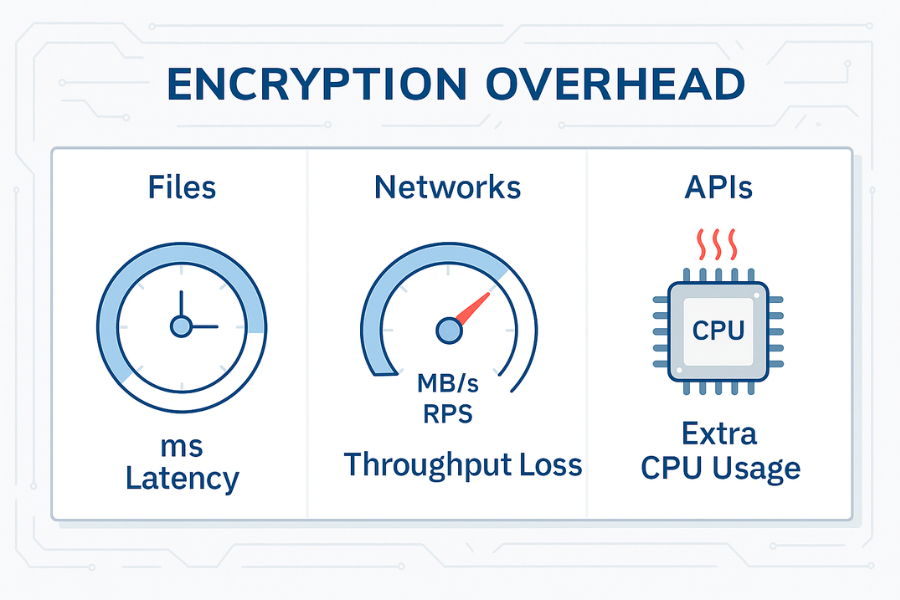
You are measuring three things.
- Extra latency in milliseconds for a single operation
- Throughput loss in megabytes per second or requests per second
- Extra CPU and power cost to deliver the same work
You get those numbers by running the same workload twice:
- Plain
- Encrypted with the cipher and mode you actually plan to ship
Then you compute:
- Overhead in milliseconds for median latency
- Percent slowdown or speed loss
- Extra CPU percent at the same load
No need to guess. No need to argue in Slack threads with vague “encryption is expensive” claims.
2. Ground rules for honest measurements
Before we split into files, networks, and APIs, a few rules keep your data clean.
2.1 Use the same hardware
Do not compare a plain run on a local SSD with an encrypted run on a shared VM. Use the same machine, disk, and network and change one variable at a time.
2.2 Separate warmup from results
Encryption overhead often shows most clearly in the first call.
- TLS handshake adds extra roundtrips on the first request.
- Disk caches hide the cost if you repeat the same file reads over and over.
Do a warmup run. Then collect at least three measured runs and average them.
2.3 Log both latency and CPU
A change that adds only 5 milliseconds but spikes CPU from 30 percent to 90 percent will come back to bite you at higher traffic. KeyCDN measured TLS CPU overhead around 2 percent and a few milliseconds when tuned, which is a good baseline to keep in mind.
2.4 Stay on a safe environment
Do not disable encryption on production just to get a baseline. Use:
- A staging cluster
- A maintenance window
- Or a synthetic workload on a cloned volume
Now we can talk about specific surfaces.
3. File and disk encryption overhead
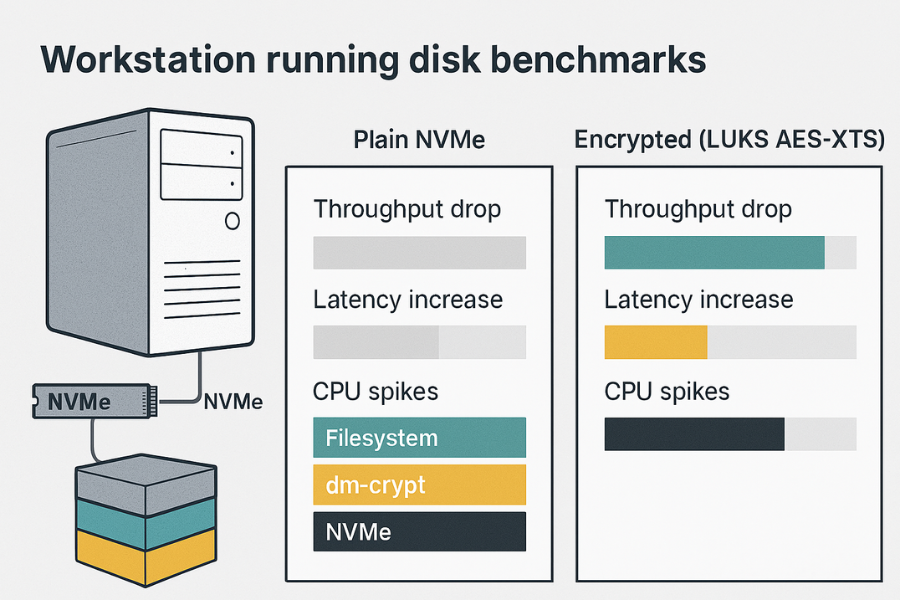
You care about two layers:
- Full disk or volume encryption
- File level encryption inside tools such as 7 Zip or VeraCrypt
3.1 What real measurements say
Recent work on LUKS shows that on spinning disks the CPU cost is small, while throughput and input output operations per second can drop sharply based on pattern:
- Up to around 79 percent lower throughput for some sequential write workloads on hard drives
- Up to around 83 percent loss on all flash NVMe arrays with stacked software encryption and a busy CPU
BitLocker tests on fast consumer SSDs show a slowdown of roughly 11 to 45 percent when software encryption is active.
That range is wide, which is exactly why you need your own numbers.
3.2 How to measure disk encryption overhead step by step
Example toolset on Linux:
lsblkandcryptsetup statusto confirm encryptionfiofor realistic disk loadiostatorpidstatfor CPU and disk stats
Step 1: Confirm baseline and encrypted volumes
- Run
lsblkand note your main data device. - Check if it is plain or wrapped in a mapper such as
dm_crypt. - If needed, prepare a separate test volume where you can toggle encryption on and off.
Gotcha: never benchmark destructive loads on the only copy of important data.
Step 2: Run a sequential workload without encryption
Example fio command:
fio --name=seqwrite_plain \
    --filename=/mnt/plain/benchfile \
    --size=4G \
    --bs=1M \
    --rw=write \
    --iodepth=32 \
    --numjobs=1 \
    --direct=1
Record:
- Write throughput
- Latency stats
- CPU percent from
iostatorhtop
Step 3: Repeat on an encrypted volume
Mount the same type of filesystem on an encrypted device and run:
fio --name=seqwrite_luks \
    --filename=/mnt/crypt/benchfile \
    --size=4G \
    --bs=1M \
    --rw=write \
    --iodepth=32 \
    --numjobs=1 \
    --direct=1
Again record throughput, latency, and CPU.
Step 4: Compare and compute overhead
Simple table example for one system:
| Test | Volume type | Throughput MB per s | Average latency ms | CPU total percent |
|---|---|---|---|---|
| Sequential write | Plain NVMe | 2600 | 3 | 35 |
| Sequential write | LUKS AES XTS 256 | 1500 | 5 | 85 |
| Random read | Plain NVMe | 450 | 1 | 25 |
| Random read | LUKS AES XTS 256 | 320 | 2 | 55 |
Numbers will differ across systems. The pattern is what matters.
Step 5: Run non destructive spot checks
Before you change production:
- Run
cryptsetup benchmarkto see AES throughput for your CPU. - Compare that number with raw disk throughput to see if CPU will be the bottleneck.
3.3 File level encryption overhead with 7 Zip
When you encrypt backups or archives with 7 Zip, you pay overhead in two places:
- Compression time
- AES time
OpenSSL based tools often hit one gigabyte per second and more on modern hardware, which means compression is often the main cost.
Quick test:
- Compress a folder without encryption.
- Compress the same folder with AES 256 and filename encryption.
- Compare runtime and CPU.
Settings snapshot that tends to work:
| Option | Value |
|---|---|
| Archive format | 7z |
| Encryption method | AES 256 |
| Encrypt file names | On |
| Dictionary size | Same in both runs |
3.4 Troubleshooting disk encryption overhead
Common symptoms and fixes.
| Symptom | Likely cause | Fix idea |
|---|---|---|
| NVMe array hits 100 percent CPU during fio with encryption | Software AES and XTS saturate cores | Check AES instructions, tune crypto engine, move hot data to hardware encrypted drives |
| Old laptop feels sluggish after enabling BitLocker or LUKS | Weak CPU without AES acceleration | Use lighter cipher where allowed, pick AES 128, or accept lower disk usage for encrypted data |
| fio results vary wildly between runs | Cache effects or noisy neighbors on shared cloud hardware | Drop caches, repeat tests, use isolated volumes |
| Real app slow but fio looks fine | App mixed pattern, many metadata updates | Run an application style benchmark or trace pattern and replay it |
Non destructive tests first. Leave production data encrypted while you profile on test volumes.
4. Network and HTTPS encryption overhead
This is where most people worry but often overestimate the cost.
4.1 What modern TLS overhead looks like
At a protocol level, first time HTTPS traffic needs more roundtrips than plain HTTP.
A classic breakdown from common answers and performance guides:
- Plain HTTP can start sending data after about one roundtrip.
- Early TLS versions often needed two extra trips before data flowed.
With a one hundred millisecond link, that can push the first request toward the half second mark. In practice, TLS 1.3, session resumption, and HTTP 2 reduce this cost and content delivery networks move endpoints closer to users, which keeps real page load differences small.
KeyCDN found HTTPS loads for a tuned site almost neck and neck with HTTP, with CPU load near one percent for TLS on frontends.
4.2 How to measure HTTPS overhead for a web site
You can do this on any staging host.
Tools:
curlwith timing output- WebPageTest or a browser with dev tools
htopfor CPU
Step 1: Stand up both HTTP and HTTPS
- Expose the same site on plain port 80 and TLS on port 443.
- Use the same content and caching rules.
- Make sure TLS uses a modern cipher like AES GCM and TLS 1.2 or 1.3.
Step 2: Use curl to measure first byte and total time
Example:
curl -o /dev/null -s \
  -w "time_namelookup %{time_namelookup}\n time_connect %{time_connect}\n time_appconnect %{time_appconnect}\n time_starttransfer %{time_starttransfer}\n time_total %{time_total}\n" \
  http://yourhost.test/
Then run the same for https://yourhost.test/.
Look at:
time_appconnectfor TLS handshake costtime_starttransferfor server side processing plus handshake
Step 3: Run a small load test
If you can, use wrk or a similar tool.
Plain:
wrk -t4 -c100 -d30s http://yourhost.test/
TLS:
wrk -t4 -c100 -d30s https://yourhost.test/
Record:
- Requests per second
- Median latency
- Tail latency such as p95 and p99
A typical pattern in benchmarks of load balancers and reverse proxies is that HTTPS throughput is slightly lower than HTTP at high concurrency, with tails growing more at extreme load, especially on older hardware or without session reuse.
4.3 Geo angle: distance matters more than ciphers
If your users are far from the server, the main cost is network distance, not AES or TLS math.
KeyCDN and Cloudflare style posts highlight:
- Terminating TLS closer to users with edge networks cuts perceived overhead.
- HTTP 2 and HTTP 3 reduce connection setup and improve multiplexing, so users see little difference between HTTP and HTTPS when you configure things well.
When you measure, always include at least one probe from a remote region, not just from a machine in the same data center.
5. API encryption overhead
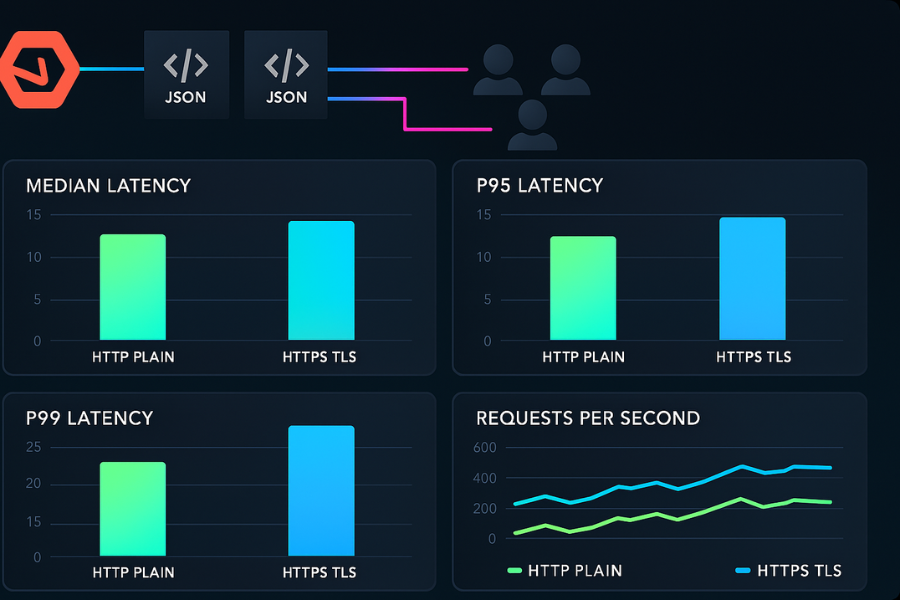
REST and gRPC APIs live behind proxies such as Nginx, Envoy, HAProxy, or cloud balancers. Those components handle TLS termination and add their own overhead.
5.1 What studies show
Benchmarks of modern load balancers often include both HTTP and HTTPS runs. At high concurrency, the TLS variants show:
- Lower raw throughput at the extreme tail
- Higher latency between 75th and 95th percentile when the box is close to saturation
The impact is very workload and proxy specific, which means you should test with your routing rules and backend timeouts.
5.2 Step by step API latency test set
Say you have a simple JSON API behind Nginx or Envoy.
Step 1: Expose two listeners
- One plain HTTP listener on a high port used only for tests.
- One HTTPS listener on the normal public port with the same backend configuration.
Keep routing logic, rate limits, and logging identical.
Step 2: Use a load generator
wrk, k6, or similar tools are fine.
Plain:
wrk -t8 -c200 -d60s \
  -s post.lua \
  http://api.test.internal/v1/items
HTTPS:
wrk -t8 -c200 -d60s \
  -s post.lua \
  https://api.test.internal/v1/items
Capture:
- Requests per second
- Median, p90, p99 latency
- Server CPU and memory
Step 3: Compare overhead
Example result table:
| Metric | HTTP plain | HTTPS TLS | Overhead |
|---|---|---|---|
| Requests per second | 11500 | 9800 | about 15 percent lower |
| Median latency ms | 18 | 22 | plus 4 ms |
| p95 latency ms | 60 | 82 | plus 22 ms |
| CPU front percent | 55 | 71 | plus 16 points |
If you see overhead much higher than this, look for:
- Missing session reuse
- Expensive cipher suites
- Mis sized worker pools
5.3 When to terminate TLS
You can terminate TLS at different places:
- Edge proxy at the data center or content delivery network
- In cluster API gateway
- Per service with sidecars or in process TLS
Each step closer to the service adds a small amount of CPU work but improves zero trust posture. Combine your latency numbers with organizational risk, not just gut feel.
6. Use case chooser table
Here is a quick chooser focused on encryption overhead decisions.
| Scenario | What to measure | Typical overhead pattern | Notes |
|---|---|---|---|
| Laptop full disk encryption | fio throughput and boot time | From barely visible to tens of percent | Check CPU features before enabling on old hardware |
| Database server with LUKS on NVMe | fio with mixed read write pattern | Can hit 70 percent throughput loss and high CPU | Consider hardware encrypting drives or more cores |
| Public site behind content delivery network | TLS handshake and first byte | Usually small compared to network latency | Edge termination and HTTP 2 hide much of the cost |
| Internal JSON API across regions | p95 latency and CPU on gateway | Extra roundtrips and some CPU, visible at high load | Use TLS 1.3 and session reuse |
| Backup pipeline encrypting archives | Time for nightly job | Often dominated by compression and disk | Choose ciphers and batch sizes based on real file tests |
7. Troubleshooting playbook
You switched encryption on, and something feels wrong. Start from symptoms.
7.1 Symptom to fix table
| Symptom or error text | Likely cause | Fix path |
|---|---|---|
p95 latency doubled after enabling HTTPS on API gateway |
No session reuse, heavy cipher, limited workers | Enable session tickets or resumption, prefer AES GCM, tune worker count |
| Disk write throughput dropped from 2.5 GB per second to 800 MB per second | Software encryption saturates CPU on NVMe | Confirm AES instructions, consider hardware drives or extra cores, reduce queue depth if needed |
| Login endpoint feels slow even if TLS benchmarks look fine | Application overhead, database calls, or session store | Profile app stack, do a plain load test, compare app time with TLS time |
| Mobile app battery drain after adding client side encryption | Busy loops, too many tiny encrypt calls | Batch encryption, use platform crypto APIs that talk to hardware engines |
openssl speed shows strange low numbers |
Wrong build, missing AES acceleration | Rebuild with hardware support, use EVP interface, confirm with docs |
7.2 Root causes ranked
Across real systems, repeated patterns show up.
- Encryption stack ignores hardware acceleration.
- Benchmarks do not match real mixed workloads.
- TLS settings block resumption or pack in slow cipher suites.
- Disk and network were nearly saturated even before encryption.
Start with least invasive tests like openssl speed and small curl checks before you change disk layouts or move gateways.
8. Verifying and sharing results safely
Once you have numbers, you want to make sure they are real and share them with your team without exposing secrets.
8.1 How to confirm your measurements
Checklist:
- Repeat each test at least three times and look for consistency.
- Capture system metrics at the same time, not just benchmark tool output.
- Change one knob at a time: cipher, mode, session reuse, not everything at once.
You can even treat openssl speed with -aead flags as a quick smoke test for TLS like sequences.
8.2 Share results without sharing secrets
A simple safe pattern:
- Put benchmark tables, commands, and graphs into a document.
- Include config snippets for cipher suites and disk layout.
- Do not paste private keys or raw key material into that doc.
- If a teammate needs to inspect keys for some reason, hand them over by a separate secure channel and rotate them after the review.
Treat configs that contain keys or passwords as sensitive, even if the rest of the report can sit in your internal wiki.
9. Structured data snippets for AEO and SEO
You can drop and adapt these JSON LD blocks into the page that will host this article.
9.1 HowTo schema for measuring encryption overhead
<script type="application/ld+json">
{
  "@context": "https://schema.org",
  "@type": "HowTo",
  "name": "How to measure encryption overhead for files, networks, and APIs",
  "description": "Step by step method to benchmark encryption latency and throughput on disks, websites, and JSON APIs using common tools.",
  "totalTime": "PT45M",
  "tool": [
    "fio",
    "curl",
    "wrk or k6",
    "openssl"
  ],
  "step": [
    {
      "@type": "HowToStep",
      "name": "Measure disk throughput with and without encryption",
      "text": "Use fio on a plain test volume and an encrypted volume with the same hardware and workload, then compare throughput and latency."
    },
    {
      "@type": "HowToStep",
      "name": "Measure HTTPS overhead on web traffic",
      "text": "Expose both HTTP and HTTPS for the same site, use curl timing and a small load test to compare median and tail latency."
    },
    {
      "@type": "HowToStep",
      "name": "Measure TLS impact on APIs",
      "text": "Benchmark your JSON or gRPC API behind a proxy with and without TLS termination, tracking requests per second and p95 latency."
    },
    {
      "@type": "HowToStep",
      "name": "Analyze CPU and choose tuning actions",
      "text": "Correlate latency and throughput with CPU usage to decide whether to enable hardware acceleration, adjust cipher suites, or change disk or proxy settings."
    }
  ]
}
</script>
9.2 FAQPage shell
<script type="application/ld+json">
{
  "@context": "https://schema.org",
  "@type": "FAQPage",
  "mainEntity": []
}
</script>
9.3 ItemList for comparison snippets
<script type="application/ld+json">
{
  "@context": "https://schema.org",
  "@type": "ItemList",
  "name": "Where encryption overhead comes from",
  "itemListElement": [
    {
      "@type": "ListItem",
      "position": 1,
      "name": "Disk encryption",
      "description": "Throughput and IOPS losses from software encryption on fast drives."
    },
    {
      "@type": "ListItem",
      "position": 2,
      "name": "TLS on web traffic",
      "description": "Handshake roundtrips and CPU cost for encrypted HTTP sessions."
    },
    {
      "@type": "ListItem",
      "position": 3,
      "name": "API gateways",
      "description": "Added latency from TLS termination and routing logic at high concurrency."
    }
  ]
}
</script>
10. FAQ on encryption overhead
Here are practical questions readers actually type into search bars.
1. How much latency does HTTPS add compared to HTTP in real use
Most tuned sites see very small differences in total page load, often within tens of milliseconds, because TLS 1.3, HTTP 2, and content delivery networks hide roundtrip costs. The handshake adds some delay on the first connection, yet CPU overhead is typically only a few percent on modern servers. (KeyCDN)
2. Does full disk encryption always slow down my computer
Not always. On slower hard drives the user experience change may be tiny, while throughput and IOPS can still drop in benchmarks. On fast NVMe drives, software disk encryption can cause large throughput losses and high CPU load at heavy write rates, though many users still find it acceptable for regular desktop work.
3. Is API response time mostly about encryption or application logic
For most JSON or gRPC APIs, application logic, database access, and caching dominate response time. TLS adds a small extra cost per call and some handshake overhead, which becomes noticeable mainly under high concurrency or with poor configuration. Measuring both HTTP and HTTPS with the same backend is the only way to see the real split.
4. How do I tell if encryption overhead is CPU bound or IO bound
Watch CPU and IO metrics during your tests. If CPU jumps to near full while disk or network still has headroom, you are CPU bound and should look at hardware acceleration and cipher choices. If CPU stays low and disks or links are saturated, the overhead is mainly IO. Tools like iostat, htop, and proxy dashboards make this clear.
5. Do I need a GPU to keep encryption overhead low
No for most workloads. Modern CPUs and mobile chips ship with AES acceleration and can handle web traffic, file encryption, and backups without a GPU. GPU offload pays off only for very large parallel workloads, such as huge backup streams or storage gateways that push many gigabytes per second.
6. Can I reduce HTTPS overhead without weakening security
Yes. Use current TLS versions, session resumption, efficient cipher suites such as AES GCM, and keep certificates on a content delivery network or edge proxy close to users. These steps keep strong security while trimming latency and CPU cost.
7. Why do my benchmarks show big overhead while case studies say it is tiny
Benchmarks with fast local links, caching, and warm sessions can make overhead look tiny. Your production may have higher latency links, heavier payloads, or fewer chances for reuse. Align your test setup with real traffic patterns before you compare your data to blog posts.
8. Does choosing AES 256 instead of AES 128 change overhead much
AES 256 is slower than AES 128 because it has more rounds and subkeys, but in many storage and network stacks the difference is small compared with IO and application costs. Some measurements place worst case slowdown at around forty percent in pure cipher tests, yet in real disk or network use the total gap is often smaller.
9. How do I include encryption overhead in capacity planning
Take your measured overhead numbers, add them as a percent margin on CPU and latency, and size your instances or pods for peak traffic with that margin included. Run both load and soak tests with TLS and disk encryption enabled so your autoscaling rules see realistic signals.
10. Should I ever turn encryption off to save latency
For any system that handles user data across networks or stores sensitive content on disks, turning encryption off to shave a few milliseconds is rarely a good trade. In many setups the latency gain is tiny relative to the security risk, especially when hardware acceleration and modern protocols are in place. The better approach is to measure, tune, and add capacity where needed. (KeyCDN)
If you walk away with one habit, make it this one: always benchmark with encryption on, treat the overhead as a measurable signal, and tune based on real numbers instead of guesswork.