
Cloud Secure Versus Provider Encrypted at Rest, Why Keys Matter
This comprehensive overview, prepared by Newsoftwares.net, dissects cloud security models to reveal a critical vulnerability: key ownership. This report provides actionable workflows to implement client side encryption, ensuring your files are protected from both provider access and legal compulsion, guaranteeing data privacy and regulatory compliance.
The Short Answer
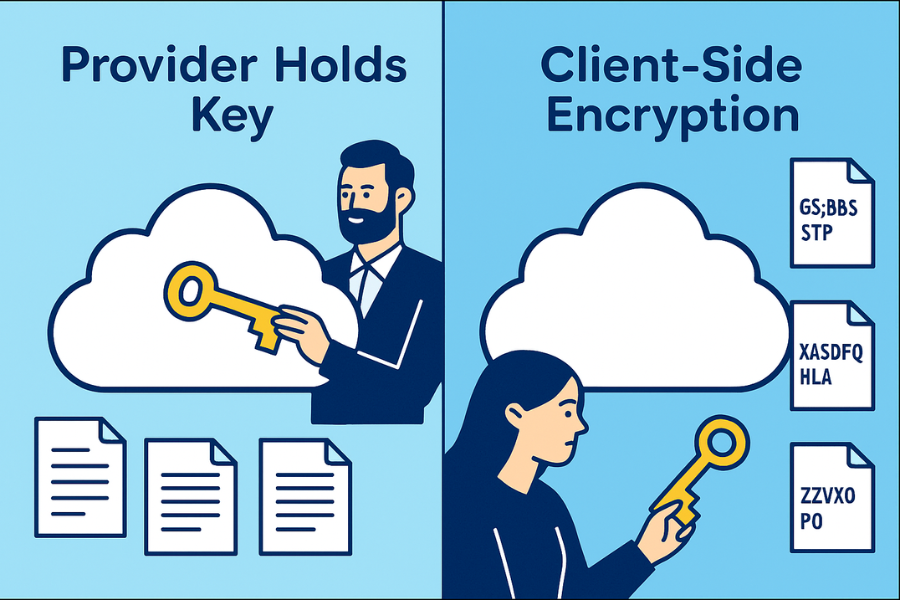
If your cloud provider holds the keys, they or anyone who compels them can open your files without you. Client side encryption puts the only usable keys in your hands, so storage providers see ciphertext only. Use Cloud Secure style tools when privacy, regulated data or cross provider portability matter. Rely on provider at rest encryption only when convenience beats control.
Gap Statement
Most guides gloss over three points that decide real safety: Missing Windows and macOS steps for encrypt before upload workflows, wrong advice that “encrypted at rest” equals zero knowledge, and underspecified recovery and lawful access scenarios, including who can decrypt what.
This overview provides step by step client side setups, comparison tables for common providers and plain English recovery rules you can enforce.
Outcomes
- Client side encryption keeps keys with you, not the cloud.
- Provider at rest encryption protects disks in the data center, not the readable files after login.
-
If you must satisfy privacy audits, bring your own keys or encrypt before upload, then document recovery and sharing policies.
What “Encrypted at Rest” Actually Covers
- Disks, snapshots and backups are encrypted in the provider’s environment.
- The provider controls the master keys or the hardware security modules.
- Once you sign in, their platform decrypts data so apps can read it.
- Admins with sufficient privilege, malware in your session or lawful requests can expose the plain files.
What Client Side Encryption Changes
- You encrypt files before they leave your computer.
- Only ciphertext is stored in the cloud.
- You hold the key material in your vault or password manager.
- Even with a valid court order, the provider can only hand over ciphertext. Requests go to you.
Use Case Chooser
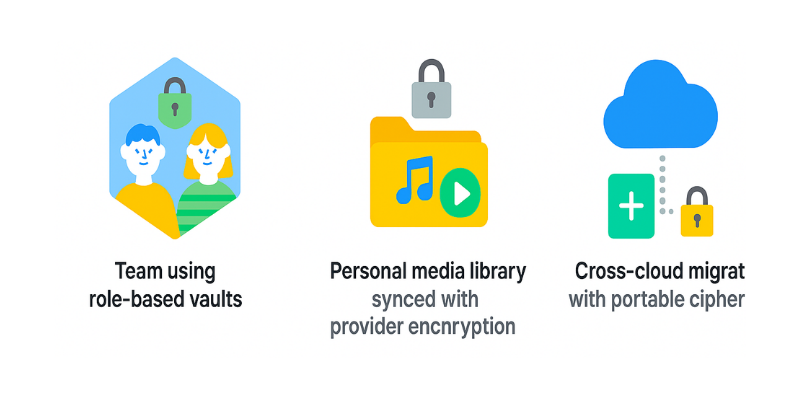
| Scenario | Best Fit | Why It Wins |
| Share one folder with a client on random laptops | Client side locker link with time limited code | No software install required, provider sees only ciphertext |
| Team file server, strong compliance pressure | Client side encryption plus role based vaults | Keys live with the team, not the vendor |
| Quick personal sync of non sensitive media | Provider at rest encryption | Enough protection for lost drives and routine outages |
| Cross cloud migration later | Client side encryption | Move the ciphertext bundle anywhere without re encrypting |
Security Specifics That Actually Matter
| Property | Provider at Rest | Client Side Encryption |
| Cipher in Storage | AES based volume encryption inside data center | AES for content, your app controls KDF and options |
| Key Ownership | Provider holds or manages keys | You hold keys locally or in your KMS |
| Access After Login | Plain files become readable in web apps | Still ciphertext in the provider, decryption happens on your device |
| Lawful Access Path | Provider can be compelled to produce readable data from live accounts | Provider can only produce ciphertext, requests route to you |
| Insider Risk | Mitigated by provider controls, not eliminated | Meaningfully reduced, provider insiders cannot read content |
| Ransomware Blast Radius | Sync may copy encrypted malware notes into cloud | Encrypted vaults slow propagation and enable clean restores |
Hands On: One Encrypt Before Upload Workflow
Prerequisites and Safety
- Back up your source folder to an external drive first.
- Know your OS edition and available disk space.
- Decide a strong passphrase stored in a password manager.
- Plan a safe channel for key exchange when sharing.
Steps, Windows and macOS
- Create a local vault on your computer with your client side tool.
- Choose AES 256 and enable filename hiding or header encryption.
- Add files to the local vault.
- Move or sync the vault container into your cloud provider folder.
- Let the provider sync the ciphertext.
- On a second device, pull the vault down, then open it with your passphrase.
- Share the key through a separate channel only after the receiver confirms the vault file arrived.
Gotcha. Do not open the same vault from two devices at the same time. Corruption can occur. Use a simple handoff rule. One editor at a time.
Verify It Worked
- In the cloud web UI you should see a single container or scrambled filenames.
- Download the vault blob to a third machine without your key. Files should remain unreadable.
- Open the vault on the authorized device and confirm checksums or document count.
Share Safely
- Send the passphrase over Signal or another end to end messenger.
- Expire the message after one day.
- Rotate the key when the project ends.
- If you must email, split the secret into two short parts and send hours apart.
Settings Snapshot for a Solid Baseline
- AES 256 for content.
- Encrypt file names option on.
- KDF rounds raised from default to high for your CPU.
- Auto lock after five minutes idle.
- Read only mount for handoffs to avoid accidental edits.
Where “Encrypted at Rest” Is Still Fine
- Company marketing assets, public PDFs, software installers.
- Short lived collaboration where key distribution slows you down more than the risk.
- Internal documents where the provider’s admin model and audit logs satisfy policy.
Lawful Access and Audit Clarity
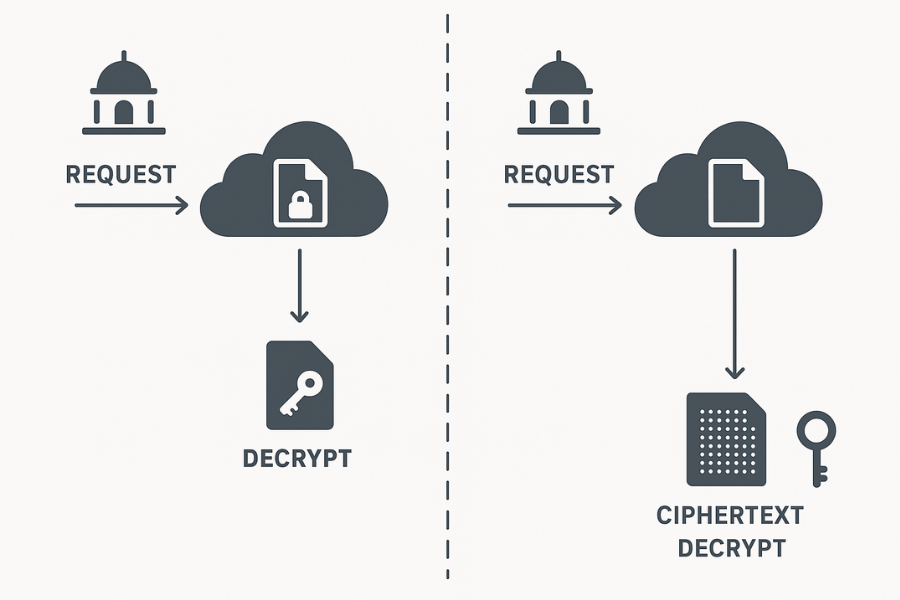
| Question | Provider at Rest Answer | Client Side Answer |
| Who can decrypt on demand | The provider platform during normal access | Only the key holder |
| What the provider can hand over | Plain files from a live session, or decrypted exports depending on policy | Only ciphertext, plus metadata such as file sizes and timestamps |
| Who must notify users | Usually the provider under its terms | You, when requests come to you, per your policy |
| How to document the model | Reference vendor encryption whitepaper and admin controls | Publish your key custody statement and recovery SOP |
Comparison Matrix by Job to be Done
| Factor | Provider at Rest | Client Side Encryption |
| Setup Time | None beyond account creation | Ten minutes per vault and user training |
| Daily UX | Seamless browser and mobile apps | Unlock vaults locally, slight friction |
| Multi OS | Full support in vendor apps | Full support once file is local, vault tool must be available |
| Recovery | Password reset restores access to plain data | Without your passphrase or recovery key, data is unrecoverable |
| Cost | Included in subscription | Tool license plus small training time |
| Risk if account is hijacked | Attacker sees plain files after login | Attacker sees ciphertext unless they also get the key |
Windows Quick Overview: Encrypt Before Upload
No Admin Crypto on Windows Home and Still Want Safety
- Install your client side encryption tool.
- Create a new vault on your Desktop.
- Open the vault and copy in your files.
- Close the vault to seal it.
- Move the vault file into your Dropbox, Google Drive or OneDrive folder.
- Wait for the sync check mark.
macOS Quick Overview: Encrypt Before Upload
When You Want Apple Convenience and Privacy Beyond Provider Defaults
- Install your client side encryption tool with drag to Applications.
- Create a vault in your home folder.
- Use Add files, not Open with, to avoid Finder preview locks.
- Close the vault. Confirm it disappears from Finder.
- Move the vault bundle into iCloud Drive or your provider folder.
- On a second Mac, download the bundle and open with your passphrase.
Common Error Text and Fixes
- Error Text: file in use. Close Explorer windows that display the vault mount, wait ten seconds, try again.
- Error Text: checksum mismatch or cannot open header. The sync completed mid write. Let sync finish, then try again.
- This item is still uploading. Wait until the small cloud icon disappears next to the bundle.
- The vault appears twice. Disable Optimize Mac Storage for this folder if you edit from multiple Macs.
- The file is damaged and cannot be opened. Gatekeeper flagged a partial download. Delete and redownload the complete bundle.
Real World Recovery Planning
Your risks are forgotten passwords, lost devices and partial cloud syncs.
- Write one page that states where the recovery key lives, who can use it and how to rotate it annually.
- Test recovery with a dummy vault once a quarter.
- If you have no recovery key by design, state explicitly that lost passphrases mean data loss.
When You Should Not Use Client Side Encryption
- You depend on web based co editing in Google Docs or Microsoft 365.
- Your recipients never install utilities and do not accept vault files.
- You need provider side search, previews and automations on the plain documents.
When You Must Not Rely Only on Provider at Rest
- You handle regulated health or finance data without a Business Associate or equivalent agreement.
- You host confidential client files where the contract expects zero knowledge storage.
- You are a journalist, activist or attorney with a duty to protect sources or clients.
Two Practical Sharing Patterns That Work
Pattern One: Quick Client Handoff
- Upload the vault into a neutral shared folder.
- Send the key through Signal.
- Ask the client to confirm they can open, then rotate the key.
Pattern Two: Ongoing Team Folder
- One vault per project and per team role.
- No simultaneous editing.
- Keep read only snapshots for delivery moments.
Frequently Asked Questions
Can my provider read files if I use client side encryption?
No. They store ciphertext only. Your device decrypts locally with your key.
Do I still need strong account passwords with client side encryption?
Yes. An attacker could still delete your ciphertext or block your access.
How do I collaborate on a spreadsheet without constant re uploading?
Use a check out rule. One editor at a time.
Can I search inside encrypted vaults in the cloud site?
No. Search after you unlock locally. If you need provider side search, keep a non sensitive index outside.
What if the vault file corrupts?
Restore last version from the provider’s version history. Keep a weekly offline backup.
Does client side encryption slow my sync?
A little during initial encryption. After that, deltas dominate and the difference is small.
Can I mix both models?
Yes. Keep plain project logistics in normal folders. Keep sensitive contracts in a vault stored beside them.
Should I use password hints?
Avoid hints that leak the answer. Store the full passphrase in your password manager.
How long should a passphrase be?
Aim for four random words or sixteen mixed characters.
Will this work on iOS and Android?
If your tool has mobile apps that unlock locally. Otherwise use a keypad hardware device for phone access.
What about shared links from the provider?
Avoid plain shared links for sensitive files. Share the vault blob, then send the key by a separate channel.
Are file names protected?
Only if you enable filename encryption. Turn it on.
Can the provider comply with a lawful request without me?
With at rest only, possibly yes. With client side encryption, they hand over ciphertext and contact you.
Do I need antivirus?
Yes. After you unlock, malware can read files like any app.
What if I must edit the same file with a teammate?
Agree a schedule. Use read only snapshots for everything else.
Conclusion
The debate over cloud security boils down to a single point: key ownership. The era of relying solely on a provider’s “encrypted at rest” guarantee is over for anyone handling truly sensitive or regulated data. That model offers convenient access but inherently leaves your information vulnerable to provider scanning, insider threats, and legal compulsion, because the provider holds the master key.
Achieving real digital sovereignty requires implementing client side encryption. This practice encrypting your files before they ever leave your device is not just an option, it is a mandate for zero knowledge privacy and compliance.
The best strategy is one of informed segregation:
- For convenience and simple sharing, accept provider at rest encryption for non-sensitive data.
- For confidentiality and audit trails, utilize client side encryption tools to transform your cloud folder into an impenetrable vault.
Ultimately, your security posture is defined not by the provider’s capabilities, but by your own actions. By establishing a clear, one-page key custody policy and ensuring passwords are sent “out of band” over a secure messenger, you transfer control from a faceless corporation to the only person who should have it: you.