
Welcome. This detailed resource outlines client side encryption best practices for protecting Personally Identifiable Information (PII) captured via web forms. We demonstrate how to encrypt sensitive fields in the browser using the Web Crypto API, and, crucially, how to secure the resulting exports and keys on staff endpoints using the integrated tools from Newsoftwares.net – Folder Lock, USB Secure, and Cloud Secure to ensure end-to-end privacy, security, and compliance convenience.
Client Side Encryption For PII Forms: End-To-End Security
Direct Answer
Client side encryption for forms keeps PII encrypted inside the browser so anyone who steals traffic, logs, or databases only sees unreadable data.
Gap Statement
Most content on PII encryption misses three important points:
- It only repeats “use TLS and a secure server” without explaining when that is not enough for high risk forms that collect identity numbers, medical details, or financial data.
- It mentions “client side encryption” but skips concrete browser patterns, key handling, and how to prove that the payload is actually encrypted on the wire.
- It almost never shows how endpoint tools like Folder Lock, Folder Protect, USB Secure, and Cloud Secure from NewSoftwares can protect exported form submissions, backups, and admin keys across laptops, USB drives, and cloud folders.
This reference closes those gaps with exact patterns, screenshots you can picture, proof that encryption works, and a small business friendly way to plug NewSoftwares tools into the workflow.
TLDR Outcome
After you apply the patterns here you will be able to:
- Encrypt sensitive form fields in the browser before submission, while still keeping the rest of your form usable and testable.
- Store and move PII in encrypted form across laptops, USB drives, and cloud sync folders using Folder Lock, Folder Protect, USB Secure, and Cloud Secure.
- Prove to yourself, auditors, or clients that data in transit and at rest really is encrypted, and fix common “it fails in production” errors.
1. What Client Side Encryption For Forms And PII Really Means

Client side encryption in this context is simple.
The browser encrypts chosen form fields before sending the request. The server receives ciphertext and either:
- Stores it as is, and only a separate decryption workflow can reveal the PII, or
- Decrypts it with keys stored in a hardened service or hardware security module.
TLS still matters. It protects the whole channel. Client side encryption adds another layer so that even if:
- A proxy logs raw HTTP bodies,
- A support engineer dumps the database, or
- A cloud storage bucket with exports leaks,
the attacker still sees encrypted blobs instead of clear personal data.
You are not trying to replace TLS, database TDE, or disk encryption. You are narrowing who can see PII in clear text.
2. When You Actually Need Client Side Encryption
You usually reach for client side encryption when at least one of these is true:
- You run a SaaS platform that wants “zero knowledge” handling of some fields, such as identity numbers or health details.
- You process forms in a regulated sector and want clear separation between app operators and data owners.
- You know some staff use laptops, USB drives, or personal cloud sync for exported CSVs, so you want encrypted blobs from the moment of capture.
If you only collect low risk fields and run everything inside a well managed internal stack, TLS plus strong server side protection may be enough.
3. Threat Model In Plain Language
Focus on four main attacker views:
- Network view: TLS blocks most of this. Client side encryption stops any plaintext exposure even if TLS is mis configured on one hop.
- Application view: Logs, analytics, and error trackers often record request bodies. Client side encryption means those systems only see ciphertext for sensitive fields.
- Storage view: Databases, CSV exports, and BI tools carry risk. Disk or TDE encryption protects against stolen disks, but not against someone with database access. Client side encryption limits cleartext to processes that hold decryption keys.
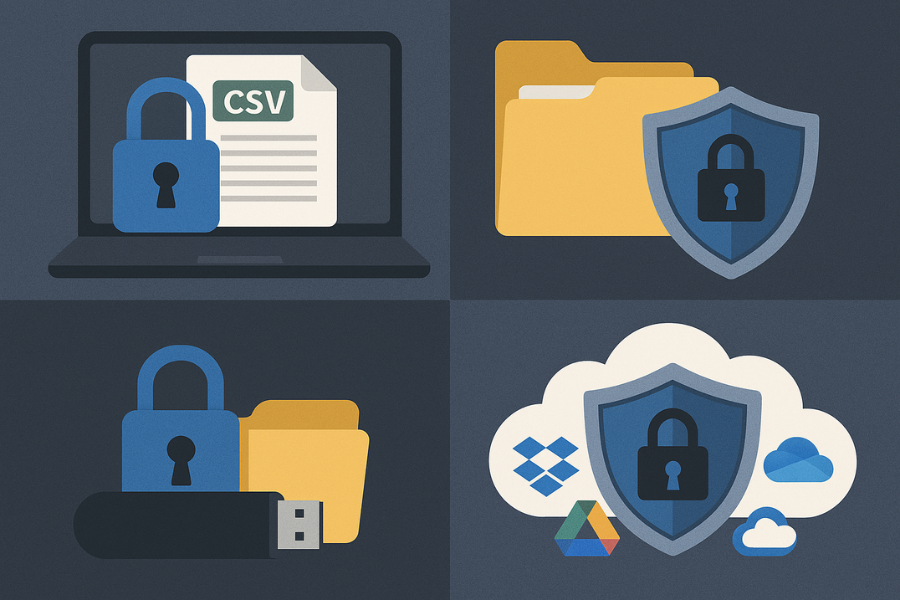
- Endpoint view: Staff download exports to laptops, copy them to USB drives, or move them to cloud sync folders. This is where NewSoftwares tools shine:
- Folder Lock for encrypted lockers on Windows and synced encrypted stores.
- Folder Protect for fine grained access rules on folders, drives, and file types.
- USB Secure and USB Block to control what leaves on removable storage.
- Cloud Secure to lock Dropbox, Google Drive, OneDrive, and Box accounts on the PC itself.
4. Patterns For Client Side Encryption Of Forms
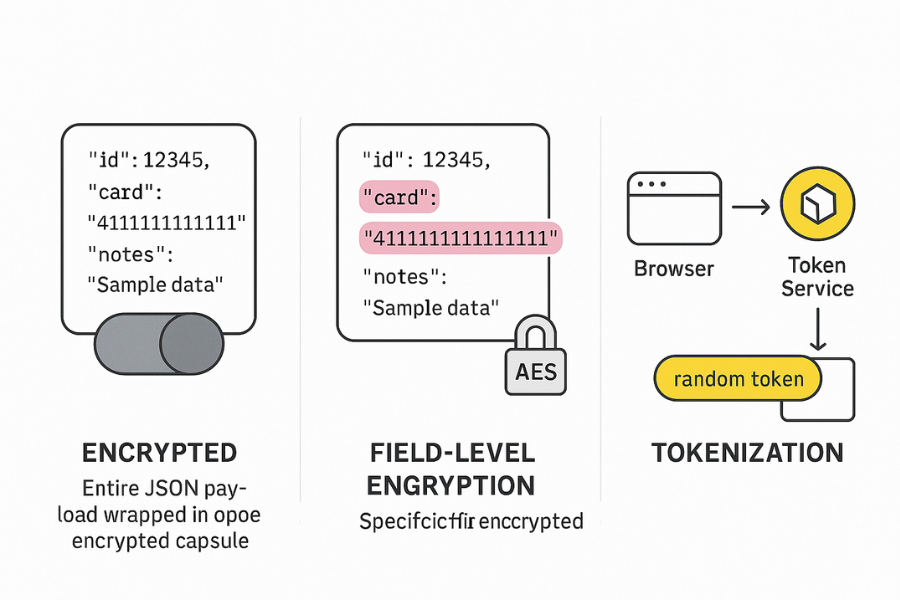
4.1. Pattern 1: Encrypt The Whole Form Payload
- Serialise the form data to JSON in the browser.
- Generate a random symmetric key for this submission.
- Encrypt the JSON with AES GCM using the Web Crypto API.
- Encrypt the symmetric key with a server public key.
- Send only the ciphertext and encrypted key.
Pros: Simple to reason about. Reduces chances of accidentally sending any clear PII.
Trade offs: Harder to run server side validation or fraud checks before decryption. Harder to search or filter submissions by encrypted fields.
4.2. Pattern 2: Field Level Encryption
- Identify only high risk fields, such as national ID, payment card number, or diagnosis notes.
- Encrypt those fields in the browser while leaving the rest plain.
Pros: Easier to integrate into existing apps. You keep clear values for low risk fields such as preference flags or general comments.
Trade offs: You must be precise about which fields carry PII. Form builders and dynamic fields need clear tagging to avoid missing something.
4.3. Pattern 3: Tokenisation With Client Side Encryption
For extreme risk data, use a separate tokenisation service.
- The browser encrypts the field value for the token service.
- The token service stores the decrypted value in its own vault.
- The main app receives only a random token.
This pattern matches how some payment providers handle card data, and it aligns well with a separate encryption key and strict access control.
5. Prerequisites And Safety Checks
Before you write a single line of crypto code, make sure you have this in place.
- A current inventory of PII in your forms, mapped to regulations that apply to you such as GDPR, HIPAA, or sector rules.
- A public key or symmetric key management approach, ideally via a cloud KMS or dedicated encryption service.
- Logging policies that forbid storing cleartext PII in browser logs, server logs, and third party analytics.
- Endpoint protection for staff devices using tools like Folder Lock and Folder Protect for local stores, USB Secure for removable media, and Cloud Secure for cloud folders.
- A clear incident plan describing who holds decryption keys and how breaches are investigated.
Safety note
Encryption exists to protect people whose data is collected. Do not use these patterns to hide wrongdoing. Do not send PII to third parties without a lawful basis and clear consent where required.
6. How To Implement Browser Based Field Encryption
This is the main hands on section. The focus is one simple pattern that most teams can adopt.
6.1. Step 1: Choose The Fields To Encrypt
Action
Create a list of form fields that count as PII or sensitive PII. For a typical customer intake form that might be:
- National ID or tax number.
- Full card number if you ever collect it directly.
- Medical or financial notes that describe conditions or income.
Gotcha
Do not encrypt fields you need for search or sort unless you are ready to use search friendly encryption or tokenisation.
6.2. Step 2: Load A Stable Crypto Helper In The Frontend
Action
Wrap Web Crypto calls in one internal helper rather than scattering encryption calls across different forms. This keeps key handling and algorithm choices consistent.
Screenshot
Editor showing a small “crypto.js” or “encryption.ts” module with createKey, encryptField, decryptField functions.
Gotcha
Never roll your own ciphers. Use AES GCM or another modern construction that comes from well tested libraries.
6.3. Step 3: Fetch Or Derive An Encryption Key
Action
When the page loads, obtain the key material for this user or session. Options include:
- A per tenant or per project public key served from your API.
- A symmetric key derived from a signed token that your KMS can map to a real key.
Screenshot
Network tab showing a small “encryption config” call that returns only public data, such as algorithm name, key identifier, and a public key.
Gotcha
Do not embed long term private keys in JavaScript bundles. If an attacker can read the bundle, the secrecy is gone.
6.4. Step 4: Encrypt Fields On Submit
Action
On submit, replace the values of tagged fields with ciphertext before the request leaves the browser. For example:
- Read the field value.
- Encrypt with AES GCM and a fresh random nonce.
- Base64 encode the ciphertext plus nonce.
- Write it back into the form body under the same name or a clear variant.
Screenshot
Browser dev tools Network tab showing “ssn” or “id_number” field as a short base64 string instead of digits.
Gotcha
Do not send both the clear value and ciphertext in the same request “for debugging”. That pattern defeats the whole purpose and often sticks around.
6.5. Step 5: Decrypt On The Server In A Limited Place
Action
On the server, only one module or microservice should hold keys and decrypt values. Everything else receives either:
- Redacted views, or
- Pseudonymous tokens.
Screenshot
Code review screen where a dedicated “pii_decryptor” component receives encrypted fields, logs only high level events, and returns safe structures.
Gotcha
Avoid sprinkling decryption logic across random controllers or background jobs. That spreads risk and makes audits painful.
6.6. Step 6: Store Encrypted Values And Protect Exports With NewSoftwares Tools
Action
Decide what stays encrypted in the database and how exports are handled. Good practice:
- Store high risk fields encrypted with a key that can be rotated.
- For exports, keep files inside a Folder Lock encrypted locker on staff machines and servers.
- Enforce extra protection for folders and extensions that carry exports using Folder Protect.
- If staff copy exports to USB drives for offline work, require USB Secure on those devices.
- When exports sync to Dropbox, Google Drive, OneDrive, or Box, lock those cloud accounts locally with Cloud Secure so only authorised staff can open them on shared machines.
Gotcha
Do not leave decrypted CSVs sitting on the desktop or Downloads folder. Always store them inside lockers protected by Folder Lock or within folders controlled by Folder Protect.
7. Verification: Prove That Encryption Really Works
Use this quick checklist after implementation.
- Network payload check
- Open browser dev tools.
- Submit a test form.
- Confirm that sensitive fields show random looking base64 text, not readable values.
- Server log check
- Inspect web server, API, and reverse proxy logs.
- Confirm that sensitive fields either do not appear at all or appear only in encrypted form.
- Database and export check
- Run queries or open CSV exports.
- Confirm that sensitive columns are encrypted or tokenised.
- Key separation check
- List who can access decryption keys.
- Confirm that this group is smaller than the group with database access.
8. Sharing Keys Safely And Rotating Them
Never send raw keys by email or chat that lacks end to end encryption. Instead:
- Use a key management service where admins can grant access to roles, not individuals.
- For very small teams, share bootstrap secrets through secure channels such as Signal, and keep them inside a password wallet rather than sticky notes or spreadsheets.
NewSoftwares offers a wallet feature inside Folder Lock that lets staff store passwords and key passphrases in structured cards protected with AES 256 bit encryption.
Share safely example
- Generate a new key in your KMS or HSM.
- Store the key identifier and passphrase in Folder Lock wallet on the admin workstation.
- Share only the key identifier with developers through ticketing systems, never the secret material.
- If you must give a passphrase to a second admin, send it through Signal with a message that disappears after one day.
9. Comparison: Where Client Side Encryption Fits Among Options
| Protection Pattern | Endpoint Tools Needed | Protects Against | Trade Off |
|---|---|---|---|
| Client Side Field Encryption | Folder Lock, USB Secure, Cloud Secure | Logs, Admin Snooping, Network Proxy Taps | Harder server-side validation/search |
| Server Side TDE (Transparent DB Encryption) | Minimal | Stolen Disks/Snapshots, Backup Leaks | Does not protect against application-level access |
| Tokenisation (Dedicated Vault) | Folder Lock (for tokens/keys) | DB Leaks, Most PCI Scope Reduction | Requires strict token management policies |
NewSoftwares tools sit beside all three designs by strengthening how data is stored and moved on endpoints and cloud sync, without forcing changes in browser side logic.
10. FAQ
1. Is Client Side Encryption Still Useful If TLS And Database Encryption Are In Place
Yes, because TLS and database or disk encryption mainly protect against network interception and stolen hardware. Client side encryption adds another layer by keeping key material separate from general operations, thus guarding against over curious admins and mis configured logs.
2. Do I Need To Encrypt Every Single Field In A Form
No. Focus on fields that clearly identify a person or reveal sensitive details, such as government ID numbers, health notes, or payment information. Keeping the rest in clear text keeps development and reporting manageable.
3. Can JavaScript Based Encryption Be Trusted For Serious PII
Yes, if you rely on Web Crypto or mature libraries and handle keys correctly. The main risk is not the algorithm, but poor key storage, nonce reuse, and logging of cleartext before encryption. A small wrapper module and good reviews reduce that risk.
4. How Do NewSoftwares Products Help If Encryption Already Happens In The Browser
Browser side encryption protects data on the wire and in the database. Folder Lock, Folder Protect, USB Secure, Cloud Secure, and USB Block protect the same data when it lands on staff machines, USB drives, and synced cloud folders, which is where many real incidents begin.
5. What Happens If We Lose The Decryption Key For Encrypted Form Data
If you choose strong encryption and lose the only copy of the key, recovery is usually impossible. This is why you need a documented key backup, escrow, and rotation process, and why you should keep those backups inside protected locations such as Folder Lock lockers with restricted access.
6. Does Client Side Encryption Slow Down The Form Experience
For typical form sizes the overhead is minor, especially when using Web Crypto with hardware acceleration. Even encrypting a large one gigabyte sample on a modern laptop can complete within a couple of minutes, while normal forms are far smaller.
7. How Do I Explain This Pattern To Non Technical Management
Describe it as “locking the data before it leaves the browser, and then keeping it locked on laptops, USB drives, and cloud folders using tools like Folder Lock and USB Secure”. That framing keeps the focus on risk reduction rather than jargon.
8. Can I Still Run Spam Checks And Fraud Detection On Encrypted Fields
Only in limited ways. Many teams keep certain metadata in clear form for antifraud logic, or use tokenisation where a specialist service runs checks and returns safe signals. Do not try to build complex analytics directly on ciphertext unless you have strong cryptographic support.
9. How Does Client Side Encryption Interact With Privacy Regulations Such As GDPR Or HIPAA
Regulations usually care about outcomes, not specific algorithms. Good client side encryption, combined with strong key management and endpoint protection through tools like Folder Lock Suite, shows that you treat PII seriously and follow defence in depth practices. Always match this with proper legal advice for your region.
10. Should Small Teams Start With Client Side Encryption Or Endpoint Protection
Often the fastest win comes from locking local storage and removable media using Folder Lock, Folder Protect, USB Secure, and Cloud Secure, since many leaks come from lost laptops or drives. Once that is in place, moving high risk form fields to client side encryption brings the next big improvement.
Conclusion
Client side encryption is a powerful, modern defense that extends data protection directly to the point of capture, securing Personally Identifiable Information (PII) before it leaves the user’s browser. By implementing a pattern of encrypting high-risk form fields, you limit the exposure of cleartext PII across logs, application servers, and databases. Crucially, this strategy must be paired with robust endpoint controls: tools like Folder Lock secure the resulting data exports and keys on laptops, USB Secure protects portable copies, and Cloud Secure locks down local cloud sync folders. This integrated, defense-in-depth approach ensures that your security posture is strong from the browser to the backend, maximizing PII privacy and meeting compliance expectations.
11. Structured Data Snippets
{
  "@context": "https://schema.org",
  "@type": "HowTo",
  "name": "Client side encryption for forms and PII",
  "description": "Encrypt selected form fields in the browser and protect exports with NewSoftwares tools.",
  "step": [
    {
      "@type": "HowToStep",
      "name": "Choose sensitive fields",
      "text": "Identify PII fields such as national ID, card numbers, and medical notes that should be encrypted in the browser."
    },
    {
      "@type": "HowToStep",
      "name": "Load crypto helper",
      "text": "Create a small frontend module that wraps Web Crypto or a trusted library for encryption and decryption."
    },
    {
      "@type": "HowToStep",
      "name": "Fetch encryption key",
      "text": "Fetch a public or derived key for the session from your backend or key management service."
    },
    {
      "@type": "HowToStep",
      "name": "Encrypt on submit",
      "text": "On form submit, encrypt tagged fields and send only ciphertext in the request payload."
    },
    {
      "@type": "HowToStep",
      "name": "Decrypt in a dedicated service",
      "text": "Decrypt sensitive fields only inside a limited backend service that enforces access control and logging."
    },
    {
      "@type": "HowToStep",
      "name": "Protect exports on endpoints",
      "text": "Store exports and backups in Folder Lock lockers, protect folders with Folder Protect, secure USB drives with USB Secure, and lock cloud accounts on PCs with Cloud Secure."
    }
  ],
  "tool": [
    "Web Crypto API",
    "Folder Lock",
    "Folder Protect",
    "USB Secure",
    "Cloud Secure"
  ],
  "supply": [
    "Modern browser",
    "Key management service",
    "Windows endpoints for Folder Lock Suite"
  ]
}
{
  "@context": "https://schema.org",
  "@type": "FAQPage",
  "mainEntity": [
    {
      "@type": "Question",
      "name": "Is client side encryption still useful if TLS and database encryption are in place?",
      "acceptedAnswer": {
        "@type": "Answer",
        "text": "Yes. TLS and database encryption protect traffic and disks. Client side encryption limits who can see clear PII by encrypting it before submission and keeping keys separate from general access."
      }
    },
    {
      "@type": "Question",
      "name": "Which form fields should be encrypted in the browser?",
      "acceptedAnswer": {
        "@type": "Answer",
        "text": "Encrypt fields that directly identify a person or reveal sensitive information, such as government IDs, card numbers, or health and financial notes. Leave low risk metadata clear for validation and reporting."
      }
    },
    {
      "@type": "Question",
      "name": "How do NewSoftwares tools support client side encrypted workflows?",
      "acceptedAnswer": {
        "@type": "Answer",
        "text": "NewSoftwares products such as Folder Lock, Folder Protect, USB Secure, Cloud Secure, and USB Block protect decrypted data, exports, and keys on laptops, USB drives, and cloud sync folders, closing endpoint gaps."
      }
    }
  ]
}
{
  "@context": "https://schema.org",
  "@type": "ItemList",
  "name": "PII protection patterns for web forms",
  "itemListElement": [
    {
      "@type": "ListItem",
      "position": 1,
      "name": "TLS plus server side encryption",
      "description": "Protects network and storage but allows many internal systems to see PII."
    },
    {
      "@type": "ListItem",
      "position": 2,
      "name": "Client side field encryption",
      "description": "Encrypts selected PII fields in the browser so only key holders can see clear values."
    },
    {
      "@type": "ListItem",
      "position": 3,
      "name": "Tokenisation through a dedicated service",
      "description": "Moves the most sensitive PII into a separate vault and gives the main app only tokens."
    }
  ]
}