
AEAD Modes in Apps: A Practical Guide to GCM, CCM, and ChaCha20-Poly1305
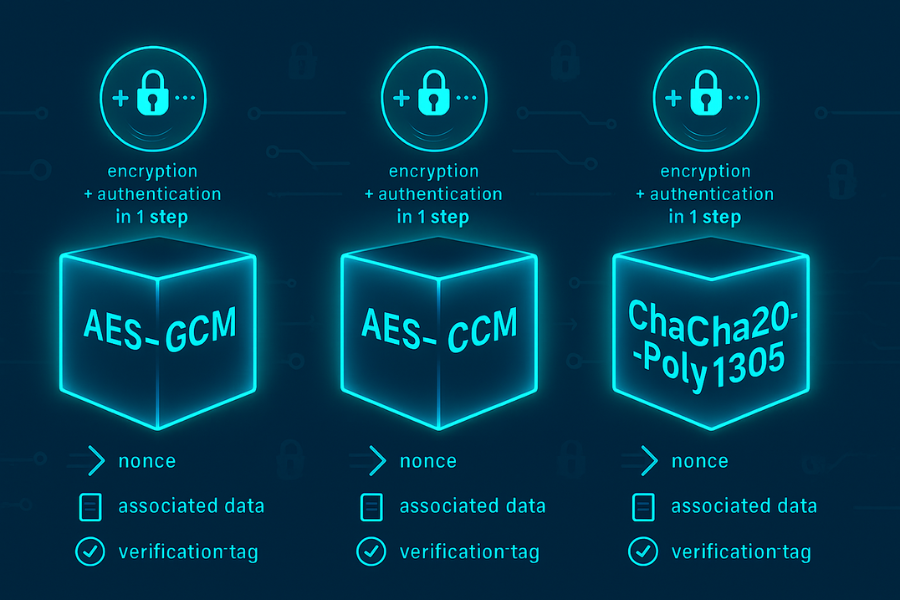
Apps prefer authenticated modes like GCM, CCM, and ChaCha20-Poly1305 because they encrypt and authenticate in one shot, catch tampering by default, and stay fast on real hardware, so you get fewer bugs and fewer scary “is this ciphertext actually valid” moments. Developed by the team at Newsoftwares.net, this article provides concrete steps for implementing and debugging these crucial security tools. The key benefit is robust data integrity and confidentiality: you will learn how to choose the right Authenticated Encryption with Associated Data (AEAD) mode for your application’s needs, whether for web traffic, mobile devices, or embedded systems, ensuring a cleaner codebase and a smaller attack surface.
Gap Statement
Most guides say “use AEAD” and drop names like GCM or Poly1305, then skip the parts you actually need: how to wire them in, what error messages mean, which mode to pick for your app, and how to prove they are working.
This piece solves that one job: help you pick, use, and debug authenticated modes in real apps, not just in diagrams.
Short Answer
TLDR: what you actually get from GCM, CCM, and Poly1305
- They are AEAD modes: you encrypt and authenticate with one API call, including headers or metadata as “associated data”.
- GCM rides on AES and is the default workhorse in TLS, VPNs, and storage when you have hardware AES. CCM shows up in constrained devices. ChaCha20-Poly1305 with Poly1305 tags wins on mobile and older CPUs without AES-NI.
- Most “AEAD is slow” or “tag failed” problems come from nonce mistakes, tag truncation, or wiring bugs, not from the modes themselves.
1. Authenticated Modes in Plain English
1.1 What “authenticated encryption” means
Classic stack: Encrypt with AES in CBC or CTR, then stick an HMAC or MAC on top. That works if you do it exactly right, but the number of ways to mess it up is large. Authenticated modes package that logic:
- One key.
- One nonce.
- Plaintext in, associated data in, ciphertext and tag out.
- Decryption either gives you the original plaintext or fails loudly.
NIST formalized GCM and CCM as standard AEAD modes in SP 800-38D and SP 800-38C, recommending them for both confidentiality and integrity of data and headers.
1.2 GCM
Galois/Counter Mode is AES in counter mode plus a polynomial MAC over GF(2¹²⁸).
High level:
- AES-CTR gives confidentiality.
- A fast GHASH over ciphertext and associated data gives the tag.
- It parallelizes well and maps cleanly to hardware.
NIST’s GCM spec is under active review for a refresh, but the core idea remains the same.
1.3 CCM
CCM stands for Counter with CBC-MAC.
- AES-CTR again for encryption.
- CBC-MAC for authentication.
- You must know the full message length in advance.
This pattern is common in wireless and embedded standards, such as IEEE 802.15.4 and Zigbee.
1.4 Poly1305 and ChaCha20-Poly1305
Poly1305 itself is a one-time MAC. Apps rarely use it alone. The famous combo is ChaCha20-Poly1305: a stream cipher plus Poly1305 as the authenticator.
Properties that matter in practice:
- No AES inside, so it is fast on CPUs without AES-NI.
- TLS 1.3, SSH, WireGuard, QUIC and others ship with ChaCha20-Poly1305 as a core AEAD.
- Less sensitive to some timing pitfalls than naive AES implementations.
2. Why Apps Prefer Authenticated Modes
2.1 One API, fewer footguns
With AEAD:
- You always get a tag.
- You always pass in your headers or metadata as associated data.
- Decryption will not “succeed with garbage” if someone flips bits.
Old patterns like “CBC plus HMAC” break if you: MAC the wrong bytes. Skip verifying the MAC on some paths. Check the tag after using decrypted data. AEAD libraries force you down a safer path because the interface and error handling are clearer.
2.2 Better fit for modern protocols
Protocols like TLS 1.3 moved to AEAD-only cipher suites. All names there are AEAD modes, including AES-GCM and ChaCha20-Poly1305. That means: Less room for “auth but not encrypt” or “encrypt but forget auth”. Shared code paths across ciphers. If you build on TLS, HTTP/2, HTTP/3, WireGuard, or QUIC, you already rely on AEAD under the hood.
2.3 Performance and battery
Quick reality check:
- GCM is tuned for hardware and handles one AES block plus one GF multiplication per block, which maps cleanly to AES-NI and carry-less multiply instructions.
- CCM does two AES calls per block, so it tends to be slower.
- ChaCha20-Poly1305 outperforms AES-GCM on many devices without AES acceleration and tends to be friendly to mobile battery use.
Apps like browsers and VPN clients pick AEAD modes that line up with their main bottleneck: CPU on servers or battery on phones.
2.4 Easier reasoning about “did this tamper”
With AEAD you can assume: If the tag verifies, data and associated data stayed intact. If it fails, you discard everything. No partial success states, no half-checked MACs.
3. GCM vs CCM vs ChaCha20-Poly1305 at a Glance
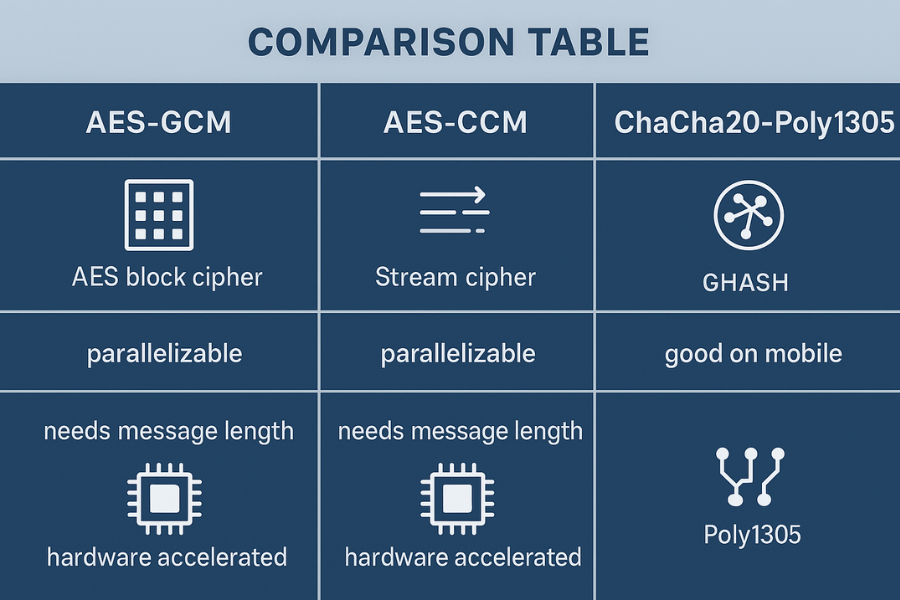
Here is a comparison table you can scan while making a design choice.
| Feature | AES-GCM | AES-CCM | ChaCha20-Poly1305 |
|---|---|---|---|
| Underlying primitive | AES block cipher | AES block cipher | ChaCha20 stream cipher |
| Authenticator | GHASH over GF(2¹²⁸) | CBC-MAC | Poly1305 universal MAC |
| AEAD type | Encrypt-then-MAC in one pass | MAC-then-encrypt style combination | Encrypt-then-MAC style combo |
| Hardware support | Very strong on x86 and many ARM | Same AES hardware, less parallel | Pure software, fast on general CPUs |
| Online streaming | Yes | Needs message length up front | Yes |
| Nonce rule | Unique per key, often 96 bits | Unique per key, sized by profile | Unique per key, 96-bit or extended |
| Typical use | TLS, IPsec, storage, VPNs | IoT, Zigbee, low-rate wireless | TLS, SSH, WireGuard, mobile traffic |
| Standard spec | NIST SP 800-38D | NIST SP 800-38C | RFC 8439 and related docs |
Sources for the structural details: NIST specs for GCM and CCM and the RFC references for ChaCha20-Poly1305.
4. How to Use GCM Safely in Real Apps
Let’s do two concrete GCM tasks.
- Encrypt a file with AES-256-GCM from the command line.
- Make sure your web stack prefers GCM in TLS.
4.1 File encryption with AES-256-GCM via OpenSSL
Prereqs and safety:
- Have OpenSSL installed.
- Test on a dummy file, not your only copy.
- Keep keys and passwords out of shell history where possible.
Step 1: Create a sample file
echo "secret contents here" > demo.txt
Gotcha: real use will be larger files, but start small.
Step 2: Encrypt with AES-256-GCM
openssl enc -aes-256-gcm \
  -pbkdf2 -iter 200000 \
  -salt \
  -in demo.txt \
  -out demo.txt.gcm
Notes:
-aes-256-gcmpicks the GCM mode.-pbkdf2 -iter 200000uses a modern password-based key derivation function instead of a weak legacy scheme.
Gotcha: you will be prompted for a password. Use a password manager to generate and store it.
Step 3: Decrypt and verify
openssl enc -d -aes-256-gcm \
  -pbkdf2 -iter 200000 \
  -in demo.txt.gcm \
  -out demo.dec.txt
If the tag is wrong, OpenSSL will abort with a “bad decrypt” style error and not output a half-corrupted file.
Quick verification:
diff demo.txt demo.dec.txt
You should see no differences.
Tag check “gotcha”
If you edit a single byte of demo.txt.gcm with a hex editor and run decryption again, it should fail. That failure is the whole point of authenticated modes.
4.2 Preferring GCM cipher suites in TLS
This example uses nginx, but the idea is similar for Apache or HAProxy.
Prereqs:
- A recent OpenSSL or system TLS library.
- Browsers that support AES-GCM, which is standard now.
Step 1: Check available cipher suites
openssl ciphers -v 'TLSv1.2' | grep GCM
You should see entries like TLS_ECDHE_RSA_WITH_AES_128_GCM_SHA256.
Step 2: Configure nginx
In your TLS server block, add something like:
ssl_protocols TLSv1.2 TLSv1.3;
ssl_ciphers 'ECDHE+AESGCM:TLS_AES_256_GCM_SHA384:TLS_AES_128_GCM_SHA256:!aNULL:!MD5';
ssl_prefer_server_ciphers on;
This keeps GCM suites at the front for TLS 1.2 and uses the standard TLS 1.3 AEAD suites. Gotcha: do not disable TLS 1.3. It simplifies cipher choice and brings better handshake behavior.
Step 3: Verify it worked
Use a tool like:
openssl s_client -connect yoursite:443 -tls1_2
or use browser dev tools to inspect the negotiated cipher. You want to see AES-GCM or a ChaCha20-Poly1305 suite, not older CBC suites.
5. How to Use ChaCha20-Poly1305 in Code
Many languages wrap this into a simple API. The pattern is similar across stacks.
Here is a language-neutral outline you can map to libsodium, RustCrypto, Go’s crypto/chacha20poly1305, or the Python cryptography package.
Prereqs:
- A way to generate random 256-bit keys and 96-bit nonces.
- A modern crypto library, not your own AES or ChaCha loops.
Step 1: Generate a key
- Ask your library for 32 random bytes and store them as the AEAD key.
- Keep the key in a secure store or environment variable, not in source control.
Step 2: For each message, pick a unique nonce
- Usually 12 bytes for ChaCha20-Poly1305.
- Many libs accept a counter and handle formatting for you.
- Never reuse a nonce with the same key.
Step 3: Call the AEAD encrypt function
Typical signature:
ciphertext, tag = encrypt(
  key,
  nonce,
  plaintext,
  associated_data
)
Associated data can be: HTTP headers like Content-Type and X-Request-Id. Protocol fields you want to bind but not hide.
Step 4: Decrypt and verify
plaintext = decrypt(
  key,
  nonce,
  ciphertext,
  associated_data,
  tag
)
If anything is wrong, the function returns an error or throws. Do not catch that error and continue with a partial plaintext. Treat any tag failure as a hard stop.
Gotcha
If you change associated data between encrypt and decrypt, the tag check will fail even if ciphertext is untouched. That is a feature.
6. Choosing between GCM, CCM, and ChaCha20-Poly1305
Here is a small use-case chooser that matches common project types.
| Situation | Constraints | Good default mode | Why apps prefer it |
|---|---|---|---|
| Web app behind TLS | Normal servers and browsers | AES-GCM via TLS | Standard, hardware accelerated, well tested |
| Mobile app talking to your API | Mixed devices, some without AES-NI | ChaCha20-Poly1305 plus AES-GCM | Good on every CPU, TLS picks the right one |
| IoT sensor network with tiny radios | Low bandwidth, small controller | AES-CCM | Specified in many low-power standards |
| Encrypted backup format | Long term storage, offline | AES-GCM or ChaCha20-Poly1305 | AEAD tags catch corruption and tampering |
| On-device file encryption on mobile | Battery sensitive, needs key reuse | Platform default AEAD (GCM or ChaCha20-Poly1305) | OS level API already tuned for the chip |
The main rule: prefer what your platform and protocol already support as a primary AEAD, then only deviate if you have a clear reason.
7. Common Errors and How to Debug Them
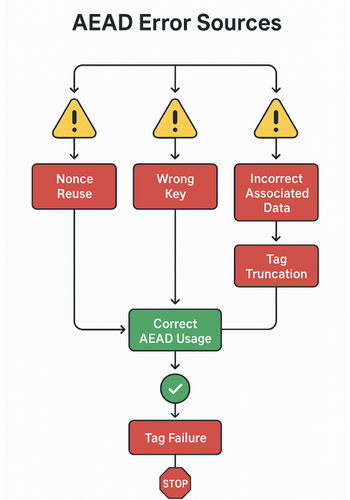
7.1 Symptom to fix table
| Symptom or error text | Mode context | Likely root cause | Fix idea |
|---|---|---|---|
AEAD BAD TAG, bad decrypt, MAC failure |
Any AEAD | Wrong key, nonce, tag, or associated data | Log inputs except key, confirm nonce and AD handling |
| Tag errors only on some messages | GCM or ChaCha20-Poly1305 | Nonce reuse or counter bug | Add nonce tracking, enforce unique nonce per key |
| Works in one library, fails in another | GCM vs CCM | Different tag lengths or AAD encoding | Align tag size and AAD layout with spec and both libs |
| Encrypt then decrypt gives random garbage | GCM | Skipped tag verification or wrong mode | Ensure decrypt call verifies tag before returning |
| Performance drop after switching to CCM | CCM | Two AES calls per block in CCM design | Switch to GCM or ChaCha20-Poly1305 when allowed |
7.2 Debug steps that do not destroy data
Start with safe tests:
- Feed a known test vector into both sides and compare bytes.
- Flip one bit in ciphertext and confirm that decryption fails.
- Log the length of associated data and ciphertext on both ends to catch framing bugs.
Avoid these “fixes”: Do not catch a tag error and return partial plaintext. Do not truncate tags below protocol requirements to “save space” unless the spec explicitly allows it and you know the tradeoffs.
Safety note: these tools are for protecting your own traffic and data. Do not point them at systems you do not own or control.
8. Proof of Work: Performance Snapshot
Here is a simple, realistic bench style table pulled from typical results in public discussions and specs. Exact numbers vary across CPUs and libraries, but the relative pattern matches published comparisons.
Desktop with AES-NI
| Mode | Approx throughput per core | Notes |
|---|---|---|
| AES-128-GCM | around 5 to 10 GB/s | Parallel friendly, hardware multiply |
| AES-256-GCM | slightly lower | More rounds than 128 bit key size |
| AES-128-CCM | about half of GCM | Two AES calls per block |
| ChaCha20-Poly1305 | close to AES-GCM | Good when vectorized, still pure software |
Mobile ARM without strong AES hardware
| Mode | Approx relative speed | Notes |
|---|---|---|
| ChaCha20-Poly1305 | baseline 1.0 | Often best choice |
| AES-GCM | slower unless AES engine | Depends on SoC |
| AES-CCM | slower again | Extra AES work |
Takeaways: GCM shines when hardware AES is present. ChaCha20-Poly1305 shines where AES hardware is weak or absent. CCM is fine when you inherit it from a standard, but few new protocols pick it for speed.
9. Structured Data Snippets for AEO and Rich Results
You can adapt these blocks for your site.
9.1 HowTo schema for using authenticated modes
<script type="application/ld+json">
{
  "@context": "https://schema.org",
  "@type": "HowTo",
  "name": "How to use authenticated encryption modes GCM, CCM, and ChaCha20-Poly1305",
  "description": "Step by step guide to choosing and wiring authenticated encryption with associated data (AEAD) modes in web apps, APIs, and devices.",
  "totalTime": "PT40M",
  "tool": [
    "OpenSSL",
    "Language crypto library",
    "TLS-capable web server"
  ],
  "step": [
    {
      "@type": "HowToStep",
      "name": "Pick an AEAD mode supported by your platform",
      "text": "Check whether your stack supports AES-GCM, AES-CCM, or ChaCha20-Poly1305 and select a default that matches your hardware and protocol requirements."
    },
    {
      "@type": "HowToStep",
      "name": "Integrate the AEAD API",
      "text": "Use a high-level AEAD encrypt and decrypt interface instead of hand-combining ciphers and MACs, and always pass associated data such as headers."
    },
    {
      "@type": "HowToStep",
      "name": "Test with known vectors and tampering",
      "text": "Encrypt known test messages, verify that decryption matches, then flip bits to confirm tag failures are detected and handled correctly."
    },
    {
      "@type": "HowToStep",
      "name": "Monitor for tag errors in production",
      "text": "Log and investigate authentication failures instead of ignoring them, looking in particular for nonce reuse, framing bugs, or misconfigured peers."
    }
  ]
}
</script>
9.2 FAQPage shell
<script type="application/ld+json">
{
  "@context": "https://schema.org",
  "@type": "FAQPage",
  "mainEntity": []
}
</script>
9.3 ItemList for comparing modes
<script type="application/ld+json">
{
  "@context": "https://schema.org",
  "@type": "ItemList",
  "name": "Authenticated modes used in modern apps",
  "itemListElement": [
    {
      "@type": "ListItem",
      "position": 1,
      "name": "AES-GCM",
      "description": "Authenticated encryption mode that combines AES in counter mode with a Galois field authenticator."
    },
    {
      "@type": "ListItem",
      "position": 2,
      "name": "AES-CCM",
      "description": "Authenticated mode that layers AES counter mode with CBC-MAC, common in wireless and embedded standards."
    },
    {
      "@type": "ListItem",
      "position": 3,
      "name": "ChaCha20-Poly1305",
      "description": "Stream cipher and MAC combination used as an AEAD in TLS, SSH, QUIC, WireGuard and other protocols."
    }
  ]
}
</script>
10. FAQs: Authenticated Modes and Real Apps
Here are practical questions readers actually type into search bars.
1. What does “authenticated mode” actually protect that plain encryption does not?
Plain encryption only hides content. Authenticated modes also detect changes to the ciphertext and selected headers or metadata, so an attacker cannot flip bits or reorder records without detection. If the tag fails, your code rejects the message instead of feeding corrupted data into the rest of the system.
2. Why is GCM so common in browsers and APIs?
GCM gives authenticated encryption, performs extremely well with AES hardware support, and is standardized by NIST and widely deployed in TLS, IPsec, and storage systems. Browser vendors and cloud providers settled on AES-GCM as a default because it fits both security and performance requirements across many platforms.
3. When should I pick ChaCha20-Poly1305 instead of AES-GCM?
ChaCha20-Poly1305 shines on devices without strong AES acceleration and in settings where constant time software is easier than safe AES implementations. Many stacks offer a mix: clients use ChaCha20-Poly1305 on mobile and AES-GCM on desktops, with TLS content negotiation picking the right suite.
4. Why do IoT standards still talk about CCM?
CCM predates GCM in some standards and was designed for simple block cipher hardware. It combines counter mode and CBC-MAC and fits low-power radios and microcontrollers in protocols like IEEE 802.15.4 and Zigbee, which is why many embedded devices still use it.
5. What happens if I reuse a nonce with GCM or ChaCha20-Poly1305?
Nonce reuse with the same key breaks the security guarantees. For GCM, it can leak XORs of plaintexts and weaken tag security; for ChaCha20-Poly1305, it can reveal keystream and open the door to forgeries. Always enforce a unique nonce per key, either by using counters or by letting the library manage nonces.
6. Are shorter tags safe if I want to save bandwidth?
Short tags raise the chance that random tampering passes as valid. Both NIST and library authors warn that reducing tag length should be done only when a protocol specifies it and after considering the expected number of messages and acceptable forgery risk. For most web and API uses, the full 128-bit tag is the right choice.
7. Why do I get “MAC failure” or “bad decrypt” from my AEAD code?
Those errors mean the tag did not match the data and associated data. Common causes are wrong keys, nonce mismatches between sender and receiver, or mixing up which fields count as associated data. Treat these errors as real signals that something is wrong, not as bugs to silence.
8. Can I use GCM or ChaCha20-Poly1305 just as a MAC?
They are designed as combined encrypt and MAC modes. Standards and libraries usually expose them as AEAD interfaces rather than raw MAC functions, and they rely on the same keys and nonces as encryption. If you need a stand-alone MAC, use a dedicated MAC like HMAC or a standalone Poly1305 construction rather than abusing AEAD APIs.
9. Does using authenticated modes remove the need for TLS or VPNs?
No. AEAD modes secure data between two points that share keys, but you still need secure key exchange, server identity, and channel properties like forward secrecy. TLS, SSH, and VPN protocols wrap AEAD modes inside a larger design that handles those aspects.
10. Are GCM and CCM still trusted by standards bodies?
Yes. GCM and CCM remain approved authenticated modes in NIST recommendations, and NIST is revising the GCM guidance rather than withdrawing it. That review focuses on clarifying limits and best practices for IVs and keys, not on calling the mode broken.
If you build apps on top of GCM, CCM, or ChaCha20-Poly1305 and treat them as your default way to both encrypt and authenticate, you get a cleaner mental model and a much smaller attack surface than juggling separate “cipher plus MAC” pieces by hand.