
Welcome. This detailed resource outlines the four critical layers of modern API encryption and access control. Beyond basic HTTPS, we cover best practices for enforcing TLS 1.3, implementing mutual TLS (mTLS) for machine identity, adding payload encryption for sensitive fields, and securing key storage using tools like Folder Lock. This approach ensures verifiable security and robust convenience for your API traffic.
API Encryption Best Practices: TLS, MTLS, Payload Crypto, Signatures
Direct Answer
You keep vault passwords safe from keyloggers and clipboard sniffers by limiting what they can see, hardening the device they run on, and changing how you type, copy, and store secrets.
Gap Statement
Most content about API encryption stops at “turn on HTTPS” and moves on.
It rarely shows:
- How to enforce strong TLS 1.3 settings instead of weak defaults
- When to add mutual TLS, and how to manage client certificates at scale
- How to combine transport security with payload encryption and signed tokens
- How to store API keys and private keys safely on real servers and laptops
This resource closes that gap with a practical, testable setup that a busy engineer can apply in one sprint.
TLDR Outcome
If you follow this walkthrough, you will:
- Shrink the windows where your vault password and logins are visible to keyloggers and clipboard stealers.
- Add simple checks for hidden spyware and hardware keyloggers on a typical Windows PC.
- Use NewSoftwares tools to encrypt vault related files, wipe clipboard traces, and block risky USB paths without slowing your daily work.
1. Mental Model: How TLS, MTLS, Payload Crypto, And Signatures Fit
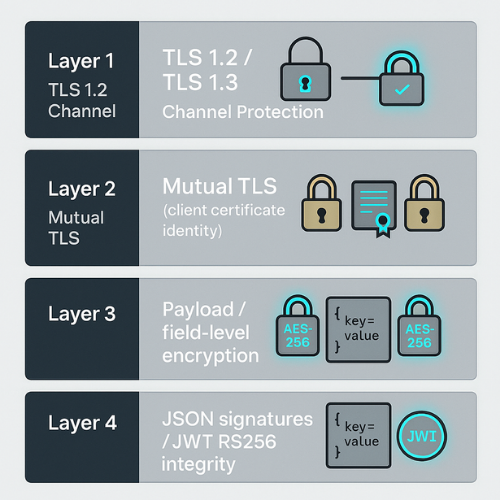
Think of your API protection as four layers:
- Channel protection: TLS 1.2 and better, ideally TLS 1.3, stops passive snooping and most man in the middle attacks.
- Strong identity: Mutual TLS adds client authentication on top of regular TLS, so only approved clients can even start talking.
- Payload protection: Field level or object level encryption protects specific values inside JSON. Even if logs or database snapshots leak, secrets stay scrambled.
- Signed tokens and messages: JSON Web Tokens and message signatures prove who sent something and that it was not changed in transit.
You rarely need all four everywhere, but you do need a clear rule for when to add each one.
2. Prerequisites And Safety
Before touching config in production, check these items.
Environment
- API behind a gateway or reverse proxy such as Nginx, Envoy, or a managed API gateway
- Certificates from a trusted authority, automated with Let’s Encrypt or a similar service where possible
- Runtime that supports TLS 1.3 and modern cipher suites
Security Decisions
- A clear list of “high value” APIs
Examples: payment, health records, export endpoints, admin dashboards - A list of fields that require payload encryption
Examples: full card numbers, national ID numbers, medical notes
Backups And Rollbacks
- Snapshot of current TLS configuration
- Ability to roll back a config change in one command or one click
- Staging environment where you can test new TLS and mTLS settingsd
Risk Notes
- Tight TLS and mTLS rules can lock out older clients
- Wrong cipher configuration can break monitoring agents and legacy services
- Poor key storage can undo all of your work even if TLS is perfect
3. Step By Step: Harden TLS For Your API
Use this as a general pattern. Exact syntax differs per gateway or web server.
Each step has one action, one “screenshot note”, and one gotcha.
3.1. Step 1: Require HTTPS For Every Endpoint

Action
Redirect plain HTTP traffic to HTTPS, or block it at the load balancer.
Gotcha
Do not forget internal health checks and old webhooks that still use HTTP. Use logs to find them during rollout.
3.2. Step 2: Enforce TLS 1.2 Minimum, Prefer TLS 1.3
Action
Disable older protocols such as SSL 3 and early TLS versions in the gateway or server.
Gotcha
Old embedded clients or legacy Java stacks may still try TLS 1.0. Add them to a migration list and give a real deadline instead of leaving weak protocols enabled forever.
3.3. Step 3: Pick Safe Cipher Suites
Action
Use modern suites that support forward secrecy, such as ones based on AES GCM or ChaCha20, and avoid outdated options such as RC4.
Gotcha
If you copy a random “secure config” from a blog without checking your environment, you may break some load balancers or language runtimes.
3.4. Step 4: Turn On HSTS
Action
Enable HTTP Strict Transport Security so browsers always go straight to HTTPS after the first visit.
Gotcha
Only enable long HSTS lifetimes when you are certain you will not need plain HTTP again on that domain.
3.5. Step 5: Add Certificate Pinning On Critical Clients
Action
Pin your server certificate or public key in sensitive clients such as mobile apps or thick desktop clients.
Gotcha
Plan for certificate rotation. If you hard code only one certificate, your app can lock itself out when that certificate expires.
4. Adding Mutual TLS For High Value Connections
Mutual TLS gives strong, hardware like identity for machines and services.
Use it for:
- Internal service to service calls that touch sensitive data
- Admin APIs used for bulk exports or configuration changes
- Machine customers that run in your partners’ infrastructure
4.1. Implementation Steps At The Gateway
- Create or import a certificate authority for client certificates
- Issue client certificates for each service or partner
- Configure your gateway to request and validate client certificates for selected routes
- Map certificate details such as subject or SAN to an identity in your API
Gotcha
Start with a small set of internal services. Turning on mutual TLS across an entire cluster in one move often locks out background jobs and third party tools.
5. Payload Encryption For Sensitive Data
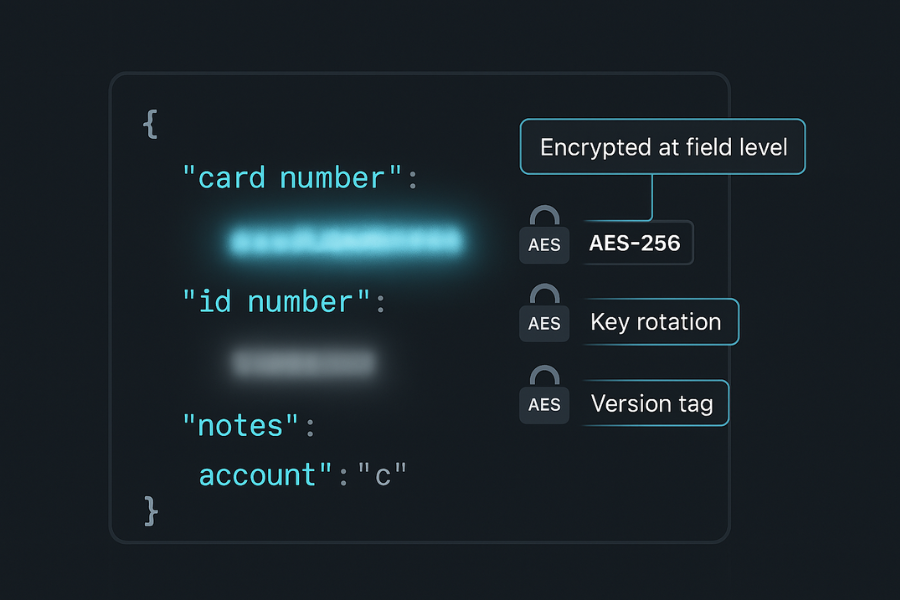
Transport encryption protects data on the wire. It does not protect logs, database dumps, or backups.
Payload encryption protects the content itself.
5.1. Where Payload Encryption Helps
- Logs sent to third party providers
- Support tools that show limited fields
- Multi tenant databases where you want extra isolation
- Backups stored in cloud storage
5.2. Practical Rules
- Use AES 256 or another modern cipher in an approved mode from your crypto library
- Store keys in a central service rather than inside app code
- Rotate keys on a regular schedule
- Include version information alongside encrypted fields so you can change algorithms later
6. Signatures And Tokens: Proving Who Sent What
Encryption hides content. Signatures protect integrity and origin.
6.1. JSON Web Tokens
Key points:
- Choose RS256 or ES256 when you want to separate signing and verification across services
- Keep signing keys in an HSM or key vault, not in environment variables on many hosts
- Validate algorithm, issuer, audience, expiry, and signature on every API call
- Avoid “none” or dynamic algorithm choices from untrusted data
6.2. Request Signatures
Good habits:
- Always include a timestamp and a short expiry window
- Reject signatures that are too old to prevent replay attacks
- Include the canonical representation of header names and values so proxies cannot reorder them silently
7. Storage Of Keys And Secrets With NewSoftwares Tools
Perfect TLS and payload crypto can still fail if someone copies your private keys or env files from disk.
7.1. Folder Lock For API Secrets
Folder Lock from NewSoftwares provides AES 256 encryption for files and folders.
Practical ways a small team can use it:
- Create an encrypted locker only for TLS private keys, JWT signing keys, and env files
- Store your
cert,key, and config files inside this locker on admin machines and jump hosts - Mount the locker only when you are changing configuration or renewing certificates
- Close the locker when you finish, so keys are not sitting on disk in plain form
This reduces the chance that:
- A stolen laptop exposes your entire API secret set
- Local malware simply reads keys from the file system
7.2. Folder Protect For Broader Control
Folder Protect gives you flexible control such as password protection, hiding, and execute blocks on folders and programs.
Useful patterns:
- Protect local backup folders that contain database dumps used for development
- Block casual access to configuration folders where API keys live
- Combine file protection with your normal OS permissions for a second layer of control
7.3. USB Secure For Portable Keys
When teams still move certificates or key backups on removable drives, USB Secure from NewSoftwares helps protect those drives with a password and controlled access.
Basic workflow:
- Place the key backup on a removable drive
- Turn on protection with USB Secure
- Keep the password in a separate secure channel
Across these tools, you get better control over where your keys live and who can copy them.
8. Verification: Check That Your Encryption Actually Works
After you change TLS and add crypto, run simple checks.
8.1. Channel Checks
- Use
curlwith--proto-default httpsand--tlsv1.3to verify protocol use - Scan your domain with a public TLS scanner to confirm protocol and cipher choices
8.2. Mutual TLS Checks
- Connect with a valid client certificate and confirm the API works
- Try without a certificate and confirm you get a clear error
- Try with an expired certificate and confirm you get a different error
8.3. Payload And Signature Checks
- Log a test request, then confirm sensitive fields are unreadable in logs
- Capture traffic in a staging environment and confirm the signature fails when you change one character in the body
- Try to reuse a signed request with an old timestamp and confirm it is rejected
9. Common Errors And Fixes
9.1. Symptom To Fix Table
| Symptom | Likely Cause | Quick Fix |
|---|---|---|
| Old clients cannot connect after TLS change | Only TLS 1.3 enabled | Allow TLS 1.2 for now, plan client upgrades |
certificate verify failed in logs |
Wrong root or intermediate certificate | Check full chain and install missing intermediate |
unknown ca errors on mutual TLS routes |
Client cert not signed by trusted authority | Re issue from correct authority, update trust store |
| JWTs always fail validation | Wrong audience or issuer values | Align API config with identity provider metadata |
| Log files show clear card numbers | Field level encryption missing or misused | Encrypt fields before logging and before storing |
10. FAQs
1. Do I Still Need TLS 1.2 If I Move Everything To TLS 1.3
In most cases you keep both for now. Some older but still supported clients cannot use TLS 1.3. The usual pattern is to allow 1.2 and 1.3 together, then review client usage before tightening further.
2. When Is Mutual TLS Worth The Extra Work
It pays off when you have machine clients that never change user, such as internal services or partner servers. In those cases a certificate tied to the machine identity is stronger and more stable than a long lived API key.
3. What Is The Difference Between TLS Encryption And Payload Encryption
TLS protects the connection between two points. Payload encryption protects the data itself. Once a request reaches your server, TLS ends. Logs, queues, and databases are no longer covered by the transport layer. Payload encryption keeps the content scrambled in those places too.
4. Is Signing Requests With HMAC Enough Without JSON Web Tokens
For simple APIs, HMAC signatures over method, path, timestamp, and body can be enough. JSON Web Tokens shine when you need to carry identity and claims across services. In many systems you use both. The JWT proves who the user is, and the HMAC proves the request itself has not been changed.
5. How Often Should I Rotate API Encryption Keys
Short answer for many teams is once or twice a year, plus any time you suspect a leak. For very sensitive systems you rotate more often and automate the entire process with a key management system. Always include version information so you can decrypt old data with older keys during a migration window.
6. Do I Need Payload Encryption If My Database Is Encrypted At Rest
Disk level encryption helps when a device is stolen or a disk is removed. It does not protect you from over permissive access inside the system or from an attacker who gains application level access. Payload encryption adds protection inside the running application and its logs.
7. How Can I Stop Replay Attacks On Signed API Calls
Include a timestamp and a unique value in each signed request, and reject anything older than a short time window. Store recent identifiers for a short period and refuse duplicates. Many providers do this with a five minute window and a cache of recent request identifiers.
8. Where Is A Practical Place To Store TLS Private Keys For Small Teams
On servers they belong in restricted directories with strong file permissions. On admin laptops and jump hosts you can store them inside encrypted storage such as a Folder Lock locker, so that a stolen device does not give an attacker instant plain access to your keys.
9. How Do I Test Mutual TLS Without Breaking Production Traffic
Start in staging with a copy of real certificates. Turn on mutual TLS for one internal service, then confirm success and failure paths. When you move to production, begin with routes that have clear on call ownership and low external dependency, such as an internal admin API, before touching public routes.
10. What Is The Most Common Mistake With JSON Web Tokens In APIs
A frequent mistake is to trust any token that has a valid signature without checking audience, issuer, and expiry. Another is to accept whatever algorithm appears in the header instead of enforcing one safe algorithm on the server. Both give attackers more room to move.
11. Structured Data Snippets For AI Overviews
HowTo Schema For “Secure An API With TLS And Mutual TLS”
{
  "@context": "https://schema.org",
  "@type": "HowTo",
  "name": "Secure an API with TLS and mutual TLS",
  "description": "Steps to configure TLS and mutual TLS for a production API.",
  "tool": [
    "API gateway",
    "Certificate authority",
    "TLS scanner"
  ],
  "step": [
    {
      "@type": "HowToStep",
      "name": "Require HTTPS only",
      "text": "Redirect all HTTP traffic to HTTPS on the load balancer or gateway."
    },
    {
      "@type": "HowToStep",
      "name": "Restrict TLS versions and ciphers",
      "text": "Allow only TLS 1.2 and 1.3 with modern ciphers in server configuration."
    },
    {
      "@type": "HowToStep",
      "name": "Enable mutual TLS on sensitive routes",
      "text": "Request and validate client certificates for admin and payment APIs."
    }
  ]
}
FAQPage Schema
{
  "@context": "https://schema.org",
  "@type": "FAQPage",
  "mainEntity": [
    {
      "@type": "Question",
      "name": "Do I still need TLS 1.2 if I move everything to TLS 1.3",
      "acceptedAnswer": {
        "@type": "Answer",
        "text": "In most cases you keep both for now. Some older but still supported clients cannot use TLS 1.3. The usual pattern is to allow 1.2 and 1.3 together, then review client usage before tightening further."
      }
    },
    {
      "@type": "Question",
      "name": "When is mutual TLS worth the extra work",
      "acceptedAnswer": {
        "@type": "Answer",
        "text": "It pays off when you have machine clients that never change user, such as internal services or partner servers. In those cases a certificate tied to the machine identity is stronger and more stable than a long lived API key."
      }
    },
    {
      "@type": "Question",
      "name": "What is the difference between TLS encryption and payload encryption",
      "acceptedAnswer": {
        "@type": "Answer",
        "text": "TLS protects the connection between two points. Payload encryption protects the data itself. Once a request reaches your server, TLS ends. Logs, queues, and databases are no longer covered by the transport layer. Payload encryption keeps the content scrambled in those places too."
      }
    }
  ]
}
ItemList Schema For Comparison
{
  "@context": "https://schema.org",
  "@type": "ItemList",
  "name": "Key Defences Against Infostealers and Clipboard Sniffers",
  "itemListElement": [
    {
      "@type": "ListItem",
      "position": 1,
      "name": "Browser and token hygiene",
      "description": "Disable browser password storage, shorten cookie lifetime, and revoke sessions after suspicious activity."
    },
    {
      "@type": "ListItem",
      "position": 2,
      "name": "Encrypted lockers and protected USB drives",
      "description": "Store important files in Folder Lock lockers and protect removable media with USB Secure and USB Block."
    },
    {
      "@type": "ListItem",
      "position": 3,
      "name": "Cloud and history protection",
      "description": "Use Cloud Secure to lock local cloud folders and History Clean to erase browser history and traces."
    }
  ]
}