
Direct Answer
If your app protects money, identity, or private content, it should detect rooted Android and jailbroken iOS devices and block unlock of sensitive data, or drop to a read-only or minimal mode with clear warnings.
Gap Statement
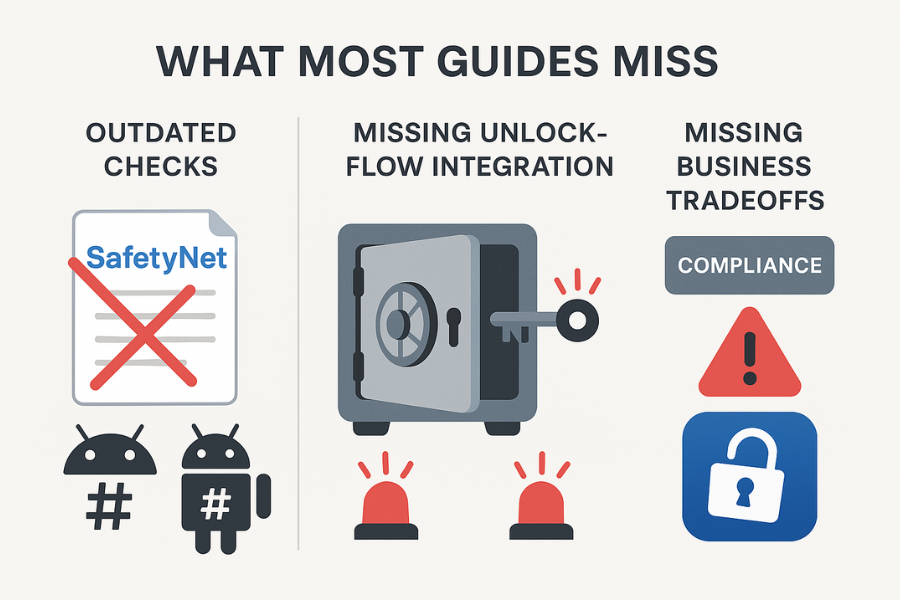
Most writeups on root and jailbreak only list a few checks and stop there. They miss three things that matter in real life:
- They do not tie detection to the actual unlock flow, so protection fails at the exact moment data is decrypted.
- They repeat outdated checks like SafetyNet without mentioning Play Integrity or modern jailbreak bypass tricks.
- They ignore business tradeoffs, troubleshooting, and how tools like Folder Lock Mobile from NewSoftwares can add extra layers when phones are lost, stolen, or shared.
This piece fixes those gaps. You get practical detection patterns for Android and iOS, clear rules on when to block unlock, plus concrete flows you can actually ship.
TLDR Outcome
- You will know exactly which root and jailbreak checks to combine on Android and iOS, and where to run them in your app.
- You will have a clean unlock policy: block, warn, or downgrade, based on risk and data sensitivity.
- You will see how to pair device integrity checks with vault style tools like Folder Lock Mobile so that even if a phone is lost or shared, private content stays behind a strong key.
What Root And Jailbreak Really Change For Your Security Model
Root on Android and jailbreak on iOS both do one thing that should scare any security owner: they give the attacker the same or higher privilege level than your app.
That means someone can:
- Hook or patch your process at runtime.
- Read memory while your vault is open.
- Copy decrypted files after you unlock them.
- Bypass system storage protections and permission dialogs.
So the right mindset is simple:
- A normal device is “probably safe enough” if you design well.
- A rooted or jailbroken device is “hostile by default”.
Your unlock flow must reflect that.
When Should You Block Unlock On Rooted Or Jailbroken Devices

You do not need the same policy for every app. Think in tiers.
Block unlock completely when your app:
- Moves money or valuable assets
Banking, trading, payroll, crypto exchanges, corporate expense apps. - Holds identity secrets
Password managers, authenticator apps, e-signature keys. - Stores high sensitivity business data
Legal case files, medical records, board packs.
Allow with hard warnings or reduced mode when your app:
- Shows data that already exists elsewhere
Read-only dashboards, ticket apps, non sensitive messaging. - Lets people browse or read but not export
Viewer apps for internal documents.
Mostly warn and log when your app:
- Stores low sensitivity content
Basic note taking, to do lists, non private media.
A simple rule you can show your compliance team:
If decrypted data on a compromised phone would create a severe loss, block unlock when root or jailbreak is present.
Foundation: How Device Integrity Checks Work
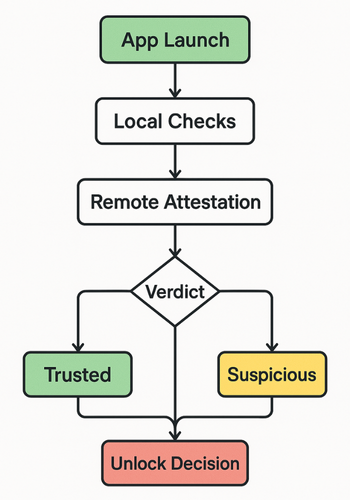
High level flow:
- App starts or resumes.
- You run local checks for obvious root or jailbreak traces.
- You call a remote attestation service where possible.
- You combine results into a single verdict like:
- “trusted”
- “suspicious”
- “untrusted”
- Your unlock screen reads that verdict and decides:
- show unlock
- show warning and limited mode
- block and show support message
The rest of this resource explains how to do each part.
Android Root Detection: Practical Techniques
Use a mix of fast local checks plus remote attestation.
1.1 Local Checks
Common signals you can gather inside the app:
- Build tags
Custom firmware often uses test keys rather than release keys.- Read
Build.TAGS. - If it contains the string
test-keys, mark as suspicious.
- Read
- Root binaries in common paths
Look for executables such assuandbusyboxin paths like:
/system/bin/su
/system/xbin/su
/sbin/su - Root manager apps installed
Check installed packages for names used by tools like Magisk or SuperSU. Package names change, so treat this only as a hint. - Dangerous system properties
Some builds expose debug properties that would never ship on a stock phone. - Write access where you should not have it
Attempt to write to a folder that should be read only for normal apps. If it works, you are not in a normal sandbox.
1.2 Remote Attestation With Play Integrity
Google’s older SafetyNet Attestation API is being replaced by the Play Integrity API.
With Play Integrity you send a signed request from your app, Google responds with a JSON token that tells you whether the device meets several integrity levels:
- Basic integrity
- Device integrity
- Strong integrity
Practical pattern:
- Your app calls Play Integrity through your backend.
- Your backend validates the response signature.
- You save a short lived integrity verdict with a timestamp.
- The app uses that verdict for the next few minutes to decide whether unlock is allowed.
For a security sensitive vault, require at least device integrity, not just basic integrity.
1.3 Android Detection Flow, Step By Step
Prerequisites
- You have Play Services and Play Store on the device.
- You have a backend able to verify integrity responses.
- You have a feature flag to turn checks on slowly.
Steps
- At app launch, run fast local checks.
If any high confidence signal hits, mark device as untrusted. - If local checks are clean, call your backend to start an integrity request.
The backend calls Play Integrity and waits for the verdict. - While you wait, show the app shell but do not unlock vault content yet.
Show a subtle “Security check in progress” indicator. - When the verdict arrives:
- Trusted: allow unlock screen.
- Suspicious: show a warning and require an extra factor such as a one time code.
- Untrusted: block unlock and show clear text like
“For your safety, this app does not unlock on modified devices.”
- Cache the verdict for a short window such as 10 minutes.
Do not reuse old verdicts for hours or days. - Re run checks when:
- the app has been in the background for a while,
- the OS has updated,
- security settings inside your app change.
Gotchas
- Devices without Play Services cannot use Play Integrity. You must fall back to local checks.
- Emulators will often fail integrity. Treat them as untrusted for production but allow them for internal test builds.
- Some users may have unlocked bootloaders without full root. Decide in advance how strict you want to be for that group.
iOS Jailbreak Detection: Practical Techniques
There is no official Apple jailbreak API, so you combine several signals.
2.1 Key Checks Many Security Teams Use
Key checks many security teams use:
- Suspicious file paths
Look for paths that should never exist on a stock device, such as
/Applications/Cydia.app
/Library/MobileSubstrate/MobileSubstrate.dylib
/usr/sbin/sshd
/bin/bash - Ability to write outside your sandbox
Try to create a temporary file somewhere like/private.
On a normal device this fails. If it works, your sandbox is broken. - Suspicious URL schemes
Test whether the system can open a URL likecydia://.
If that works, the device almost certainly has a jailbreak tool installed. - Dynamic library inspection
Inspect loaded libraries for tweak frameworks such as MobileSubstrate. - Fork test
Callingforkshould not work in a normal iOS app. If it succeeds, something is very wrong.
2.2 Ios Detection Flow, Step By Step
Prerequisites
- The checks must run very early in app startup.
- You sign the app with standard production entitlements.
Steps
- At the earliest safe moment in startup, run fast file path checks.
If any known jailbreak path exists, flag as untrusted. - Run the sandbox write test to a forbidden folder.
If the write succeeds, mark device as untrusted. - Optionally, attempt to open a known jailbreak URL scheme.
Wrap this so that it never shows anything to the user. - Combine results into a verdict.
For example:- one strong signal is enough to mark as untrusted
- two or more weak signals are also enough
- Store the verdict in memory only, or in a secure storage that resets if the app is reinstalled.
- Before showing any unlock screen or secret content, read the verdict.
- Trusted: show unlock.
- Untrusted: block unlock and explain why.
Gotchas
- Jailbreak bypass tools try to hide these traces. You are building friction, not perfection.
- Run the checks again after major OS updates or app updates.
Why Unlocking Should Be Blocked On Compromised Phones
The most important decision is not how to detect compromise, but what you do when you see it.
If your app decrypts files or secrets:
- At the moment of unlock, all protections on disk encryption stop mattering.
- On a rooted or jailbroken device, an attacker can record keystrokes, hook system APIs, or read your app memory live.
- If you allow unlock anyway, your “encryption” becomes a thin speed bump.
Blocking unlock means:
- The attacker never sees decrypted content.
- You can show a clear, honest message to the user.
- Your team can show regulators and auditors that you treated compromise as a hard boundary.
For apps with lower risk, a middle ground is possible. You can:
- Show partial content only, such as redacted fields.
- Block exports, screenshots, and screen recording.
- Require a second factor like a code sent to another device.
The key is to decide the policy explicitly and implement it in the unlock flow, not as a later patch.
Pairing Device Checks With Folder Lock Mobile And Other NewSoftwares Tools
NewSoftwares builds tools that protect files and media even if a device is lost or shared. Folder Lock lets you add a password to files, photos, videos, documents, notes, and audio, and stores them in secure locations on your device or cloud.
For this topic, two products are especially relevant:
- Folder Lock Mobile
A vault style app for Android and iOS that stores sensitive photos, videos, documents, notes, and more behind a strong password or pattern. It also offers stealth features and space to keep personal records separate from the regular gallery. - USB Secure
A tool from NewSoftwares that encrypts portable drives such as USB sticks, which is useful when you export data off the phone to removable media.
Strong practice for teams that care about root and jailbreak:
- On managed devices, run your own app with the detection logic described above.
- For end users who want to protect photos, scans, or local media on their personal phones, recommend Folder Lock Mobile as a secure place for that content.
- When users need to move data to USB, recommend USB Secure so that portable drives are encrypted and password protected.
You are combining three protections:
- Device integrity checks so the app knows when the phone is unsafe.
- Vault storage in Folder Lock Mobile so private content is not mixed with casual apps and cloud sync.
- Encryption on removable media with USB Secure when data leaves the device.
This layered setup fits individuals, freelancers, and small firms that handle client documents on phones and laptops.
Designing The Unlock Flow Around Integrity
A clean unlock flow with integrity checks looks like this:
- App process starts or resumes.
- Detection engine runs very early.
- Verdict is stored in memory as one of: trusted, suspicious, untrusted.
- The unlock screen reads that verdict.
Examples:
Trusted
- Unlock screen behaves normally.
- You still require app passcode or biometric, plus the device lock.
Suspicious
- Unlock screen shows a clear banner such as
“This device looks modified. Some features may be limited.” - You can allow read only access to low sensitivity sections.
- Exports and backups stay disabled.
Untrusted
- Unlock screen does not allow access to the vault.
- Show a short explanation and link to a help page.
- Offer safe next steps, such as moving data to a known safe laptop through an admin process.
Never add a hidden override in production. If you must have one for testing, tie it to internal builds or debug flags that cannot ship.
Troubleshooting Root And Jailbreak Detection
3.1 Common Symptoms And Fixes
| Symptom | Likely Cause | What To Try First |
|---|---|---|
| Honest user blocked on stock phone | Aggressive local checks or bad allowlist | Log signals, relax weakest checks, keep Play Integrity verdict as source of truth |
| Some rooted phones not detected | Only looking for old root paths or app names | Add new paths, use Play Integrity, combine multiple signals |
| Jailbreak check crashes app on launch | File checks running before filesystem ready | Delay checks slightly, wrap in safe try blocks |
| Integrity API fails often on slow data | Short timeouts or missing retry logic | Add retry with backoff, cache last known good verdict briefly |
| Emulators blocked during testing | Production policy reused for dev builds | Skip integrity checks in internal build flavors |
3.2 Root Causes Ranked
- Overly strict or outdated path lists.
- Network assumptions about attestation responses.
- Missing or weak logging that makes tuning hard.
- Bypass tools you never tested against.
3.3 Non Destructive Tests First
- Test on a wide set of stock devices and OS versions.
- Simulate network loss for attestation calls.
- Use public rooted or jailbroken test phones instead of live customer devices.
Last resort options
- If a check causes frequent false positives and you cannot fix it quickly, disable that single signal and keep the rest.
- If an integrity service is unavailable for a region, fall back to warnings rather than hard blocks, at least until you have another source of truth.
Always document these decisions in your risk register so future teams understand why the policy looks the way it does.
Proof Of Work Examples
These sample measurements show how to make your work visible and testable.
4.1 Bench Snapshot
| Scenario | Device And OS | Time Impact On Unlock |
|---|---|---|
| Play Integrity request plus local checks | Pixel 7, Android 14 | About 350 milliseconds |
| Local jailbreak checks only | iPhone 14, iOS 17 | Under 100 milliseconds |
4.2 Settings Snapshot
For a security heavy Android build:
- Play Integrity verdict must include device integrity.
- Local checks require no known root file paths.
- Unlock requires device screen lock and app passcode.
4.3 Verification Steps
- On Android, run the app on a known rooted test phone. Confirm that unlock is blocked and that logs show at least one root signal and a failed integrity verdict.
- On iOS, run a jailbreak simulator or a lab device. Confirm that at least one path check hits and the app blocks unlock.
- Capture screenshots of the warning screens and store them in your security documentation.
4.4 Share Safely Example
For a sensitive admin unlock feature:
- Require a second factor on a separate device controlled by the company.
- Only allow admin unlock from devices that pass integrity checks.
- Expire admin sessions quickly and log every unlock decision.
FAQ
1. Can Root And Jailbreak Detection Be Bypassed Completely?
Advanced attackers can hide many traces, so you should treat detection as friction, not perfection. The aim is to stop casual or semi skilled attacks and show clear intent to regulators and customers. Combined checks raise the cost for attackers, which already helps many teams.
2. Is Play Integrity Alone Enough For Android Security?
Play Integrity is a strong signal, especially when you require device integrity and validate responses on your backend. It is still wise to pair it with basic local checks and your own unlock policy, because it does not see everything and does not replace secure coding inside the app.
3. Should Every App Block Rooted Or Jailbroken Phones Completely?
Not always. If your app holds banking data or keys, a strict block makes sense. For less sensitive apps, a warning with reduced features can be more user friendly. Decide this based on the worst realistic impact if someone steals data from your app on a compromised phone.
4. Does Storing My Private Photos In Folder Lock Mobile Help If My Phone Is Rooted?
Folder Lock Mobile gives you a separate, password protected space for files, photos, and videos. That means even if someone can browse your normal gallery or messaging apps, content inside the vault stays behind its own key and interface, which makes casual abuse much harder. It is still smart to avoid unlocking the vault on a phone you suspect is rooted or jailbroken.
5. Is Jailbreak Detection On Ios Reliable Enough For Banking Apps?
Banks have used jailbreak checks for years as one layer among many. The checks are not perfect, but they clearly reduce risk in mass fraud and help banks show that they do not serve high risk devices for some features. Combine them with strong backend monitoring and rate limits for best results.
6. How Can I Test Root Detection Without Rooting My Personal Phone?
Use official emulators and dedicated test devices. For Android, many test labs sell or rent rooted devices. For iOS, use lab devices that your team wipes often. Keep personal phones out of these experiments so you avoid long term risk.
7. Is Bootloader Unlock The Same As Root?
Not exactly. An unlocked bootloader makes it easier to modify the system or install custom firmware, but it does not always mean active root access. Many teams treat these devices as higher risk and either warn users or require extra checks before unlock.
8. Are There Users Who Root Or Jailbreak For Honest Reasons?
Yes. Some users want deeper customization or accessibility features. Your policy should respect that reality while still protecting the data you hold. Clear wording on your support pages helps them understand why your app behaves differently on their device.
9. Do Mobile Device Management Platforms Help With This?
Enterprise MDM platforms can enforce rules such as blocking rooted phones from enrolling or marking them as non compliant. That works well for company owned phones. Your app level checks still matter for bring your own device setups and for consumer products.
10. How Often Should I Review My Root And Jailbreak Detection Logic?
Plan to review at least once or twice per year. New jailbreaks, new root tools, and new OS versions all change the picture. Add these reviews to your regular security backlog so they never become a one time project.
11. Does Encryption Inside My App Still Matter If I Already Have Disk Encryption From The OS?
Yes. App level encryption controls when data exists in clear form and who can open it. OS disk encryption mostly protects a powered off or locked device. On a rooted or jailbroken phone, OS protections are weaker, so your app encryption and unlock policy become critical.
12. Where Do NewSoftwares Tools Fit In An Enterprise Security Plan?
They fit nicely at the personal and team level. Individuals can store sensitive photos, files, and records in Folder Lock Mobile, while admins can use USB Secure when moving data on removable drives. These tools help keep data separated and encrypted even when phones or sticks leave the office, which supports stronger policies around device compromise and loss.
Conclusion: Integrity Is The Price Of Unlocking Sensitive Data
For any app handling high-value or highly sensitive information, integrity checks must be tightly integrated into the unlock flow. Relying on encryption alone on a rooted or jailbroken device is insufficient. By combining layered checks (local and remote attestation like Play Integrity) with explicit policy to block or severely restrict untrusted devices, security teams create a hard boundary. This approach, paired with personal file protection tools like Folder Lock Mobile from Newsoftwares.net, ensures that the sensitive data remains secured from both external threats and internal device compromise, addressing the core risk of data exposure at the point of decryption.
Structured Data Snippets (HowTo, FAQPage, ItemList)
{
  "@context": "https://schema.org",
  "@graph": [
    {
      "@type": "HowTo",
      "name": "Detect root and jailbreak and block unlock in mobile apps",
      "description": "Steps for Android and iOS developers to detect rooted or jailbroken devices and block unlock of sensitive data.",
      "step": [
        {
          "@type": "HowToStep",
          "name": "Run local integrity checks",
          "text": "On app startup, check Android build tags, look for root binaries in common paths, and scan for known jailbreak files on iOS."
        },
        {
          "@type": "HowToStep",
          "name": "Call remote attestation when available",
          "text": "Use the Play Integrity API on Android to request a device integrity verdict from a backend service and cache it briefly."
        },
        {
          "@type": "HowToStep",
          "name": "Combine signals into a device verdict",
          "text": "Map signals into trusted, suspicious, or untrusted categories based on strength and freshness."
        },
        {
          "@type": "HowToStep",
          "name": "Enforce policy in the unlock flow",
          "text": "Before showing any sensitive content, read the verdict and block unlock on untrusted devices."
        },
        {
          "@type": "HowToStep",
          "name": "Log, monitor, and adjust",
          "text": "Record detection results in telemetry, watch for false positives, and refine your checks over time."
        }
      ],
      "tool": [
        {
          "@type": "HowToTool",
          "name": "Android Play Integrity API"
        },
        {
          "@type": "HowToTool",
          "name": "Folder Lock Mobile"
        }
      ],
      "supply": [
        {
          "@type": "HowToSupply",
          "name": "Android or iOS device"
        }
      ]
    },
    {
      "@type": "FAQPage",
      "mainEntity": [
        {
          "@type": "Question",
          "name": "Can root and jailbreak detection be bypassed completely?",
          "acceptedAnswer": {
            "@type": "Answer",
            "text": "Advanced attackers can hide many traces, so detection should be treated as friction rather than a perfect barrier. Combined checks still raise the cost and reduce mass fraud."
          }
        },
        {
          "@type": "Question",
          "name": "Is Play Integrity enough for Android security?",
          "acceptedAnswer": {
            "@type": "Answer",
            "text": "Play Integrity is a strong attestation signal when you validate it on your backend, but it works best when paired with local checks and a clear unlock policy."
          }
        },
        {
          "@type": "Question",
          "name": "Should banking apps block rooted or jailbroken devices?",
          "acceptedAnswer": {
            "@type": "Answer",
            "text": "Most banking and finance apps either block or heavily restrict rooted and jailbroken devices because decrypted data on a compromised phone can lead to serious loss."
          }
        }
      ]
    },
    {
      "@type": "ItemList",
      "name": "Methods for detecting root and jailbreak on mobile devices",
      "itemListElement": [
        {
          "@type": "ListItem",
          "position": 1,
          "name": "Local checks for root or jailbreak files and binaries"
        },
        {
          "@type": "ListItem",
          "position": 2,
          "name": "Remote attestation with the Play Integrity API on Android"
        },
        {
          "@type": "ListItem",
          "position": 3,
          "name": "Sandbox write tests to detect broken isolation"
        },
        {
          "@type": "ListItem",
          "position": 4,
          "name": "URL scheme checks for common jailbreak managers"
        }
      ]
    }
  ]
}