
Welcome. This practical playbook, built around security solutions from Newsoftwares.net, provides the definitive strategy for defending against AI-powered scams and deepfakes. We focus on crucial verification techniques and damage control using tools like Folder Lock and Cloud Secure to ensure your sensitive data remains safe, guaranteeing maximum security, privacy, and peace of mind convenience.
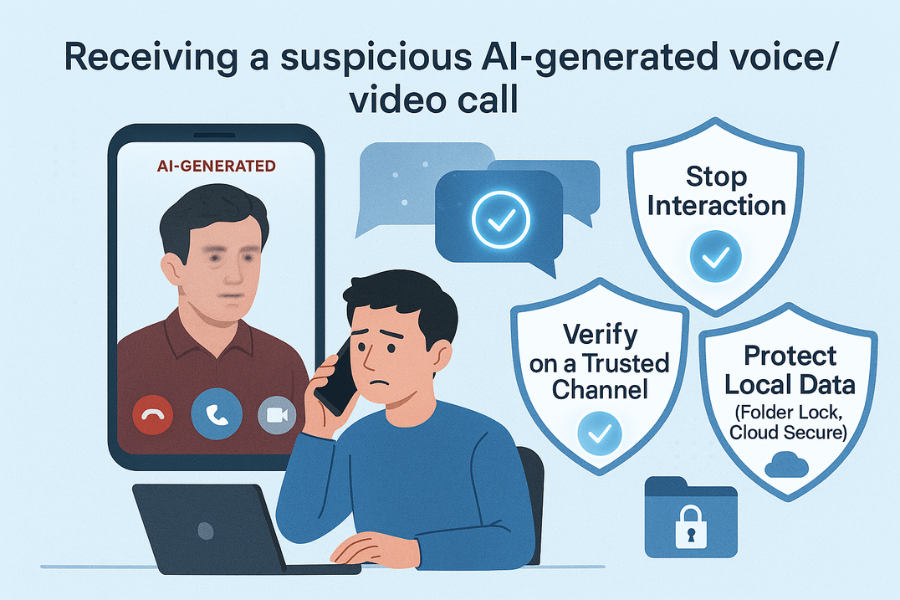
AI Scams And Deepfakes: Verification And Safe Response Playbook
AI powered scams and deepfakes are safest handled when you stop the interaction, verify the person or request through a separate trusted channel, and only then decide whether to pay, share, or click.
Gap Statement
Most pieces on AI scams do three things that are not helpful when you are staring at a fake “boss” on video:
- They explain what deepfakes are, but barely show you how to verify a call, voice, or payment request in under two minutes.
- They repeat “be careful of unknown callers” and skip the real tricks: safe words, call backs on known numbers, and analog tests that break deepfake tools.
- They ignore what happens after someone falls for a scam: damage control, history cleanup, and local data protection with tools such as Folder Lock, Cloud Secure, USB Secure, USB Block, and History Clean from NewSoftwares.
This playbook fixes that by keeping one job in focus: help you verify and respond safely when AI is used against you.
TLDR Outcome
If you follow this playbook, you will:
- Cut your risk of falling for AI scams across voice, video, text, and social channels.
- Have a repeatable verification routine for urgent money or data requests.
- Know how to clean up and limit damage using strong local protection with NewSoftwares tools.
1. Quick Reality Check: How Bad Are AI Powered Scams Right Now
Some fresh numbers set the stage:
- One report on digital fraud found deepfake attacks jumped about four times in 2024.
- Around one third of people say they feel confident spotting AI scams, yet one fifth admit they still fell for phishing in the last year.
- Voice deepfake scams have surged, with firms reporting hundreds of incidents where cloned voices pose as executives and ask for urgent payments.
You cannot rely on “this sounds a bit off” anymore. You need specific checks that work even when the fake looks and sounds right.
2. How AI Powered Scams And Deepfakes Actually Work
2.1. Main Flavors You Will Meet
- Voice cloning calls: Attackers feed old interviews, podcasts, or leaked calls into voice models, then call staff or family members pretending to be a boss or relative who needs urgent help.
- Video deepfake meetings: Fraudsters join a video call as a “CEO” or “supplier” using a synthetic face mapped on top of a stand in. They ask for wires, gift cards, or confidential data.
- Deepfake identity documents and selfies: These target banks and fintech apps. AI generated faces and tampered ID scans are used to open accounts or pass know your customer checks.
- Synthetic romance, job, and support scams: Social profiles and customer support chats now mix AI generated text, voice, and pictures to create a long, slow con.
The goal is nearly always the same: money movement, credentials, or high value data.
3. Core Idea: Treat Every Urgent Remote Request As “Unverified” By Default
One sentence that keeps you safe:
Any remote request that is urgent, emotional, or secret stays “unverified” until you check it through a second trusted path.
Examples of second paths:
- Call back on a number you already have saved, not the number that called you.
- Confirm with a colleague on an internal chat or in person.
- Log in to your bank or supplier portal directly instead of clicking a link in mail or chat.
You are not trying to become a deepfake analyst. You are trying to force attackers into more steps, where mistakes show.
4. Verification Tricks That Trip Up Deepfakes
Security teams are using some surprisingly simple checks that work well in the real world.
4.1. Analog Curveball Tests
These rely on tasks that AI tools still struggle with in real time.
- Ask the caller on video to move the camera to show something random in the room. Most deepfake tools lag or glitch.
- Ask them to write a short phrase or a smiley face on paper, then hold it up. This trick has already exposed fake job candidates.
- Ask about a very recent shared event that is not public: “What did you say about the printer issue this morning” or “Which cafe did we meet at last week”.
4.2. Safe Words And Passphrases
Some firms and families now use spoken passphrases for high risk actions.
- Agree a phrase only said during genuine high value requests, like “Green folder check” at the start of a payment call.
- Set a second factor: if the phrase is missing, the rule is to hang up and call back on a known number.
Passphrases help, but they must live in people’s heads, not emails or chats that can be stolen.
4.3. Procedures That Beat “Urgency Pressure”
Good scammers push you to move fast. Your defense is small bits of friction:
- A rule that any payment above a set amount needs two approvals.
- A rule that bank details never change by phone alone.
- A rule that support staff never ask for full one time passcodes on a single channel.
These sound simple. They work because AI cannot bypass a process written into policy.
5. How To Respond When You Suspect An AI Scam, Step By Step
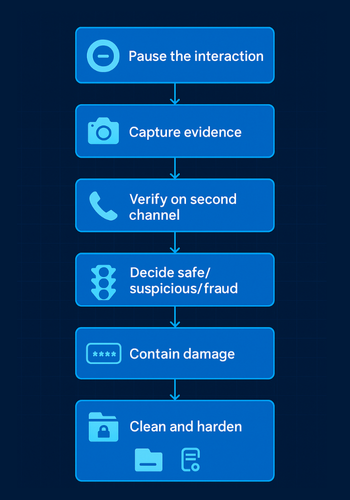
This is the heart of the playbook.
Prereqs And Safety
Before trouble hits, line up:
- A short “always verify” policy at work or at home.
- Known good phone numbers for your bank, boss, and close family.
- Security on your devices, plus local protection for stored files using Folder Lock, Cloud Secure, USB Secure or USB Block, and History Clean so leaked data and drives reveal less.
5.1. Step 1. Pause The Interaction
Action:
- Stop responding in the current channel.
- Say something neutral if needed, like “I will check that and call you back”.
Gotcha: Action: do not argue with the suspected scammer. Every extra sentence gives them more data to model your voice or behavior.
5.2. Step 2. Capture Enough Evidence
Action:
- Save screenshots or photos of the screen.
- Note down phone numbers, email headers, and usernames.
- Record the time and channel.
Gotcha: Action: avoid clicking suspicious links while capturing content. Use built in screenshot tools instead of “download recording” links from unknown platforms.
5.3. Step 3. Verify Through A Second Channel
Action:
- Call the person back using a number you already had saved or from an official site.
- For banks and suppliers, open the app or website directly from your own bookmark.
- Ask a specific question they can answer only if they are real, like “What did we discuss in yesterday’s 3 pm meeting”.
Gotcha: Action: never trust numbers or links given inside the suspicious message.
5.4. Step 4. Decide: Safe, Suspicious, Or Clear Fraud
Now you have:
- Evidence from the original call or message.
- Verification from another channel.
Action:
- If the real person confirms “That was not me”, treat it as fraud and move to Step 5.
- If they confirm “Yes, I just called you from that number” but it still feels strange, slow down the transaction and ask for a written request through your normal process.
5.5. Step 5. Contain Damage
If you shared anything sensitive, move fast.
Action:
- For passwords or passcodes, change them at once from a trusted device.
- For card or bank details, call the bank’s fraud line and follow their instructions.
- For identity data like ID scans, contact the relevant authority if your country offers identity theft support.
- If you sent files from your computer, consider where else that data lives and move high value sets into encrypted lockers with Folder Lock.
Gotcha: Action: do not reuse old passwords after a scare. Use a password manager and make them unique.
5.6. Step 6. Clean Local Traces And Harden For Next Time
Action:
- Run History Clean to remove browsing history, cookies, and PC usage traces, especially on shared devices.
- Store sensitive documents and scans in Folder Lock lockers instead of open folders.
- Protect USB drives that carry backups or ID copies with USB Secure, so lost sticks do not hand scammers more data.
- Lock local cloud drive folders (Google Drive, Dropbox, OneDrive, Box) with Cloud Secure so anyone who gets into your PC still needs another password to see synced content.
- In offices, use USB Block to restrict unknown USB devices that could bring in malware or copy out data.
Gotcha: Action: tools are not a substitute for process. You still need approval rules for payments and data sharing.
6. Channel By Channel Verification Checklist
6.1. Voice Calls
- Stay calm when you hear a panicked friend or family member. AI can clone their voice.
- Ask a question only they can answer that is not on social media.
- Hang up and call back on the number you had before.
- Refuse to read full one time passcodes out loud. Real banks rarely ask for that.
6.2. Video Meetings
- Watch for slight lip sync issues or freezing when the person laughs or moves.
- Use “camera tests” such as “Show me the whiteboard behind you” or “Turn your camera to the window”.
- For payment meetings, request a short follow up email from the official company domain, then verify through internal channels.
6.3. Email, Messaging, And Social
- Check the domain carefully. “ceo-company.com” is not the same as “ceo.company.com”.
- Treat any urgent payment, gift card, or crypto request as unverified until checked.
- For support chats, never type full card numbers, full one time codes, or password hints.
6.4. Biometric And Selfie Checks
Deepfake video and audio can target face and voice logins used by banks and phone providers.
Your steps:
- Use multi factor sign in that adds a hardware key or app prompt.
- If your bank offers alerts for new devices and biometric changes, turn them on.
- If you see logins or changes you did not start, contact support from the official app at once.
7. NewSoftwares Tools As Part Of Your Safe Response Stack
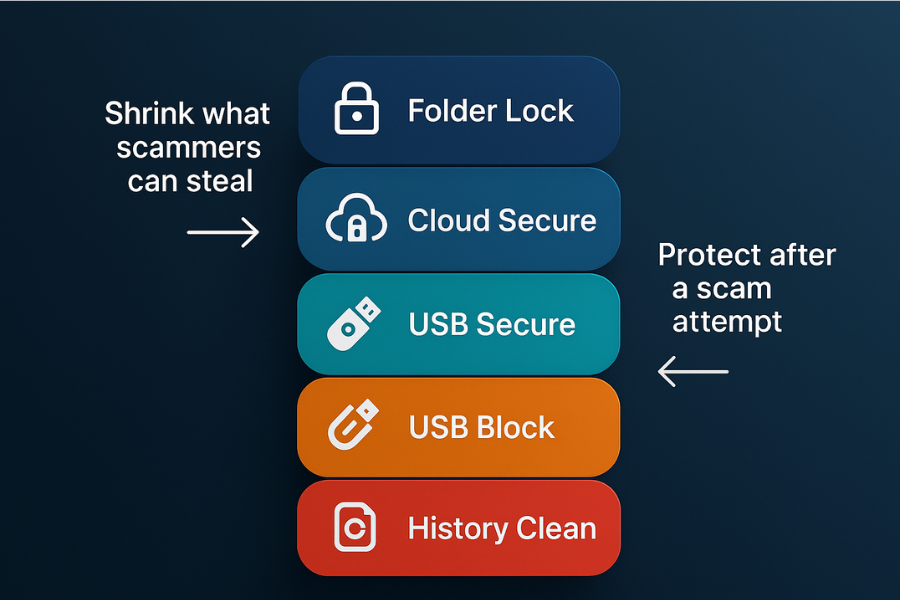
AI scams aim to get into your money and your data. Public stories focus on the cash. Quiet damage often comes from stolen files and traces taken from your devices. NewSoftwares tools help here by shrinking what can be stolen and by giving you better cleanup.
7.1. Folder Lock: Keep Sensitive Data In Encrypted Lockers
Folder Lock gives you AES 256 bit encryption for files, folders, and drives, plus secure backup and digital wallet features on Windows and across devices.
Use after or before scams in this way:
- Store ID scans, contracts, bank statements, and client data inside lockers instead of the desktop or “Downloads”.
- Use the wallet feature for card numbers and access codes, not plain text files.
- Enable backup for lockers to external drives or online storage so you can recover them if malware hits.
This way, even if a scam leads to remote access, much of your data stays encrypted.
7.2. Cloud Secure: Lock Cloud Drive Access On Your PC
Cloud Secure protects local folders of Google Drive, Dropbox, OneDrive, and Box with an extra password while still letting them sync in the background.
That matters because many AI scams end with remote access tools on your PC. When Cloud Secure is in place:
- An attacker who reaches your desktop still needs the Cloud Secure password to open cloud folders.
- You can lock all cloud accounts from one screen when you step away from your machine.
7.3. USB Secure And USB Block: Protect Removable Media And Block Risky Devices

USB Secure password protects USB and external drives, encrypting data on them. USB Block restricts which USB devices can connect to your PC and blocks unknown ones.
Uses with AI scams in mind:
- Keep backup copies of key documents on USB Secure drives so a scammer cannot read them if they steal or find the drive.
- Deploy USB Block in offices to stop staff from plugging in random USB sticks given out at conferences or sent by mail, which can carry malware droppers for remote access and later AI scams.
7.4. History Clean: Erase Traces And Shred Unwanted Files
History Clean removes browser histories, cookies, cache, recent file lists, and other usage traces. It also shreds files so they cannot be easily recovered.
Practical moves:
- Run a scheduled clean on shutdown, especially on shared or work computers.
- After any suspected scam, wipe related browsing sessions and temporary files.
- Use shredding for old exports of customer lists, ID scans, and other data that no longer needs to sit on the disk.
This trims the amount of material a later attacker or malware can harvest.
8. Troubleshooting: Symptom To Fix
| Symptom or clue | Likely root cause | First fix | Next step if not solved |
|---|---|---|---|
| “Boss” or client asks for urgent payment on a new channel | Social engineering with possible AI voice/video | Pause, verify by known number or internal chat | escalate to security or finance team |
| Video caller refuses camera movement or paper test | Real time deepfake struggling with request | Treat as unverified, end call, log details | report to IT or fraud contact |
| Family member sounds like themselves but story has gaps | Voice clone built from public clips | Call back on saved number, ask private follow up info | contact bank if any payment already made |
| Bank calls and asks for full one time passcode | Fraudster hoping to complete a transaction | Hang up, call bank using app or card number | flag account and change login details |
| Unknown login alerts from bank or email | Creds or tokens exposed in scam or malware | Reset passwords, enable multi factor sign in | run scans, move documents into Folder Lock lockers |
| Random USB stick promises “video evidence” or “photos” | Dropper or malware carrier | Do not plug in | if already plugged, run scans and inform IT |
| After scare, browser keeps auto filling old passwords | Browser still storing credentials | Move to password manager, clear browser passwords | use History Clean to wipe remaining traces |
9. Use Case Chooser: Matching Defenses To Real Life
| Scenario | Main worry | Best mix of habits and NewSoftwares tools |
|---|---|---|
| Solo freelancer on Windows | Client leaks, stolen sessions | Folder Lock + History Clean + Cloud Secure |
| Small office with shared PCs | Staff copying data to USB, infostealers | USB Block + USB Secure + History Clean + Folder Lock |
| Remote worker on laptop and phone | Compromised WiFi, mixed personal use | Folder Lock desktop + Folder Lock mobile + History Clean + Cloud Secure mobile |
| IT admin in a small business | Privileged access abuse, malware spread | USB Block on admin PCs + Folder Lock for admin docs + History Clean everywhere |
| Privacy focused home user | Browser history and local snooping | History Clean + Folder Lock for personal docs |
10. Quick Personas And Verdicts
- Student with shared laptop: Use History Clean and Folder Lock to keep personal files and browsing private from roommates.
- Freelance designer or consultant: Keep project folders inside Folder Lock, deliver work on USB Secure drives, and wipe old cookies with History Clean at the end of each week.
- SMB owner: Deploy USB Block on office PCs to stop random drives, require Cloud Secure on machines with synced cloud storage, and train staff on infostealer phishing.
- IT admin: Combine enterprise endpoint protection with History Clean on shared machines and use Folder Lock for admin runbooks and sensitive exports.
11. Safety And Ethics
People caught by AI scams often feel ashamed. That shame helps attackers, because victims stay silent. Build a culture, at home and at work, where people can say “I think I just got tricked” without blame. Then you can fix problems early, rotate data and passwords, and update procedures before the next attempt.
12. Proof Of Work Style Examples
These are realistic time ranges on a typical Windows 11 laptop with a solid state drive. They are not hard promises but help you plan.
| Task | Typical time range | Notes |
|---|---|---|
| Creating a new 1 GB encrypted locker in Folder Lock and moving files | Around 2 to 4 minutes | Depends on drive speed and file count |
| Protecting a 64 GB USB drive with USB Secure for the first time | Around 1 to 3 minutes | Later unlocks are near instant |
| Running a full History Clean pass on three browsers and Windows traces | Around 1 to 3 minutes | Faster if you run it daily |
Simple settings snapshot that matches this playbook:
- Two step checks for any payment above your own threshold.
- Folder Lock installed and used for documents that matter.
- Cloud Secure set to lock all cloud accounts on your PC.
- History Clean running at shutdown on shared machines.
- USB Secure on backup drives and USB Block on office PCs.
Verification checklist:
- No passwords stored in browser password menus.
- History Clean runs at shutdown and shows small, predictable cleanup sets.
- Encrypted lockers and USB drives always ask for passwords when opened.
- Cloud folders appear locked in Cloud Secure until you unlock them.
13. FAQs On AI Powered Scams, Deepfakes, And Safe Response
1. How Can I Spot An AI Voice Clone On A Phone Call?
Short calls can be tricky. Listen for odd pauses, clipped breathing, or responses that dodge direct questions. Ask something specific from recent shared experience and, most important, hang up and call back on a saved number.
2. Are Video Deepfakes Common In Business Scams?
They are no longer rare. Reports show attempted deepfake CEO meetings at mid sized firms, not only global brands. Treat unexpected high level video calls as unverified until checked.
3. Can Deepfakes Break Bank Face Or Voice Logins?
Deepfake audio and video can mimic biometric traits and have been used to try to bypass biometric checks. Banks respond with extra layers like device checks, behavior analytics, and multi factor prompts. Turn on every extra security control your provider offers.
4. What Is The Single Fastest Check I Can Do During A Suspicious Call?
Switch channel. Say you will call back, then ring the person on a number from your own contacts or from the official website. If they say “I never called you”, you have your answer.
5. Does Caller ID Still Matter When AI Tools Exist?
It still helps but cannot be trusted alone. Callers can spoof numbers. See caller ID as one signal among several, and never as proof that the person is genuine.
6. How Do NewSoftwares Tools Help With AI Scams If They Don’t Detect Deepfakes?
They protect what scammers want after a scam works: data. Folder Lock and Cloud Secure keep important files and cloud folders under strong encryption and extra passwords. USB Secure and USB Block protect removable media. History Clean wipes traces that make you easier to profile next time.
7. Should Families Use Safe Words For Voice Calls?
For families targeted by “kid in trouble” scams, spoken safe words can help. Pick something private and never write it in chats. Still combine it with a call back on the known number and, if needed, a quick video check.
8. Are AI Scam Detection Apps Enough On Their Own?
Detection apps can help flag some content, but current tools miss many deepfakes and can also raise false alarms. Research shows humans still beat automatic detectors when they know what to look for. Combine tools with training and process.
9. I Already Posted Lots Of Videos And Interviews. Am I Doomed?
Public footage does make cloning easier. You can still protect yourself with strong verification habits, strict payment procedures, and good data hygiene. The aim is to make scams fail when the attacker tries to turn your public content into pressure on staff or family.
10. Do I Need To Worry About Deepfakes In Personal Relationships?
Yes. AI can feed romance scams, fake job offers, and fake landlords. Take the same steps: video calls with analog tests, independent checks of documents, and never rushing payments based only on one channel.
11. How Often Should I Run History Clean?
On shared devices, running it at shutdown is a good habit, so your traces do not pile up. On personal devices, run it after sensitive sessions like banking or ID uploads, and on a regular schedule you can remember.
12. Does Using Encrypted Lockers Slow Down My Work?
On normal hardware, encrypting and opening lockers in Folder Lock feels close to working with normal folders, especially after the first setup. You gain strong protection for key data at a small cost in extra clicks.
13. Is A Hardware Security Key Still Useful If Infostealers Exist?
Yes. Keys stop many phishing and credential stealing attacks and raise the bar. Even if an infostealer grabs some cookies, keys still protect new sign in flows and recovery paths.
14. What Is The Single Most Important Habit To Start Today?
Stop storing passwords in browsers and move them into a dedicated manager. Then enable multi factor sign in on the accounts that matter most. That alone cuts the value of many stealer logs.
15. Where Do NewSoftwares Tools Fit In A Broader Security Stack?
Use them as practical layers around data:
- Folder Lock for encrypted storage and vaults
- USB Secure and USB Block for removable media
- Cloud Secure for local cloud folder access on PC and mobile
- History Clean for history wiping and secure deletion
Together they reduce the amount of readable data an infostealer can grab in one pass and help you keep long term control of your digital footprint.
Conclusion
Defending against AI scams is a multi-layered process that demands both proactive system hardening and a tested recovery plan. By moving credentials out of the vulnerable browser store and into a password manager, utilizing tools like Folder Lock to encrypt files at rest, and ensuring a swift reset of tokens and sessions, you significantly reduce the attack surface. This comprehensive approach, combined with regular cleanup using History Clean, transforms your defense from passive hope into active, repeatable security.
14. Structured Data Snippets (HowTo, FAQPage, ItemList)
{
  "@context": "https://schema.org",
  "@type": "HowTo",
  "name": "Verify and respond safely to AI powered scam attempts",
  "description": "Step by step playbook for spotting deepfake and AI driven scam attempts and reacting without panic.",
  "step": [
    {
      "@type": "HowToStep",
      "name": "Pause the suspicious interaction",
      "text": "Stop engaging in the current channel, give a neutral reply if needed and avoid sharing more information."
    },
    {
      "@type": "HowToStep",
      "name": "Capture evidence",
      "text": "Take screenshots or photos of the screen and record phone numbers, usernames and timestamps for later review."
    },
    {
      "@type": "HowToStep",
      "name": "Verify through a second trusted channel",
      "text": "Call back on a saved number or contact the person through a known internal or official channel before acting."
    },
    {
      "@type": "HowToStep",
      "name": "Decide whether the request is genuine",
      "text": "Use the response from the real person and your own checks to classify the event as safe, suspicious or fraud."
    },
    {
      "@type": "HowToStep",
      "name": "Contain any damage",
      "text": "If you shared data, change passwords, contact banks or providers and move sensitive files into encrypted lockers."
    },
    {
      "@type": "HowToStep",
      "name": "Clean traces and harden for next time",
      "text": "Use privacy tools to clear history, protect USB drives and lock cloud folders so future attackers see less."
    }
  ],
  "tool": [
    { "@type": "HowToTool", "name": "Folder Lock" },
    { "@type": "HowToTool", "name": "Cloud Secure" },
    { "@type": "HowToTool", "name": "USB Secure" },
    { "@type": "HowToTool", "name": "USB Block" },
    { "@type": "HowToTool", "name": "History Clean" }
  ]
}
{
  "@context": "https://schema.org",
  "@type": "FAQPage",
  "mainEntity": [
    {
      "@type": "Question",
      "name": "How can I spot an AI voice clone on a phone call?",
      "acceptedAnswer": {
        "@type": "Answer",
        "text": "Listen for strange pauses or dodged answers, then hang up and call back on a saved number. Ask about a recent shared event that is not public to confirm identity."
      }
    },
    {
      "@type": "Question",
      "name": "Are video deepfakes common in business scams?",
      "acceptedAnswer": {
        "@type": "Answer",
        "text": "Video deepfakes now target mid sized firms as well as large ones. Treat unexpected payment or data requests in video calls as unverified until you confirm through a second trusted channel."
      }
    },
    {
      "@type": "Question",
      "name": "How do NewSoftwares tools help after an AI scam attempt?",
      "acceptedAnswer": {
        "@type": "Answer",
        "text": "Folder Lock and Cloud Secure keep important files and cloud folders encrypted and locked, while USB Secure, USB Block and History Clean protect USB media and remove traces that attackers could later exploit."
      }
    }
  ]
}
{
  "@context": "https://schema.org",
  "@type": "ItemList",
  "name": "Key defenses against AI powered scams and deepfakes",
  "itemListElement": [
    {
      "@type": "ListItem",
      "position": 1,
      "name": "Channel shifting and call backs",
      "description": "Treat urgent requests as unverified until you contact the person or provider on a saved or official channel."
    },
    {
      "@type": "ListItem",
      "position": 2,
      "name": "Analog tests and passphrases",
      "description": "Use camera movement tests, written notes on camera and spoken passphrases to expose synthetic callers."
    },
    {
      "@type": "ListItem",
      "position": 3,
      "name": "Local data and device protection",
      "description": "Use encrypted lockers, USB protection and history cleaning to reduce the impact if a scam succeeds."
    }
  ]
}