
7, Zip vs WinRAR vs WinZip: AES-256 Strength and Correct Settings
This executive overview, created by the security experts at Newsoftwares.net, provides the definitive security framework for file protection. Stop risking sensitive files with outdated encryption. The default Windows ZIP tool and legacy software standards rely on dangerously weak protocols that compromise confidentiality. When archiving files for storage or transfer, the security choice is non, negotiable: you must use AES-256 encryption and enforce metadata protection. This comprehensive post reveals the exact settings required in 7, Zip, WinRAR, and WinZip to achieve military, grade AES-256 confidentiality, and exposes the single, crucial mistake nearly everyone makes that leaves their file names and directory structures exposed, ensuring verifiable data confidentiality.
Stop risking sensitive files with outdated encryption. The default Windows ZIP tool and legacy software standards rely on dangerously weak protocols that compromise confidentiality. When archiving files for storage or transfer, the security choice is non, negotiable: you must use AES-256 encryption and enforce metadata protection.
This overview reveals the exact settings required in 7, Zip, WinRAR, and WinZip to achieve military, grade AES-256 confidentiality, and exposes the single, crucial mistake nearly everyone makes that leaves their file names and directory structures exposed.
The Encryption Verdict Summary
- Mandatory Cipher: Always select AES-256 encryption. Legacy Zip 2.0 (ZipCrypto) is easily cracked and should be avoided for any sensitive data.
- Mandatory Setting: Regardless of the tool, you must explicitly enable Encrypt file names (or Header Encryption). Failure to do this exposes the file list, compromising confidentiality immediately.
- Tool of Choice: 7, Zip is recommended for its open, source auditability, strong AES-256 implementation, and reliable metadata protection via the
7zarchive format.
I. The Critical Flaw: Why Standard ZIP Files Are Not Secure
The single most common mistake in file encryption is assuming that applying a password is enough. It is not. Most native and legacy archival tools suffer from two catastrophic flaws that render them useless for professional security.
The ZipCrypto Death Sentence
ZipCrypto (also known as Zip 2.0 encryption) is an obsolete and vulnerable encryption method often implemented by default in older ZIP utilities and native operating system extractors.
- Weakness: The algorithm is easily broken by modern cracking tools, making the password irrelevant to an attacker with minimal resources.
- Trade, Off Trap: While ZipCrypto offers high compatibility, allowing recipients to open the archive instantly without special software, this is an unacceptable trade, off for security. For any file marked confidential, you must sacrifice convenience for cryptographic strength by mandating AES-256.
The Metadata Leak: Filenames in the Clear
Even if you use AES-256 encryption, the protection fails if you use the traditional ZIP format and ignore the metadata setting. The security flaw lies in the structure of the ZIP file itself.
The archive’s Central Directory (the internal table of contents) is usually stored unencrypted.
- File names
- Directory names
- File creation dates
- File lengths
An attacker can easily view this metadata using a command, line utility or even a standard archiver tool, often without ever being prompted for a password. For example, seeing the unencrypted file list reveals that the archive contains 2025_Q3_Proprietary_Sales_Report.xlsx, providing critical intelligence and proving confidentiality was compromised.
The Only Fix: To prevent this, the user must select the “Encrypt file names” option (sometimes called Header Encryption) during the creation process. This critical step encrypts the Central Directory, preventing the leakage of file context.
II. The Security Baseline: AES-256 and Key Derivation
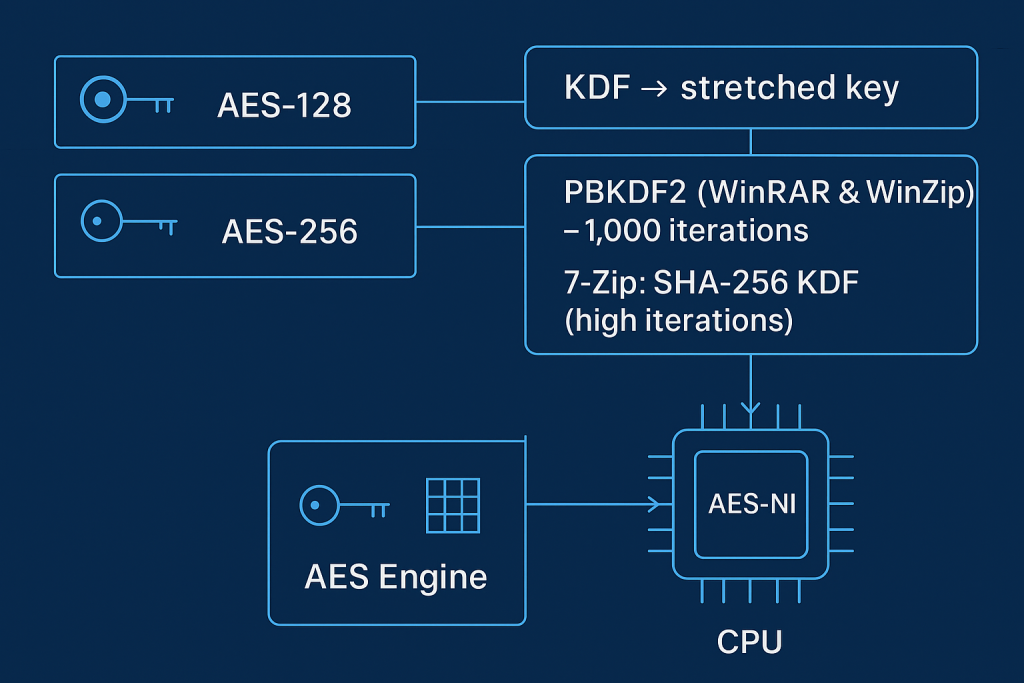
The Advanced Encryption Standard (AES) is the gold standard for symmetric encryption, used by the U.S. government for classified data and widely adopted across technology, including VPNs, HTTPS, and disk encryption like BitLocker and FileVault.
Cipher Strength: 128, bit vs. 256, bit
While both AES-128 and AES-256 are considered mathematically unbreakable by brute force, 256, bit is preferred for highly sensitive or long, term archived data. AES-256 provides a higher level of cryptographic assurance and is often required for regulatory compliance. Since modern CPUs with AES-NI instructions can perform 256, bit encryption with near, zero performance loss, there is no technical reason to choose the weaker 128, bit option.
Key Derivation Function (KDF)
The strength of the final key is determined by the Key Derivation Function (KDF), which converts your human, readable password into a mathematically robust encryption key. All three major archivers use key stretching to slow down brute, force attacks:
| Utility | KDF Implementation | Security Detail |
| 7, Zip | SHA-256 based KDF | Uses a large number of iterations to increase the cost of searching for the password. |
| WinRAR | PBKDF2 using HMAC-SHA1 | Typically uses 1,000 iterations for key derivation, a widely adopted standard. |
| WinZip | PBKDF2 using HMAC-SHA1 | Also uses 1,000 iterations and adds a verification check (CRC) to enhance data integrity. |
The goal of the KDF is simple: ensure that guessing a single password takes enough time (milliseconds) to make automated, large, scale attacks infeasible.
III. Tutorial: Mandating AES-256 and Metadata Protection
To guarantee security, users must ignore the default settings in most applications and manually enforce the two mandatory requirements: AES-256 and Filename Encryption.
Method 1: Securing Files with 7, Zip (Recommended Standard)
7, Zip is the most reliable choice for this process, as its open, source nature provides auditability, and its native 7z format is designed for high security.
Tool: 7, Zip (Windows/Linux) or Keka (macOS).
- Initiate Archive:
Action: Right, click the file(s) or folder to encrypt. Select 7, Zip, then click Add to archive….
- Select Format:
Action: In the “Add to Archive” window, set the Archive format to 7z.
- Choose Cipher:
Action: Ensure the Encryption method is set to AES-256.
- The Critical Step:
Action: In the Encryption section, locate and select the checkbox labeled Encrypt file names. This is the mandatory step that locks down the file metadata (names, sizes, structure).
- Set Password:
Action: Enter and re, enter a strong password (minimum 8 characters, ideally 12+ mixed characters).
- Create:
Action: Click OK to create the new encrypted
.7zfile.
Proof of Work: Verification
To confirm the encryption worked, attempt to open the archive in 7, Zip File Manager. If the settings are correct, you will be prompted for the password immediately, and the file list will be completely obscured until the password is entered.
Method 2: Securing Files with WinRAR (RAR5 Format)
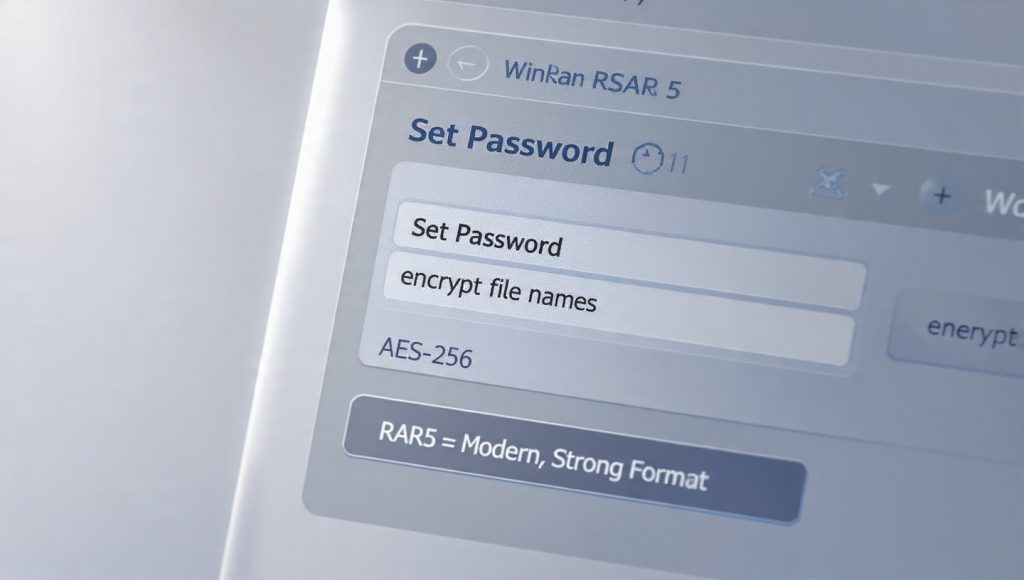
WinRAR supports AES-256 via its modern RAR5 archive format, which has been standard since version 5.0.
- Initiate Archive:
Action: Right, click the file(s) and select Add to archive…
- Select RAR5 Format:
Action: Ensure Archive format is set to RAR5 (or the latest available RAR standard).
- Set Password:
Action: Click the Set password… button.
- Mandate Encryption:
Action: Ensure AES-256 is selected in the Encryption section.
- Enable Metadata Protection:
Action: Check the box labeled Encrypt file names. This ensures the contents list is hidden.
- Create:
Action: Click OK to generate the encrypted
.rarfile.
Method 3: Securing Files with WinZip (Integrity Focus)
WinZip supports 256, bit AES encryption and emphasizes integrity checks, but users must often manually select the AES standard in the application’s configuration first.
- Configure Cipher (Pre, Archiving):
Action: Open WinZip. Go to Settings or Conversion Settings. Navigate to Encryption and select 256, bit AES encryption.
-
Action: Right, click the files and select WinZip then Add to Zip file.
- Enable Encryption:
Action: In the Add to ZipFile window, check the Encryption box under the Options menu.
- Set Password:
Action: The Encrypt dialog window will appear. Enter a strong password.
- Verification:
Verify: Confirm encryption visually by noting the asterisk $(*)$ at the end of the file name in the WinZip interface (in older versions).
Data Integrity Feature: WinZip often utilizes the AE-1 format, which stores a Cyclic Redundancy Check (CRC) value along with the encrypted data. This CRC acts as an integrity check, verifying that the data was not corrupted during encryption or transmission.
IV. Operational Security: Sharing the Key Safely
No AES-256 implementation can protect files if the password is stolen. The primary risk in sharing encrypted files is failing to separate the file from the key.
The Golden Rule of Key Exchange: The decryption password must always be sent via a different communication channel (out, of, band) than the encrypted file.
| File Transfer Channel | Password Key Exchange Channel | Reason |
| Email, Cloud Link (File) | Secured Phone Call, Signal/WhatsApp (Password) | Prevents an attacker who intercepts the email or cloud storage link from obtaining both the key and the data simultaneously. |
V. Troubleshooting Encryption Failures
Most AES-256 failures are due to compatibility or user, side errors, not the cryptographic strength itself.
| Symptom / Error String | Root Cause | Non, Destructive Fix |
| Windows Explorer won’t open archive, no password prompt. | The native Windows extractor does not support AES-256 encryption. | Action: Recipient must install 7, Zip, WinRAR, or WinZip (AES-compatible version). |
| Archive opens easily, but all file names are visible before I enter the password. | Gotcha: Encrypt file names option was missed during creation (metadata leakage). | Action: Sender must re, archive the original files, ensuring the filename encryption box is checked. |
| 7, Zip reports “incorrect password” on a known password. | High key stretching iterations, password typo, or internal file corruption (less common). | Action: Carefully re, enter the password. Check for keyboard layout conflicts. Redownload the file and try again. |
| Files cannot be opened after extraction, or contents appear as garbage data. | Corruption in the archive. | Action: Redownload the archive from the source. The sender should re, archive the file and provide a checksum for verification. |
| Recipient cannot extract a ZIP file created by 7, Zip. | 7, Zip sometimes uses non, standard flags in the ZIP format, confusing legacy extractors. | Action: Sender should choose the 7z format instead of ZIP for maximum reliability. |
Last Resort (Data Loss Warning): If the AES-256 password is lost or forgotten, there are no reliable, commercially available methods for recovery. Password cracking tools are ineffective against AES-256 when a strong passphrase is used. Always maintain an unencrypted backup of the original data.
VI. Frequently Asked Questions (FAQs)
1. Does AES-256 on a ZIP file still expose my filenames
Yes, by default. The standard ZIP archive structure (Central Directory) stores filenames unencrypted. You must use the “Encrypt file names” option in the archiver utility to protect this metadata.
2. Can Windows Explorer open an AES-256 encrypted ZIP file
No. Windows Explorer and native macOS tools typically only support the weak, legacy ZipCrypto standard. To open an AES-256 archive, the recipient must install a compatible utility like 7, Zip or WinRAR.
3. What is the fundamental security flaw of ZipCrypto
ZipCrypto uses an outdated, proprietary stream cipher that is easily cracked through publicly known plaintext attacks. It offers inadequate protection for sensitive or confidential data, making it functionally useless against modern attackers.
4. Is the security impact of AES-256 worth the slight drop in speed
Yes, absolutely. Any performance loss is negligible on modern CPUs due to hardware acceleration (AES-NI). The cryptographic assurance of AES-256 is mandatory for protecting sensitive data against future threats.
5. What role does PBKDF2 play in archive encryption
PBKDF2 (Password, Based Key Derivation Function 2) intentionally forces the computer to spend thousands of calculation rounds stretching the user’s password into a strong binary key. This process is crucial because it makes automated brute, force attacks impractical.
6. Why is 7-Zip often considered stronger than other archivers
7, Zip is open source, allowing the security community to audit its code for backdoors or vulnerabilities. It also uses a strong SHA-256 based KDF with a large number of iterations to stretch the password into the key.
7. Does WinZip’s data integrity check (CRC) make it more secure than 7-Zip
WinZip’s CRC check primarily verifies that the file was not corrupted during transmission or storage. It’s an integrity feature, not an encryption feature. Both rely on the mathematical strength of AES-256 for confidentiality.
8. What is the minimum recommended password length for AES-256 archives
While 8 characters is often a baseline, security experts strongly recommend using a passphrase of at least 12 characters, ideally combining mixed cases, numbers, and symbols, to maximize the work required by the KDF.
9. Can I use AES-256 encryption on a Mac
Yes. Mac users can use open, source alternatives like Keka or command, line utilities to create and extract AES-256 archives. The encrypted file is fully compatible across Windows and Linux, provided they also use compatible software.
10. Does 7-Zip support creating RAR files
No. 7, Zip supports reading and extracting most formats, including RAR, but cannot create (pack) archives in the proprietary RAR format. You need WinRAR for RAR creation.
11. Can I use a single password for all my sensitive files
No. Security best practice dictates using unique, strong passwords for each layer of encryption (e.g., one password for BitLocker, a different one for a VeraCrypt container, and unique passwords for different archived files).
12. If I forget the password, can I pay a recovery service to break the encryption
For files encrypted with AES-256 and a strong passphrase, recovery is considered cryptographically impossible. Recovery services are typically only successful against the weak, legacy ZipCrypto encryption.
13. What is the strongest archive format for encryption: ZIP or 7z
The 7z format is generally considered the strongest because its architecture offers better security against code execution vulnerabilities and provides a structurally more robust platform for AES-256.
14. Why is my email system blocking my encrypted ZIP file
Some email servers employ robust antivirus scanning that flags or blocks archives that use any form of encryption, even AES-256. This often requires sending the file via a dedicated, secure file transfer service instead.
15. Why does WinRAR use HMAC-SHA1 for key derivation instead of SHA-256
WinRAR’s implementation of PBKDF2 often uses HMAC-SHA1 with 1,000 iterations. While effective, the 160, bit output of SHA-1 means the encryption key’s search space cannot be guaranteed to exceed 160 bits, even if a 256, bit key is specified.
VII. Final Verdict
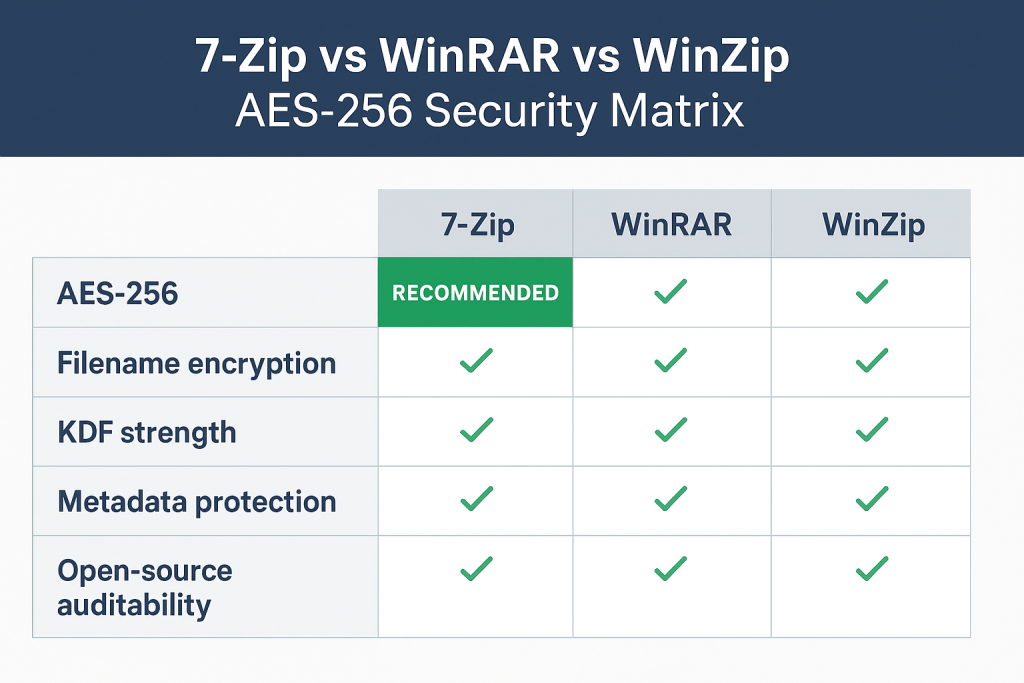
For professional data exchange and long, term storage, the choice is clear: standardize on AES-256 and ensure metadata protection. The reliance on free, open, source utilities like 7, Zip is the most auditable and reliable practice for cross, platform sharing. BitLocker remains the seamless choice for Windows system, level protection, but for portable files, containerization (VeraCrypt) or secure archiving (7, Zip) is mandatory. Abandon any tool or practice that compromises either the AES-256 cipher or the confidentiality of file names.