

Introduction:
The most threatening risk is that if the hackers were able to access our drives, all of our folders stored in it would be at loss. Losing a single file/folder would not be that disturbing as an entire drive would be. Hence, Folder Protect lets you protect the entire drives where the major risk factor could not be removed but can be minimized. Make sure the drive you are protecting possess all the files/folders that are confidential and such files/folders are not kept un-secure.
How to Password Protect Drives & Restrict Unauthorized Access Using Folder Protect?
Folder Protect is a unique addition in the world of security products because it brings a totally new but valuable conception of ‘Data in Use’ Protection i.e. data remain in working condition but completely protected from renaming or getting deleted or amended. It offers you customized security so that you choose the kind of protection your want for your data and what access rights you want to assign to a particular file or folder.
With Folder Protect installed on your computer, you can very easily protect your files from unauthorized access by making them absolutely inaccessible; hidden, delete-proof and / or write-protected. You can protect all your files, folders, drives, disks, installed programs and even system-wide extension types (masks), for instance; avi, gif, jpeg, bmp, mp3, wmv, mpeg, doc and many more.
Mostly files and folders are password protected, but how great it would be if you can protect drives that contain numbers of files and folders rather than protecting individual file? Imagine you can protect all your important files, family photos, videos, office documents, tax records, banking information, etc with just a single mouse click.
Lock and password protect drives with Folder Protect and make them inaccessible so that no one can view, check, edit, copy, move or delete your data. Follow these easy and self explanatory steps to lock drives with Folder Protect:
- Download Folder Protect and install it on your computer.
- Run the program and it will ask you to set and confirm a password. Make sure to set a strong password which is easy to remember but hard to guess.
- Click ‘OK’ to log in to the application and then click ‘Add’ button to add files, folders, drives, program and extensions.
- When you click ‘Add’ button, Folder Protect’s Wizard screen will appear showing you two steps:
- Step 1: Choose Protection Method
- Step 2: Add Items You Wish to Protect
- Both of these steps are self-explanatory. Choose Protection Method step asks you how do you wish to protect your files and folders, and it gives you four different methods of protection you can choose according to your need and feasibility. You can select No Access, No Visible, No Delete or No Write to make your data completely inaccessible, hidden, delete proof or write proof respectively. Add Items You Wish to Protect step allows you to protect files, folders, drives, masks or programs.
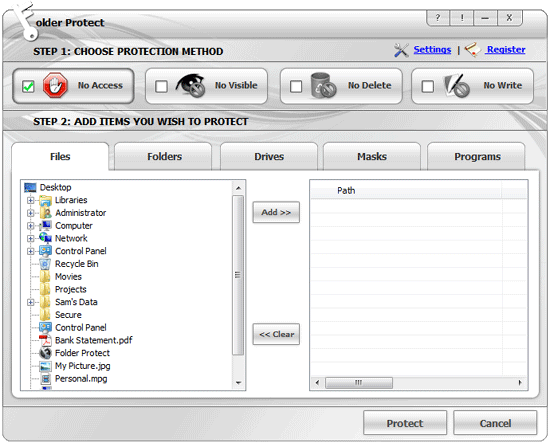
- To protect drives with Folder Protect, you need to apply ‘No Access’ protection level, which is selected by default.
- Click ‘Drives’ tab and Folder Protect will show you a drive tree containing all the drives so that you can choose which drive you want to protect.
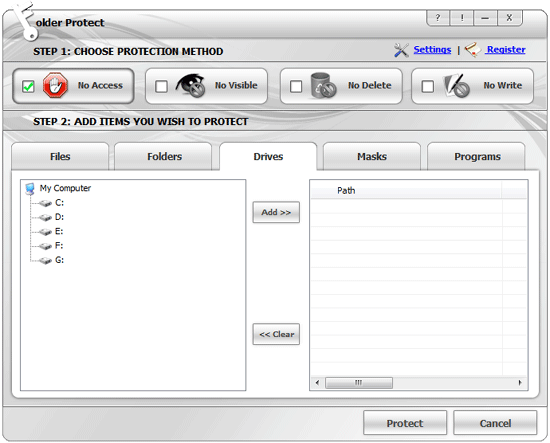
- Select drives and add them to your locking list by using ‘Add’ button. Drag and drop is also supported.
- When you’re done with the selection, click ‘Protect’.
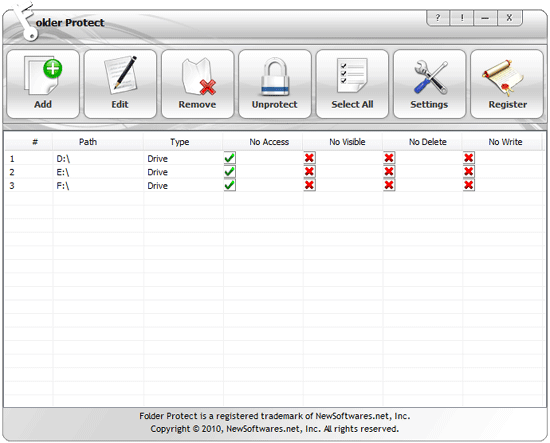
- Once you click ‘Protect’ you’ll be able to see the list of your protected items, from where you can easily manage your protected items.
Summary:
Consider yourself waking up on a day and realizing a hacker who could either ask you to pay ransom or misuse your data has just wiped all of your data out. Hence, Folder Protect’s password protection feature lets you have a complete peace of mind knowing your data is safe even when you are not around.